
Workflows Live
AI meeting preparation: how to get a deal brief and first-meeting research before you join
How Oliv AI prepares you for a sales meeting, from the deal brief that arrives 30 minutes before the call to first-meeting research on a new contact, and how to use both.
On this page
- At a glance
- Before you begin
- Step 1: Connect your calendar, recorder and CRM
- Step 2: Let the brief arrive before the call
- Step 3: Read the brief in about a minute
- Step 4: Ask Olivia to get you ready
- Step 5: Walk in with the agenda
- What meeting preparation in Oliv AI is
- Why meeting preparation matters
- The Oliv AI approach to meeting preparation
- How sales meetings get prepared
- How to prepare for a sales call by hand
- How to check your meeting prep is working
- What to check when a brief is missing or looks wrong
- How meeting preparation works with other features
- Who uses meeting preparation, and how
- How Oliv AI compares for AI meeting preparation
- Limits and things to know
- Common questions
- Further reading
- Related
Preparing for a deal meeting by hand means pulling the deal status, the people and an agenda together yourself, and a first meeting adds research on a new contact. AI meeting preparation puts all of that in front of you before you join. Oliv AI sends you a brief before your sales meetings, so you walk in knowing where things stand and what to cover. For a meeting on an active deal, Oliv AI's Meeting Assistant agent sends the deal summary, qualification status, stakeholders and a recommended agenda 30 minutes before the call. For a first meeting with someone new, Oliv AI's Olivia agent researches the company and the person.
At a glance
| What arrives | A pre-meeting brief, one screen long |
| When | 30 minutes before the meeting |
| Deal brief covers | Deal summary, qualification status, stakeholders, recommended agenda |
| First-meeting brief covers | Three bullets on the company and the person, plus an icebreaker |
| On demand | Ask Oliv AI's Olivia agent on Home, and she lays out the deal, the attendees, risks and talking points |
| Reading time | About 60 seconds |
| Methodologies | MEDDPICC, MEDDIC, SPICED, BANT or DRIVE, whichever your team sets as Active |
| You connect | Your calendar, your call recorder and your CRM |
Before you begin
- Connect three things. The brief draws on your calendar, your call recording tool or Oliv AI's own recorder, and your CRM: Salesforce, HubSpot or Zoho.
- Have the deal in your CRM. Deal briefs cover meetings linked to an active opportunity. First meetings with new contacts get a research brief instead.
- Check your methodology. Qualification status is shown against the framework set as Active in Settings › Qualification Framework.
- Don't wait for a clean CRM. Oliv AI's CRM Manager agent fills in missing or stale fields from call history as it goes, so the brief works from day one.
Step 1: Connect your calendar, recorder and CRM
Connect your calendar so Oliv AI knows which meetings are coming up. Then connect your call recorder and CRM: your existing recording tool or Oliv AI's own recorder, plus Salesforce, HubSpot or Zoho. The brief is built from past conversations and deal records. Most teams are connected within a week.
Step 2: Let the brief arrive before the call
There's nothing to request. Oliv AI's Meeting Assistant agent sends the brief automatically before every meeting linked to an active opportunity, 30 minutes ahead of the start time. Oliv AI's Olivia agent works through Slack, Teams or the Oliv AI product, so prep shows up where you already work.
Step 3: Read the brief in about a minute
The deal brief is designed to fit one screen and take about 60 seconds to read. It has four parts:
| Part | What it tells you |
|---|---|
| Deal summary | Stage, amount, close date, last activity and next steps |
| Qualification status | Where the deal stands against your methodology, with gaps and open questions highlighted |
| Stakeholders | Who's in this meeting, the role each plays, and what they care about based on earlier conversations |
| Recommended agenda | What to cover, tailored to the deal stage and the qualification gaps |
Start with the gaps. They're the questions worth asking while there's still time to act on the answers, which is the point of sales meeting preparation.
Step 4: Ask Olivia to get you ready
You don't have to wait for the scheduled brief. Open Home, keep the Ask tab on Oliv AI's Olivia agent, and type the call you're preparing for, such as "Get me ready for my renewal call at 4pm today." Olivia answers in the chat, and a collapsed Reasoning Trace row shows the steps she took.
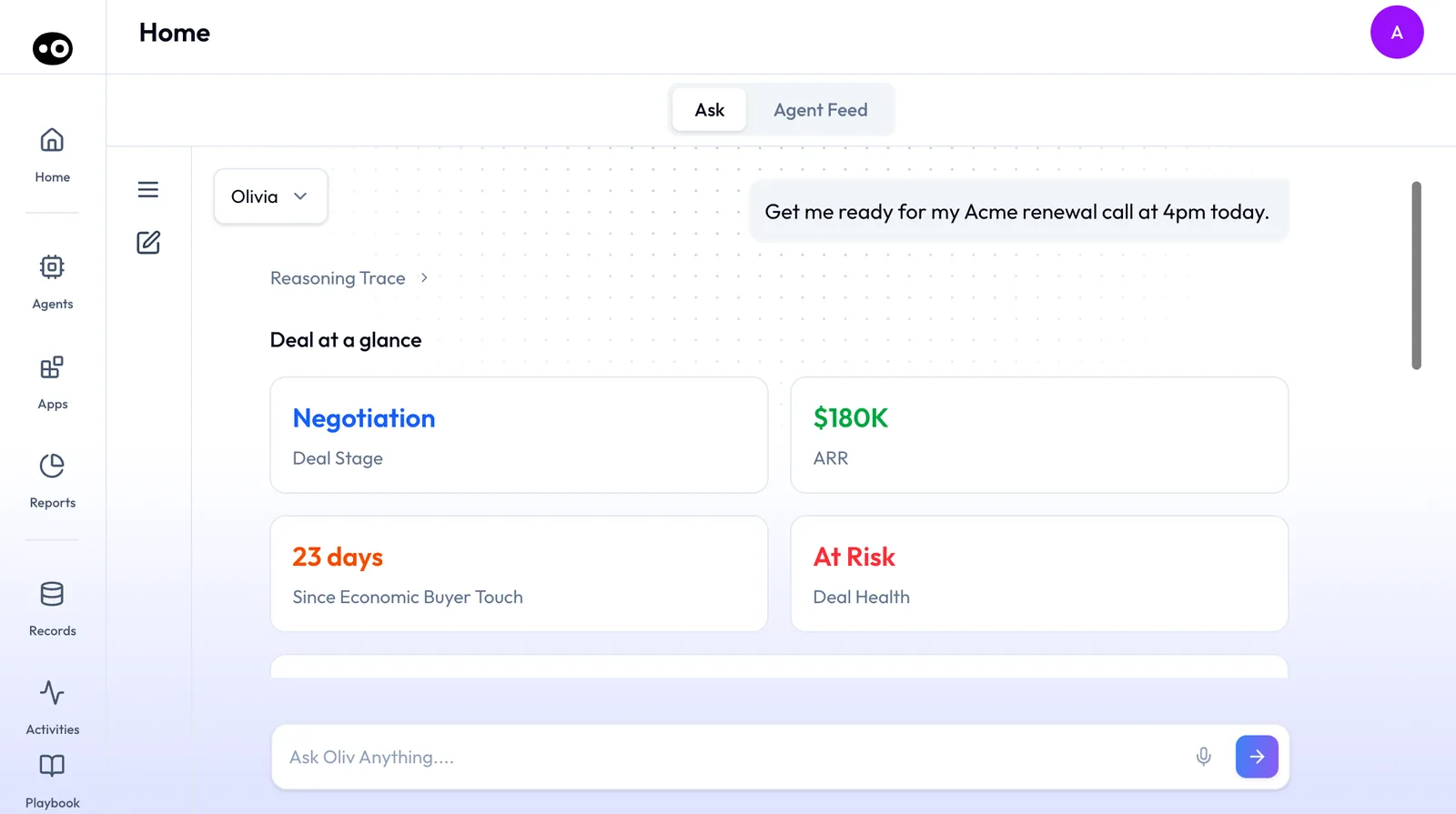
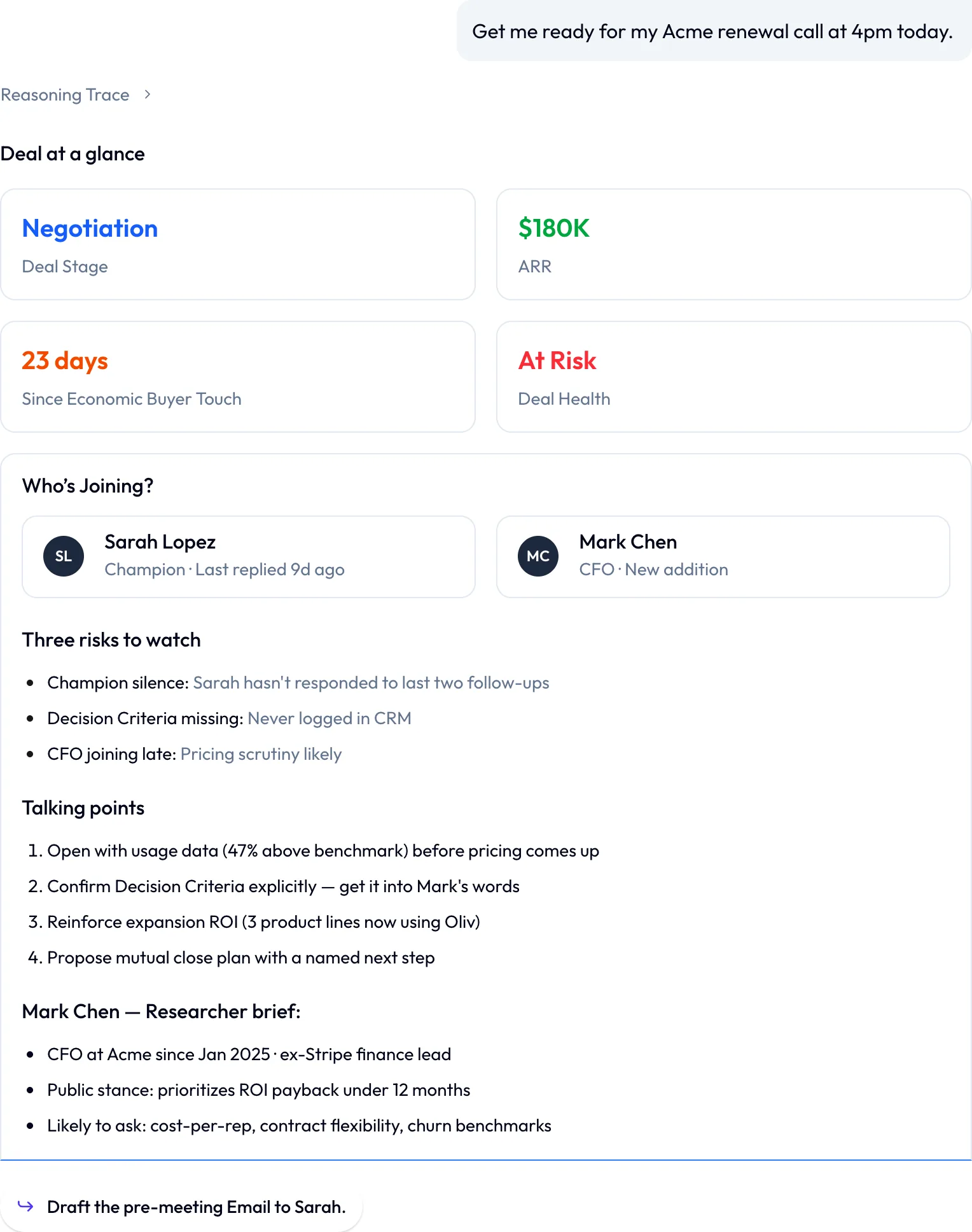
Her answer runs in a fixed order:
| Section | What it tells you |
|---|---|
| Deal at a glance | Four cards: deal stage, ARR, days since the economic buyer was last touched, and deal health |
| Who's Joining? | Each attendee with their role, such as champion or a new addition to the call |
| Risks to watch | What could go wrong on this call, such as a silent champion or missing decision criteria |
| Talking points | A numbered list of what to raise and in what order |
| Research on a new attendee | A short profile of anyone new on the call, researched by Olivia: role, background and what they're likely to ask |
A first meeting has no deal history to draw on, so the prep is research. You can tell Olivia you're meeting someone for the first time and ask her to prepare you. Otherwise, she sends three bullets and an icebreaker 30 minutes before the meeting:
| Part | What it covers |
|---|---|
| The company | What it does, its size and industry, funding history and stage, recent news and market context |
| The person | LinkedIn career history, current role and tenure, interests, and shared connections or common ground |
| The icebreaker | One specific talking point to open the conversation |
For a VP or C-suite contact, the brief also covers company tenure and publicly known priorities. If you want more than the three bullets, the full detail view is in the Oliv AI platform.
Send a pre-meeting email
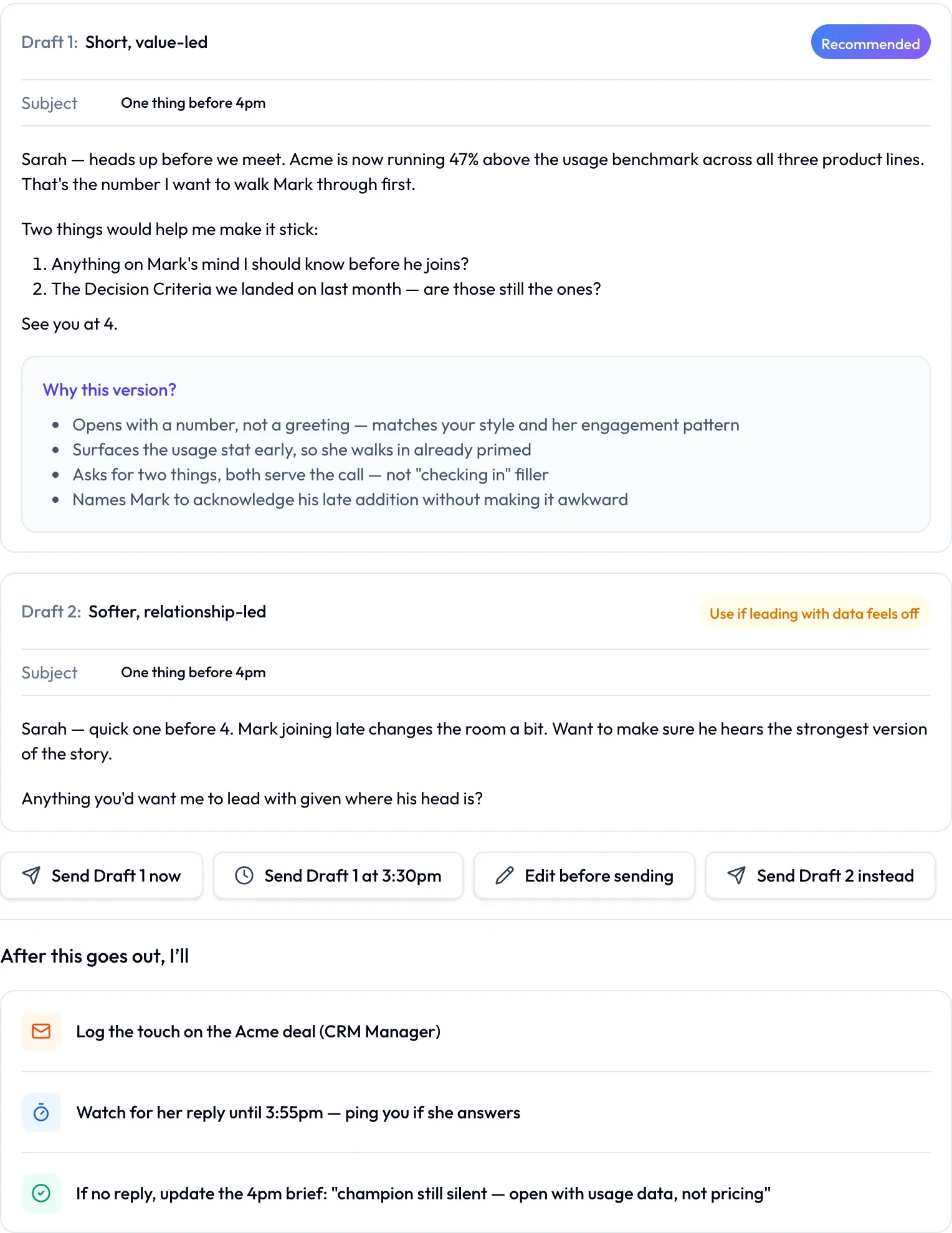
Oliv AI's Olivia agent ends her prep with a suggested next step, such as Draft the pre-meeting Email. Click it, and she writes the email two ways:
- Compare the drafts. One is marked Recommended, with a Why this version? box listing her reasons. The other is a softer alternative, tagged with when to use it.
- Choose how it goes out. Pick Send Draft 1 now, schedule it with Send Draft 1 at 3:30pm, Edit before sending, or Send Draft 2 instead. Nothing goes out until you choose.
- Read what happens next. Under After this goes out, I'll, Olivia lists her follow-through: log the touch on the deal through Oliv AI's CRM Manager agent, watch for a reply and ping you, and update your brief if none comes.
Step 5: Walk in with the agenda
- Open the recommended agenda and check it against what you planned to cover.
- Turn each highlighted qualification gap into a question for the call.
- Read the stakeholder notes, and decide who each point is aimed at.
- If a competitor is live in the deal, watch the clips pulled from past calls before you join.
- Join the call. After it, the follow-up draft and proposed CRM updates come back to you.
What meeting preparation in Oliv AI is
Oliv AI prepares you in one of two ways, depending on whether a deal exists yet.
| Deal brief | First-meeting brief | |
|---|---|---|
| For | Meetings on an active opportunity | First meetings with new contacts |
| Sent by | Oliv AI's Meeting Assistant agent | Oliv AI's Olivia agent |
| Built from | Your CRM and earlier conversations on the deal | Company research and the contact's LinkedIn |
| Contains | Deal summary, qualification status, stakeholders, agenda | Three bullets and an icebreaker |
| Arrives | 30 minutes before the meeting | 30 minutes before the meeting |
Oliv AI's Olivia agent sits across both. She coordinates Meeting Assistant for active opportunities and does the research for new contacts herself. You can also ask her for prep at any time, and she lays out the deal, the attendees, the risks and the talking points in one answer. That's the difference between an AI meeting assistant for sales and a recorder that only helps after the call.
Why meeting preparation matters
What it's for
A brief tells you where the deal stands, who's in the room and what to raise. The first minutes of the call then go on the buyer, not on catching up.
How it helps
- You don't have to ask. The brief lands 30 minutes before the meeting.
- It reads in a minute. One screen, about 60 seconds, scannable on the way into the room.
- Gaps show up early. Open qualification questions appear while you can still ask them.
- First calls get research too. New contacts come with company and person context and an opening line.
What happens without it
Without prep, reps rebuild each deal from notes and CRM records before the call, or walk in cold. Qualification gaps tend to surface at the forecast review, too late to fix. First calls open with questions the rep could have answered beforehand.
Why buyers care
This matters most to sales leaders whose teams run dozens of calls a week. It matters just as much to SDR and BDR leads whose reps book first meetings back to back. On calendars like those, there's rarely time to prepare by hand.
The Oliv AI approach to meeting preparation
Take an SDR who has booked a first discovery call with a finance VP at a target account. The call is at 2pm, with three other calls before it. The goal is to qualify the account and hand a live opportunity to an account executive.
The usual prep is a quick tour of LinkedIn, the company's website and a news search, plus any notes in the CRM. Reps who do this well tend to spend 15 to 20 minutes per contact. On a full day that time often isn't there, so the research gets skimmed or skipped.
The SDR doesn't need everything about the account, just the few facts that make the opening specific. That's a short job if someone else has already done the reading.
Oliv AI does the reading before the SDR has to. Oliv AI's Olivia agent sends three bullets on the company and the person, plus one icebreaker to open with. Funding, market position and recent news cover the account. Career history, role and interests cover the person.
The research brief lands 30 minutes before the meeting, and the full detail view stays in the platform for anyone who wants more. Between calls, the SDR reads the brief and opens the 2pm call with the icebreaker, not with a question the website already answers. The comparison table further down this page shows how other platforms prepare reps for a first meeting.
How sales meetings get prepared
Prep draws on four places, whether you do it by hand or a brief does it for you. Know what each misses before you rely on it in a meeting.
The CRM record: where the deal sits
The record gives you stage, amount, close date and last activity at a glance. It misses what the buyer actually said, and it's only as current as its last update. Defaults can mislead too: in HubSpot, a new open deal with no close date gets the last day of the month by default. That date may be nothing the buyer ever told you.
The stage needs the same care. Gartner said in 2019 that B2B buyers often revisit buying tasks rather than moving through them in order. A stage tells you where the seller placed the deal, so check it against what the buyer last did.
Past conversations: what people said
Call recordings and notes show what was agreed, who raised what and what each person cares about. They can't help with someone who hasn't spoken yet, such as a finance lead joining late. Rereading them is also the slow part of prep. Before a first meeting, there's nothing to read.
A qualification framework: what you still don't know
Holding a deal against MEDDPICC, BANT or your team's own framework shows which questions nobody has answered. That makes it the best input for an agenda. It won't catch anything the framework doesn't ask, and a filled-in item can still rest on a weak answer.
Outside research: who you're meeting
The company's site, funding news and the contact's LinkedIn are all you have when no deal exists yet. They give you a specific way to open the call. They can't tell you what this person thinks of your product, and public profiles can be out of date.
Which of these the briefs use
Oliv AI's Meeting Assistant agent builds the deal brief from your CRM and earlier conversations on the deal, then shows qualification status against your Active framework. A first-meeting brief draws on company research and the contact's LinkedIn.
How to prepare for a sales call by hand
To prepare for a sales call, find out where the deal stands, who's joining and what you still need to learn. Then turn that into an agenda. Before a first meeting, swap the deal check for research on the company and the person. For more on the planning itself, read this sales call planning guide.
Here's the routine, in order:
- Sort your calendar. Mark each meeting as a live deal, a first meeting or internal, because each one needs different prep.
- Open the CRM record for each deal meeting. Note the stage, amount, close date, last activity and next steps. In HubSpot, the last activity date shows the latest note, call, email or meeting logged on the deal, so an old date warns you the rest may be stale.
- Reread the last conversation. Find what was agreed and who owes what.
- List who's joining. Write down each person's role and what they've cared about so far, and look hardest at anyone new.
- Check qualification against your framework. Write each open item as a question you can ask.
- Write the agenda from those questions. Roger Schwarz argues in Harvard Business Review that a good agenda sets out what has to happen before the meeting as well as during it. If the buyer needs to bring something, send the agenda early enough for them to do it.
- For a first meeting, research instead. Check what the company does, its size, funding and recent news, then the person's career and role. Pick one specific point to open with.
What usually goes wrong is time. On a full day, steps 2 to 5 are often the first to go, and the rep walks in having read only the calendar invite.
The same job with Oliv AI
Oliv AI's Meeting Assistant agent does most of this for meetings on an active opportunity, and Olivia does the research for first meetings. The judgment stays with you.
| By hand | What arrives | What you still do |
|---|---|---|
| Sort your calendar | A deal brief for meetings linked to an active opportunity, research for first meetings | Check that every live deal is in your CRM |
| Open the CRM record | Deal summary: stage, amount, close date, last activity and next steps | Query anything that doesn't match what you know |
| Reread the last conversation | Context from earlier conversations, including what was agreed last time | Add anything said outside a recorded call |
| List who's joining | Stakeholders: roles, and what each person cares about | Decide who each point is aimed at |
| Check qualification | Qualification status, with gaps and open questions highlighted | Turn each gap into a question |
| Write the agenda | Recommended agenda, tailored to the stage and the gaps | Check it against what you planned to cover |
| Research a new contact | Three bullets and an icebreaker | Open the full detail view if you want more |
Worked example: sorting a week of 12 meetings
This is an illustrative calculation with sample figures, not an Oliv AI output, and it says nothing about time saved. A rep sorts next week's 12 meetings. Seven are linked to active opportunities, three are first meetings and two are internal.
| Meeting type | Meetings | What the rep gets | Share as first sorted | Share after adding the missed deal |
|---|---|---|---|---|
| Linked to an active opportunity | 7 | A deal brief | 7 / 12 = 58% | 8 / 12 = 67% |
| First meeting | 3 | Research from Olivia | 3 / 12 = 25% | 2 / 12 = 17% |
| Internal | 2 | Neither | 2 / 12 = 17% | 2 / 12 = 17% |
Shares are rounded, which is why the last column adds up to 101%. One of the three first meetings turns out to belong to a live deal nobody had entered in the CRM. Left alone, the rep would walk in with company research and no deal status.
Adding the deal lifts deal briefs from 7 to 8, or 67% of the week. So before each week starts, read down your first meetings and ask whether any of them belongs to a deal you already know about.
How to check your meeting prep is working
Two simple counts tell you whether prep is doing its job. Neither needs more than your calendar and the briefs themselves.
Brief coverage
Take your customer meetings for the week and count how many arrived with the right kind of prep. In the worked example, that's all 10 customer meetings, with 8 deal briefs and 2 research briefs. The weak spot is that coverage counts what arrived, not what you read. It can also look fine while hiding a deal missing from the CRM, because that meeting still counts as a first meeting.
Gaps still open at the next meeting
Pick one deal and compare the highlighted gaps in this brief with those in the next one. If the same gap shows up twice, the question either wasn't asked or wasn't answered. Don't expect every gap to close in one call, because a question for the economic buyer has to wait until that person joins.
Where to see these
Qualification status sits in each deal brief, so you can compare gaps from one meeting to the next. Managers see each rep's meetings, with the deal behind them, in the Morning Brief in Reports › My Reports. Count coverage from your calendar.
What to check when a brief is missing or looks wrong
Work through these in order when a meeting starts in 30 minutes and you have nothing, or the brief doesn't match the deal you know:
- Is the meeting linked to an active opportunity? Deal briefs cover only those meetings, so a live deal missing from your CRM won't get one. Add the deal.
- Is it really a first meeting? A new contact gets research on the company and the person, not deal status.
- Are your connections in place? The brief needs your calendar, your recorder and your CRM connected.
- Do you need prep right now? Don't wait for a scheduled brief. Open Home, keep the Ask tab on Oliv AI's Olivia agent, and type the call you're preparing for.
- Does a stage or date look stale? Check it against the CRM record and your last call. Oliv AI's CRM Manager agent fills in missing or stale fields from call history as it goes. If the record still looks off, confirm the detail on the call.
How meeting preparation works with other features
Follow-up after the call
Once the recording is processed, Oliv AI's Meeting Assistant agent drafts the follow-up email from the actual transcript, not a template. It also proposes CRM updates for stage, amount, close date, qualification fields and next steps. Oliv AI's CRM Manager agent writes those updates, so the next brief starts from current data.
Clips from past calls
Oliv AI's Content Curator agent reviews every new recording and picks out clips that match a brief you set. When a competitor comes up in a live deal, Meeting Assistant pulls three recent clips from the competitive playlist before the next meeting, showing how other reps handled that comparison.
Manager one-on-ones
Managers get prep too. In Reports › My Reports, Oliv AI's Deal Driver agent delivers a Morning Brief every weekday. It covers the day's meetings, the ones marked important, and each rep's meetings with the deal behind them.
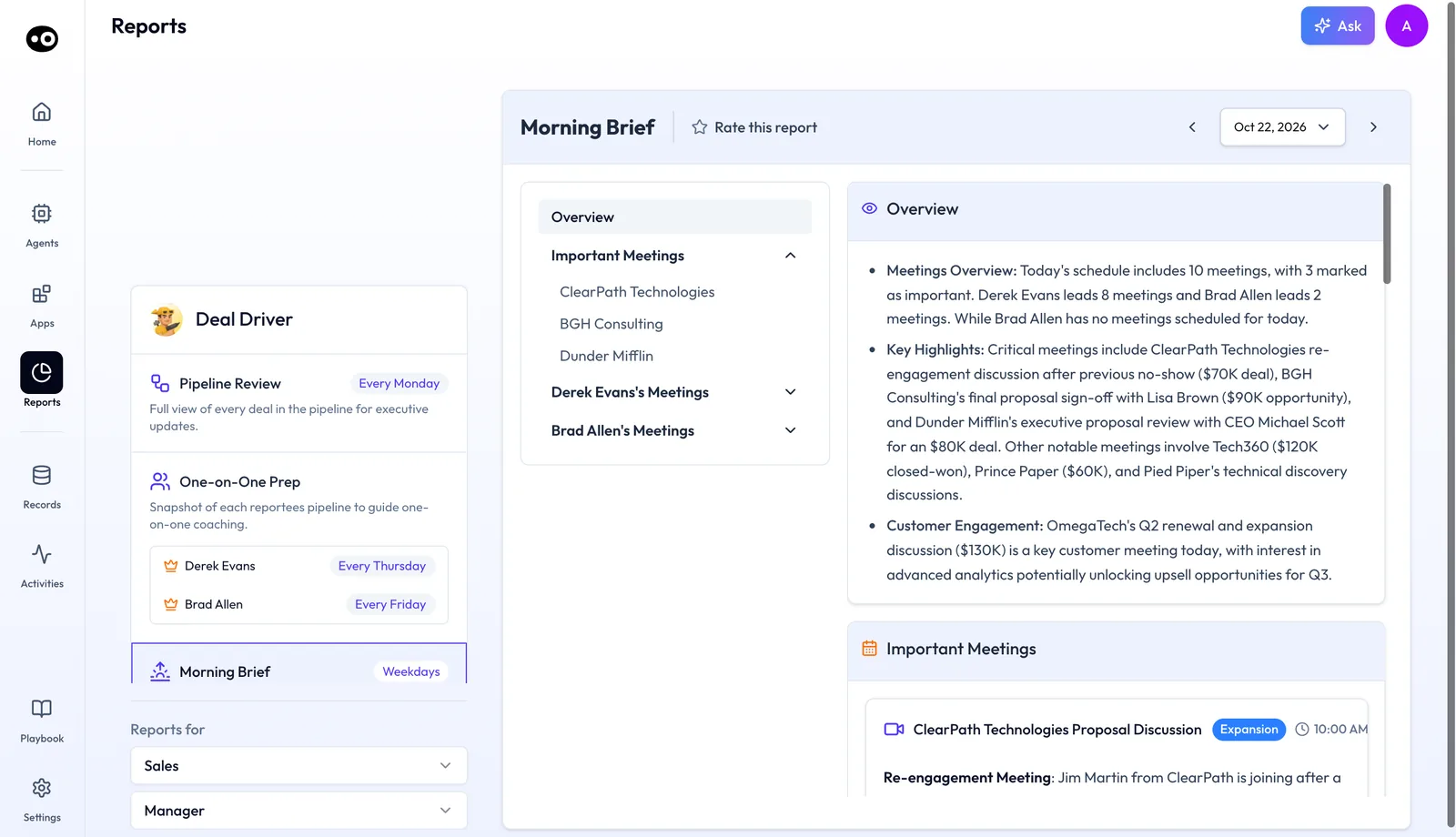
Each meeting card in the brief has Add me to this call, Leave a note and Review Deal, and a line comparing the meeting with your own calendar. Deal Driver also prepares a One-on-One Prep report for each rep, on that rep's own day, such as every Thursday or every Friday. Oliv AI's Coach agent follows minutes later with that rep's coaching goal.
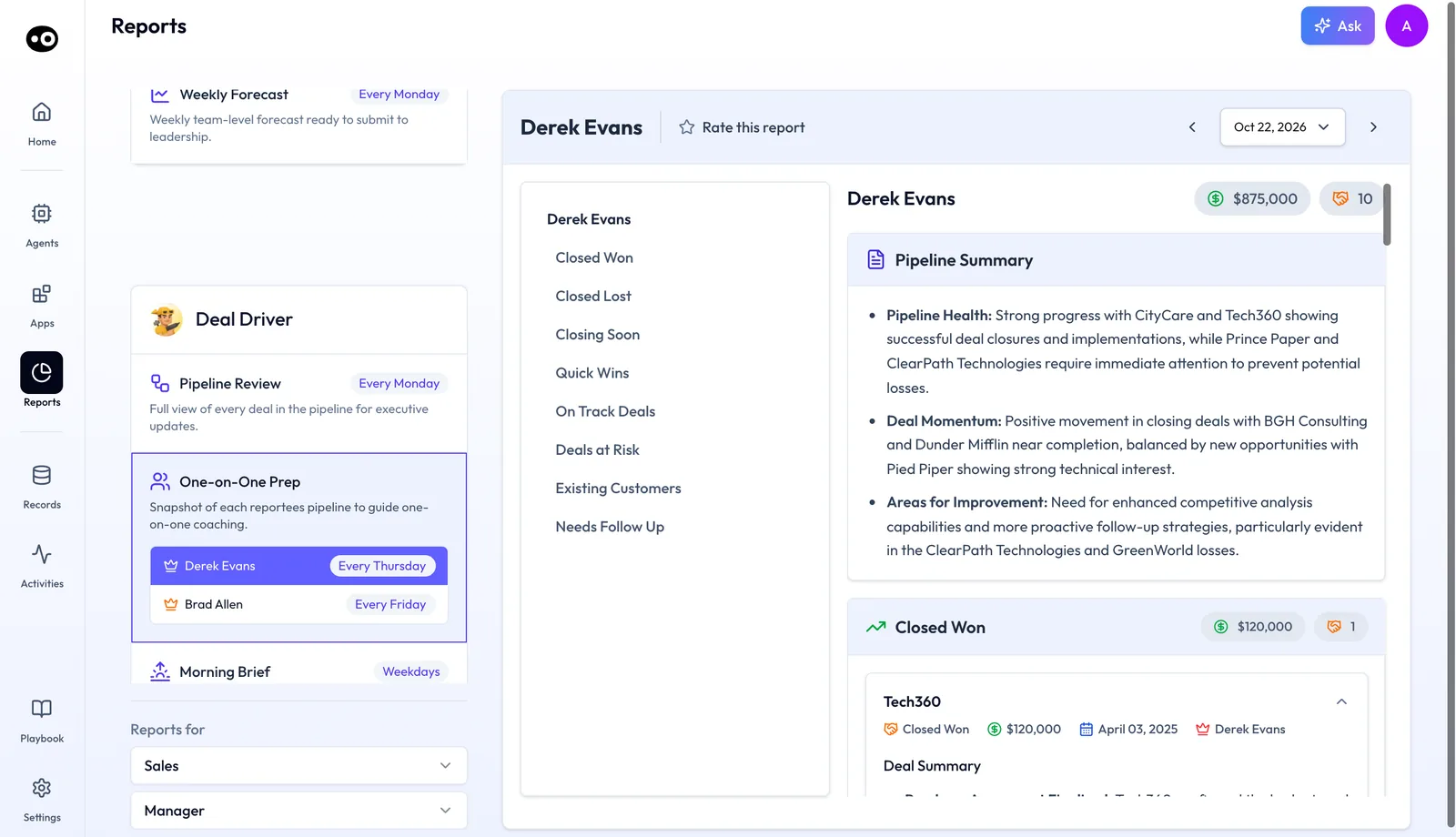
On customer success teams, Oliv AI's Portfolio Manager agent builds a briefing of each CSM's book before every scheduled 1:1.
Qualification methodology
The qualification status in each brief follows the framework your team runs, whether that's MEDDPICC, MEDDIC, SPICED, BANT or DRIVE, set as Active in Settings › Qualification Framework. See how Oliv AI scores calls against your sales methodology.
Agent tools
The actions agents take around a meeting, in your calendar, mailbox and CRM, are listed on each agent's Tools tab. Agent tools and run modes explains how to choose which of those actions wait for your approval.
Who uses meeting preparation, and how
These are typical patterns, shown to illustrate how the briefs are used.
Sales development
A sales development team books first meetings every day. Each rep reads the research brief between calls and opens with the icebreaker, so no first call starts with "tell me about your company." It's one way to keep AI-assisted prospecting personal.
Account executives
An account executive with a full pipeline reads the deal brief before each call. The qualification gaps become the questions for that meeting, and the stakeholder notes show who needs which point.
Account managers
An account manager walks into a renewal or expansion call with the full account history ready. Oliv AI's Olivia agent has it assembled before the call, including what was agreed last time.
Sales managers
A sales manager starts the day with the Morning Brief, then opens each rep's 1:1 with their pipeline, activity and flagged deals already on the page.
How Oliv AI compares for AI meeting preparation
Oliv AI's brief arrives on its own 30 minutes before the meeting, with the deal's qualification status and a recommended agenda built in. First meetings get research on the company and the person, plus an icebreaker. Oliv AI is the only platform in this table that does all four.
AI meeting preparation, from each platform's public documentation:
| Platform | Brief sent automatically before the meeting | Qualification status in the brief | Recommended agenda in the brief | Research on new contacts before a first call |
|---|---|---|---|---|
| Oliv AI | Yes | Yes | Yes | Yes |
| Gong | Partly (CRM-triggered briefs) | Partly (separate MEDDICC agent) | Not in docs | Partly (web search sections) |
| Outreach | Yes (Meeting Prep Agent briefs) | Partly (separate Deal Agent) | Partly (Talking Points section) | Partly (uses past account engagement) |
| Fireflies.ai | Yes (Meeting Prep created automatically) | Not in docs | Not in docs | Partly (needs past meetings) |
| Avoma | Reminder email only | Not in docs | Partly (template you apply) | Not in docs |
Yes: documented and built in. Partly: documented with a limit, shown in brackets. Not in docs: not found in the vendor's public documentation.
Why Oliv AI is the stronger choice for AI meeting preparation
- Gaps inside the brief. Oliv AI's brief shows qualification status against your methodology, next to the agenda. Gong documents a separate MEDDICC agent that shows where the gaps are. See Oliv AI as a Gong alternative.
- An agenda built from the deal. Oliv AI's recommended agenda follows the deal stage and the open qualification gaps. Avoma documents sharing an agenda that you build from a notes template. See Oliv AI vs Avoma.
- Ready for people you've never met. Oliv AI's first-meeting brief covers the company, the person and an icebreaker. Fireflies.ai builds its brief from your previous meetings with the same attendees.
- On the calendar, not on a trigger. Oliv AI sends the brief 30 minutes before each meeting on an active opportunity. Gong's automated briefs go out when predefined CRM conditions are met. See Gong vs Oliv AI.
Competitor details checked against each vendor's public documentation on 21 October 2026. Features and plans change, so confirm with the vendor before you decide.
Limits and things to know
- Deal briefs need a deal. The deal brief covers meetings linked to an active opportunity in your CRM. Meetings with new contacts get the research brief instead.
- Connections come first. No brief arrives until your calendar, recorder and CRM are connected.
- The research brief is short by design. It's three bullets and an icebreaker. The full detail view is in the platform.
- Emails wait for your choice. A pre-meeting or follow-up email goes out only when you pick a send option or press send.
Common questions
When does the brief arrive?
Thirty minutes before the meeting. You don't need to request it; it's sent automatically for meetings linked to an active opportunity.
How long is the brief?
One screen, about 60 seconds to read. It covers the deal summary, qualification status, stakeholder context and a recommended agenda.
What do I get before a first meeting with someone new?
Three bullets on the company and the person, plus an icebreaker. Oliv AI's Olivia agent sends it 30 minutes before the meeting.
Which sales methodologies does the brief use?
MEDDPICC, MEDDIC, SPICED, BANT or DRIVE. Your team marks one as Active in Settings › Qualification Framework, and the brief maps the deal against it.
Can AI build an agenda for a sales meeting?
Yes. The recommended agenda in the deal brief is tailored to the deal stage and its qualification gaps, so it points you at what still needs answering. Check it against what you planned before you join.
Do I need a clean CRM before the brief works?
No. Oliv AI's CRM Manager agent fills in missing or stale fields from call history as it goes, so the brief can start straight away.
Where do briefs and alerts show up?
Oliv AI's Olivia agent works through Slack, Teams or the Oliv AI product. In the product, you ask her on the Home screen's Ask tab, and managers read Deal Driver's briefs in My Reports.
Is the follow-up email a template?
No. Oliv AI's Meeting Assistant agent writes the draft from the call transcript: what was discussed, what was agreed and what happens next. You review, adjust and send.
Can managers get prep for their 1:1s?
Yes. Oliv AI's Deal Driver agent prepares a One-on-One Prep report for each rep on that rep's set day, such as Thursday or Friday. Its Morning Brief covers the team's meetings every weekday.
Is there a minimum team size?
No. A single rep gets value from the first brief. Gap tracking becomes more useful as deal volume grows, because there's more for it to catch.
How do you prepare for a sales call?
Find out where the deal stands, who's joining and what you still need to learn, then turn that into an agenda. Before a first meeting, research the company and the person instead, and pick one specific point to open with.
What should you research before a first sales meeting?
Research the company and the person. For the company, check what it does, its size, funding and recent news. For the person, check career history, role, tenure and common ground. Oliv AI's Olivia agent sends the short version as three bullets and an icebreaker.
Why didn't my meeting get a deal brief?
Deal briefs cover meetings linked to an active opportunity, so first check that the deal is in your CRM. Then check that your calendar, recorder and CRM are connected. You can still ask Oliv AI's Olivia agent for prep on the Home screen's Ask tab.
Further reading
Related
Updated 3 November 2026: added how meetings get prepared, the manual routine with the same job in Oliv AI, a worked example, two prep checks, a missing-brief checklist and further reading.