
Platform Live
Context, process and signal graphs
The three graphs underneath Oliv AI's agents, what each one holds, how it stays current, and which agents read it before they act.
On this page
Oliv AI's agents don't start from a blank page each time you ask them something. Three graphs sit underneath them. The context graph places every activity on the right account and opportunity. The process graph holds how your company sells. The signal graph stores precomputed answers to the revenue questions teams ask most. This page explains what each one holds and which agents read it.
At a glance
| Graph | What it holds | Who reads it | How it stays current | Where you see it |
|---|---|---|---|---|
| Context graph | Every conversation, message and activity, mapped to the right people, account and opportunity | Every agent that needs to know who said what | Each new activity is mapped as it arrives | An account's Timeline and Contacts tabs, and a contact's Associated Objects |
| Process graph | Your playbook: ICP, approval flows, methodology, exceptions | Every Oliv AI agent, before it acts | Oliver proposes changes for approval, and every change is logged in History | Playbook, at the bottom of the sidebar |
| Signal graph | Precomputed answers from 100+ small language models, per deal, account and contact | The AI answering your questions | Updated as new information arrives | A deal's Health tab, among other places |
Oliv AI is a layer that sits on top of your existing CRM rather than replacing it. The graphs add context to what your CRM already holds.
Where the graphs get their data
Every signal flows into one foundation first: calls, emails, meetings, CRM fields, docs and product usage. From there it's enriched and ready to reason over.
Conversations are the starting point, not the whole picture:
- Your data warehouse. Product usage, support tickets, billing history and onboarding completion. Oliv AI connects to Snowflake, Databricks, Redshift and BigQuery.
- Shared channels with customers. Decisions often get made in channels shared between companies. Oliv AI monitors them and makes that context available to your AI.
- Your connected tools. The integrations overview lists what connects, including Slack and the Converse app for meetings and calls.
An account's Timeline, under Records › Companies, shows that mix in one feed. Its filters cover Communication (Calls, Conversations, Email, LinkedIn, SMS, WhatsApp) and Contact Activity, such as Ads Activity, Form submissions and Marketing events. News about the account appears there too.
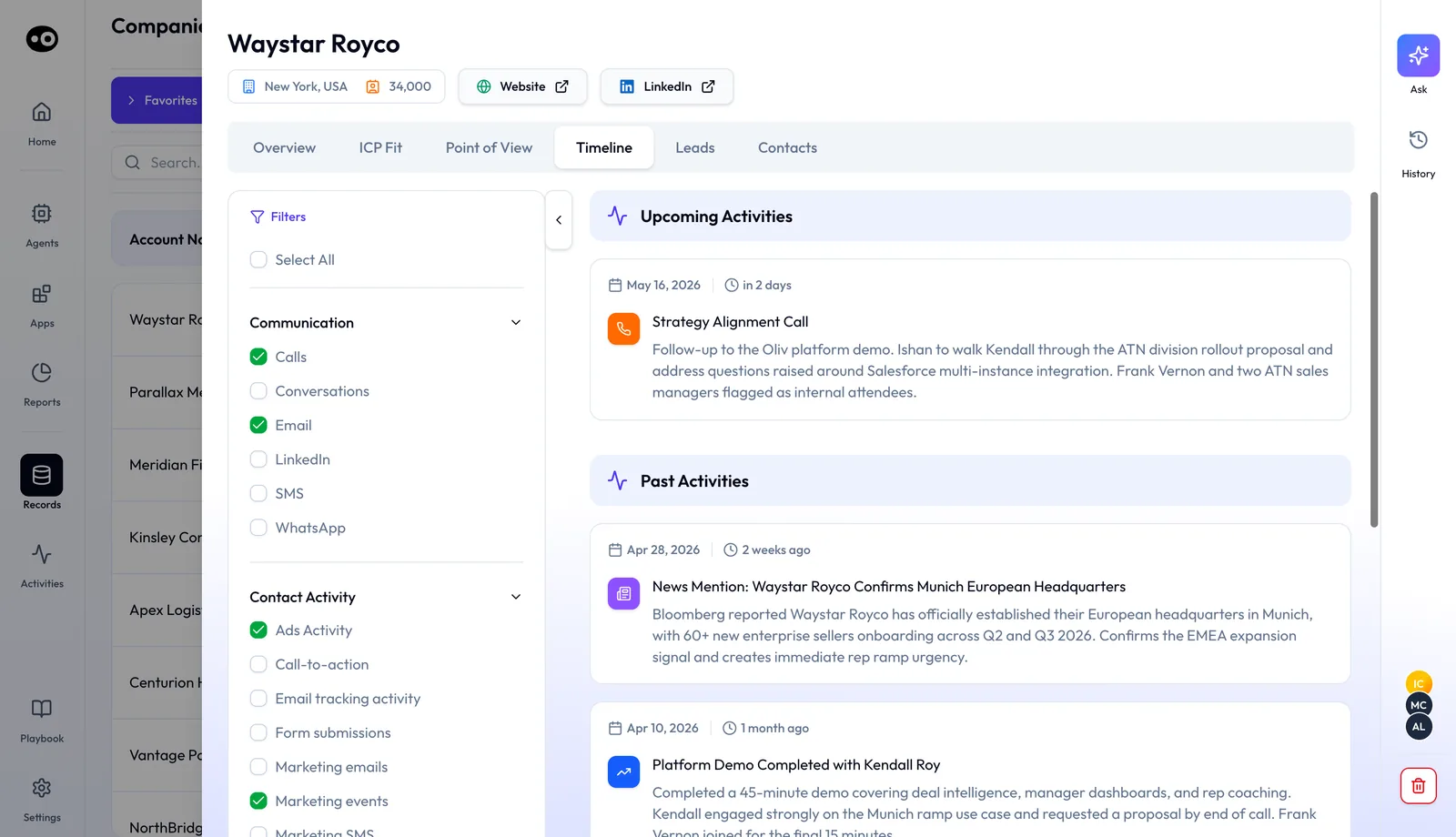
Each activity keeps its full content. An email, call, calendar event or Slack message is captured as a rich context object with participants, content and timestamps, not just its metadata.
Context graph
The context graph connects every conversation, message and activity to the right people, account and opportunity. Your agents know who said what, and which account or opportunity it belongs to. Over time it becomes the full story of every account, built as a memory.
How an activity finds its place
A simple lookup matches the email domain and takes the first account. That breaks on a messy CRM. The context graph works through four steps instead:
- Capture the full activity. Participants, content and timestamps, not only the metadata.
- Pull every candidate object. All accounts, opportunities and contacts, including acquisition links found through live web research.
- Reason through the full picture. Recency, engagement history, conversation content and relationship context decide the mapping.
- Clean the CRM along the way. Activity lands in the right place, and duplicates get cleaned up as a byproduct.
The cases it's built for
| Situation | What goes wrong with a lookup | What the context graph weighs |
|---|---|---|
| Two open opportunities in one account | Activity is filed against one and the other is ignored | Which buying group and product the conversation is about |
| One partner call covering three customer accounts | Everything is logged to the partner account | Each customer account and its opportunities |
| A customer acquired, now emailing from a new domain | The unknown domain finds no match and the activity is dropped | Acquisition links surfaced through web research |
| The same account in the CRM twice | One record is picked at random | Recency and engagement signals to find the live record |
Who reads it
Oliv AI's CRM Manager agent maps every activity to the right account and opportunity the way a seller would. If it can't resolve a match, it asks the seller. Oliv AI's Gold Digger agent uses the context graph to understand what a customer already uses before it flags an expansion signal. The CRM Manager agent page covers how mapped activity reaches Salesforce and HubSpot.
Where you see it
The mapping shows up wherever a record lists the people and activity tied to it. An account's Contacts tab groups people into Buying Committee and Other Contacts, each with a sentiment face. Select a person to see role tags such as Economic Buyer, plus their Pain and Needs and Objections, drawn from calls and emails. A contact's Associated Objects tab works the other way round: it lists every deal and company the person is tied to, with their role on each deal, such as Champion or Technical Evaluator.
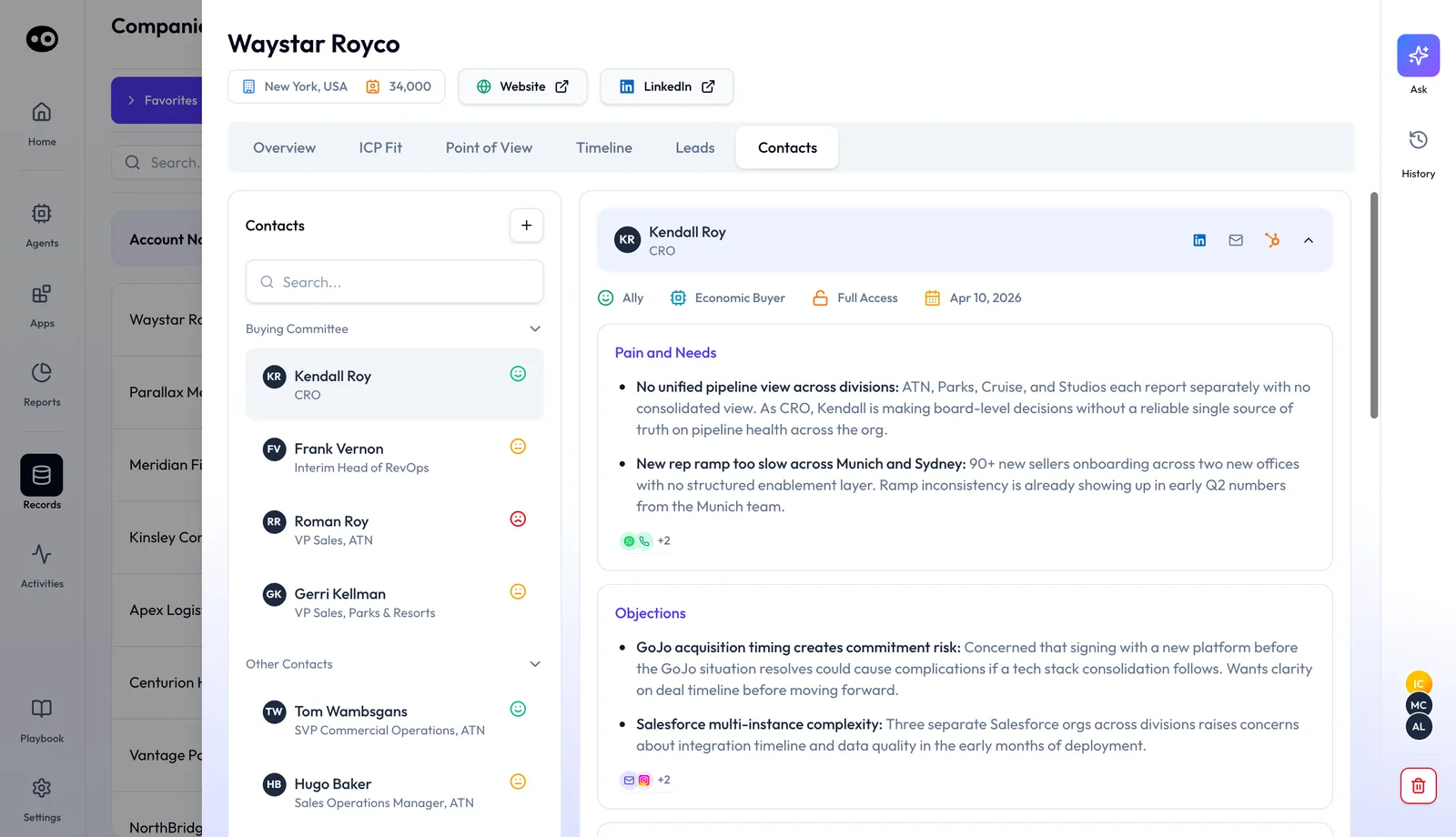
More on the mapping is on Oliv AI's context graph page, and its post on enriching your CRM without replacing it explains the sync.
Process graph
The process graph is the living playbook every Oliv AI agent reads before it acts. It documents your processes, judgment calls and company knowledge in a form agents can reason from, not just retrieve. It's a set of linked documents: proposal connects to approval, which links to discount authority and back to your ICP. It records how your company does operate, not how it should.
Three layers
| Layer | What it holds | Who sees it |
|---|---|---|
| Global Handbook | Company ICP, approval flows, pricing logic, competitive positioning | Shared across every agent in your org |
| Agent Context | What each specialist agent needs, such as the qualifying criteria Oliv AI's Prospector agent works from | That agent |
| Personal Memory | A rep's current accounts, focus areas and working style | Private to that rep, maintained by their own agent |
How it's built and kept current
Oliv AI learns your product, qualification criteria, processes and exceptions from your documentation and from what happens in the field. You bring the knowledge, and there's no cleanup sprint or CRM audit first.
Oliv AI's Oliver agent keeps the playbook current. When RevOps changes the ICP, every agent reflects that change: one update, consistent across the revenue org. Oliver also watches what's winning in the field and drafts the next process update for your review.
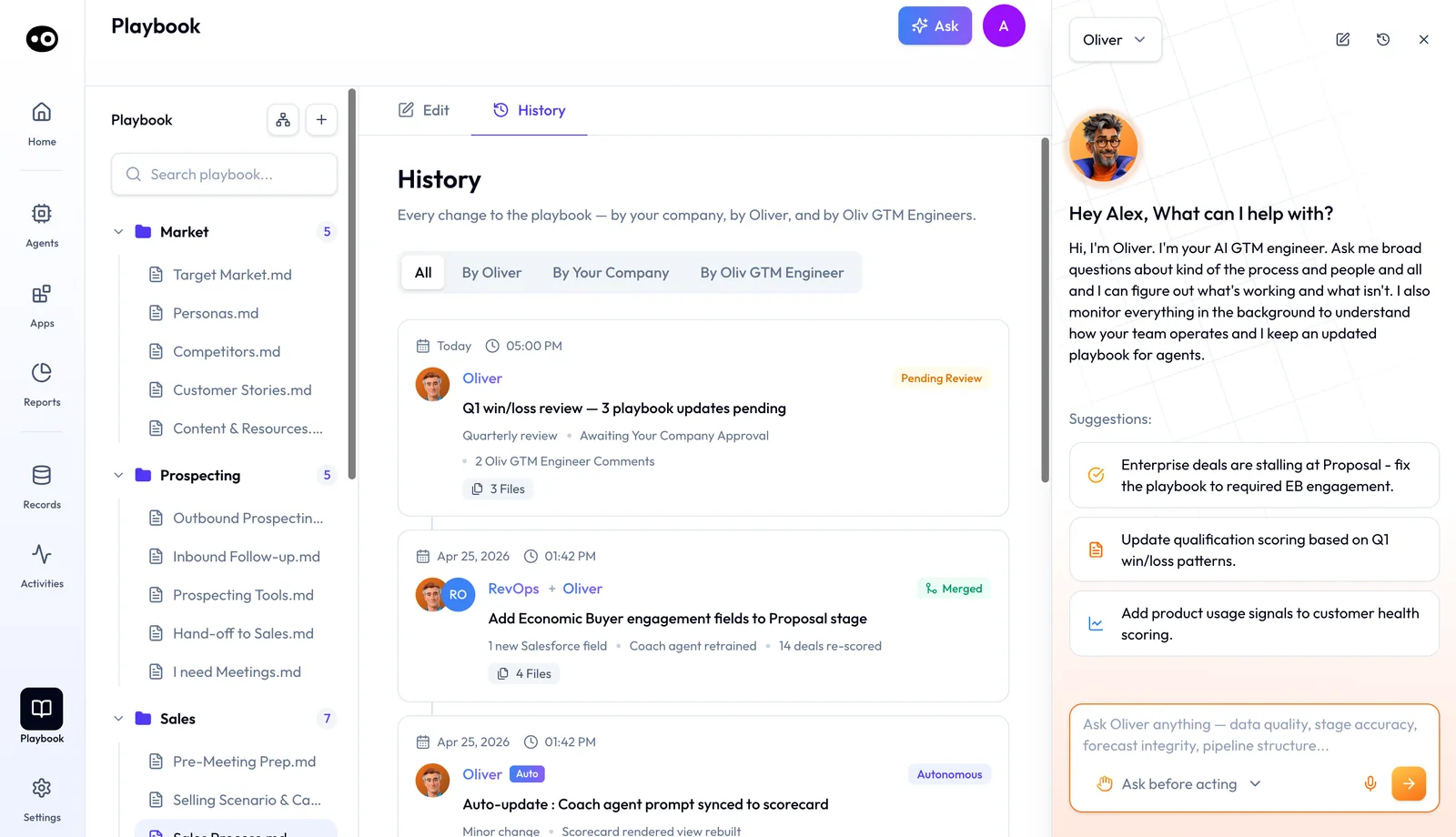
Oliver's proposals wait as Pending Review until your company approves them. You read a line-by-line diff of each affected file, then choose Approve & merge, Request edit or Cancel. Small changes, such as an agent prompt synced to a scorecard, apply as Autonomous, with no human review needed. The Oliver agent page shows how a proposed change is reviewed.
Where you see it
The process graph lives in Playbook, pinned at the bottom of the sidebar. It's a tree of markdown files in folders such as Market, Prospecting and Sales, each with Edit and History tabs and a Synced status. Files link to each other: Sales Process.md, for example, links to the selling-scenario and discovery files it builds on. Oliver's panel sits on the right, so you can ask for a change in plain language.
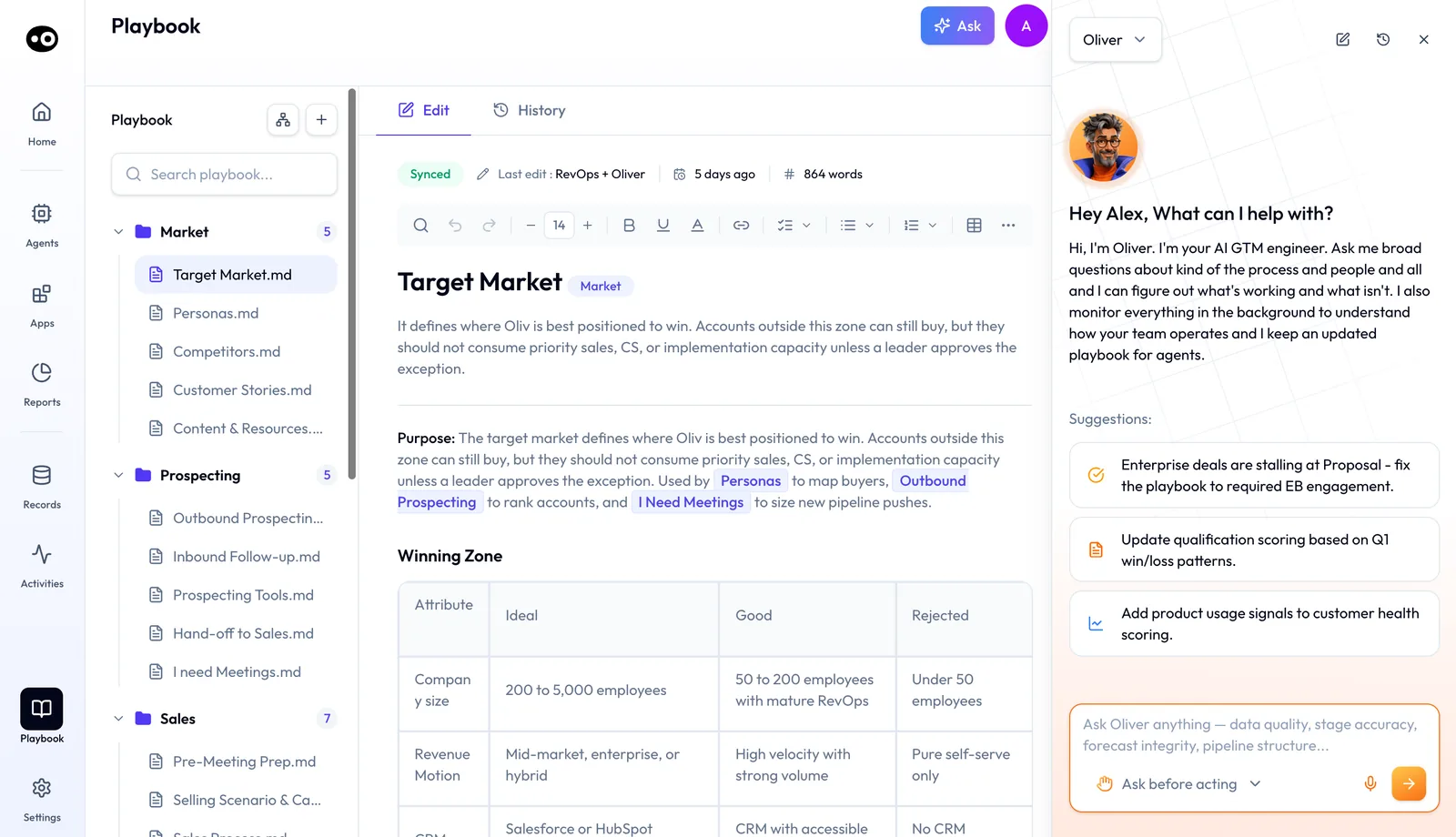
When two sources disagree, the process graph documents the conflict instead of hiding it. An agent working from it understands gaps and loops in a person instead of acting on outdated knowledge.
Who reads it
Every agent. Some of what each one takes from it:
- Oliv AI's Olivia agent operates inside the stages, ownership and handoffs Oliver sets, from day one. See the Olivia agent.
- Oliv AI's Coach agent coaches every rep against the same up-to-date methodology. See the Coach agent.
- Oliv AI's Deal Driver agent grounds its alerts in your qualification framework. See the Deal Driver agent.
- Oliv AI's Forecaster agent builds its signals on that framework, so the forecast rests on one qualification standard. See the Forecaster agent.
- Oliv AI's CRM Manager agent tracks and updates the fields Oliver defines, including those in your CRM field mapping.
For agents you build yourself, agent instructions and knowledge files add focused context on top. Oliv AI's process graph page has more on the layers.
Signal graph
The signal graph stores the answers to common revenue questions before anyone asks them. Oliv AI runs 100+ specialized small language models, each fine-tuned to answer one revenue question. They read every meeting, email and note end to end, with no chunking. The answers are precomputed per deal, per account and per contact, and updated as new information arrives.
Why precompute
Revenue teams ask many of the same questions about every account. What are the pains? Who decides? What's the budget? Retrieving a few similar-looking fragments at question time loses the thread across meetings. The signal graph reads the full history instead, so the model receiving your question gets complete context, not fragments. Oliv AI reads context, sentiment and intent rather than matching keywords.
What the models cover
The models span the revenue lifecycle, before and after the sale. A sample:
| Stage | Example signals |
|---|---|
| Qualification | Pains and needs, budget availability, decision criteria, economic buyer, champion identification |
| Deal progress | Next steps, risk signals, buying committee, objection tracking, deal velocity |
| Methodology | MEDDIC scoring, MEDDPICC score, BANT score, SPICED score |
| Post-sale | Renewal risk score, expansion signals, executive sponsor health, product adoption gaps, QBR readiness |
Tuned to what you sell
Each model is further tuned to your business, because the pains a developer tools vendor hears differ from those a RevOps platform hears. Tuning runs on a short schedule:
- Day 0, at proof of value kickoff. Oliv AI's agent studies your website, product pages and positioning.
- Day 1. Each model gets a tailored prompt that limits it to signals relevant to your solution.
- Week 1 onward. Human feedback and quarterly re-research track new offerings, positioning and buyer personas.
Who reads it
The AI answering your question uses those precomputed answers instead of rebuilding context from raw history. Ask which deals are likely to close this quarter, and the answer comes from checking each deal's pain point, compelling event, timeline and MEDDPICC signals. That's the kind of question you'd bring to a pipeline review or to meeting prep.
Where you see it
Per-deal answers surface on each deal in Records › Deals. The Health tab has sub-tabs for Forecast, Risks, Qualification, Competition, Objections, Buying Committee and POC Health. The Forecast sub-tab reads out a win probability, how many MEDDPICC criteria are confirmed, how often the close date has slipped, and the one thing dragging the score down. On an account, the Point of View tab lists intent signals such as Expansion Momentum and Leadership / Org Change.
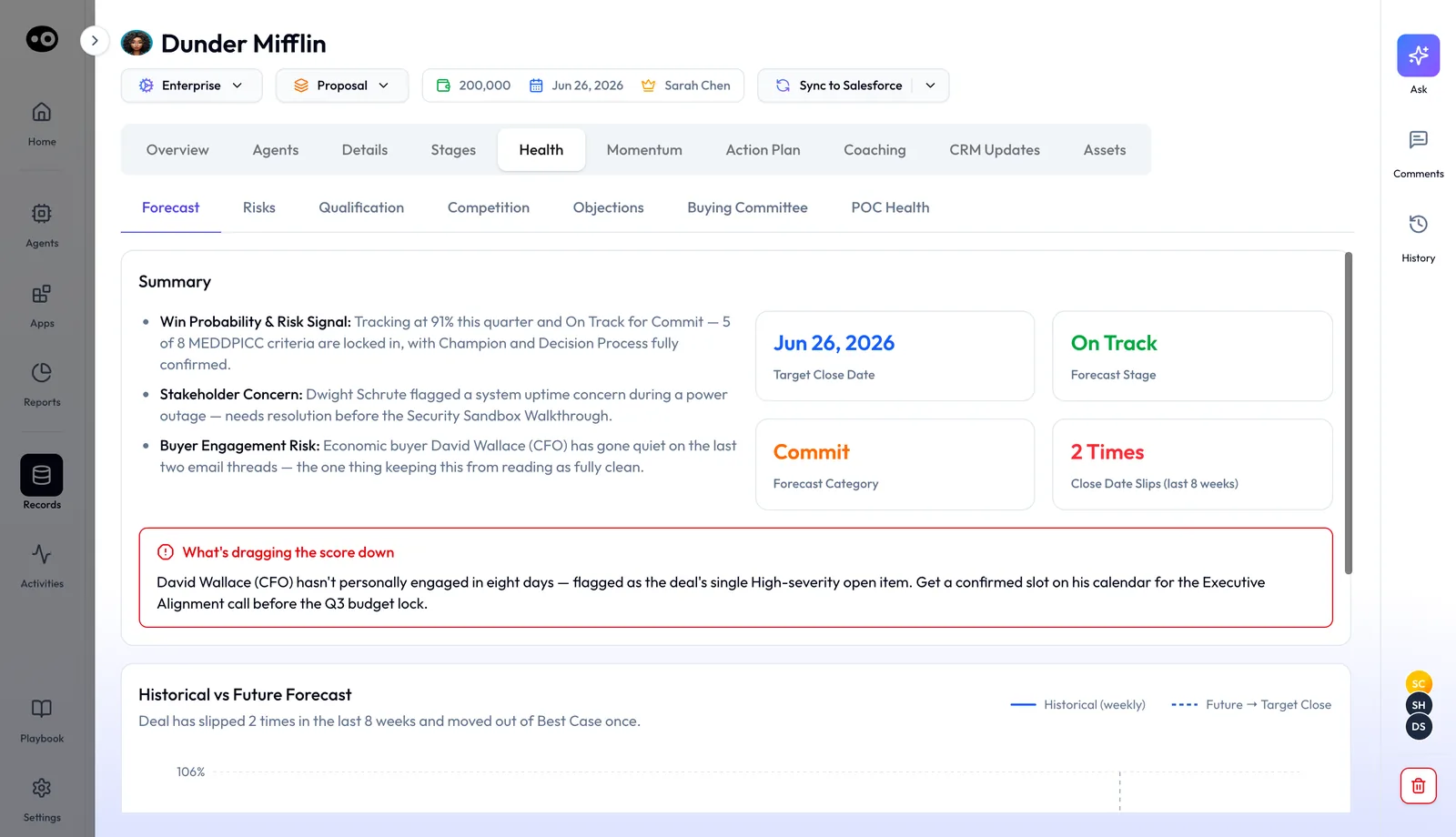
Oliv AI's signal graph page shows the model library. Its posts on meaning extraction versus raw transcripts and why retrieval fails on CRM data go deeper on the reasoning.
Limits and things to know
- Your CRM stays the system of record. Oliv AI works on top of it and enriches it; it doesn't replace it.
- Unclear matches go to a person. When Oliv AI's CRM Manager agent can't resolve where an activity belongs, it asks the seller.
- Process changes are reviewed or logged. Oliver's larger proposals wait as Pending Review for a person to approve. Minor changes can apply as Autonomous, and every change appears in the Playbook's History.
- Personal memory stays personal. It's visible only to the rep it belongs to.
- Signal models start general, then get tuned. They run out of the box and are tuned to your business from the proof of value kickoff.
Common questions
What is the difference between the three graphs?
The context graph places each activity on the right account and opportunity. The process graph holds how your company sells. The signal graph stores precomputed answers to revenue questions, per deal, account and contact.
Do I need a clean CRM before the context graph works?
No. It's built for messy data: duplicate records, several open opportunities and changed email domains. It cleans duplicates as a byproduct of mapping.
What happens when one call covers several customer accounts?
The context graph weighs each customer account and its opportunities, instead of logging everything to the partner who joined the call.
What if a customer is acquired and emails from a new domain?
The context graph pulls acquisition links found through live web research, so the activity can still reach the open opportunity.
Does Oliv AI keep the content of calls and emails, or only metadata?
The content. Each activity is captured as a rich context object with participants, content and timestamps.
Which agents read the process graph?
Every Oliv AI agent reads it before it acts. Olivia, Coach, Deal Driver, Forecaster and CRM Manager each draw on it.
How does a playbook change reach every agent?
You tell Oliver what changed, or edit the file in Playbook yourself. When RevOps changes the ICP, every agent reflects it once the change is merged. Oliver's own proposals wait as Pending Review until someone approves them.
Can the process graph learn from our existing documents?
Yes. Oliv AI learns your product, qualification criteria, processes and exceptions from your documentation and from what happens in the field.
Is personal memory shared with my manager?
No. Personal memory is private to each rep, maintained by their own agent and visible only to them.
How many signal models are there?
More than 100 out of the box, each fine-tuned to answer one revenue question, across pre-sales and post-sales.
Are the signals tuned to what we sell?
Yes. Each model gets a tailored prompt from the first day of your proof of value. Human feedback and quarterly re-research keep it current as your offering changes.
Does Oliv AI pull in product usage and billing data?
Yes. It connects to Snowflake, Databricks, Redshift and BigQuery for product usage, support tickets, billing history and onboarding completion.