
AI sales assistant Status: Live

AI sales assistant: how Oliv AI's Olivia prepares you for calls and asks before she acts
How Oliv AI's Olivia agent works as an AI sales assistant: how to ask her questions and hand her work, what she needs connected, and how she compares with other AI sales assistants.
On this page
- At a glance
- What the Olivia agent is
- Why the Olivia agent matters
- The Oliv AI approach to the Olivia agent
- Set up what Olivia reads
- How routine sales work gets handed to an assistant
- Ask Olivia a question
- Choose per conversation whether she asks first
- How to measure whether her drafts are ready to go out unchanged
- How to prepare for a call and follow up by hand
- How Olivia works with other agents
- Who uses Olivia, and how
- How Oliv AI compares as an AI sales assistant
- Limits and things to know
- Common questions
- Further reading
- Related
Your next call is close, the last one's follow-up isn't written, and you'd hand both to an AI sales assistant that knows your deals, as long as you control what it sends. Oliv AI's Olivia agent is built for that handover: you ask in plain language about deals, meeting prep, pipeline or next steps, and she either answers or hands the work to a specialist agent and reports back. She also monitors your conversations in the background and takes care of things before you ask. A dropdown on each conversation sets whether she asks you first.
At a glance
| What it does | Answers questions and gets work done through specialist agents |
| Who it's for | AEs, BDRs, SDRs, CSMs and AMs across the revenue org |
| Where you find her | The Ask tab on Home, or a side panel opened with Ask from other screens |
| How freely she acts | Ask before acting (the default) or Act without asking, set per conversation |
| Past conversations | Saved in a history panel, with search and New Chat |
| Where alerts reach you | Slack, Teams, or within the Oliv product |
| What she needs | A recording or transcript input, a CRM connection and a calendar |
What the Olivia agent is
Oliv AI's Olivia agent is one of two super agents in Oliv AI. The other is Oliv AI's Oliver agent. Oliver owns the back end: the process handbook, the configuration and the rules the org runs on. Olivia is the one you work with day to day on deals, meetings and next steps.
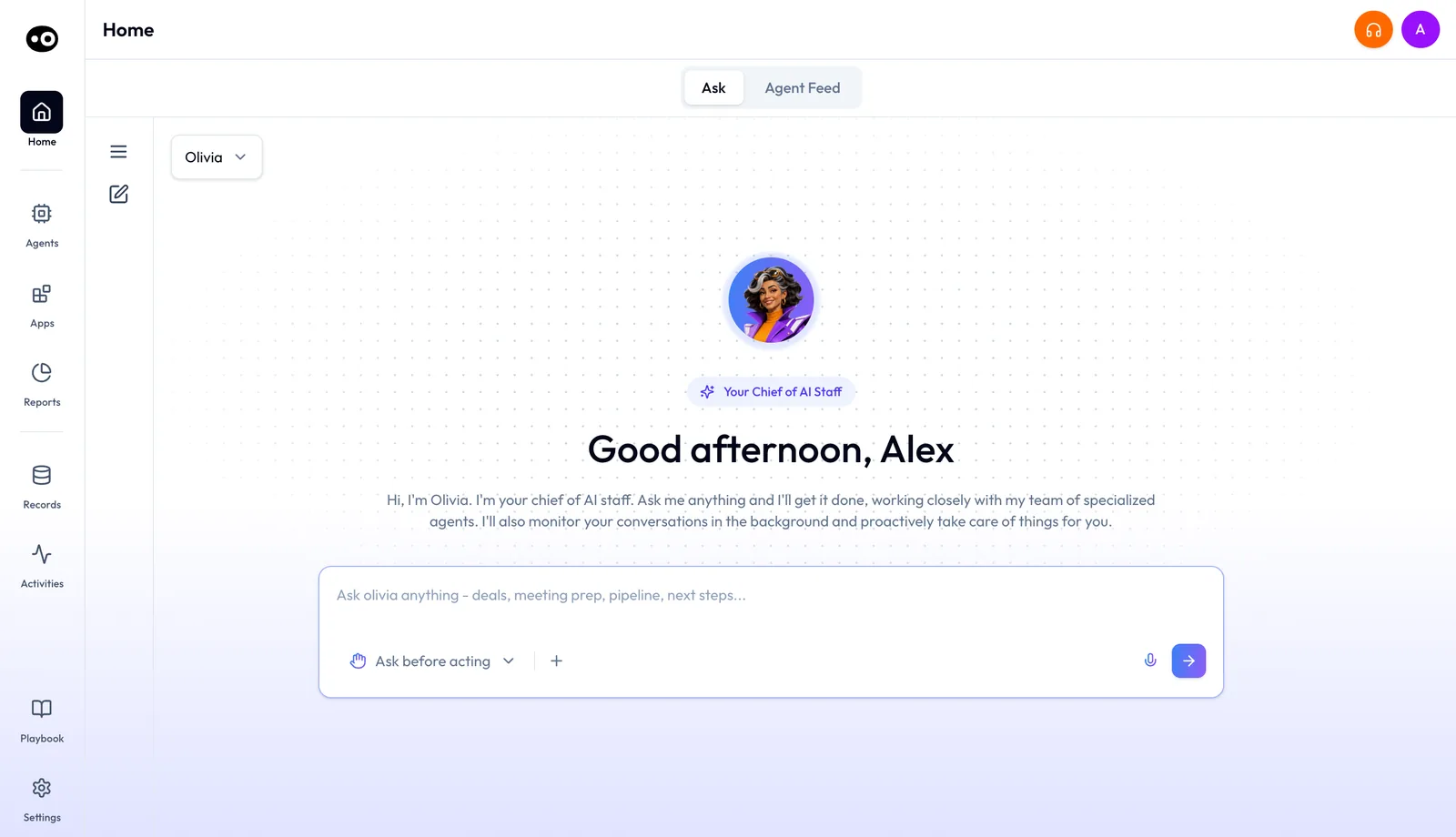
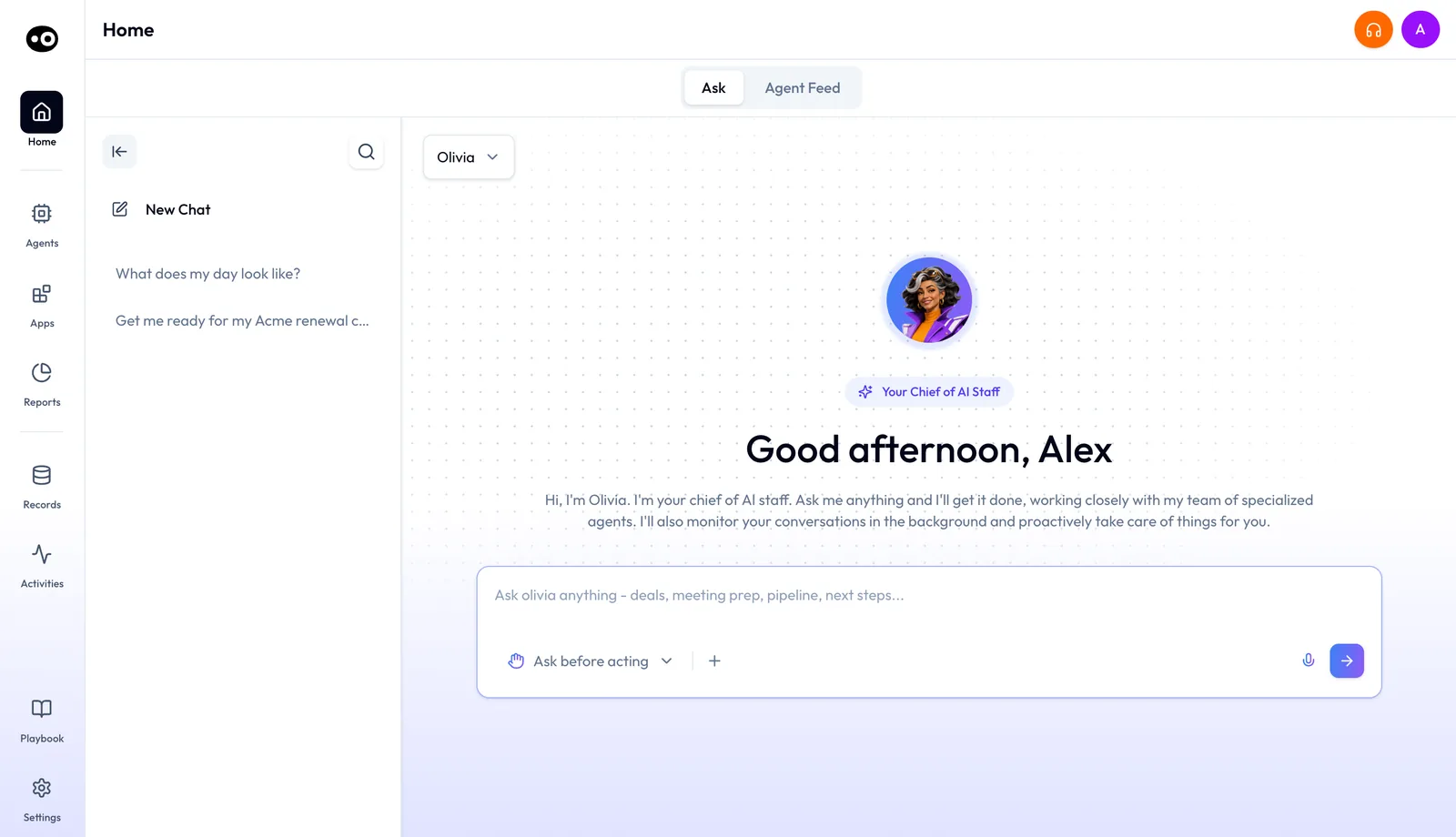
On Home, the Ask tab opens with Olivia chosen. Her pill reads Your Chief of AI Staff, and the Agent Feed tab beside it shows what your agents have done.
She is the same agent for the whole revenue org, not a separate instance per person. She adapts to each rep's accounts and deals, while Oliver keeps her inside consistent company process. In the agent picker she describes herself in one line: "I see everything across your team and dispatch the right sub-agent for each task."
Olivia is a conversation, not a marketplace agent
Olivia doesn't appear in the agent marketplace. She has no card, no detail page, no tools tab and no run history. You reach her on the Ask tab or in a side panel, and her background work shows up as rows in the Agent Feed.
Why the Olivia agent matters
What it's for
An AI sales assistant should take routine work off your hands and leave you in control of what it sends. Oliv AI's Olivia agent is for revenue people who need the full picture of a deal or account at the moment they act. That picture is split across the CRM, call recordings and email, and someone has to stitch it together.
How it helps
- Prep that's already done. She surfaces deal context about 30 minutes before a meeting, so you don't rebuild it yourself.
- Follow-up drafted for you. After a call, the follow-up email is drafted and ready within minutes.
- Risk raised early. She flags deals with no activity, close dates nearing without progress, or qualification gaps.
- One place to ask. You tell Olivia what you need, and she routes it to the right agent.
What happens without it
Each piece of busywork is small: prep a meeting, follow up a call, update a field, brief a colleague on a handoff. Added up, it slows the whole team. A quiet deal often gets noticed only when a rep escalates it.
Why buyers care
Olivia is usually bought by a VP of Sales or a RevOps lead, and AE and BDR team leads feel the daily value first. Sales managers care that every rep works inside the same process.
The Oliv AI approach to the Olivia agent
Picture a customer success manager who looks after a book of mid-market accounts. One customer has a renewal call at 4pm, and the CSM last spoke to them six weeks ago. Since then the account has had a support escalation, two calls with an account executive and a run of emails.
A common fix is to open the CRM record, skim old call notes, search the inbox and message the AE for anything missed. That likely takes half an hour per call. Even then, a hint of expansion buried in one of those calls may never reach the CSM.
None of this information is new. It already sits in the calls, the CRM and the inbox. What the CSM lacks is someone who holds that history and assembles it before the call.
Oliv AI puts that assembly in a chat beside the work. The CSM presses the suggestion for a renewal call at 4pm. Oliv AI's Olivia agent returns the deal at a glance, who is joining, the risks to watch and talking points. She can call on Oliv AI's Portfolio Manager agent for account health and its Gold Digger agent for expansion signals.
The autonomy dropdown under the message box opens on Ask before acting, so Olivia aligns on her approach before she takes any action. The comparison below checks other tools for the same setting.
Set up what Olivia reads
Oliv AI's Olivia agent works from the data you connect, so connect the first three sources before you rely on her answers.
- Connect a recording or transcript input. Oliv Notetaker, or an equivalent, is the primary source of her live context.
- Connect your CRM. It gives her pipeline and deal history. Oliv AI works as a layer on top of the CRM, alongside your other connected tools.
- Connect your calendar. It's how she knows which meetings are coming up.
- Add email, if you can. Email is optional, but it adds a lot of context between meetings. LinkedIn or Sales Navigator is optional too, for contact enrichment.
- Let Oliver set the playbook. RevOps and leadership configure Oliver with your stages, ownership and handoffs, and Olivia operates inside those rules from day one.
How routine sales work gets handed to an assistant
Every call leaves you with prep before it and a follow-up after it. There are four common ways to pass that work on, and they differ in how much context they hold and who presses send. Our ranked list of AI sales assistants covers which products to shortlist. This section covers how the handover itself works.
Templates and sequences: the same words on a timer
A sequence sends prewritten emails and reminders on a schedule. HubSpot's help center, for example, describes timed sales emails and follow-up tasks that stop for a contact who replies or books a meeting. This catches the follow-up you would otherwise forget. It misses anything said on the call, because the words were written before the call happened.
A chat assistant that only answers: you still do the work
You ask a question about a deal and get an answer. That helps when you can't find a fact in time, such as what a buyer asked for last month. The follow-through stays with you, because you still write the email and update the record.
Drafts that wait for your approval
The assistant writes the email and holds it until you choose, so you can stop a wrong figure or tone before the buyer sees it. The risk is habit. Nielsen Norman Group warns that people stop paying attention to confirmations they see for routine actions, and a draft you approve all day can turn into a click rather than a check.
An assistant that acts on its own
The assistant takes the action without checking with you, so work no longer sits in your queue. The cost is the mistake you would have spotted, which has already reached the buyer. The same Nielsen Norman Group guidance keeps confirmations for actions with serious consequences, especially those that can't be undone, and you can't recall an email a customer has read.
Which of these Olivia does
Oliv AI's Olivia agent covers the last three. She answers plain-language questions about your deals. On Ask before acting she aligns on her approach before she takes any action, and a drafted email waits for you to choose a send option. On Act without asking she takes actions without asking for permission. You make that choice in each conversation.
Ask Olivia a question
- Open Home and stay on the Ask tab. On another screen, press Ask in the header to open her in a side panel beside your work.
- Check the agent picker at the top reads Olivia. Her surface is blue to violet with a dotted background. Oliver's is amber to orange with a grid.
- Choose how freely she acts with the dropdown beneath the message box: Ask before acting or Act without asking.
- Ask your question. Type into the box that reads Ask olivia anything - deals, meeting prep, pipeline, next steps..., or use the microphone. The + button attaches a file.
- Check her working. A Reasoning Trace row sits above each answer. It stays collapsed until you open it to read the steps she took.
- Read the answer. It can be plain text or a structured result, such as a renewal brief with the deal at a glance, attendees, risks and talking points.
- Choose what goes out. On Ask before acting, drafted work waits for you to pick a send option, edit it or press a review button.
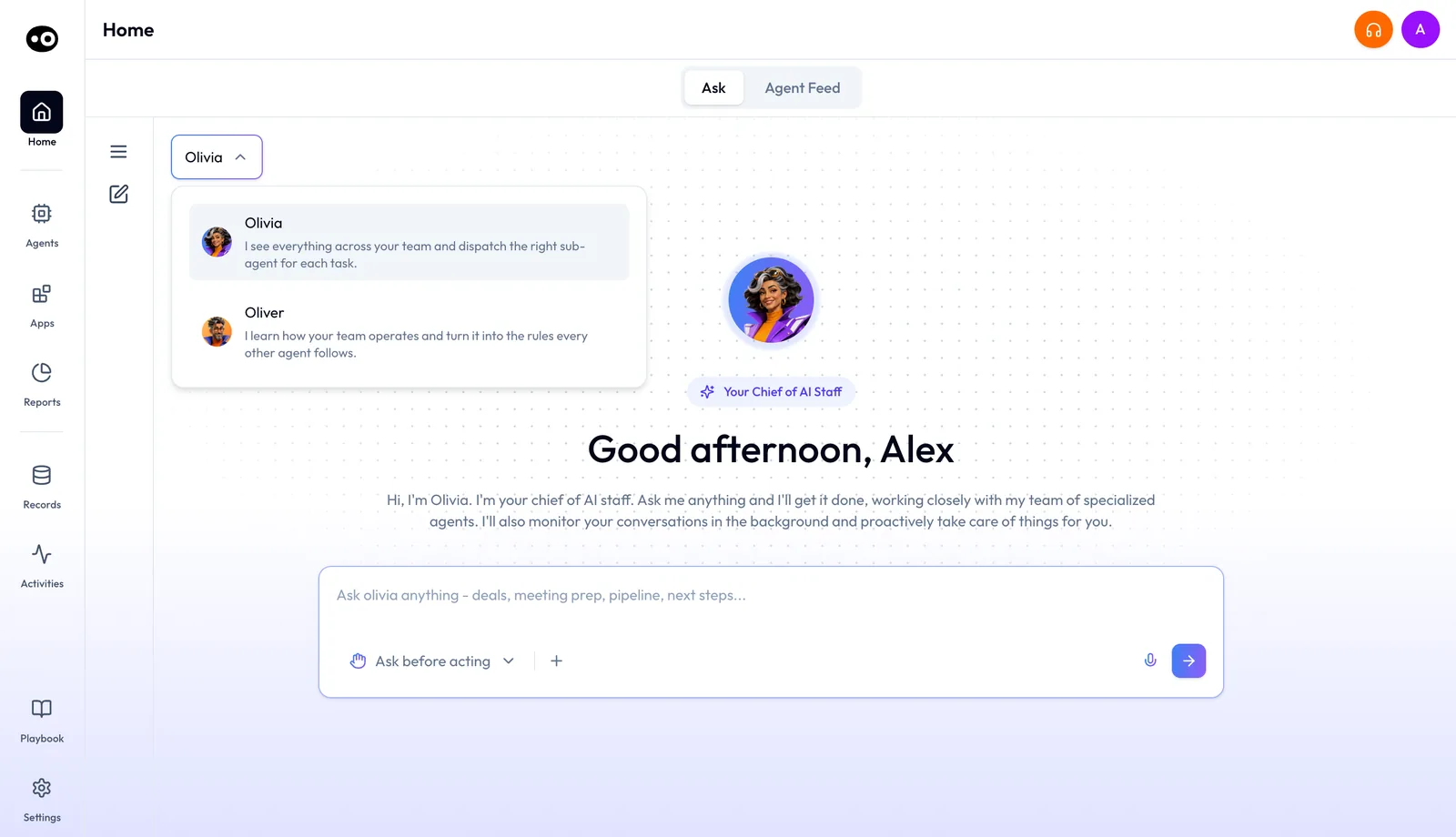
The suggestion cards
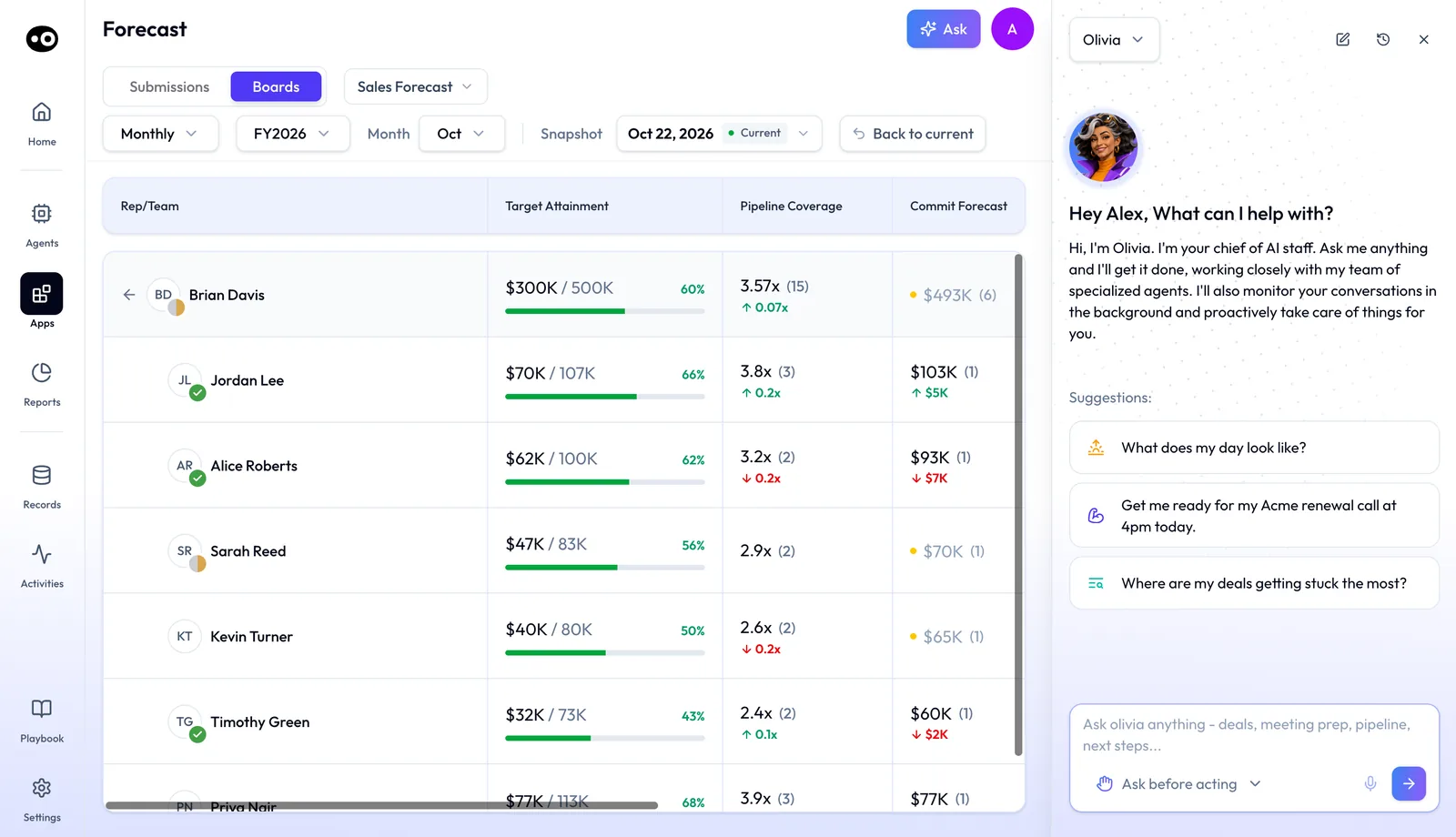
In the side panel, Olivia offers three suggestions about your own day and deals:
- What does my day look like?
- Get me ready for my [account] renewal call at 4pm today.
- Where are my deals getting stuck the most?
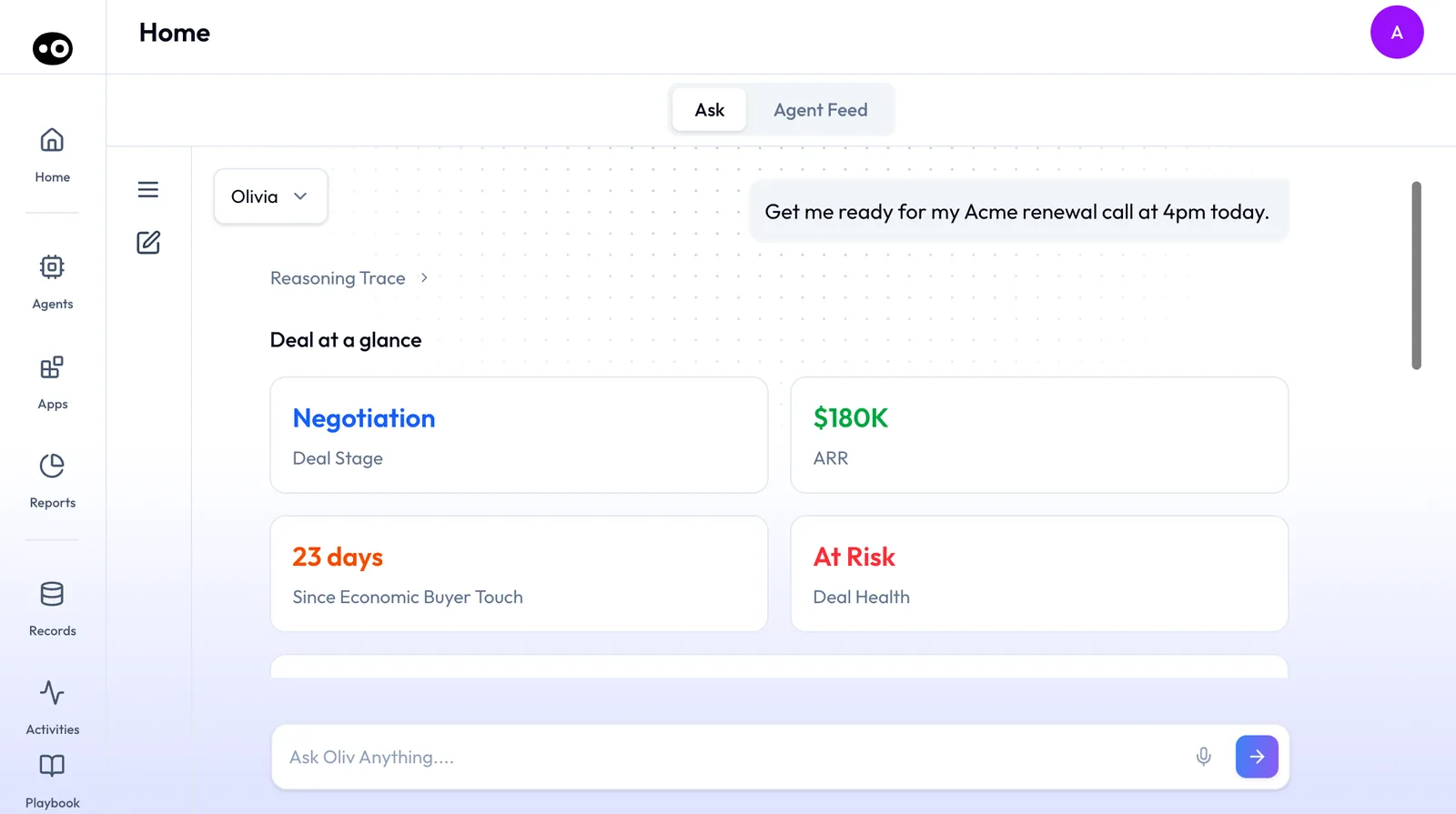
What a call-prep answer holds
Ask Olivia to get you ready for a call, and she starts with Deal at a glance: four cards for Deal Stage, ARR, Since Economic Buyer Touch and Deal Health. Below them sit Who's Joining?, Three risks to watch, numbered Talking points and her research on a new attendee. A suggestion chip at the end offers the next step, such as drafting the pre-meeting email.
Drafts that wait for your choice
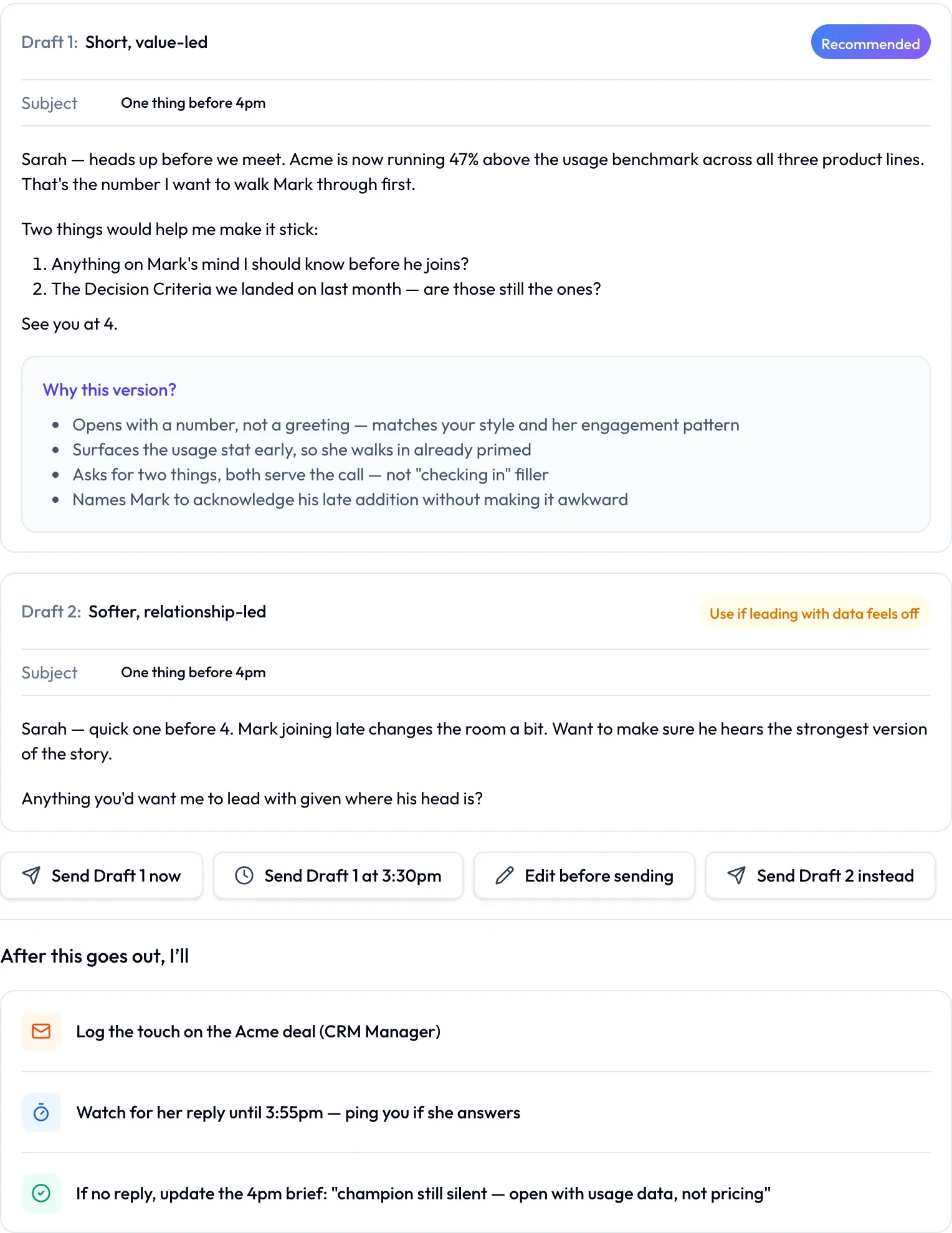
When Olivia drafts an email, she writes two versions. Draft 1 carries a Recommended badge and a Why this version? box, and the second draft says when to use it instead. You choose Send Draft 1 now, send it at a set time, Edit before sending or Send Draft 2 instead.
Under After this goes out, I'll, she lists what follows. Oliv AI's CRM Manager agent logs the touch on the deal, and she watches for a reply.
A daily brief works the same way. It groups the work under the agent that did it, with a review button for each, such as Review meeting plan and Review draft from Deal Driver.
Pick up an earlier conversation
Press the menu icon beside the picker to open the history panel. It lists your saved chats with Olivia, with a search icon and New Chat at the top. Oliver keeps a separate list. The pencil icon starts a new chat at any time.
Ask about a row in the Agent Feed
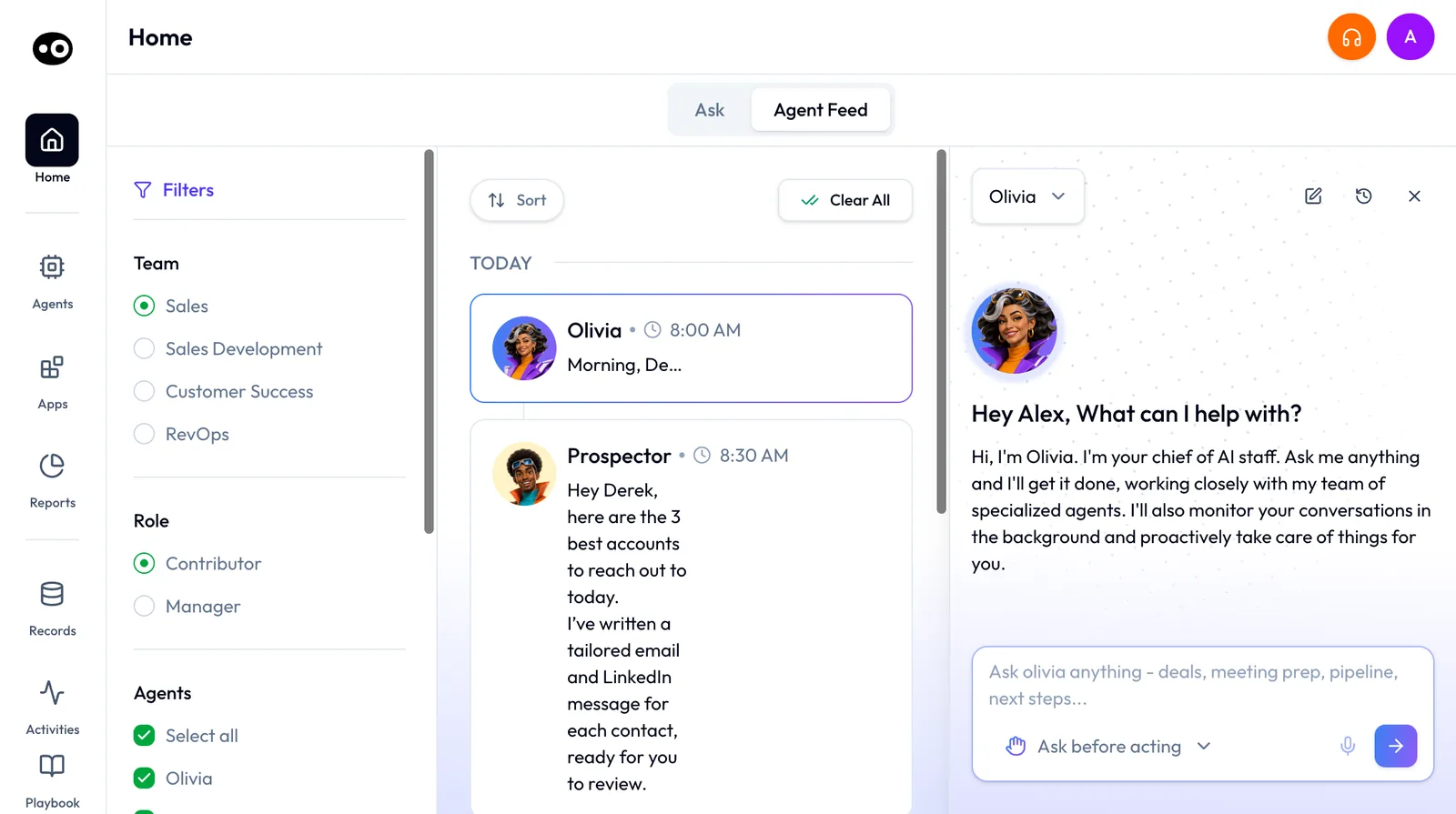
Hover a row in the Agent Feed to show two buttons: a comment button and Clear. Press the comment button and Olivia opens in a side panel beside the feed, with that row outlined. The panel has its own new chat, history and close buttons.
Things you can hand her
You can describe the work in your own words. For example:
- "Draft the follow-up from my call this afternoon." Olivia pulls from the meeting transcript and drafts it.
- "This deal has been stuck for three weeks." She engages Oliv AI's Re-Activator agent and surfaces a re-engagement strategy.
- "Can you prep a mutual action plan for this deal?" She engages Oliv AI's MAP Manager agent.
- "I just met six people at an event, line up outreach for each of them." She engages Oliv AI's Prospector agent.
Choose per conversation whether she asks first
Say you want a renewal email sent to a customer whose champion has gone quiet, and you also want a list of your stuck deals. Those two requests don't carry the same risk, so they shouldn't share a setting. Oliv AI's Olivia agent takes the setting from the conversation you are in, which lets you treat them differently.
- Start a new chat for each kind of work. The pencil icon opens one, so renewal emails don't sit in the same chat as pipeline questions.
- Read the dropdown before your first message. It sits beneath the message box and opens on Ask before acting.
- Leave it there until this kind of work has earned a change. The tally in the next section gives you a way to tell.
- Switch to Act without asking only in that chat. From then on she takes actions without asking for permission.
- Check what she did. Her work shows up as rows in the Agent Feed, and a brief groups each piece under the agent that did it.
Treat this table as a starting point to adjust, not a rule the product applies.
| The work | Start on | Why |
|---|---|---|
| Email to a buyer on a live deal or renewal | Ask before acting | A wrong figure or tone reaches the customer, and you can't take it back. |
| Outreach to new contacts after an event | Ask before acting | These people form a first impression from that one message. |
| Questions about your day, deals or pipeline | Either | She is answering you, so nothing reaches a customer. |
| A kind of follow-up your tally shows you rarely change | Try Act without asking in one chat | You have evidence for that kind of email, and only that kind. |
What goes wrong
The usual slip is switching a chat for one quick task and then using it for something bigger. The setting stays with that conversation, so start a new chat for the bigger job. Another is assuming the setting reaches further than it does. It isn't connected to any tool's run mode, so changing it here leaves the agents you have built as they were.
How to measure whether her drafts are ready to go out unchanged
Before you change a setting, you want evidence about the emails themselves. Two measures give you that, and you can count both from the buttons on a drafted email.
First-choice rate
This is the share of drafted emails you send as Draft 1 with no changes. Send Draft 1 now and the timed send both count. A high rate suggests the recommended version usually fits, but it can mislead. Nielsen Norman Group notes that slips happen when people are on autopilot, so a run of quick sends may show habit rather than quality. Reread a few sent emails each week and ask whether you would still send them.
Rewrite rate
This is the share you change with Edit before sending. Count every use of that button, even a one-word change, so the rule stays simple. Don't mix kinds of email in one figure. One rate across all your email can hide a single kind of message that you rewrite every time, so record the kind of email beside each count.
Where the numbers come from
Keep the tally in a simple sheet with one row per email: the kind of email and the button you pressed. Send Draft 2 instead gets its own column. If you miss an entry, the history panel lists your saved chats with Oliv AI's Olivia agent, so you can reopen the conversation and check.
How to prepare for a call and follow up by hand
You can only judge a handover if you know the job being handed over. Done by hand, it runs like this.
- Check the calendar for who is joining, and look up anyone new.
- Open the deal record and read its dates and next step. In HubSpot, for example, Last contacted, Next activity date and Next step are default deal properties.
- Skim the last call's recording or notes for anything you promised.
- Search your inbox for what has happened since that call.
- Write the risks and your questions on one page.
- Run the call, and note each commitment as you go.
- Write the follow-up straight after the call, then log the touch on the deal.
- Set yourself a reminder to check for a reply.
Steps 3 and 4 are usually the first to go when calls run back to back, and that's where a promise tends to get lost. Step 7 slips next, because the following call has already started.
The same job with Olivia
Oliv AI's Olivia agent takes steps 1 to 5 when you ask for them, though step 4 needs email connected, or surfaces the deal context about 30 minutes before the meeting. She returns the deal at a glance, who is joining, the risks to watch and talking points. For step 7 she drafts the follow-up from the meeting transcript and waits for your choice. After it goes out, Oliv AI's CRM Manager agent logs the touch and she watches for a reply, which covers step 8.
Step 6 stays yours, and so does the choice of what goes out. The full walkthroughs are in prepare for a meeting and record a meeting and follow up.
Worked example: two weeks of drafted emails
A customer success manager logs all 30 emails Olivia drafted over two weeks, along with the button pressed for each. This is an illustrative calculation with sample figures. It isn't an Oliv AI output or a result.
| What happened to the draft | Emails | Arithmetic | Share |
|---|---|---|---|
| Sent as Draft 1, unchanged | 21 | 21 ÷ 30 | 70% |
| Sent as Draft 2 | 6 | 6 ÷ 30 | 20% |
| Rewritten before sending | 3 | 3 ÷ 30 | 10% |
| Total | 30 | 21 + 6 + 3 | 100% |
The 70% alone doesn't tell the CSM what to change. The next move is to take the 9 emails that didn't go out as Draft 1 (6 + 3) and sort them by kind of email. Any kind that appears among those 9 stays on Ask before acting. A kind that never appears, and came up often enough to judge, is the one to try in its own chat on Act without asking. The CSM rereads a few of the 21 first, in case some of those sends were habit. Two weeks from one person is a reason to look closer, not a benchmark, and the split says nothing about time saved.
How Olivia works with other agents
Oliver
Oliv AI's Oliver agent sets the process and Olivia runs within it. When Oliver updates the company's methodology or approval process, her behavior updates to match. The Process Graph is the living playbook every Oliv agent reads before it acts.
Meeting Assistant and research on new contacts
Before a meeting, Olivia coordinates with Oliv AI's Meeting Assistant agent for active opportunities, and she researches new contacts.
CRM Manager
After every call, she surfaces proposed CRM updates, such as field values, stage changes and next steps, for the rep to review and approve. Oliv AI's CRM Manager agent handles the execution of those writes.
Gold Digger and Portfolio Manager
Olivia alerts the team when Oliv AI's Gold Digger agent detects an expansion signal. For CS managers she also calls on Oliv AI's Portfolio Manager agent for account health.
Deal Driver
She also alerts reps when Oliv AI's Deal Driver agent flags a manager-level concern on one of their deals.
Context underneath
Every agent draws on the same foundation. Context Capture maps raw activity into account, deal, people and process context, so Olivia knows what changed and what needs attention.
Who uses Olivia, and how
Account executives
Before a call, an AE gets the brief from Oliv AI's Olivia agent. When the call ends, she drafts the follow-up and proposes CRM updates for the AE to approve. She also flags deals with no activity. More on AI agents for sales teams.
Sales development
A BDR back from an event gets every contact enriched, matched and sequenced before the signal cools. High-intent inbound is qualified and routed in under 30 minutes. See how Oliv AI supports sales development teams.
Account managers
An account manager gets the full account history before every call. Olivia surfaces the revival window before an account goes dark, and expansion signals from calls nobody would review by hand.
Customer success managers
Expansion signals from customer calls reach sales the same day, without anyone asking. At-risk accounts surface before the renewal window closes, and every call updates portfolio health. More on Oliv AI for customer success teams.
How Oliv AI compares as an AI sales assistant
Many revenue tools now answer plain-language questions about deals. Oliv AI's Olivia agent also hands the work to specialist agents, raises deal risk on her own, and lets you choose per conversation whether she asks before she acts. Oliv AI is the only platform in this table that does all four.
AI sales assistant features, from each platform's public documentation:
| Platform | Plain-language questions on deals and pipeline | Hands tasks to specialist agents | Deal risk raised automatically | Ask-before-acting setting per conversation |
|---|---|---|---|---|
| Oliv AI | Yes | Yes | Yes | Yes |
| Gong | Yes (Gong Assistant) | Partly (runs your saved personal agents) | Yes (AI Deal Monitor warnings) | Not in docs |
| Avoma | Yes (Global Ask Avoma) | Not in docs | Yes (Deal Health Score) | Not in docs |
| Fireflies | Yes (Global AskFred) | Not in docs | Yes (Deal Intelligence) | Not in docs |
| Fathom | Yes (Account-Wide Ask Fathom) | Not in docs | Partly (answers on deal risks) | Not in docs |
| Outreach | Yes (Omni) | Not in docs | Yes (Deal Health) | Not in docs |
Yes: documented and built in. Partly: documented with a limit, shown in brackets. Not in docs: not found in the vendor's public documentation.
Why Oliv AI is the stronger choice as an AI sales assistant
- Work handed off, not just answered. Olivia dispatches the right specialist agent for each task and reports back. Gong's help centre describes agents as personal assets that each team member creates for their own use. Compare Oliv AI vs Gong.
- Answers that lead to action. Olivia drafts the follow-up and surfaces CRM updates for review after a call. Avoma describes Global Ask Avoma as an assistant for asking questions about your organization's data. Compare Oliv AI vs Avoma.
- You set how far she goes. Olivia opens each conversation on Ask before acting, and you can switch to Act without asking. Gong documents that its agents don't perform actions in external systems. See Oliv AI as a Gong alternative.
Competitor details checked against each vendor's public documentation on 21 October 2026. Features and plans change, so confirm with the vendor before you decide.
Limits and things to know
- Not in the marketplace. Browsing agents won't find Olivia. Reach her on the Ask tab, through Ask on another screen or from an Agent Feed row.
- One history per super agent. Saved chats with Olivia and with Oliver sit in separate lists, so switch the picker to find a conversation.
- English only. Olivia works in English.
- Don't wait for a warning on Act without asking. Oliver shows a High Risk banner for this setting, so don't count on one here. Check the dropdown before your first message.
- Hand-offs show in the work, not in a log. A brief groups each piece under the agent that did it, and delegated work carries a "Drafted by" line.
- She doesn't own process. Stages, ownership and handoffs are set through Oliver.
Common questions
What can an AI sales assistant do?
Oliv AI's Olivia agent answers questions about deals and pipeline, prepares you for calls, drafts follow-up emails and hands larger tasks to specialist agents. She also flags deals with no activity or close dates nearing without progress.
Can an AI sales assistant draft emails for me?
Yes. Oliv AI's Olivia agent writes two versions of an email and recommends one. You then send either version, send the recommended one at a set time, or edit it before sending.
Who is Olivia?
Oliv AI's Olivia agent is the agent you talk to rather than configure. She introduces herself as your chief of AI staff and works through Oliv AI's specialist agents.
Is Olivia the same for everyone on the team?
Yes. She's one agent for the whole revenue org. She adapts to each rep's accounts and deals, and Oliver keeps her within company process.
How is Olivia different from Oliver?
Oliver is the back-end super agent that RevOps and leadership configure. Olivia is the front-facing one the revenue team works with. Oliver sets the rules and Olivia runs the plays.
Why use Olivia instead of the individual agents?
Individual agents are specialists, each with its own job. Olivia picks the right agent for your request, gives it the context and brings back the result, so you don't need to know which one to ask.
Does Olivia work in Slack?
Yes. She surfaces alerts and drives execution through Slack, Teams, or within the Oliv product.
Can I stop her acting on her own?
Yes. The dropdown beneath the message box offers Ask before acting and Act without asking. It opens on Ask before acting in each conversation.
Does she really watch my conversations?
Her introduction says she monitors your conversations in the background and proactively takes care of things for you.
How do I see what she has done?
Her work shows up as rows in the Agent Feed. In a chat, her answers group each piece of work under the agent that produced it.
Are my conversations with her saved?
Yes. The history panel lists your saved chats with Olivia, with search and New Chat. Oliver keeps a separate list of his own.
Can I ask Olivia from other screens?
Yes. Press Ask in the header of a screen such as the Forecast board, and she opens in a side panel beside it.
What does Olivia need connected?
A recording or transcript input such as Oliv Notetaker, a CRM connection and a calendar. Email and LinkedIn or Sales Navigator are optional.
Is Olivia sold separately?
No. She's the front-facing interface to the Oliv platform. For plans, see Oliv AI pricing.
Further reading
Related
Updated 3 November 2026: added how routine work gets handed to an assistant, how to choose per conversation whether she asks first, how to measure her drafts and a worked example.