
Deal intelligence agent Status: Live

Deal intelligence software for sales managers: how Oliv AI's Deal Driver flags deal risk
Deal intelligence software for sales managers: what Oliv AI's Deal Driver agent sends each day and week, which deal risks trigger an alert, how to set it up, and how it compares with other tools.
On this page
- At a glance
- What the Deal Driver agent is
- Why the Deal Driver agent matters
- The Oliv AI approach to the Deal Driver agent
- Set up Deal Driver
- How a deal at risk gets spotted
- Deal risk alerts and next steps
- Meeting support for reps
- How to measure deal slippage
- How to find deal risk in a pipeline by hand
- How Deal Driver works with other agents
- Who uses Deal Driver, and how
- How Oliv AI compares with other deal intelligence software
- Limits and things to know
- Common questions
- Further reading
- Related
Deal intelligence software should tell a sales manager which deals need attention before the forecast call, not after a rep escalates. Oliv AI's Deal Driver agent does that: it keeps sales managers ahead of their team's pipeline without daily standups, manual rep check-ins or digging through CRM reports. Every weekday it sends a Morning Brief, fires alerts when something important happens, and closes the day with a Sunset Summary. It also prepares a One-on-One Prep report for each rep and a Pipeline Review every Monday.
At a glance
| What it does | Watches the team's pipeline and tells managers what needs attention |
| Who it's for | Sales managers, BDR leads and regional heads of sales, plus VP Sales and RevOps |
| Daily rhythm | Morning Brief and Sunset Summary every weekday, plus event-triggered alerts |
| Weekly rhythm | Pipeline Review every Monday; One-on-One Prep for each rep on that rep's own schedule |
| Where it reaches you | Reports › My Reports, plus Slack or email |
| Includes | The Meeting Assistant capability for reps |
What the Deal Driver agent is
Oliv AI's Deal Driver agent is a manager intelligence agent. One agent keeps you informed at every level: a single deal, an individual rep or the full team. It doesn't write to the CRM. It surfaces signals for the manager to act on.
Deal Driver is also a bundle. It includes the capabilities of Oliv AI's Meeting Assistant agent: pre-call prep, post-call follow-up and CRM sync for reps. If you're on Deal Driver, your reps already have Meeting Assistant.
Where the reports live
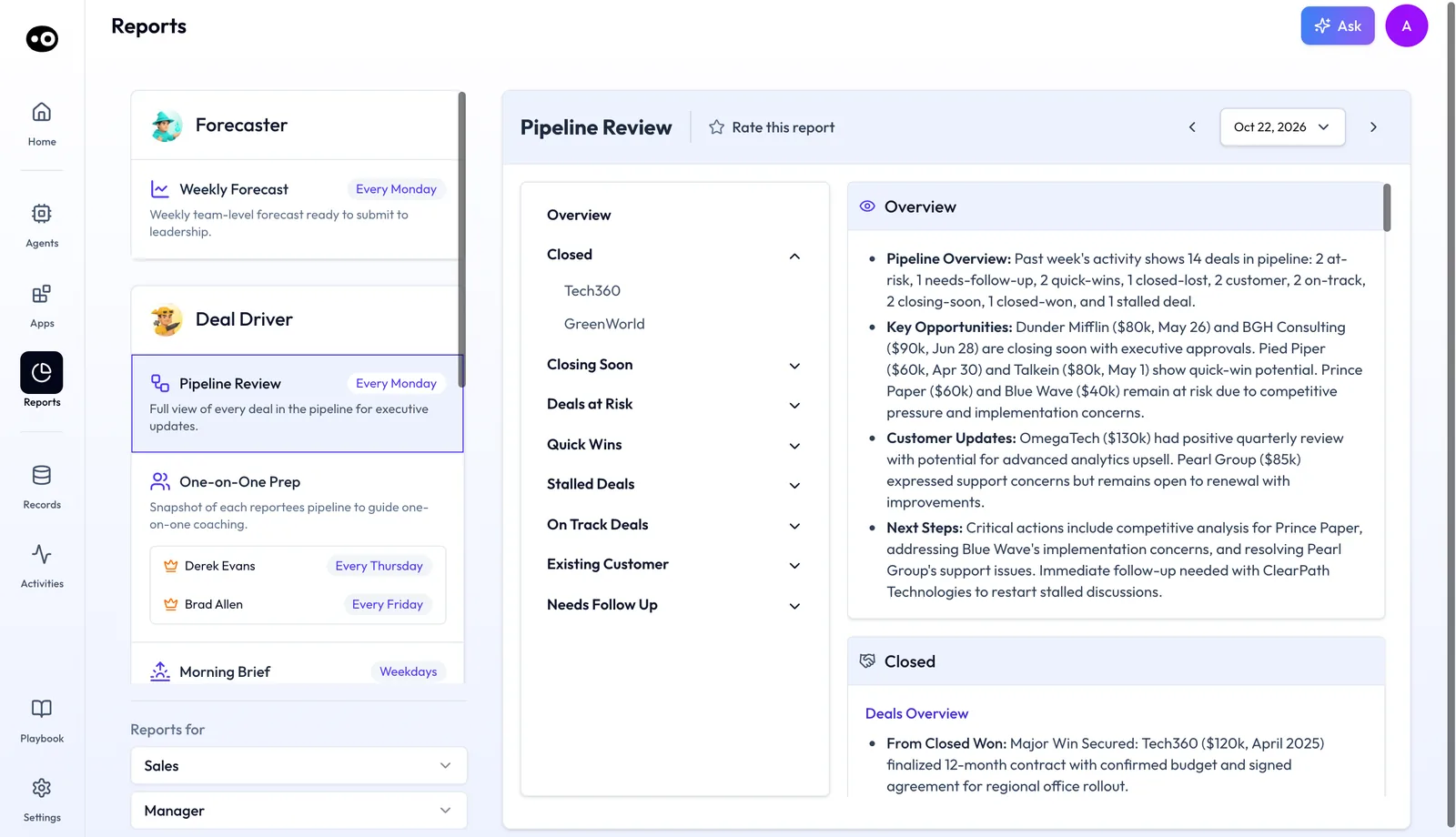
Open Reports › My Reports. The Deal Driver card lists its four reports, each with a schedule tag: Pipeline Review, One-on-One Prep, Morning Brief and Sunset Summary. The Reports for dropdowns above the list set the team and role, such as Sales and Manager.
Each open report has a Rate this report button and a date picker. The previous and next arrows step between editions of the same report. Olivia's daily brief also carries a Deal Driver section, such as a check-in draft for a quiet deal, with a Review draft from Deal Driver button.
The daily rhythm
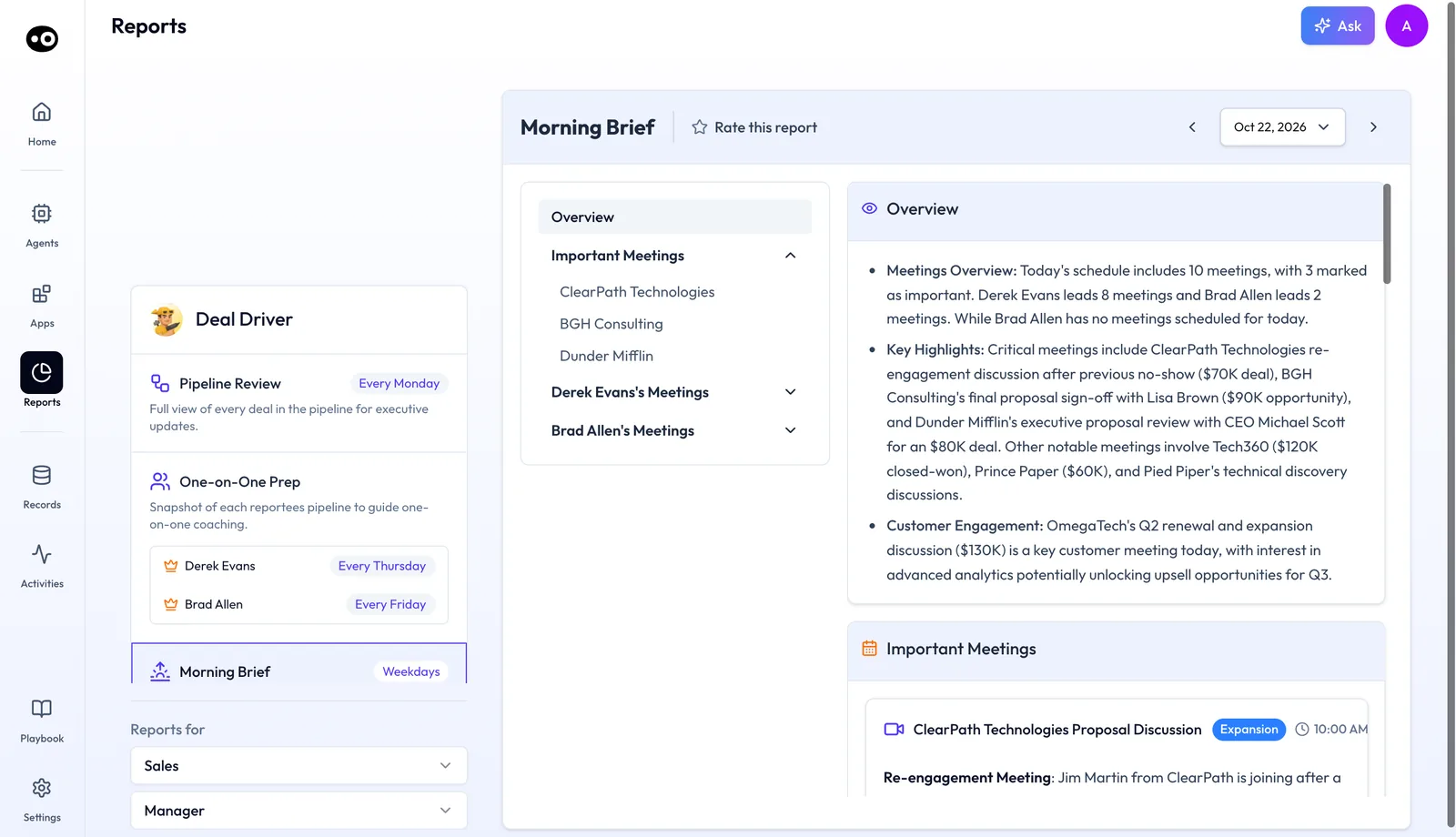
- Morning Brief. Sent every weekday. An Overview covers the day's meetings, key highlights and customer engagement. Important Meetings come next, then a section of meetings for each rep.
- Event-triggered alerts. A signal during the day when a deal stalls, a stage drifts or a high-value opportunity goes quiet.
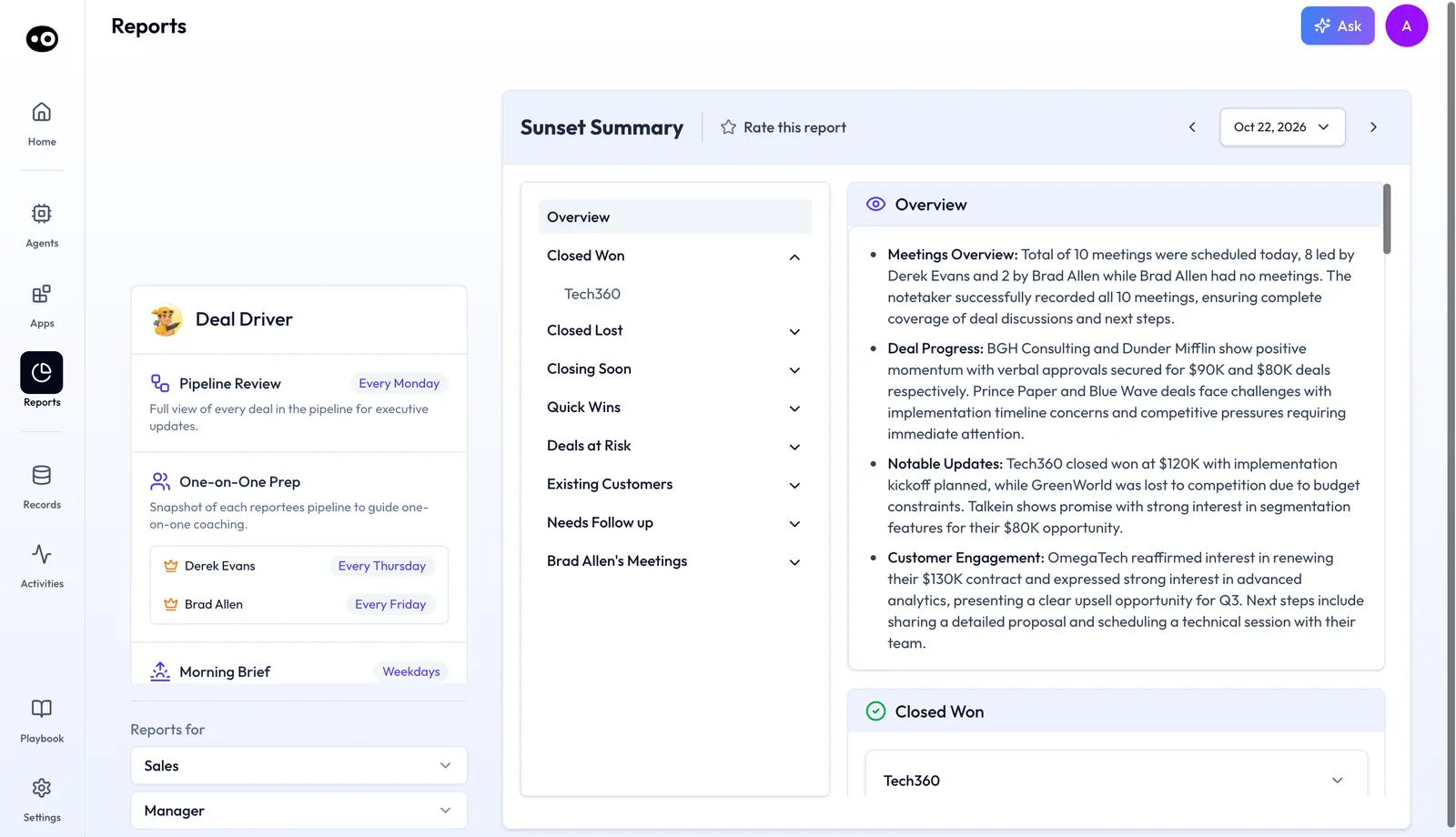
- Sunset Summary. Sent every weekday as an end-of-day recap of wins, risks and next-step gaps. Its Overview covers meetings, deal progress, notable updates and customer engagement.
Each Morning Brief meeting card shows a type tag, such as Expansion or New Business, the time and a short note. An availability line compares the meeting with your own calendar. Add me to this call and Leave a note let you join or brief the rep, and Review Deal opens the deal.
The Sunset Summary's meetings line also says whether the notetaker recorded the day's meetings. Its sections then walk through Closed Won, Closed Lost, Closing Soon, Quick Wins, Deals at Risk, Existing Customers and Needs Follow up.
The weekly rhythm
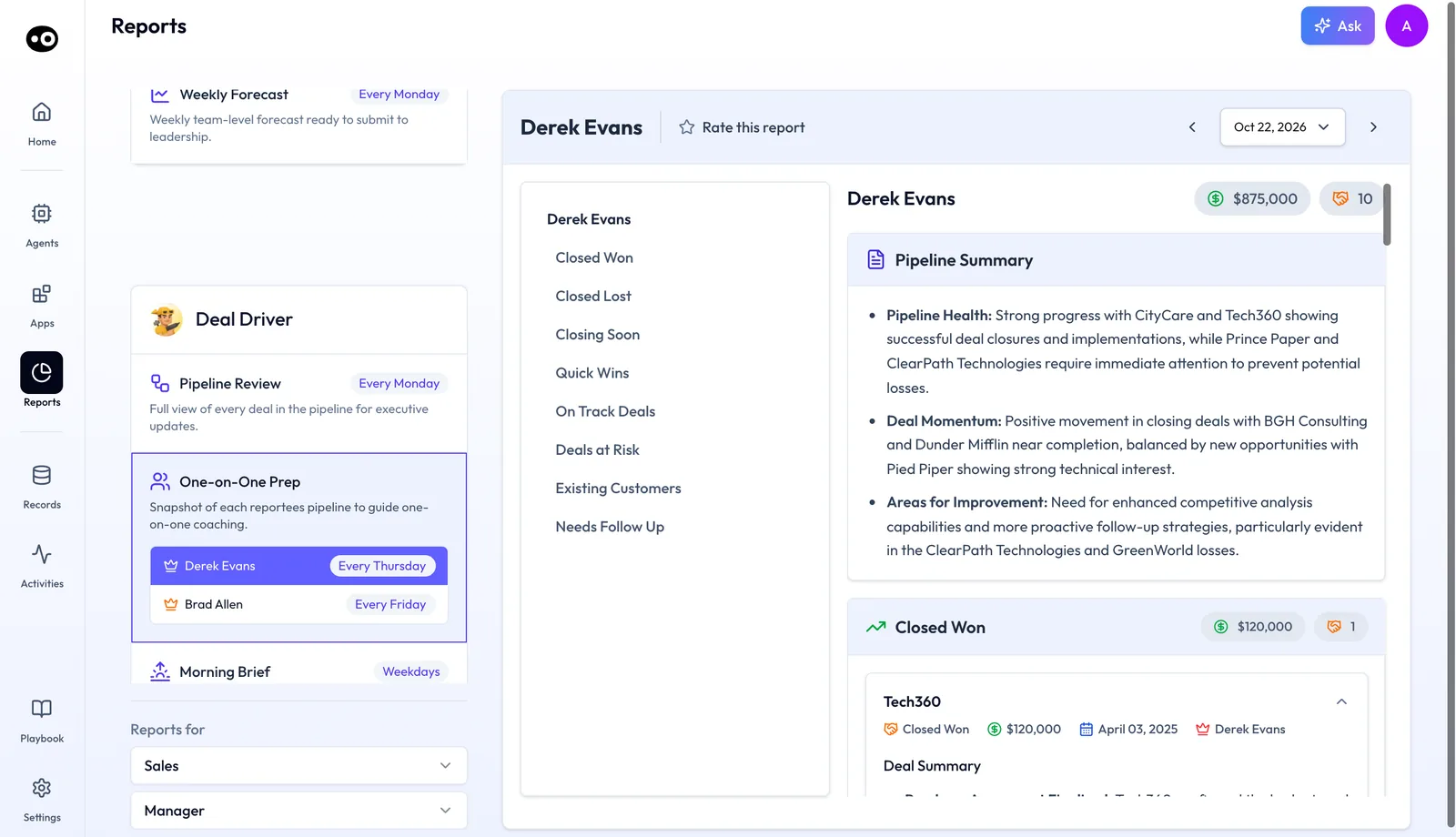
- One-on-One Prep. A snapshot of each rep's pipeline to guide one-on-one coaching. Each rep has their own schedule tag, such as Every Thursday or Every Friday.
- Pipeline Review. Every Monday, a full view of every deal in the pipeline for executive updates. It's ready before the first standup of the week.
A One-on-One Prep report opens with the rep's total pipeline value and deal count. A Pipeline Summary follows, covering Pipeline Health, Deal Momentum and Areas for Improvement. Each status section then carries its own value and deal count.
Pipeline Review opens with an Overview of Pipeline Overview, Key Opportunities, Customer Updates and Next Steps. Its sections run from Closed through Closing Soon, Deals at Risk, Quick Wins, Stalled Deals, On Track Deals and Existing Customer to Needs Follow Up. Each deal card holds a Deal Summary, a Next Step and Review Deal.
Why the Deal Driver agent matters
What it's for
Oliv AI's Deal Driver agent is for managers who need to know what is happening in their team's pipeline without asking for it. It removes the lag between what happens in the field and what the manager hears.
How it helps
- The day starts briefed. Meetings, risks and deals that need attention first are surfaced before the day starts.
- Risk shows up early. Alerts fire the moment deals stall or stages drift, not when a rep escalates.
- 1:1s start at strategy. Rep reviews arrive prepped, so the meeting skips twenty minutes of status updates.
- Reps get time back. A follow-up is drafted in about five minutes for the rep to review and send.
What happens without it
A deal can go quiet with no activity, no CRM flag and no alert. A week later, the rep says "it's progressing" at the standup. By day fourteen the deal is cold and the rep escalates, after two or more weeks of invisible risk.
Why buyers care
Sales managers, VPs of Sales and regional heads buy Deal Driver. Sales managers use it most each day, because time that went on admin goes to coaching instead.
The Oliv AI approach to the Deal Driver agent
Think of a regional sales leader with eight account executives and about forty open opportunities. Every Monday she walks the VP of Sales through the region's pipeline. On Friday she starts working out which of those forty deals are really moving.
The usual method is a CRM export, a message to each rep asking for an update, and a skim of recent call notes. It can easily take an evening. Even then, the picture is only as current as the last field each rep remembered to fill in.
The raw signals already exist as the team works. Meetings get held, next steps get set, close dates slip and fields stay blank. What's missing is something that reads those signals every day and rolls them up on a schedule.
Oliv AI handles this with its Deal Driver agent. It monitors all activity on the team's deals and alerts the leader when a deal enters a risk state. Each alert carries the signal, the context and a suggested action. Before the first Monday standup, the Pipeline Review is already prepared.
Managers choose what counts as risk. Inactivity windows, field completion requirements and deal value thresholds can all be set per manager or per team. A quiet week means something different on a short sales cycle than on a long one. Agree the windows with revenue operations, because they keep the CRM data behind the alerts accurate. For how this rhythm lines up against other tools, see How Oliv AI compares with other deal intelligence software, below.
Set up Deal Driver
- Connect your CRM. Deal Driver reads Deal Insights data: stage, amount, close date and next steps.
- Connect your team's calendar. Meeting and activity data from Oliv feed the Morning Brief and the alerts.
- Confirm the team roster and manager hierarchy. Deal Driver needs both to know whose deals roll up to whom.
- Set your alert thresholds. Choose inactivity windows, field completion requirements and deal value thresholds, per manager or per team.
- Adjust the brief format if you want to. Managers can customize alert sensitivity and brief format.
Most managers are live within a week. Reps don't need to change anything. Deal Driver works in the background and shows up for them as follow-up prompts and next-step reminders.
How a deal at risk gets spotted
Most pipeline tools can tell you where a deal sits. Spotting risk means noticing that a deal has stopped moving while it still looks healthy on paper. Three common ways of reading a pipeline catch that at very different times.
Stage probability: where the deal sits
Each pipeline stage gets a fixed chance of closing. In HubSpot, the weighted amount in board view is calculated by multiplying the total amount in each stage by the stage probability. A deal worth 100,000 USD in a stage set to 40% counts as 40,000 USD of weighted pipeline, and it keeps counting that way after the buyer stops replying.
Forecast categories: what the rep believes
HubSpot's default deal properties sort deals into Not forecasted, Pipeline, Best case, Commit or Closed won. A category is quick to read on a forecast call, but it only changes when the rep changes it. A deal that has gone quiet stays in Commit until someone moves it.
Activity signals: what is happening on the deal
Activity signals look at meetings held, emails answered, next steps set and close dates moved. A late-stage deal with no meeting for three weeks reads very differently from one with a call booked for Tuesday. This reading catches a quiet deal early, because the silence shows up before the stage or the category changes.
Which of these Deal Driver uses
Deal Driver reads activity and data signals, and the next section lists what triggers an alert. It doesn't write to the CRM, so stage probabilities and forecast categories stay as your team set them. Forecaster rolls Deal Driver's signals into the number.
Deal risk alerts and next steps
Deal Driver monitors all activity and triggers an alert when:
- A deal enters a risk state, such as no activity for a set number of days or a close date approaching without progress.
- A rep hasn't updated the Core 4 Fields after a meeting.
- A deal stage changes unexpectedly, moving backward or stalling mid-stage.
- A high-value opportunity goes quiet.
- A rep shows a pattern that warrants attention, such as consistently missing next-step fields.
Each alert includes the deal, the signal, the relevant context and a suggested action for the manager.
Nudges for reps
Deal Driver also nudges reps directly when deals stall, next steps go overdue or activity drops. That catches the gap before a manager needs to step in.
Meeting support for reps
The Deal Driver bundle includes meeting-level support for individual reps.
- Before the meeting. About 30 minutes before every meeting on an active opportunity, the rep gets a deal summary, qualification status against the methodology, stakeholder context and a recommended agenda. Qualification follows the framework marked Active in Settings › Qualification Framework, which lists MEDDPICC, MEDDIC, SPICED, BANT and DRIVE.
- After the meeting. Once the recording is processed, the follow-up email is drafted, CRM field updates are proposed and qualification gaps are flagged, all within five minutes of the call ending.
How to measure deal slippage
Deal slippage is the share of your pipeline whose close date moves out of the period. It's the measure closest to Deal Driver's job. Gartner's research note of 3 June 2026 names pipeline slippage rate as one of three measures of pipeline health, alongside initial pipeline value and pipeline conversion rate. Gartner's public abstract doesn't publish a formula. The common working one is the value of deals whose close date moved past the period end, divided by the pipeline value at the start of the period.
Its weak spot is timing. Slippage only shows once the date has changed, and by then the deal may have been quiet for weeks. The early signs are no activity, a close date near with no progress, and missing next steps. Those are the signals Deal Driver watches.
Reading slippage against Deal Driver's reports
The Monday Pipeline Review groups every deal into Closed, Closing Soon, Deals at Risk, Quick Wins, Stalled Deals, On Track Deals, Existing Customer and Needs Follow Up. Check Stalled Deals and Deals at Risk first, because that's where you can act before a date moves. The One-on-One Prep shows the same picture for one rep, with total pipeline value, deal count and a Pipeline Summary of Pipeline Health, Deal Momentum and Areas for Improvement.
How to find deal risk in a pipeline by hand
Without deal intelligence software, finding risk means pulling the signals together yourself. Most managers do it on a Friday, before the Monday forecast call.
- Export the open deals expected to close this period from the CRM, with amount, stage, close date, last activity date and next step.
- Work out each deal's weighted amount (amount times stage probability) and add them up.
- Sort by last activity date, and mark any deal with no meeting or reply inside a window you choose, such as 14 days.
- Mark deals whose close date falls in the next 30 days with no next step booked.
- Check whether any close dates moved since last week, and note the value that moved out of the period.
- Message each rep about the marked deals, and wait for answers.
- Total the weighted pipeline again without the marked deals, to see the size of the gap at risk.
The Monday meeting itself is covered step by step in Run a pipeline review.
The same job with Deal Driver
Deal Driver covers most of steps 3 to 6 as deals move, instead of once a week. It watches activity and close dates on every deal, alerts the manager when a deal enters a risk state, nudges the rep directly when next steps go overdue, and files the Pipeline Review before the first Monday standup. That leaves you the weighted totals and the decision that follows: which deals to join, rescue or drop.
Worked example: a quarter's pipeline with slippage
This is an illustrative calculation with sample figures, not an Oliv AI output. A manager starts the quarter with eight deals, using stage probabilities a team might set in its CRM. All amounts are in US dollars.
| Deal | Amount (USD) | Stage probability | Weighted amount (USD) | Outcome at quarter end |
|---|---|---|---|---|
| A | 200,000 | 20% | 40,000 | Still open |
| B | 150,000 | 40% | 60,000 | Slipped to next quarter |
| C | 120,000 | 60% | 72,000 | Won |
| D | 100,000 | 40% | 40,000 | Slipped to next quarter |
| E | 80,000 | 80% | 64,000 | Won |
| F | 70,000 | 20% | 14,000 | Lost |
| G | 50,000 | 60% | 30,000 | Slipped to next quarter |
| H | 30,000 | 80% | 24,000 | Won |
| Total | 800,000 | 344,000 |
| Measure | Calculation (USD) | Result |
|---|---|---|
| Initial pipeline value | Sum of all eight amounts | 800,000 |
| Weighted pipeline | Sum of the weighted amounts | 344,000 |
| Slipped value | B + D + G = 150,000 + 100,000 + 50,000 | 300,000 |
| Pipeline slippage rate | 300,000 ÷ 800,000 | 37.5% |
The weighted pipeline promised 344,000 USD, and 130,000 USD of it sat in the three deals that later slipped. In this example, each of those deals had gone quiet weeks before its close date moved. An alert on the silence reaches the manager when the deal stops moving, not when the date changes at quarter end.
How Deal Driver works with other agents
Coach
Oliv AI's Coach agent is the rep development layer. On a rep's 1:1 day, the One-on-One Prep lands first with pipeline status, and Coach follows minutes later with that rep's coaching goal. In My Reports, Coach's Monthly Review sits beside it, one for each rep every 30 days.
Forecaster
Oliv AI's Forecaster agent builds on Deal Driver's signals. Deal Driver flags the exceptions, such as close dates without activity, and Forecaster rolls those signals into the number.
CRM Manager
Oliv AI's CRM Manager agent refreshes deal fields overnight from calls, emails and meetings. It also supplies the Core 4 Fields completion data that triggers gap alerts.
Portfolio Manager
Oliv AI's Portfolio Manager agent is the customer success equivalent. It applies the same manager-visibility model to the renewal and retention book.
Olivia
Oliv AI's Olivia agent is the front-facing master agent for reps. Deal Driver is the manager's tool, though the Meeting Assistant capability inside the bundle serves reps directly.
Who uses Deal Driver, and how
Sales managers
A sales manager reads the Morning Brief before the standup and each rep's One-on-One Prep before their 1:1. Many shorten the daily standup, and some drop it. See Oliv AI for sales managers and a day in a sales manager's workflow.
BDR leads
BDR leads use Deal Driver the same way as sales managers. The Morning Brief, rep activity alerts and One-on-One Prep reports work across BDR and AE pipelines, with different cadence and field settings. See how Oliv AI supports sales development teams.
VPs of Sales and regional heads
Leaders get the Pipeline Review every Monday, ready before the first standup of the week. Read how a VP of Sales can stop deals slipping unseen.
Revenue operations
RevOps sets the alert thresholds and keeps the CRM data behind them accurate. See how Oliv AI works for revenue operations.
How Oliv AI compares with other deal intelligence software
Most deal intelligence software gives managers somewhere to look. Deal Driver tells them when to look, sends a 1:1 report for every rep each week, and wraps each weekday in a Sunset Summary. Oliv AI is the only platform in this table that does all three.
Deal intelligence software features, from each platform's public documentation:
| Platform | Deal risk alerts | Per-rep 1:1 report each week | End-of-day summary for the manager |
|---|---|---|---|
| Oliv AI | Yes | Yes | Yes |
| Gong | Yes (AI Deal Monitor warnings) | Partly (deal board to check before 1:1s) | Not in docs |
| Avoma | Yes (AI-powered health alerts) | Not in docs | Not in docs |
| Fireflies | Yes (Deal Intelligence risks) | Not in docs | Not in docs |
| Outreach | Partly (Deal Health score) | Partly (pipeline summary for 1:1 reviews) | Not in docs |
| Fathom | Partly (answers on deal risks) | Not in docs | Not in docs |
Yes: documented and built in. Partly: documented with a limit, shown in brackets. Not in docs: not found in the vendor's public documentation.
Why Oliv AI is the stronger choice of deal intelligence software
- The 1:1 report comes to you. Deal Driver compiles each rep's pipeline on that rep's own schedule and files it in the manager's My Reports. Gong recommends checking a deal board weekly, particularly before 1:1s and pipeline reviews. Compare Oliv AI vs Gong.
- An alert with a next move. Each Deal Driver alert carries the deal, the signal, the context and a suggested action. Avoma's Deal Health produces a 0 to 100 risk score with a Low, Medium or High classification. Compare Oliv AI vs Avoma.
- A daily rhythm, not a weekly check. Deal Driver sends a Morning Brief and a Sunset Summary every weekday. Gong's pipeline generation dashboard recipe says it should be viewed weekly. See Oliv AI as a Gong alternative.
Competitor details checked against each vendor's public documentation on 21 October 2026. Features and plans change, so confirm with the vendor before you decide.
Limits and things to know
- It doesn't update CRM fields. Deal Driver surfaces data quality gaps. CRM Manager makes the updates.
- It isn't the forecast. Forecaster handles pipeline projection and accuracy. Deal Driver handles real-time visibility and alerts.
- It isn't a coaching tool. Coach handles rep development.
- It's built for sales teams. Customer success managers use Portfolio Manager instead.
- Signals depend on the data. Deal Driver's signals are only as good as the data behind them, which is why CRM Manager matters.
Common questions
Will Deal Driver replace my daily standup?
For many managers, yes. When reps get their own activity alerts and you have a Morning Brief, the standup becomes a strategy conversation. Some managers drop it.
Can I customize what triggers an alert?
Yes. Inactivity windows, field completion requirements and deal value thresholds are all configurable per manager or per team.
Does it work for BDR teams?
Yes. Sales managers and BDR leads use it the same way. Cadence and field settings differ, but the structure is the same.
How does the One-on-One Prep report work?
Each rep gets their own report on their own schedule, such as Every Thursday or Every Friday. It shows the rep's pipeline total, a Pipeline Summary and every deal by status.
We already have a pipeline visibility tool. Do we still need Deal Driver?
Visibility tools show you the pipeline. Deal Driver tells you when to look, what to pay attention to and what to do. Many teams run both.
Do I need Meeting Assistant separately?
No. Meeting Assistant is included in Deal Driver, so your reps already have it.
Does Deal Driver write to the CRM?
No. It sends alerts, briefs and summaries to Slack, email or Reports › My Reports in Oliv AI. CRM Manager handles field updates.
Does it work for customer success managers?
It's designed for sales managers and BDR leads. Customer success managers have an equivalent agent, Portfolio Manager.
How long does setup take?
Connect your CRM and your team's calendar, then set your alert thresholds. Most managers are live within a week.
Do reps need to change how they work?
No. Deal Driver works in the background and shows up for reps as follow-up prompts and next-step reminders.
What is deal intelligence software?
Deal intelligence software reads what is happening on individual deals, such as meetings, emails and field changes, and turns it into signals about risk, momentum and next steps. Deal Driver is Oliv AI's agent for this job, and it sends those signals to the sales manager.
Which pipeline metrics show deal risk early?
Gartner points to initial pipeline value, pipeline conversion rate and pipeline slippage rate. Slippage is the clearest measure of risk, but it only shows once a close date moves. Inactivity and missing next steps show the same risk earlier.
Does Deal Driver change my stage probabilities or forecast categories?
No. Deal Driver doesn't write to the CRM, so stage probabilities and forecast categories stay as your team set them. Forecaster uses Deal Driver's signals when it builds the forecast.
Further reading
Related
Updated 2 November 2026: added how a deal at risk gets spotted, how to measure deal slippage, the manual method with a worked example, three more questions and further reading.