
Integrations Live
Gmail
How Oliv AI connects to Gmail, files every customer email against the right deal, drafts replies for you to review and gives the agents you build nine Gmail actions.
On this page
- At a glance
- What the Gmail integration is
- Why the Gmail integration matters
- The Oliv AI approach to the Gmail integration
- Connect Gmail
- What Oliv AI does with your email
- Drafts and replies in Gmail
- Gmail in agents you build
- How Gmail works with Oliv AI's agents
- Who uses the Gmail integration, and how
- How Oliv AI compares for sales email in Gmail
- Limits and things to know
- Common questions
- Related
Oliv AI's Gmail integration puts your customer email in the same picture as your calls. Once Gmail is connected, Oliv AI captures each email with its participants, content and timestamps, and files it against the right account, contact and opportunity. Agents then use those threads to update the CRM, answer questions about a deal and draft replies for you to review.
At a glance
| What it does | Captures Gmail email and calendar events, and lets agents draft in Gmail |
| Who it's for | Account executives, sales managers, CSMs and RevOps |
| How to connect | Log in to the Oliv AI web app at web.oliv.ai |
| Calendar | Required: Gmail or Outlook |
| Where email lands | The right account, contact and opportunity in your CRM |
| Agent tools | Nine Gmail actions in the agent builder |
| To disconnect | Message Oliv through Intercom in the Oliv UI |
What the Gmail integration is
The Gmail integration links your Google mailbox and calendar to Oliv AI. Gmail appears as one of two calendar integrations, next to Outlook, and as one of two email sources. Email threads are captured the same way as video calls and phone lines, so a deal's record holds both.
Three jobs Gmail does
- Calendar. Oliv AI reads your calendar to know which meetings to join. Without a calendar connection, Oliv can't take notes in your meetings.
- Email capture. Every email is kept as a rich record with its participants, content and timestamps, alongside calls, calendar events and Slack messages.
- A tool for agents. Gmail is one of seven systems in the agent builder, with nine named actions an agent can take.
Where your emails land
Oliv AI uses AI to connect each email to the right account, contact and opportunity in your CRM. That holds when one account has several opportunities. It also covers a contact who now emails from a new domain after an acquisition. When Oliv AI's CRM Manager agent can't settle where an email belongs, it asks the seller.
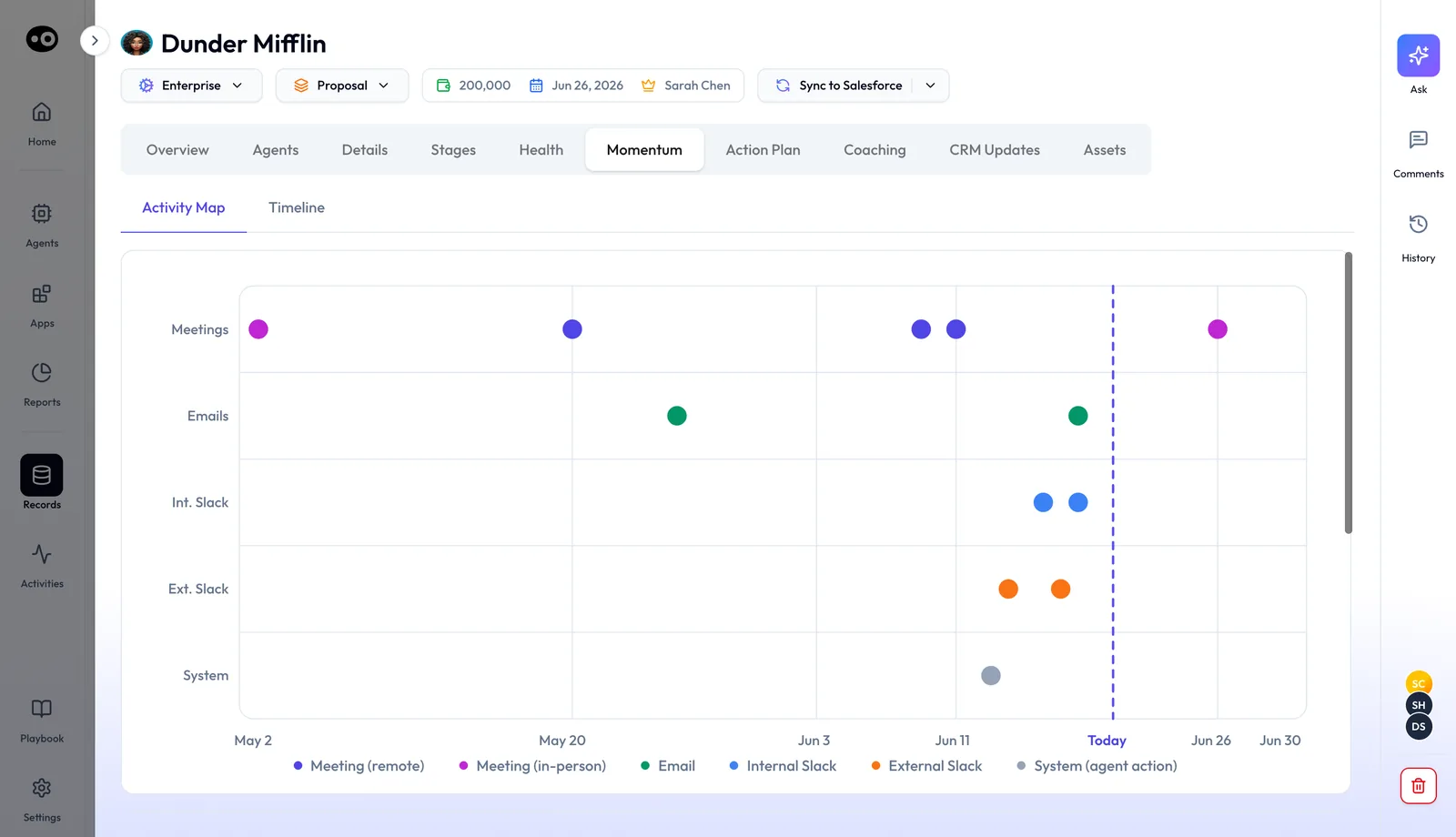
On the deal itself, captured emails get their own row on the Momentum tab's Activity Map. They sit next to meetings, internal and external Slack, and agent actions, so you can see when the thread went quiet.
Why the Gmail integration matters
What it's for
The Gmail integration is for deals that move as much by email as by meeting. It puts what the buyer wrote next to what the buyer said, on the same deal. People and agents then work from one record.
How it helps
- Email counts as deal activity. Each customer email is logged against the account, contact and opportunity it belongs to.
- The CRM catches up by itself. Contact roles and tasks are updated from signals in emails, as well as calls and meetings.
- Answers draw on the thread. When you ask about a deal, the answer can use what was written between meetings.
- Replies start as drafts. Agents write replies and outreach as drafts, so you review them before they go.
What happens without it
A deal's record shows the calls and little else. The buyer's written questions, a promise made in a reply and a new name copied on a thread stay in one person's inbox. Agents and managers then judge the deal on half the story.
Why buyers care
Account executives care when a deal runs on long threads between calls. Sales managers care at pipeline review, when the CRM should match what buyers have put in writing. RevOps cares when email activity has to land on the right opportunity, not only the right account.
The Oliv AI approach to the Gmail integration
Picture an account executive on a deal that has run mostly over email. The thread with the buyer is now forty messages long. A pricing question, a security review and a new timeline are all in there, spread across three people.
The usual fix is to scroll and search before each call, then copy the key points into the CRM by hand. On a busy week that can eat an hour, and it may not happen at all. When it doesn't, the deal record may miss what the buyer actually wrote.
Yet the thread already holds the facts. Who asked what, who agreed to what, and when, are all written down with names and times. What's missing is something that reads the thread next to the calls and files each point against the right deal.
Oliv AI captures email from Gmail into the same record as calls and meetings. Each email keeps its participants, content and timestamps, and is matched to the right account, contact and opportunity. Oliv AI's CRM Manager agent then turns what changed into CRM updates. Oliv AI's Olivia agent can draw on the thread when you ask about the deal.
The matching holds when one account has several opportunities, as Where your emails land sets out above. How that lines up with other tools is covered in How Oliv AI compares for sales email in Gmail, below.
Connect Gmail
- Log in to Oliv AI. Go to web.oliv.ai and log in. That is how you connect Gmail.
- Check your calendar is connected. Calendar integration is required. Oliv then joins external calls automatically, and Google Meet calls need no separate integration.
- Connect your CRM. Email is matched to records in your CRM, so connect Salesforce or HubSpot as well.
- Add the Chrome extension if you use Google Calendar. It lets you stop the note taker joining a meeting from Google Calendar. The recording modes guide covers the other ways to manage it.
- Disconnect by message. To remove the Gmail integration later, send Oliv a message through Intercom in the Oliv UI.
What Oliv AI does with your email
| What happens to a customer email | Agent |
|---|---|
| Logged against the right account, contact and opportunity | CRM Manager |
| A new company or person on the thread becomes a CRM record | CRM Manager |
| Opportunity contact roles updated from signals in the thread | CRM Manager |
| Next steps in the email become tasks | CRM Manager |
| Used as context when you ask about a deal | Olivia |
| Read when the forecast is recommended | Forecaster |
CRM Manager works after every activity, including each email, and syncs its updates to the CRM. You can review its suggestions before they sync, as set out in how to keep the CRM updated.
Drafts and replies in Gmail
- Drafts wait for a person. When an agent writes an email rather than sending one, the draft is put in front of a person first. On a Comms Manager run, the record labels the draft Draft · Gmail, lists the Deal context used: and offers Review draft in Gmail or Copy.
- Drafts can sit in Gmail. Oliv AI's customer success workflow shows targeted outreach drafted per customer, with the drafts left in Gmail, ready to send.
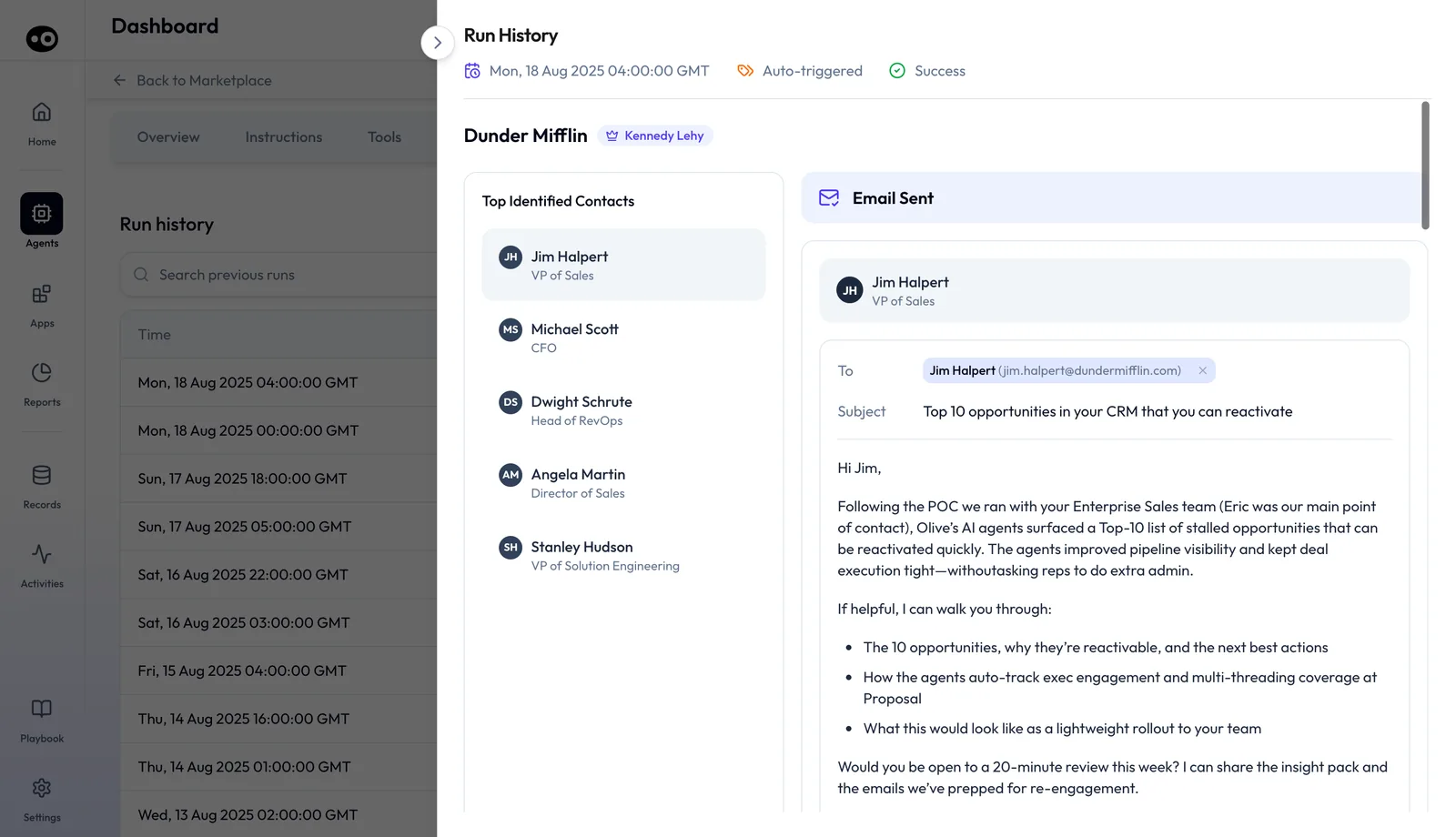
- Run records hand off to Gmail. An agent's run record shows one card per contact under an Email Sent banner, with the To chip, Subject and full body. Open in Gmail opens Gmail's compose screen with the recipient, subject and body filled in. It doesn't send anything.
- You decide what may send. Each Gmail tool has a run mode: Auto Run, Requires Approval or Agent Decides. The tools and run modes guide explains each one.
For writing that lands, Oliv AI's notes on sales emails that get responses and sales email templates by stage are a useful start.
Gmail in agents you build
In the Add Tool picker, Gmail has one group of tools named Actions. It offers nine: Send Email via Gmail, Get Emails from Gmail, Search Emails in Gmail, Reply to Email, Draft Email in Gmail, Attach File to Gmail, Label Email in Gmail, Get Gmail Threads and Delete Email from Gmail. Oliv AI's public RevOps page describes custom agents whose runs execute across Gmail, Slack and the CRM.
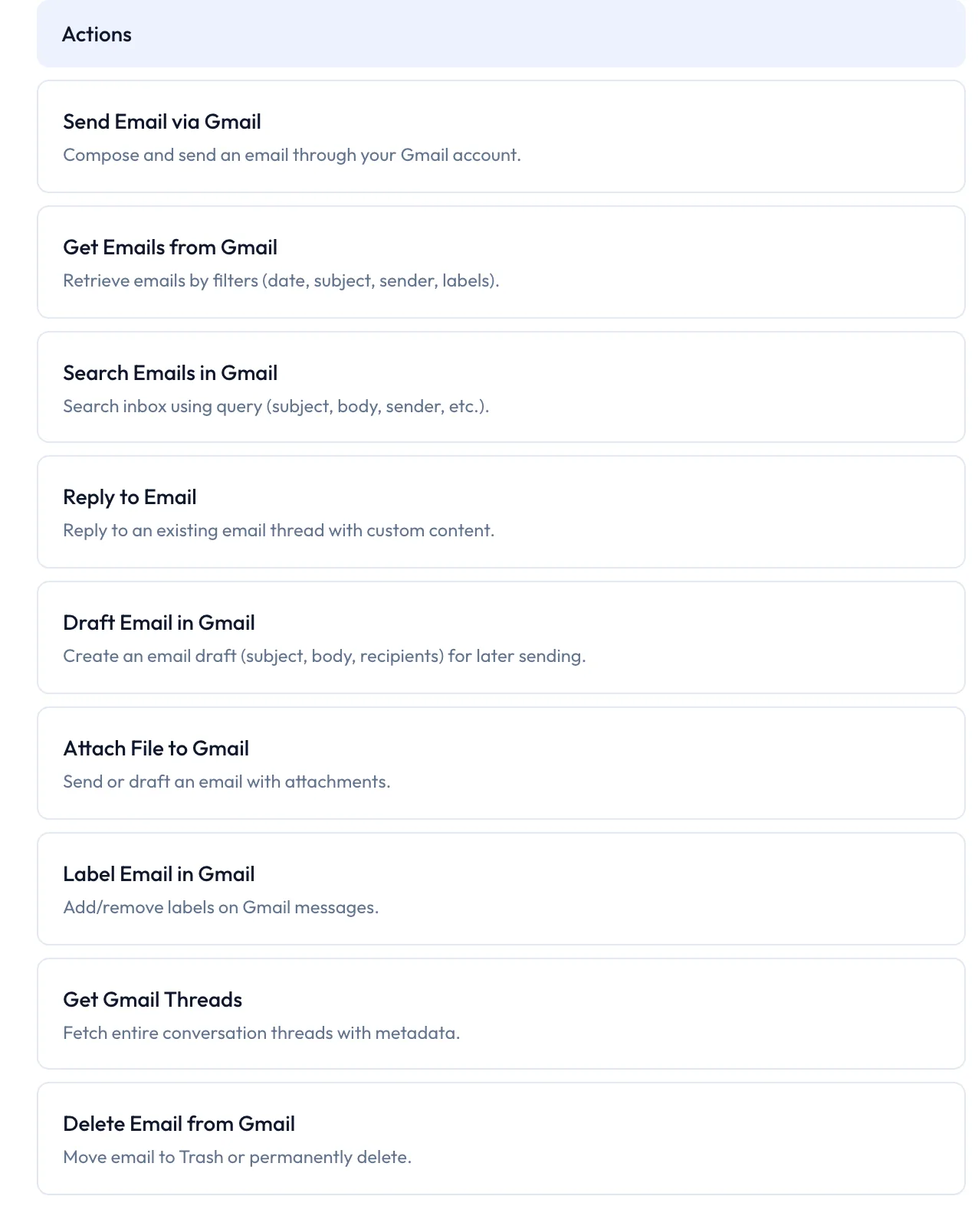
Give Send Email via Gmail and Delete Email from Gmail the Requires Approval run mode if a person should check every one.
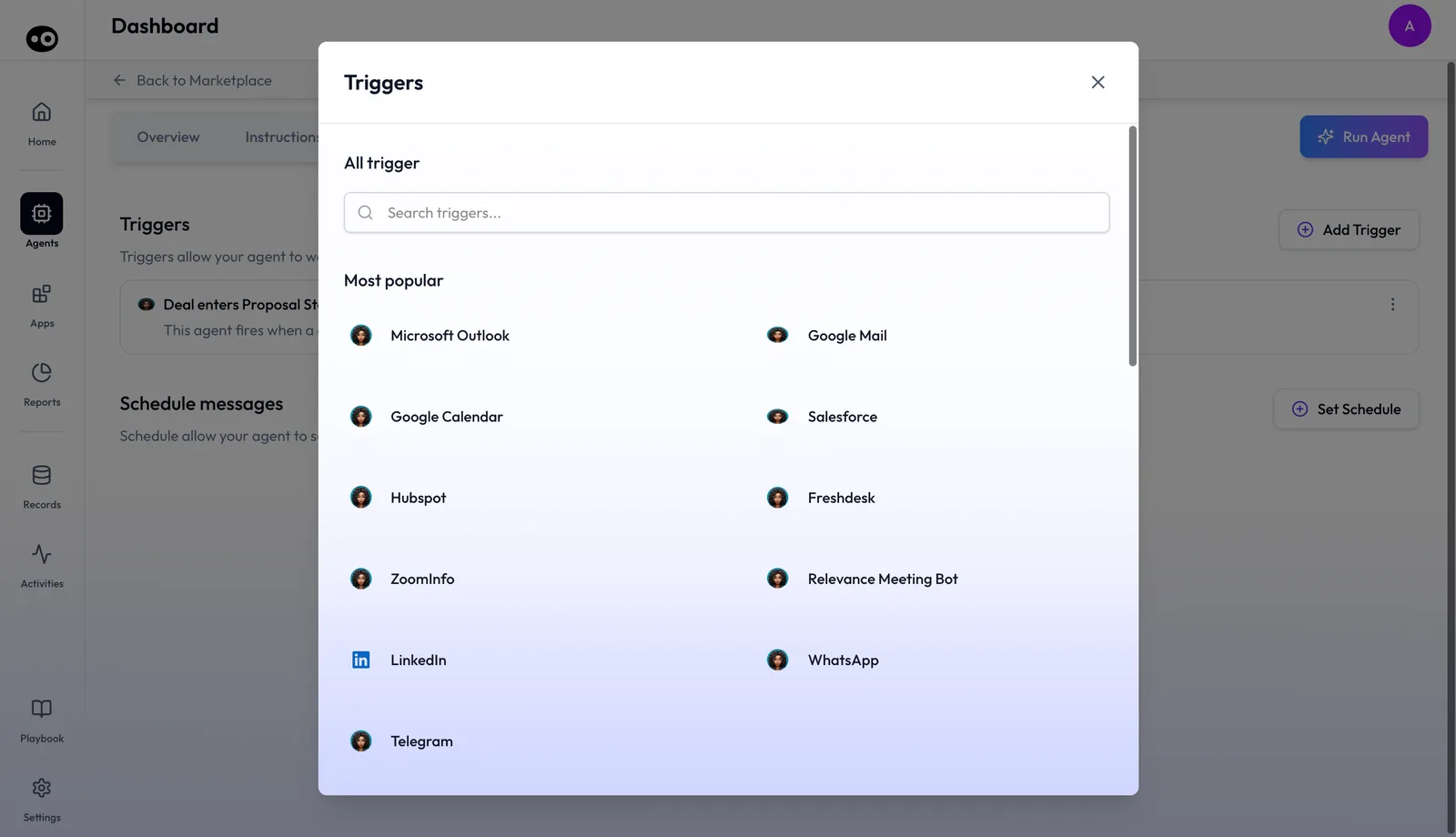
Pick a trigger for when the agent starts, then choose which Gmail actions it may take. Gmail can start an agent too: Google Mail is in the Most popular group of the trigger picker.
The agent builder overview walks through the rest of the setup.
How Gmail works with Oliv AI's agents
CRM Manager
Oliv AI's CRM Manager agent is triggered after every meeting, call and email. It logs each one against the right account, contact and opportunity. When an email involves a company or person not yet in the CRM, it creates the record.
Olivia
Oliv AI's Olivia agent holds context from meeting data, CRM records and emails. Its agent doc lists email integration as optional but says it significantly enriches context between meetings.
Meeting Assistant
Oliv AI's Meeting Assistant agent drafts the follow-up email after each call. It also flags deal field updates that need to go into the CRM. The full flow is in how to record a meeting and follow up.
Deal Driver and Forecaster
Oliv AI's Deal Driver agent flags risk from deal fields that CRM Manager refreshes from calls, emails and meetings. Oliv AI's Forecaster agent builds its recommendations from what is happening in calls and emails.
Portfolio Manager
Oliv AI's Portfolio Manager agent reads customer-facing interactions to keep account health current. Its inputs include email threads, next to QBRs, check-ins and support conversations.
Catalog agents that draft in Gmail
- Multithreader. Oliv AI's Multithreader agent proposes five more people for a deal at Proposal stage. It writes one labeled Gmail draft per contact.
- Momentum Reviver. Oliv AI's Momentum Reviver agent drafts an email for each stalled opportunity after a funding signal. The seller reviews and sends.
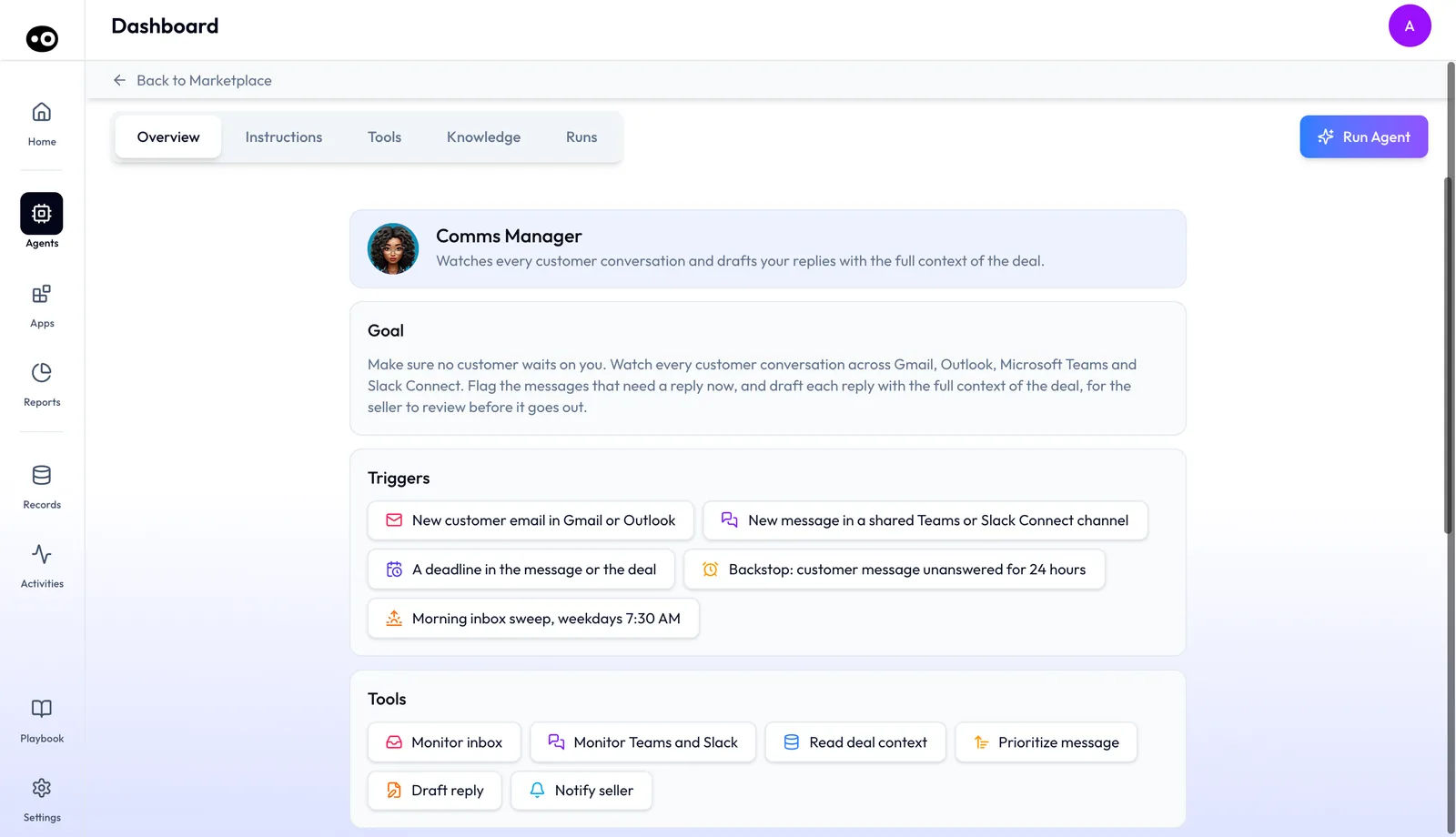
- Comms Manager. Oliv AI's Comms Manager agent watches customer email and chat, and drafts replies threaded under the customer's message. It sends nothing itself. It starts on a New customer email in Gmail or Outlook, and runs a Morning inbox sweep, weekdays 7:30 AM.
Who uses the Gmail integration, and how
Account executives
An AE with long buyer threads gets each email filed on the right deal, and a follow-up draft after every call. Comms Manager drafts replies that already know the deal. The whole day is in running deals as an account executive.
Sales managers
Managers get deal risk from fields refreshed by email as well as calls. That shapes the weekly pipeline review, and Forecaster's recommendations.
Customer success and account management
CSMs get account health that reflects email threads, not just meetings. Drafted outreach can wait in Gmail, ready to send. Prep for the next call is covered in how to prepare for a meeting.
Revenue operations
RevOps gets email activity matched to the right opportunity, even when one account has several. Its integration blueprint for calls, email and Slack covers the wider stack.
How Oliv AI compares for sales email in Gmail
Oliv AI files each email against the right deal, even when one account has several opportunities. It also drafts replies inside the customer's thread, and gives the agents you build nine Gmail actions. Oliv AI is the only platform in this table that does all four.
Email features, from each platform's public documentation:
| Platform | Email threads kept with full content | Email matched when an account has several deals | Reply drafts in the customer's thread | Gmail actions in agents you build |
|---|---|---|---|---|
| Oliv AI | Yes | Yes | Yes | Yes |
| Gong | Yes (emails imported and stored) | Partly (logged to the account when several match) | Partly (drafts from to-dos, flows or calls) | Partly (internal email action only) |
| Avoma | Yes (Gmail sync builds deal timelines) | Linked to relevant opportunities | Partly (follow-up email from meeting notes) | Not in docs |
| Outreach | Yes (sync from the connected mailbox) | Partly (Gmail and Outreach Mail only) | Yes (AI email replies with Smart Email Assist) | Not in docs |
| Fireflies | Partly (inbox searched through AskFred) | Not in docs | Yes (Auto Draft reply drafts) | Not in docs |
| Fathom | Not in docs | Not in docs | Partly (follow-up to copy and paste) | Not in docs |
Yes: documented and built in. Partly: documented with a limit, shown in brackets. Not in docs: not found in the vendor's public documentation.
Why Oliv AI is the stronger choice for sales email in Gmail
- The right deal, not just the account. Oliv AI matches email to the right opportunity when an account has several. In Gong's Salesforce logging, the account is used when several opportunities could match. Compare Oliv AI vs Gong.
- Replies, not only follow-ups. Oliv AI's Comms Manager agent drafts replies threaded under the customer's message. Avoma drafts a follow-up email from your meeting notes. Compare Oliv AI vs Avoma.
- Gmail inside the agents you build. A custom Oliv agent can search, read threads, draft, label and send in Gmail. A Gong automated agent can send an internal email to Gong team members. See Oliv AI as a Gong alternative.
- Matching across every channel. Oliv AI connects meeting, phone, email and Slack activity to the right opportunity. Outreach's email-to-opportunity association is only available in Gmail and Outreach Mail. Read Gong vs Outreach.
Competitor details checked against each vendor's public documentation on 22 October 2026. Features and plans change, so confirm with the vendor before you decide.
Limits and things to know
- The calendar comes first. Calendar integration is required. Without it, Oliv can't take notes in your meetings.
- Matching needs your CRM. Emails are matched to accounts, contacts and opportunities in your CRM, so connect it too.
- Unclear cases go to the seller. When CRM Manager can't resolve where an email belongs, it asks the seller.
- Open in Gmail hands off. The link opens a filled-in Gmail compose screen. You send from Gmail.
- Sending follows the run mode. An agent acts in Gmail within each tool's run mode. Set send to Requires Approval if every email should be reviewed.
- Removal is a request. To disconnect Gmail, message Oliv through Intercom in the Oliv UI.
Common questions
How do I connect Gmail?
Log in to the Oliv AI web app at web.oliv.ai. That is the integration step for Gmail.
Do I need to connect my calendar?
Yes. Calendar integration is required for Oliv to work. Without it, Oliv can't take notes during your meetings.
Will Oliv join my Google Meet calls?
Yes. No separate Google Meet integration is needed. Oliv joins meetings automatically once your calendar is integrated.
Which deal does an email get logged to?
Oliv AI uses AI to connect each email to the right account, contact and opportunity in your CRM. That includes accounts with several opportunities.
What if a contact starts emailing from a new domain?
CRM Manager handles acquisitions, such as emails from Company B when the opportunity lives on Company A. If it can't resolve a case, it asks the seller.
Will an agent send email without me seeing it?
That depends on the run mode you set for each Gmail tool. Drafted emails wait for a person, and Comms Manager sends nothing itself.
What does Open in Gmail do?
It opens Gmail's compose screen in a new tab, with the recipient, subject and body filled in. It doesn't send anything.
Which Gmail actions can a custom agent use?
Nine: send, retrieve, search, reply, draft, attach, label, read threads and delete. Each one has its own run mode.
Does Olivia read my email?
Olivia draws on meeting data, CRM records and emails. Its agent doc calls email integration optional, and says it significantly enriches context between meetings.
Which plan includes email capture?
Email capture is listed in the Converse app. The plans and seat roles guide explains how apps map to roles, and Oliv AI pricing has the current plans.
Does it work with Outlook instead?
Yes. Outlook is listed next to Gmail as a calendar integration and an email source. You connect it the same way, by logging in to web.oliv.ai.
How do I remove the Gmail integration?
Send Oliv a message through Intercom in the Oliv UI.