
AI meeting assistant for sales Status: Live
AI meeting assistant: how Oliv AI briefs you before deal meetings and drafts the follow-up
How Oliv AI's Meeting Assistant agent works as an AI meeting assistant for sales: what it sends before each deal meeting, what it drafts and flags after the call, how to set it up, and how it compares with other AI meeting assistants.
On this page
- At a glance
- What the Meeting Assistant agent is
- Why the Meeting Assistant agent matters
- The Oliv AI approach to the Meeting Assistant agent
- Set up Meeting Assistant
- How deal meetings get prepared and followed up
- Review and send the follow-up
- How to measure meeting prep and follow-up
- How to prepare for and follow up a deal meeting by hand
- How Meeting Assistant works with other agents
- Who uses Meeting Assistant, and how
- How Oliv AI compares as an AI meeting assistant
- Limits and things to know
- Common questions
- Further reading
- Related
Back-to-back meetings on open deals leave little time to prepare or to follow up, so an AI meeting assistant has to cover both ends of the call. Oliv AI's Meeting Assistant agent does that for every meeting linked to an active opportunity. Thirty minutes before the call, it sends a one-screen brief with the deal status, qualification gaps and a recommended agenda. After the call, it drafts the follow-up email, proposes CRM field updates and flags new qualification gaps.
At a glance
| What it does | Prepares you before each deal meeting and drafts the follow-through after it |
| Who it's for | Account executives, BDRs and account managers, plus sales managers and customer success leads |
| Before the meeting | A one-screen brief, 30 minutes before the call |
| After the meeting | A follow-up email draft, proposed CRM updates and qualification gap flags |
| Runs on | Every meeting linked to an active opportunity in your CRM |
| Built from | Oliv Notetaker recordings and transcripts |
| Where you see it | Home's Agent Feed before the call; the meeting's page in Activities › Meetings after it |
| Also part of | The Deal Driver bundle |
What the Meeting Assistant agent is
Oliv AI's Meeting Assistant agent is an action agent for the people who run meetings on open deals. It works only on active opportunities. If the deal exists and the meeting is on your calendar, it runs automatically. First meetings with new contacts get a research brief instead, covered in Prepare for a meeting. In the Agents marketplace it's listed as a Pre-built agent under Customer Success.
Before the meeting
The brief arrives 30 minutes before the call. It's built to fit one screen and take about 60 seconds to read.
- Deal summary. Stage, amount, close date, last activity and next steps.
- Qualification status. Where the deal stands against your methodology, with gaps and open questions highlighted.
- Stakeholders. Who's in the meeting, the role each plays, and what they care about based on earlier conversations.
- Recommended agenda. Tailored to the deal stage and the qualification gaps.
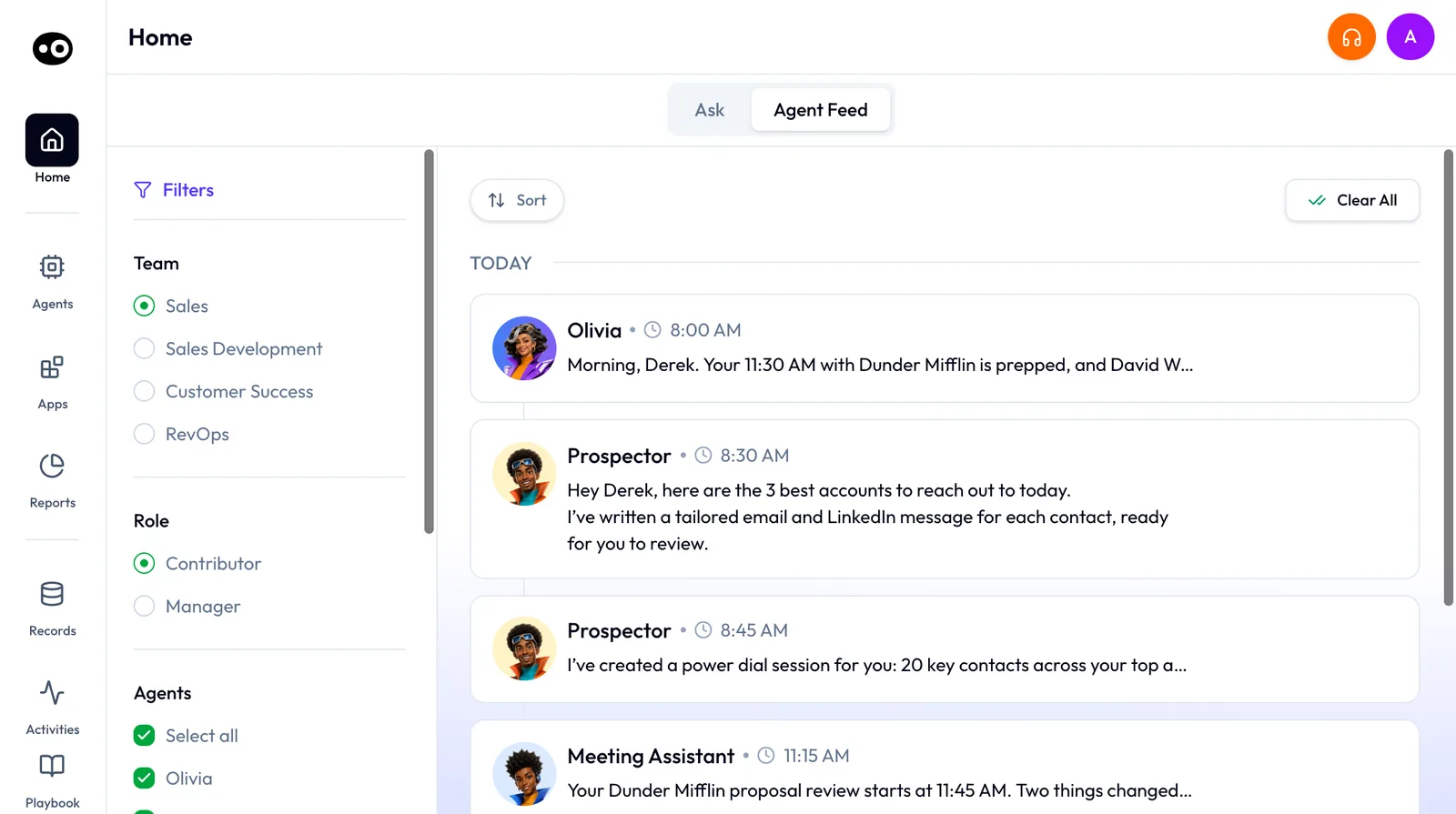
The prep also reaches you on Home. When something about an upcoming meeting changes, Meeting Assistant posts a row in the Agent Feed. Olivia's daily brief carries a Meeting Assistant section with Detours, plans for objections that might come up, and a Review meeting plan button.
After the meeting
Once the recording is processed, three things are ready for you.
- A follow-up email draft. Written from the transcript: what was discussed, what was agreed, and next steps with dates where possible. It isn't a template.
- Proposed deal field updates. Stage, amount, close date, qualification fields and next steps, based on what was said.
- Qualification gap flags. New information, or notable absences, that change the deal's qualification status.
On the meeting's page
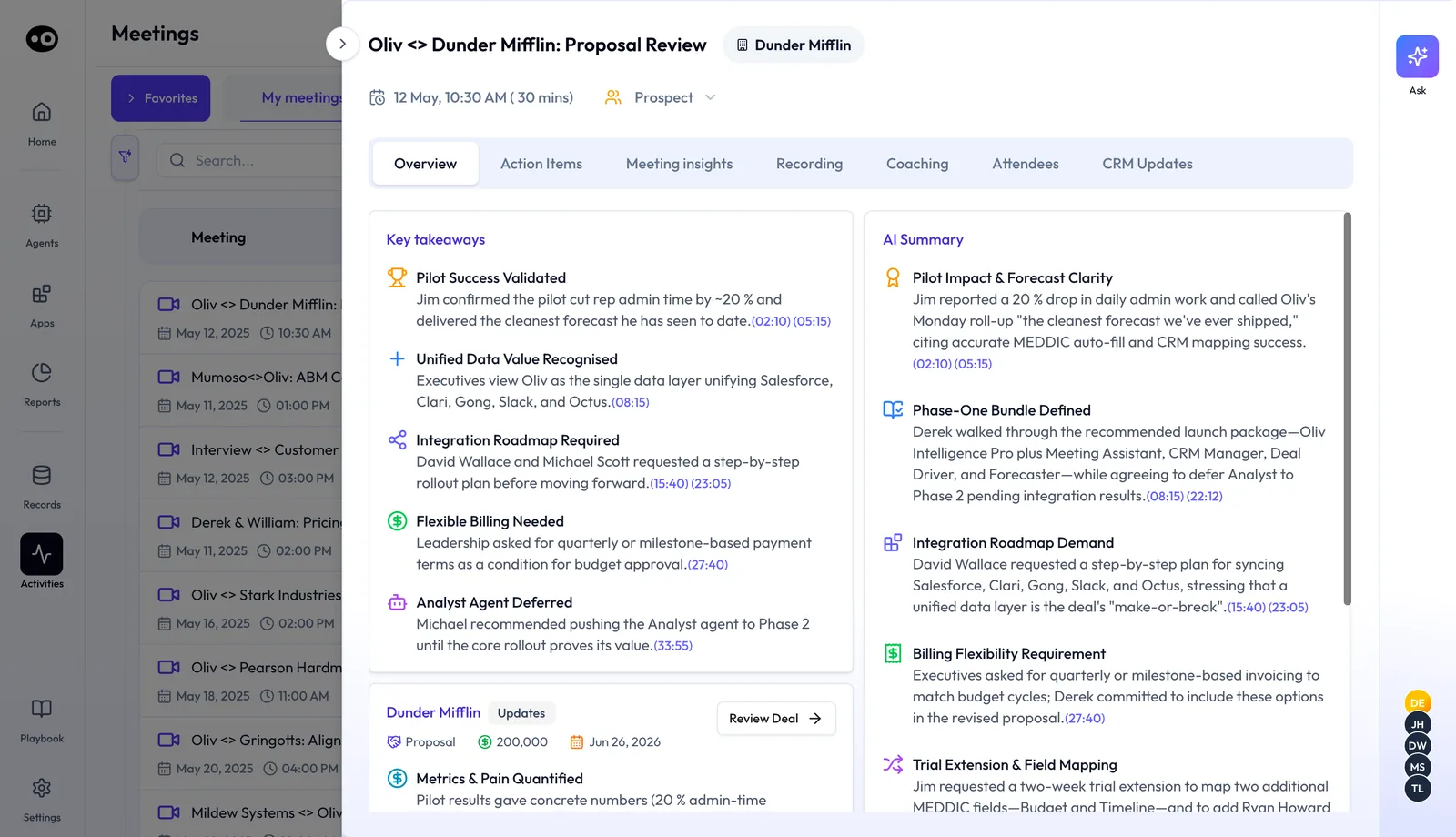
Open the meeting from Activities › Meetings. Its Overview tab shows Key takeaways and an AI Summary, with blue timestamps that link into the recording. A deal card under the takeaways shows stage, amount and close date, with Review Deal.
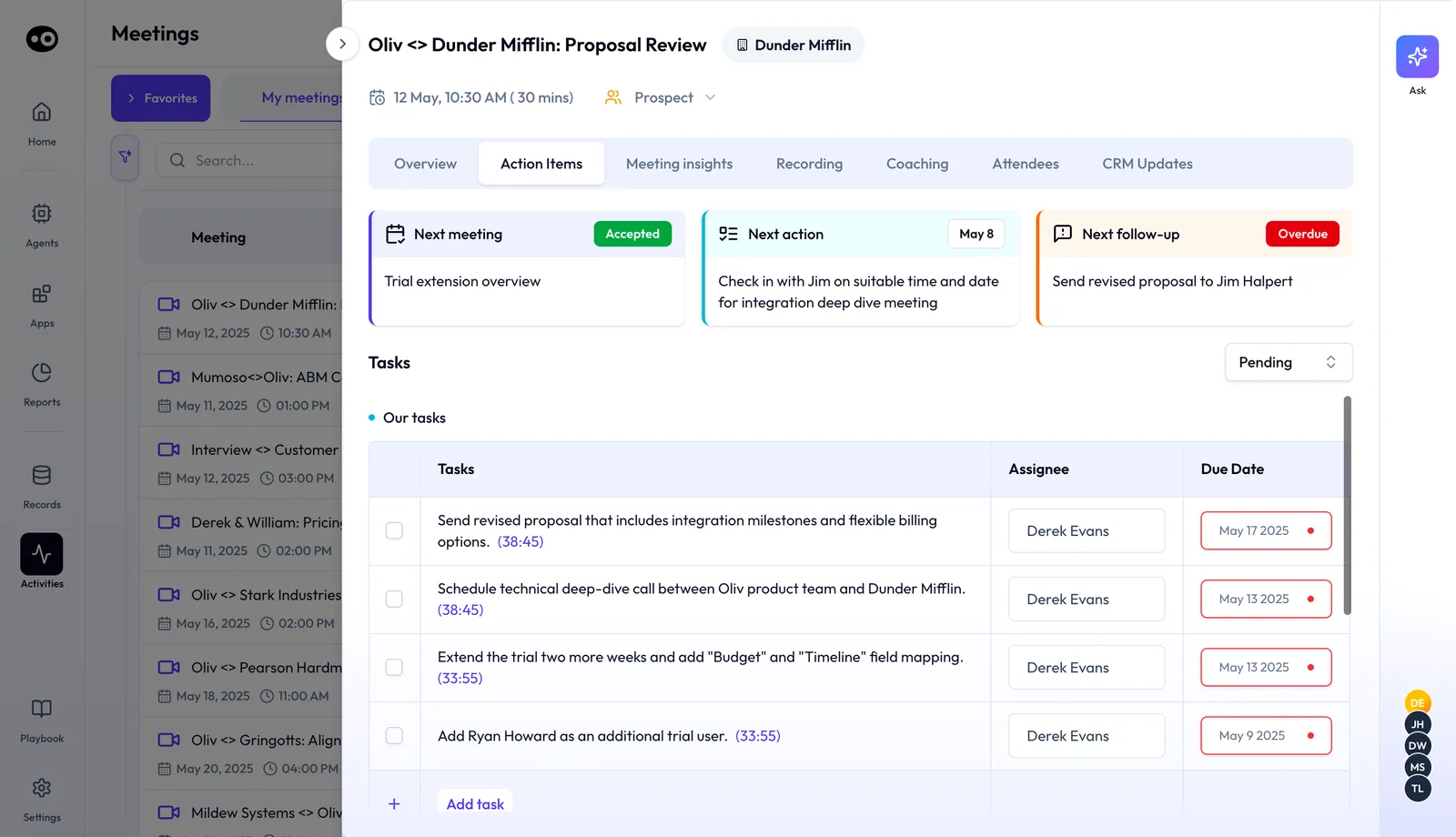
The Action Items tab turns commitments into work. Next meeting, Next action and Next follow-up cards sit above a Tasks table with Assignee and Due Date. Each task links to the moment it was agreed, and Add task adds your own.
The full tour of every tab is in meeting details.
Across the life of a deal
As meetings stack up on a deal, Meeting Assistant keeps an updated picture of the opportunity. That picture doesn't depend on a rep typing notes after every call. For the follow-up habit itself, read better sales follow-ups. For how other tools handle prep and recap, read this round-up of AI meeting assistants for sales.
Why the Meeting Assistant agent matters
What it's for
An AI meeting assistant earns its place when you run back-to-back deal meetings and the prep or the recap keeps slipping. Oliv AI's Meeting Assistant agent takes on both, and your job becomes reading, checking and sending.
How it helps
- You walk in ready. The brief lands half an hour early and reads in about a minute.
- The email is already written. The draft comes from the real conversation, so you edit rather than start from a blank page.
- The CRM keeps pace. Changes heard on the call come back as CRM updates you can check on the meeting.
- Gaps show up early. Missing qualification details are flagged after each deal meeting, while there's time to fix them.
What happens without it
Reps lose 15 to 20 minutes rebuilding context before each call. Each follow-up email takes another 15 minutes. CRM updates rely on memory, so fields drift out of date. Qualification gaps surface at the forecast review, when it's too late to act on them.
Why buyers care
VPs of Sales and sales managers are the usual buyers. Account executives champion it, because they get time back before and after every deal call. The value grows with deal volume, since there's more for the gap tracking to catch.
The Oliv AI approach to the Meeting Assistant agent
Say a customer success manager has just wrapped a quarterly business review with three people from one account. The operations director wants a rollout plan. The finance lead asked for usage numbers before the renewal talk. The admin raised two open support issues, and the renewal opportunity is sitting in the CRM.
That recap often gets written later in the day, from memory and a page of scribbles, and it has to work for three readers. Small promises tend to slip, and the renewal record often stays exactly as it was before the call.
Yet nothing in that recap is new information. Every ask, owner and date was said out loud on a recorded call. The real job is turning the transcript into an email and a few field changes while the meeting is still fresh.
Oliv AI does that with its Meeting Assistant agent. When the recording is processed, it drafts the follow-up from the transcript with the recap, commitments, owners and next steps. It also proposes field updates for the renewal and flags any qualification gaps the call exposed. The CSM reads it, adjusts a line or two and sends it.
The draft lands within minutes of the call ending. Each CRM change shows on the meeting's CRM Updates tab, with a stage move held for the CSM to confirm. To compare other meeting tools, see the table further down this page.
Set up Meeting Assistant
- Connect your calendar. Meeting Assistant looks for meetings linked to an active opportunity.
- Connect your call recorder. Use your existing recording tool or Oliv AI's own recorder. The follow-up and gap flags are built from recordings and transcripts, which Oliv AI's Converse app captures with call recording and transcription.
- Connect your CRM. Salesforce, HubSpot or Zoho. This is where the deal context comes from and where approved updates go. See the full list of supported integrations.
- Confirm your methodology. Open Settings › Qualification Framework. It lists MEDDPICC, MEDDIC, SPICED, BANT and DRIVE, and the one marked Active is what Meeting Assistant maps each deal meeting against. Preview another tab, then press Activate to switch.
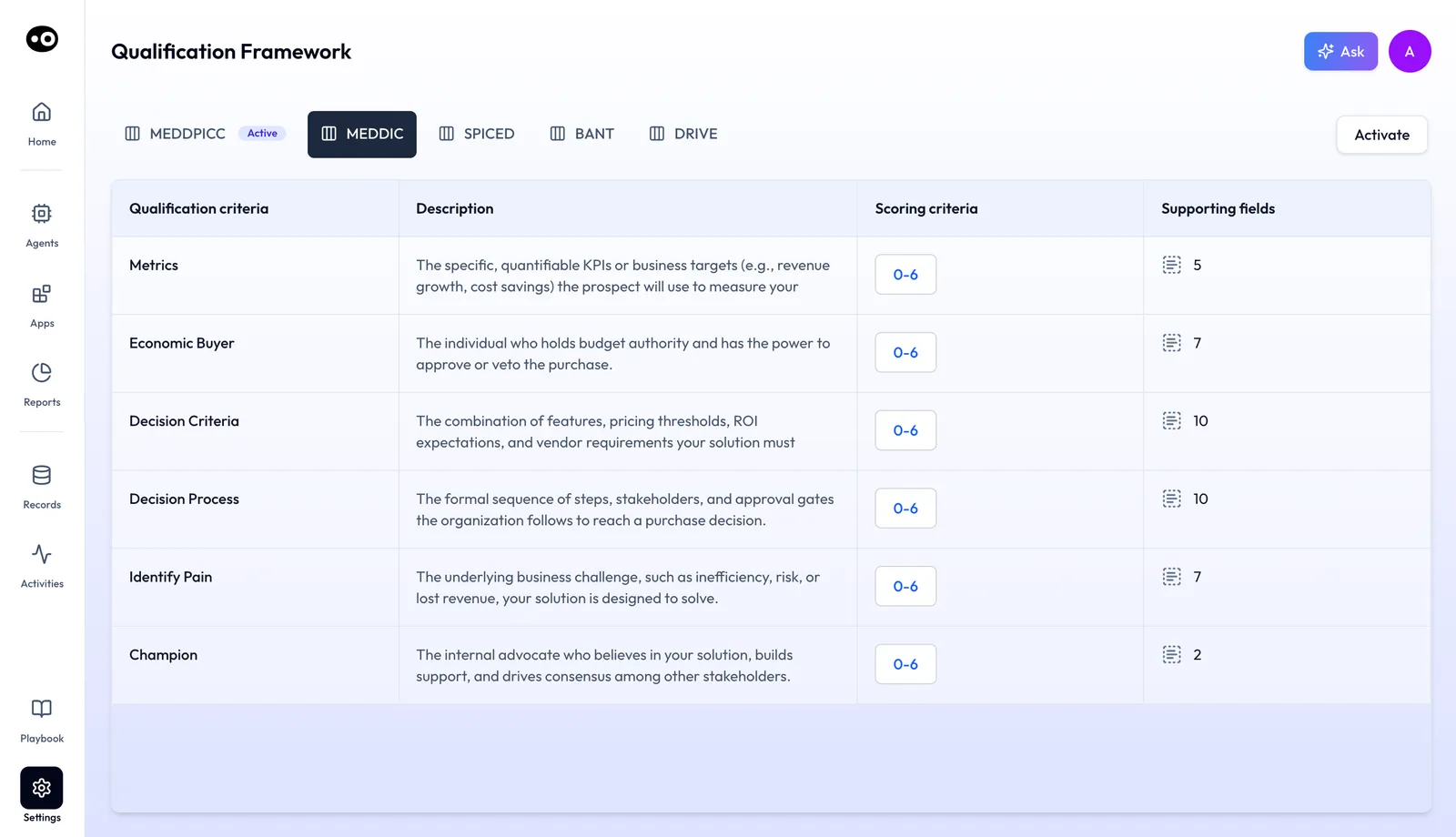
Most teams are connected within a week. You don't need a clean CRM to start: Oliv AI's CRM Manager agent fills in missing or stale fields from call history as it goes.
How deal meetings get prepared and followed up
There are three common ways to get ready for a deal meeting and close it out afterwards.
Prep from the CRM record
You open the opportunity and read its fields. In HubSpot, for example, a close date is the day the deal is expected to close, and next step holds what you or a colleague will do next. This catches the deal's shape fast. It misses anything nobody typed in, and a field that was never updated after the last call still looks current.
Prep from notes and past recordings
You reread your notes, scroll the last email thread and replay the end of the previous call. This catches what the buyer actually said and who said it. It is slow, often 15 to 20 minutes per call, and it depends on your notes being complete.
Follow-up from memory or from the transcript
Writing the recap from memory is quick to start but drops small promises and dates. Writing it from the transcript catches every ask, owner and date, but by hand it takes about 15 minutes per call. Either way, someone still has to copy the changes into the CRM.
Which of these Meeting Assistant does
Meeting Assistant builds its brief from the deal's CRM fields and from earlier conversations, so it combines the first two ways. After the meeting, it drafts the follow-up from the transcript and proposes the field changes, which covers the third.
Review and send the follow-up
The follow-up is a draft, not an automatic send. Read it, adjust anything that needs changing, and send it yourself. The pre-meeting brief for any active deal or customer works the same way: it informs you, and you decide what happens next.
Approve the proposed field updates
The agent reads the call, finds what changed, and proposes updates. That keeps stage, close date and next steps current without chasing anyone.
The meeting's CRM Updates tab lists what changed after the call. Applied changes, such as an account summary, a scorecard or a new contact, carry a green check and a link to the record. A change waiting for you, such as a stage move, shows as Pending Update with Update Deal. Before you press it, check the move against what the buyer actually agreed.
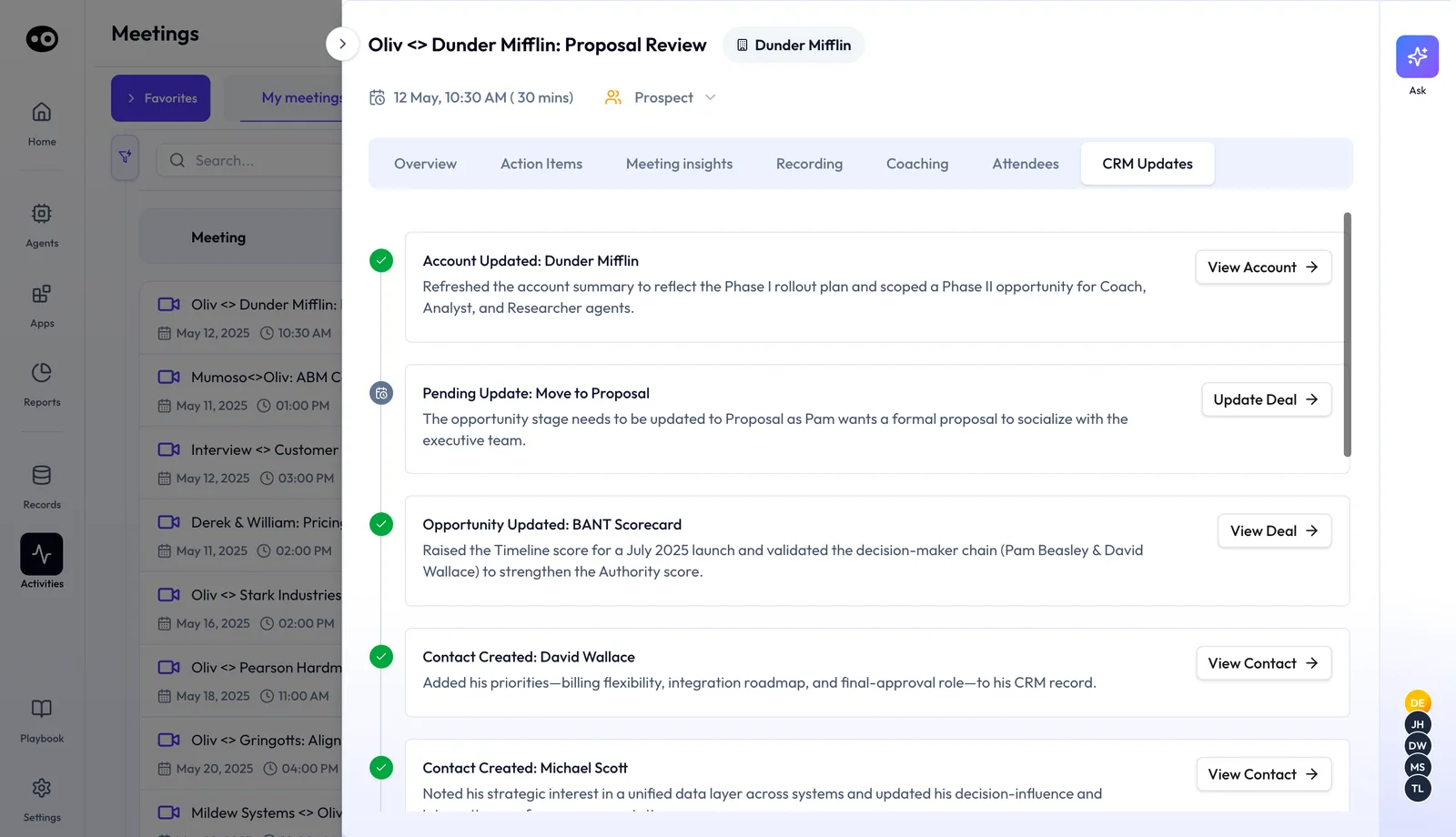
Approval settings for agent actions in general are explained in agent tools and run modes.
Act on the qualification gaps
Gap flags appear after each deal meeting, so you can ask for the missing detail on the next call. The meeting's Meeting insights tab has a chip for each criterion of the active framework, from Metrics to Champion, plus Additional Fields. Each section holds evidence cards with timestamps. Where nothing was said, the card says so, as in "No ROI".
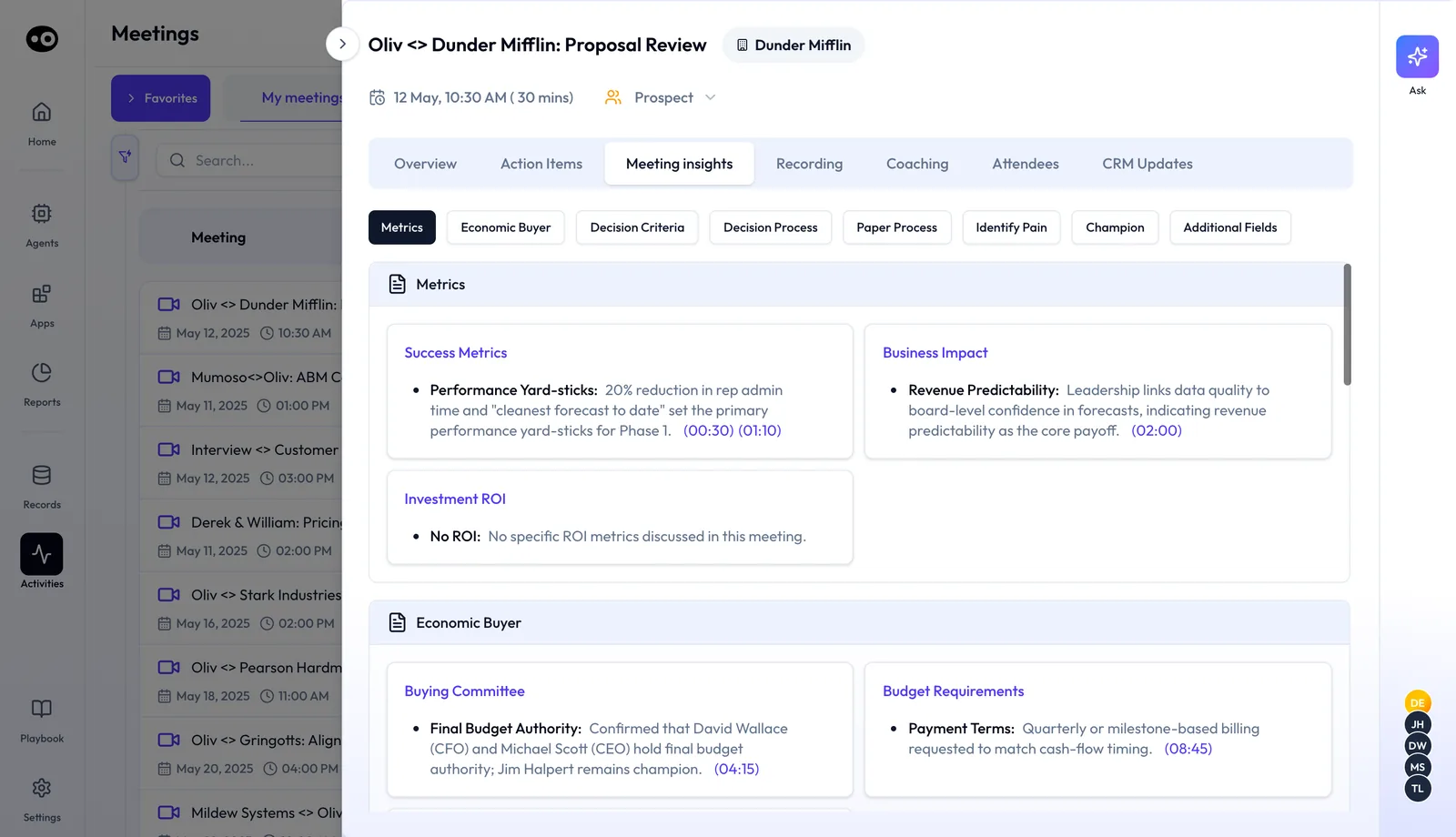
Your team's framework decides what counts as a gap, so it helps to agree on your sales methodology first.
How to measure meeting prep and follow-up
Two measures tell you whether deal meetings are being prepared and closed out well. Track them per rep for a few weeks before you change anything.
- Follow-up turnaround. The time from the end of the call to the recap reaching the buyer. Its weak spot: a fast email can still miss what was agreed, so read a sample of them too.
- Fields current after each meeting. The share of deal meetings after which stage, close date and next step were checked or changed. Its weak spot: a filled field can still be wrong. HubSpot's last activity date shows that something was logged, not whether the deal record matches the call.
Where you see them in Meeting Assistant
On each meeting's page, the Action Items tab shows the Next follow-up card, which turns Overdue when it slips. The CRM Updates tab shows which changes were applied and which still wait as a Pending Update. Checking both after a week of meetings shows you where follow-through is stalling.
How to prepare for and follow up a deal meeting by hand
- Open the opportunity. Note the stage, which signals where the deal is in your process, plus amount, close date and next step.
- Reread the last conversation. Pull the previous call's notes or recording and list what the buyer asked for.
- Check qualification. Mark which criteria of your methodology are still unconfirmed.
- Write an agenda. Put the open criteria and the buyer's asks at the top.
- Run the meeting and take notes. Capture asks, owners and dates as they come up.
- Write the recap. Send the buyer what was discussed, what was agreed and the next steps with dates.
- Update the CRM. Change stage, close date, next step and qualification fields to match the call.
What goes wrong is usually steps 6 and 7. They happen at the end of the day, from memory, after the next three calls.
The same job with Meeting Assistant
Meeting Assistant does steps 1 to 4 for you and sends the result as the brief 30 minutes before the call. After the recording is processed, it drafts step 6 and proposes step 7. Your part is to read the brief, run the meeting, then review the draft and approve the updates.
Worked example: a week of deal meetings
This is an illustrative calculation with sample figures, not an Oliv AI output, and it claims no saving. Take an account executive with 12 meetings on active deals in one week. The per-meeting minutes use the status-quo ranges on Oliv AI's agent page: 15 to 20 minutes on context and 15 minutes on the follow-up.
| Task by hand | Minutes per meeting | Meetings | Minutes in the week |
|---|---|---|---|
| Rebuild deal context (low end) | 15 | 12 | 15 × 12 = 180 |
| Rebuild deal context (high end) | 20 | 12 | 20 × 12 = 240 |
| Write the follow-up email | 15 | 12 | 15 × 12 = 180 |
| Total, low end | 30 | 12 | 180 + 180 = 360 (6 hours) |
| Total, high end | 35 | 12 | 240 + 180 = 420 (7 hours) |
That is 6 to 7 hours a week before any CRM updates, close to a full working day. Run the same sum with your own meeting count before deciding which steps to hand over.
How Meeting Assistant works with other agents
CRM Manager
Oliv AI's CRM Manager agent writes the field updates that Meeting Assistant proposes, which keeps the pipeline current without manual cleanup.
Deal Driver
Oliv AI's Deal Driver agent adds pipeline context before every manager 1:1: what changed, what's stuck and which deals need attention. Meeting Assistant summarizes what happened on each call, so managers coach from the same context their reps have. Deal Driver's Sunset Summary also says whether the notetaker recorded the day's meetings.
Forecaster
Oliv AI's Forecaster agent uses the deal qualification data that Meeting Assistant helps keep current.
Coach
Oliv AI's Coach agent is developmental and works on recordings after the fact. Meeting Assistant is operational and works before and right after the call.
Olivia
Oliv AI's Olivia agent is the front-facing master agent for reps. Meeting Assistant works in the background around each call, so the brief and follow-up arrive without anyone asking.
Who uses Meeting Assistant, and how
Account executives
Account executives are the main users. They get the brief before each deal meeting and the drafted follow-up after it, so prep and recap stop eating the gaps between calls. The full rep workflow is in Run deals as an account executive.
Account managers and customer success
Account managers and CSMs use it on meetings tied to a renewal or expansion opportunity. A check-in with several stakeholders ends with the recap already drafted. See how Oliv AI supports customer success teams and account management.
BDRs
BDRs use it on meetings tied to an active opportunity. They get the same brief before the call and the same drafted follow-up after it. More on Oliv AI for sales development teams.
Sales managers
Sales managers see the same call summaries their reps do before each 1:1. Combined with Deal Driver, the 1:1 opens on the deal, not on a retelling of it. Read how Oliv AI works for sales managers.
How Oliv AI compares as an AI meeting assistant
Most meeting tools draft a follow-up email. Meeting Assistant also proposes CRM updates for approval, flags qualification gaps and summarizes each call for the manager's 1:1, all from the same recording. Oliv AI is the only platform in this table that does all four.
AI meeting assistant features, from each platform's public documentation:
| Platform | Follow-up drafted from the call | CRM updates proposed for approval | Qualification gaps flagged after each call | Call summary for the manager's 1:1 |
|---|---|---|---|---|
| Oliv AI | Yes | Yes | Yes | Yes |
| Gong | Yes (follow-up email from the call page) | Partly (one text field on deal boards) | Partly (separate MEDDICC agent) | Partly (deal board to check before 1:1s) |
| Outreach | Yes (Smart Email Assist follow-up) | Yes (Deal Agent field recommendations) | Partly (methodology in the Deal Agent) | Partly (deal questions to cut 1:1 admin) |
| Fireflies | Yes (follow-up after every sales call) | Yes (Autofill CRM review) | Partly (BANT and MEDDIC scorecards) | Not in docs |
| Avoma | Yes (auto-generated follow-up email) | Automated field updates | Yes (gaps in the deal dashboard) | Not in docs |
| Fathom | Partly (drafted when you prompt Ask Fathom) | Writes summaries and tasks to CRM | Partly (MEDDPICC deal summary template) | Not in docs |
Yes: documented and built in. Partly: documented with a limit, shown in brackets. Not in docs: not found in the vendor's public documentation.
Why Oliv AI is the stronger choice as an AI meeting assistant
- One recording, every output. Meeting Assistant turns each call into a follow-up, CRM proposals and gap flags at once. Gong puts generating a follow-up email among the call page actions, while a MEDDICC agent shows where the gaps are. Compare Oliv AI vs Gong.
- Gaps flagged on every deal call. Meeting Assistant maps each call against the methodology your team runs. Avoma's Deal Methodology surfaces compliance and gaps in the deal dashboard once an admin configures it. Compare Oliv AI vs Avoma.
- The manager gets the call context without asking. Before every 1:1, Meeting Assistant summarizes what happened on each call. Outreach's manager workflows suggest you use pipeline summary to review a rep's opportunities and pull that context together yourself. Read how Gong and Outreach compare.
Competitor details checked against each vendor's public documentation on 21 October 2026. Features and plans change, so confirm with the vendor before you decide.
Limits and things to know
- It works on active opportunities. Meetings with no linked opportunity don't get a deal brief. First meetings with new contacts get a research brief instead.
- It proposes, it doesn't send. You review, adjust and send the follow-up yourself. Field updates go through CRM Manager, which holds changes like a stage move for you to confirm.
- It isn't a forecasting agent. Meeting Assistant surfaces field updates. Forecaster uses them for pipeline projection.
- It isn't a coaching tool. Meeting Assistant is operational. Coach handles rep development.
- It needs recordings. The follow-up, field updates and gap flags come from Oliv Notetaker recordings and transcripts.
Common questions
How long is the pre-meeting brief?
One screen, about 60 seconds to read. It covers the deal summary, qualification status, stakeholder context and a recommended agenda.
What sales methodologies does it support?
MEDDPICC, MEDDIC, SPICED, BANT and DRIVE, listed in Settings › Qualification Framework. Meeting Assistant maps each deal meeting against the one marked Active.
Does it work for every meeting, or only some?
Every meeting linked to an active opportunity in your CRM. If the deal exists and the meeting is on your calendar, it runs automatically.
Is the follow-up email a template?
No. Meeting Assistant reads the recording transcript and drafts from the actual conversation: what was discussed, what was agreed and what happens next. You review it, adjust it and send it.
How soon after the call is the follow-up ready?
The follow-up is drafted within minutes of the call ending, once the recording is processed.
Does it change CRM fields on its own?
Meeting Assistant proposes the updates, and CRM Manager writes them. Check the meeting's CRM Updates tab: a stage move waits as a Pending Update until you press Update Deal.
I'm already on Deal Driver. Do I need this separately?
No. Meeting Assistant is included in Deal Driver, so if you're on Deal Driver, your reps already have it.
What does it need connected?
Your calendar, your call recording tool or Oliv AI's own recorder, and your CRM: Salesforce, HubSpot or Zoho. Most teams are connected within a week.
What if our CRM data is incomplete?
Meeting Assistant works with CRM Manager to keep deal fields current. If data is missing or stale, CRM Manager fills it in from call history, so you don't need a clean CRM to start.
Is there a minimum team size?
No. A single rep gets the brief and the drafted follow-up straight away. Qualification gap tracking gets more useful as deal volume grows.
Can customer success teams use it?
Yes, on meetings linked to an active opportunity, such as a renewal or expansion.
What should a pre-call brief include?
For a deal meeting, the deal summary, where qualification stands, who is attending and what they care about, and an agenda. Meeting Assistant's brief carries all four on one screen.
Can an AI meeting assistant update the CRM?
Yes. Meeting Assistant proposes the field changes it heard on the call, and CRM Manager writes them. Changes like a stage move wait for your approval on the meeting's CRM Updates tab.
Can it track MEDDPICC gaps?
Yes. When MEDDPICC is the Active framework, the Meeting insights tab shows a chip for each criterion, and a card says so when a criterion wasn't discussed.
Further reading
Related
Updated 2 November 2026: added how deal meetings get prepared, how to measure follow-through, the manual method, a worked example, more questions and further reading.