
Reference Live
Capabilities
Every Oliv AI capability in one catalog, grouped by agents, agent building, autonomy, conversation capture, opportunity and account management, add-ons, context and integrations.
On this page
This catalog lists what Oliv AI does, grouped the way the product is organized. Each row says what the capability does and links the docs page that covers it, where one exists. Oliv AI's agents do the work, and every capability below feeds them or shows you what they did.
At a glance
| Group | What it covers |
|---|---|
| Agents | The two agents you talk to and the specialist agents they hand work to |
| Agent building | The marketplace, instructions, tools, triggers, schedules, knowledge, data and sequences |
| Autonomy and review | Run modes, approval, drafted emails, run history, the agent feed and scheduled reports |
| Conversation capture | Meetings, phone calls, in-person meetings, email and Slack, in the Converse app |
| Opportunity management | Deals, companies and contacts in Records, plus forecasting in the Forecast app |
| Account management | Customer health, churn risks, renewals and expansion, in the Retain app |
| Add-ons | Enable for coaching and clip libraries, Engage for outreach and dialling |
| Context layer | The capture, graphs, playbook and models every agent reads from |
| Integrations and surfaces | CRMs, meeting platforms, Slack, Outlook, Chrome and the iPhone app |
Agents
Agents are the product. You talk to two of them, and they pass focused work to specialist agents.
The agents you talk to
| Capability | What it does |
|---|---|
| Oliv AI's Olivia agent | Your Chief of AI Staff. You ask in plain language, and she answers or hands the work to a specialist agent and reports back |
| Oliv AI's Oliver agent | Your Chief GTM Engineer. It studies how the team operates and keeps the playbook every other agent follows up to date |
Specialist agents
| Capability | What it does |
|---|---|
| Oliv AI's Deal Driver agent | Tracks deals, flags risks, sends a weekly pipeline update and loops in sales managers at key moments |
| Oliv AI's CRM Manager agent | Creates and enriches accounts and contacts, updates fields and creates deals from your qualification criteria. You can map your custom CRM fields for it |
| Oliv AI's Meeting Assistant agent | Prepares you for meetings, takes notes, assigns action items and sends the follow-up email |
| Oliv AI's Forecaster agent | Rolls up call, upside, commit and best case, with AI notes on risks and changes |
| Oliv AI's Coach agent | Maps skill gaps per rep, prescribes small coaching tasks and tracks progress weekly |
| Oliv AI's Content Curator agent | Finds the call moments that match your enablement priorities, clips them and sends them to the right people |
| Oliv AI's Prospector agent | Builds tailored outreach and runs campaigns to turn target accounts into pipeline |
| Oliv AI's Researcher agent | Researches accounts and buyers for ICP fit and context, and develops a point of view |
| Oliv AI's Portfolio Manager agent | Tracks CSM portfolios across implementation, onboarding and success, and flags accounts that need attention |
| Oliv AI's Gold Digger agent | Finds expansion signals across your accounts |
The agent marketplace on oliv.ai groups agents by the roles they serve, and lets you pick a pre-built agent or create your own.
Agent building
Every agent with a detail page is built from the same parts. The agent builder overview shows how they fit together.
| Capability | What it does |
|---|---|
| Agent marketplace | One place to see every agent available to you, as cards you can filter by category or search |
| Categories and persona filters | Filters for All, Our Agents, Sales, Revenue Operations and Customer Success |
| View Agent and Clone Agent | View Agent opens an agent your organisation runs; Clone Agent copies a pre-built one to start from |
| Pre-built and Custom badges | A badge on a card shows where that agent came from |
| Instructions | The agent's objective, process and output, with each process step naming the tool it uses |
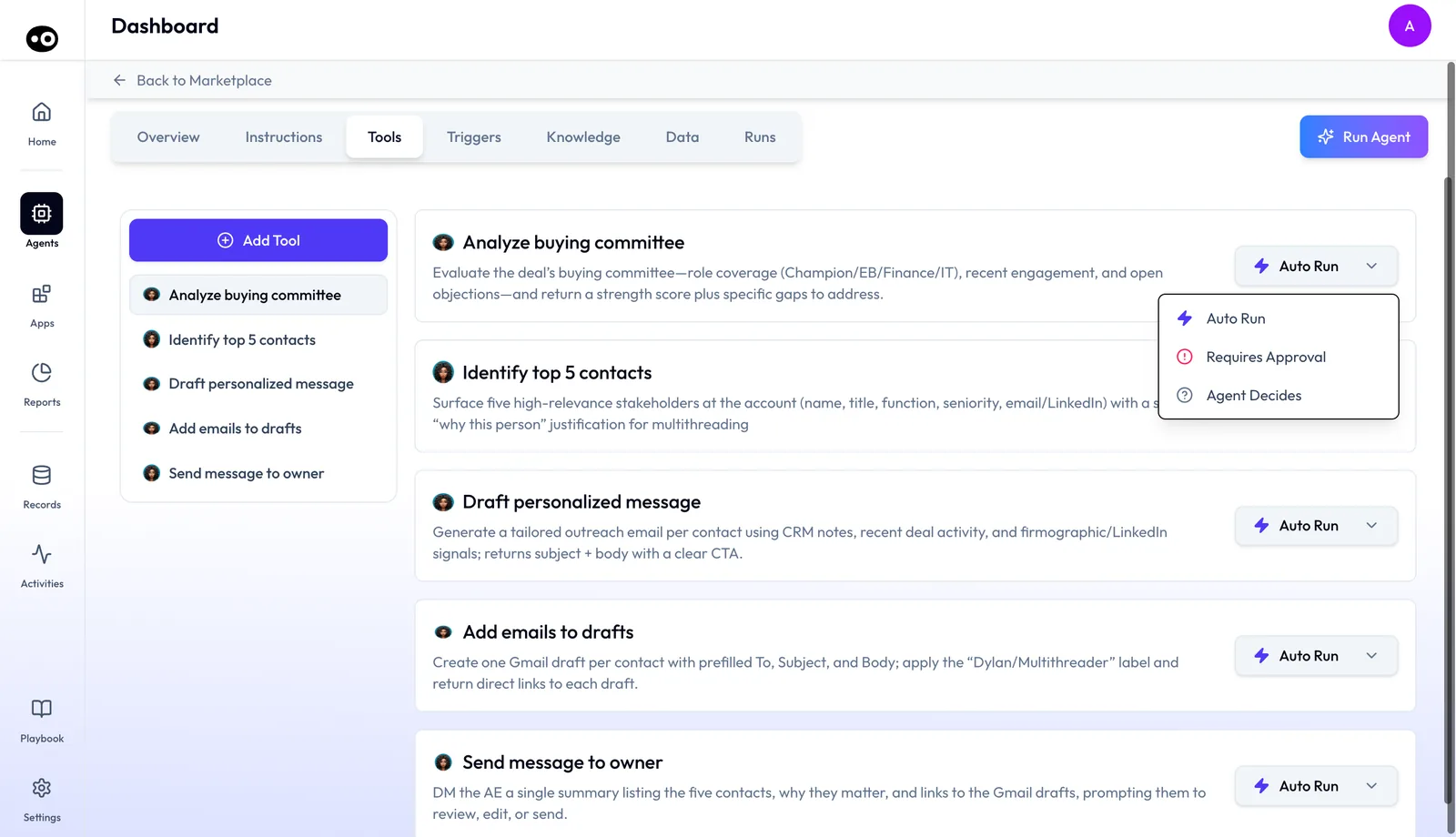
| Tools | The actions an agent may take, such as looking up a record, drafting an email, posting to a channel or updating a field |
| Triggers | The events that start an agent on auto-pilot, without anyone pressing anything |
| Schedules | Fixed times when an agent acts, set by name, frequency, day and time on the same tab as triggers |
| Knowledge files | The background reading an agent works against, such as an ICP document or a solution deck |
| Data sources | The CRM objects, activity history and insights an agent reads, shown field by field so you can see what it knows |
| Sequences | Outreach planned over days and across channels, laid out as a numbered timeline of steps |
Autonomy and review
You decide how much freedom an agent has, and you can check every action it took.
| Capability | What it does |
|---|---|
| Run mode per tool | Each tool is set to Auto Run, Requires Approval or Agent Decides on the agent's Tools tab |
| Run Agent | Runs an agent by hand from its detail page, beside the runs its triggers start |
| Ask before acting | A conversation with Olivia or Oliver is set to Ask before acting or Act without asking |
| Drafted email review | When an agent writes an email instead of sending it, a person reviews the draft and presses Send |
| Run history | Every time an agent worked: when it ran, how it started and how it ended |
| Run details | For one run: the people it touched, the exact text of every email, any meeting booked and a timestamped list of changes |
| Agent Feed | One stream of everything your agents have done, with items that need you grouped under WAITING ON YOU. Filter it by Team, Role, Agents and Timeline |
| My Reports | Reports agents deliver on a schedule, beside an analyst report Library under Reports |
Conversation capture
The Converse app captures customer conversations and turns them into searchable records. It's built to understand context, not just track keywords.
| Capability | What it does |
|---|---|
| Botless meeting capture | Records through the meeting platform when your company organizes the meeting. Bot and botless recording explains the modes |
| Bot-based meeting capture | A meeting assistant joins the call, including externally hosted meetings when permitted. Priced as an add-on |
| Phone call capture | Captured phone calls sit in the Calls list beside your meetings |
| In-person meeting capture | Through the mobile app. Sell and Grow also support Plaud recordings, with the hardware bought separately |
| Email capture | Email threads join the same record as your calls |
| Slack, WhatsApp and LinkedIn capture | Conversations on these channels join the record, each priced as an add-on |
| Meeting transcription | Every conversation transcribed, with every speaker labeled |
| AI summaries and action items | A summary and next steps, ready as soon as the call ends |
| Conversation library and search | Every captured meeting in one list under Activities, with My meetings and Team meetings views |
| Meeting record | The recording, transcript, notes, AI summary and next steps for one meeting |
| Clips | A Clip button on a meeting's recording saves a moment into a clip library, each set to Public or Private |
| Meeting notes in the CRM | The AI summary and full transcript attached to the opportunity record |
Opportunity management
Opportunity management spans Records (Deals, Companies and Contacts) and the Forecast app, which comes with the Sell and Grow plans. The Forecast app page on oliv.ai shows its views.
| Capability | What it does |
|---|---|
| Opportunity grids | Every deal in one grid, in Commit, Most Likely, Best Case, Pipeline and Closed views, with Forecast, Risks, Health, Momentum and Relationships signals per row |
| Deal record | One drawer per deal, with tabs from Overview to CRM Updates and Assets, covered in Oliv AI and your CRM |
| Account prioritisation | Companies ranks target accounts by ICP fit, in Target Prospects, Customers, Trending Prospects and Lookalike Prospects views |
| Contacts | Each person's company, owner and last meaningful engagement, in My Contacts and Team Contacts views |
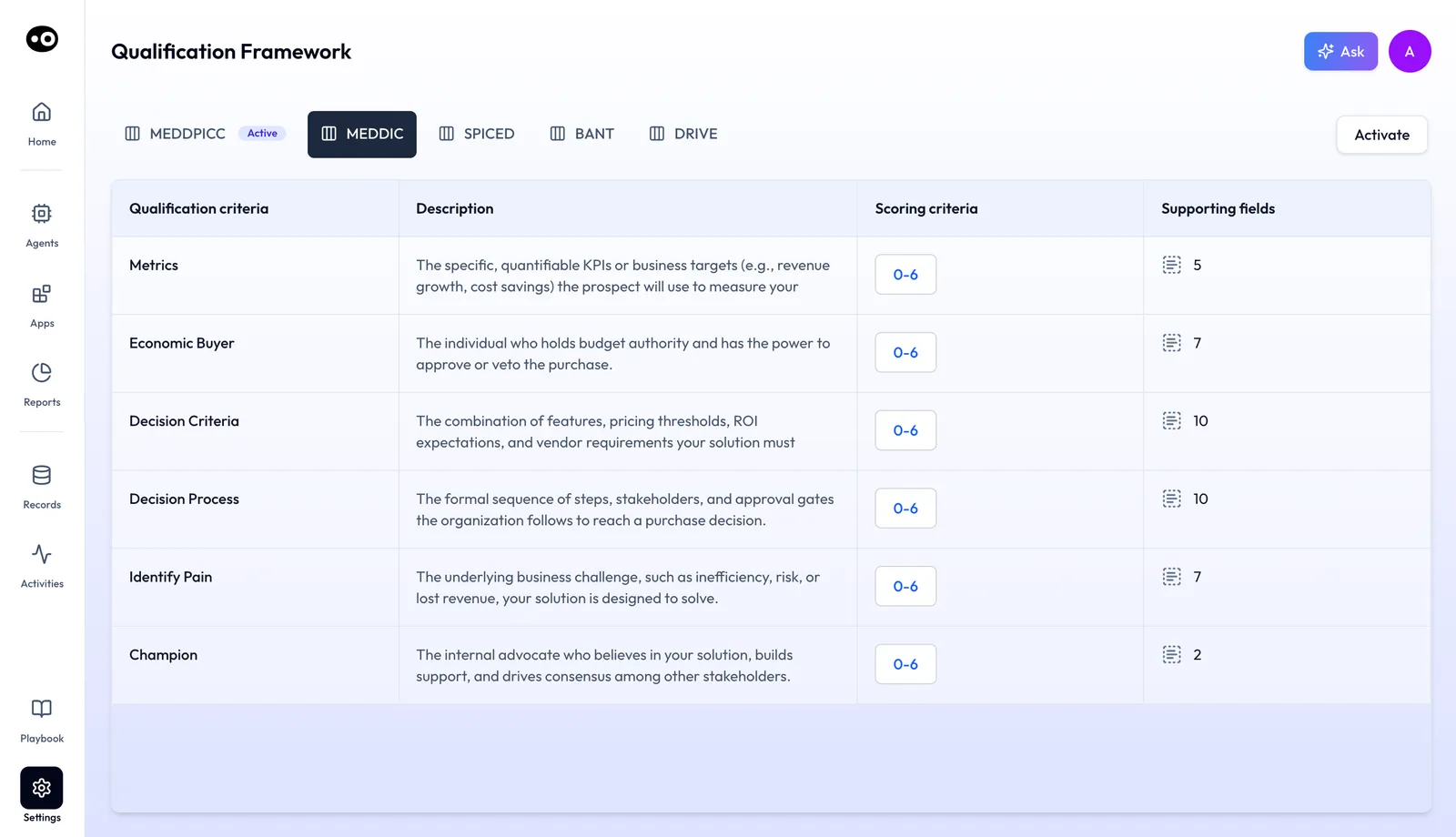
| Sales methodology tracking | Pick the active framework in Settings › Qualification Framework: MEDDPICC, MEDDIC, SPICED, BANT or DRIVE |
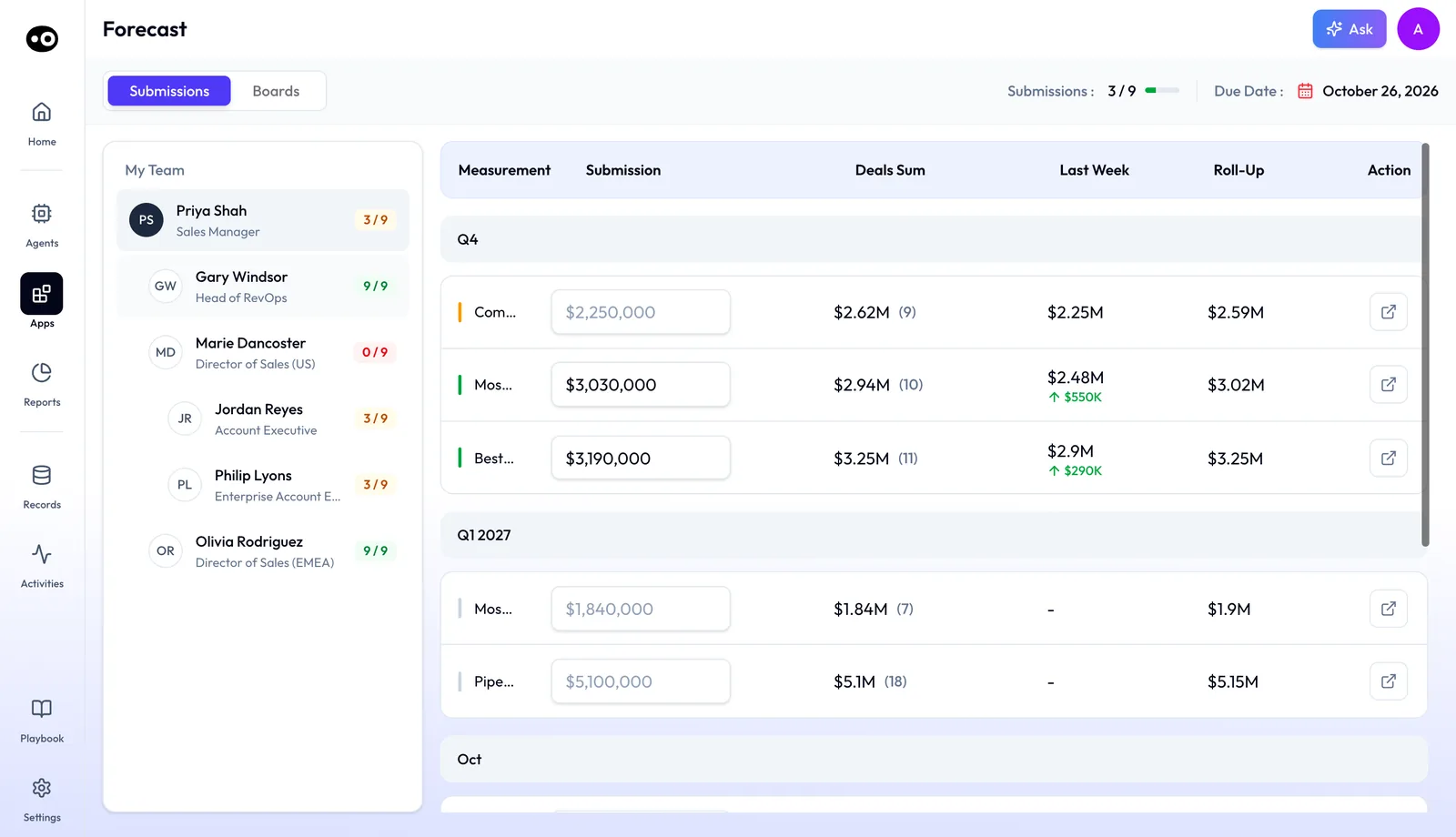
| Buying committee tracking | Tracks the buying committee on each deal | | Deal health and risks | Flags at-risk deals before the review call | | Revenue forecast boards | The Boards tab rolls a team up by period and snapshot, with target attainment, pipeline coverage, commit and most likely per manager and rep | | Forecast submissions | Reps submit their forecast. Oliv AI's Forecaster agent pre-drafts it, and the rep reviews, adjusts and submits. The Submissions tab compares each number with the deals sum, last week and the roll-up | | Targets, measurements and cadences | Settings holds revenue targets, the Basic or Formula measurements a forecast is built from, and the rep and manager submission cadence |
| Weekly pipeline snapshots | A snapshot of the pipeline taken each week | | Deal change history | Stage movement and deal velocity tracked over time |
Account management
The Retain app covers account management. It comes with the Grow plan.
| Capability | What it does |
|---|---|
| Customer grids | Every customer account in one grid |
| Customer health scorecards | Health scorecards for each customer account |
| Churn risks | Churn risks raised on customer accounts |
| Retention forecast boards | Forecast boards for retention |
| Product usage tracking | Product usage tracked per customer |
| Support ticket tracking | Support tickets tracked per customer |
| White space tracking | Every product a customer hasn't bought, and every team that hasn't signed |
| Customer stakeholder tracking | Stakeholders tracked on the customer side |
Add-ons
Add-ons are priced separately and added per person.
| Capability | What it does |
|---|---|
| Enable: coaching scorecards | Evaluates customer conversations against coaching scorecards to identify where a rep needs help. Settings › Coaching Scorecard holds the library across Deals, Customers, Meetings and Phone calls |
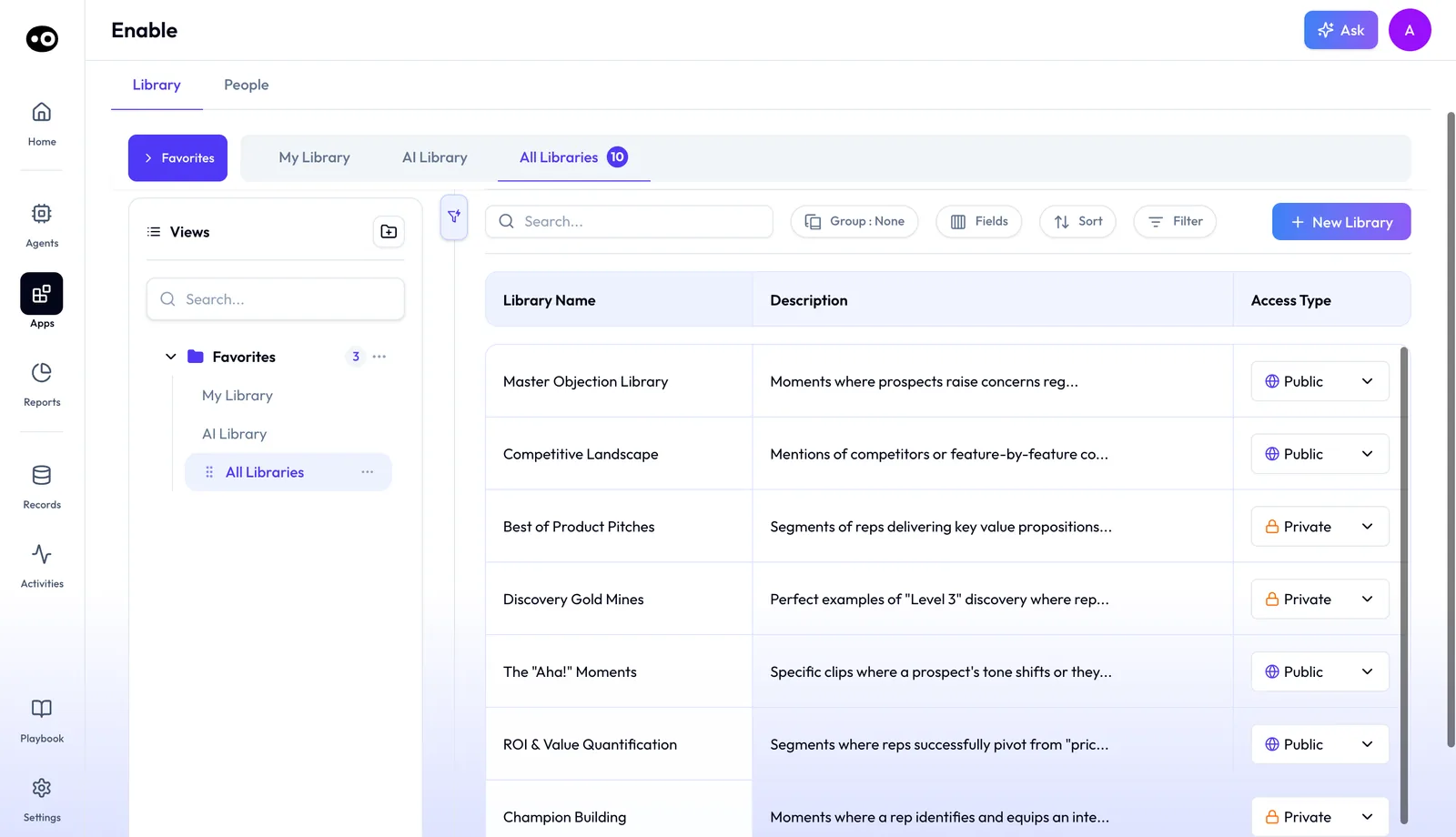
| Enable: clip libraries | The Library tab lists clip libraries, including AI-built ones, each Public or Private |
| Enable: People | The People tab shows the team's attainment and each rep's pacing, leading to one-on-one and coaching reports |
| Engage: email and LinkedIn outreach | One connected primary mailbox and LinkedIn automation |
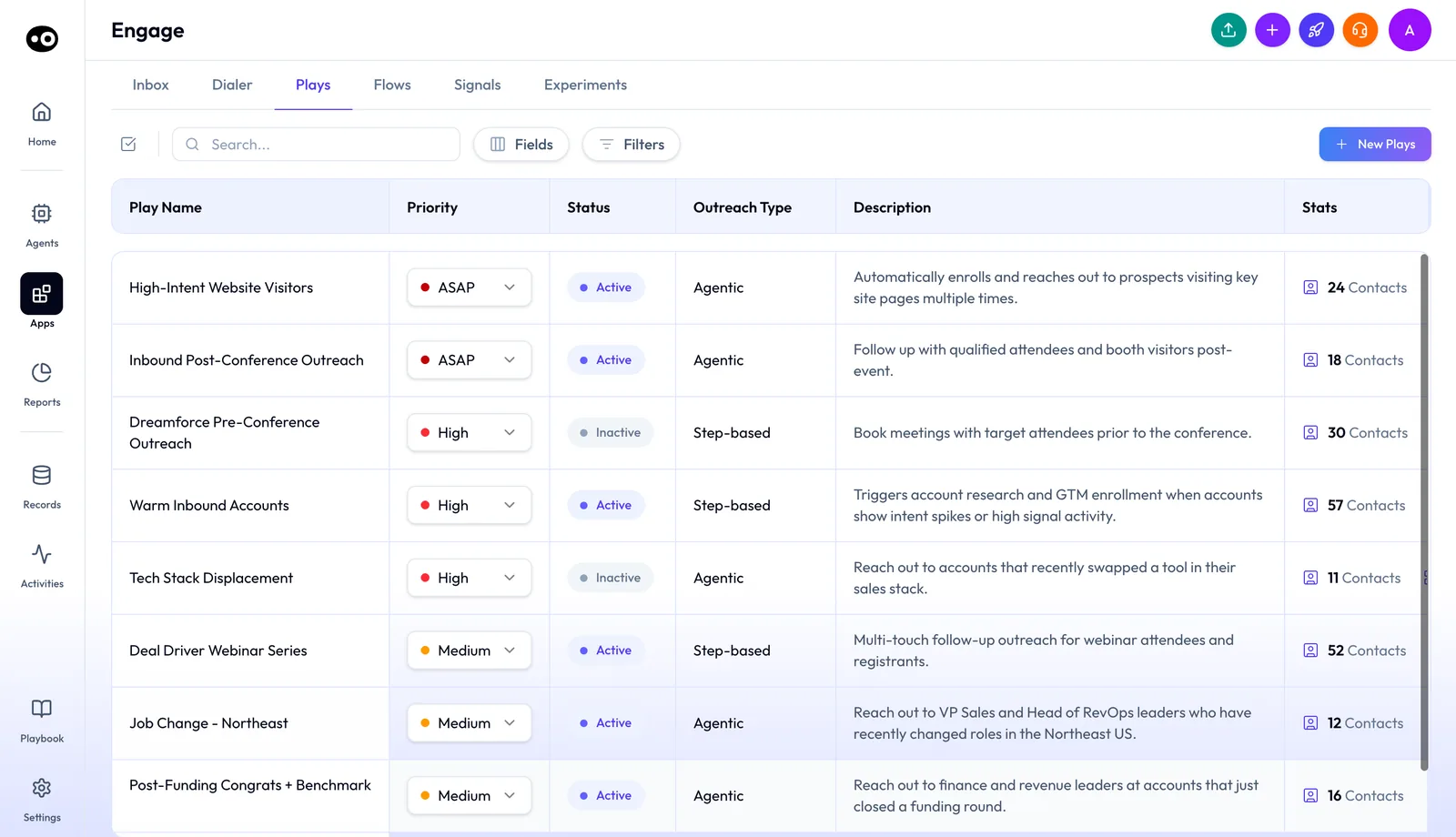
| Engage: plays, flows and signals | Plays react to buying signals with Agentic or Step-based outreach, Flows lists each outreach flow and how it performs, and Signals is the library of buying signals plays react to |
| Engage: dialer | One US phone number, with calling minutes to the US and Canada. The Dialer tab runs Power and Parallel sessions |
| Engage: messaging channels | WhatsApp, Telegram or Instagram, chosen per channel |
| Engage: extra mailboxes | Additional warm email mailboxes to scale outreach |
Plans and seat roles shows which plan brings each app and which add-ons stack on top. Prices are on Oliv AI's pricing page.
Context layer
Every agent and app reads from the same context. This layer is why one captured call can shape a follow-up, a CRM update and a coaching note.
| Capability | What it does |
|---|---|
| Context capture | Captures calls, emails, Zoom meetings, messages and in-person meetings, enriched with ZoomInfo, 6Sense and LinkedIn data |
| Context graph | Connects every conversation, message and activity to the right people, account and opportunity |
| Process graph | Learns your product, qualification criteria, processes and exceptions, and documents them as a playbook agents follow. You edit it in Playbook, with Oliver beside it |
| Signal graph | More than 100 specialized small language models, each answering one revenue question as new information arrives |
| Always-on agents | Agents run in the background, start work from signals and schedules, and collaborate with your team and each other |
| Context sync | Brings account and opportunity context back into Salesforce, Snowflake, Databricks or Redshift |
Integrations and surfaces
| Capability | What it does |
|---|---|
| CRM | Salesforce, HubSpot or Zoho syncs pipeline, fields, owners, close dates, stages and forecast categories |
| Meeting platforms | Oliv AI joins Zoom, Google Meet and Microsoft Teams automatically, and Webex through the Webex App Hub |
| Calendly | A Calendly event setting helps Oliv AI recognize meeting participants and detect prospects |
| Slack | A summary of tomorrow's meetings, a meeting prep summary and a meeting summary arrive in Slack |
| Outlook add-in | Available for Outlook on Windows and on Mac |
| Chrome extension | Oliv Conversation Intelligence brings call recording and transcription to the browser |
| iPhone and iPad app | Records and transcribes in-person conversations, on iOS 15.1 or later |
| Plaud | Captures in-person meetings through the Plaud integration |
Common questions
Which capabilities come with every plan?
Oliv AI's Olivia and Oliver agents, reviewing conversations, opportunities and accounts, and building custom agents. Agent use is billed through credits on every plan.
Which plan adds forecasting?
Sell. It brings the Forecast app, with opportunity grids, methodology tracking, forecast boards and forecast submissions.
Which plan adds customer health and churn risk?
Grow. It brings the Retain app, with health scorecards, churn risks and retention forecast boards.
Can I build my own agent?
Yes. You can pick a pre-built agent from the marketplace or create your own, from instructions, tools, triggers and knowledge.
Can agents act without approval?
Only when you allow it. Each tool is set to Auto Run, Requires Approval or Agent Decides, and each conversation is set to Ask before acting or Act without asking.
How do I see what an agent did?
Open the agent's run history. Each run shows the people it touched, the emails it wrote and the changes it made.
Which meeting platforms does Oliv AI record?
Zoom, Google Meet and Microsoft Teams, which it joins automatically, and Webex through the Webex App Hub.
Does Oliv AI replace my CRM?
No. Oliv AI works as a layer on top of your existing CRM. It brings the context together and keeps your CRM updated.