10 Best Sales Call Notes Software in 2026: Auto-Transcription, Structured Notes, CRM Sync, and Search
Written by
Ishan Chhabra
Last Updated :
August 22, 2026
Skim in :
13
mins
In this article
Revenue teams love Oliv
Here’s why:
All your deal data unified (from 30+ tools and tabs).
Insights are delivered to you directly, no digging.
AI agents automate tasks for you.
Thank you! Your submission has been received!
Oops! Something went wrong while submitting the form.
Meet Oliv’s AI Agents
Hi! I’m, Deal Driver
I track deals, flag risks, send weekly pipeline updates and give sales managers full visibility into deal progress
Hi! I’m, CRM Manager
I maintain CRM hygiene by updating core, custom and qualification fields all without your team lifting a finger
Hi! I’m, Forecaster
I build accurate forecasts based on real deal movement and tell you which deals to pull in to hit your number
Hi! I’m, Coach
I believe performance fuels revenue. I spot skill gaps, score calls and build coaching plans to help every rep level up
Hi! I’m, Prospector
I dig into target accounts to surface the right contacts, tailor and time outreach so you always strike when it counts
Hi! I’m, Pipeline tracker
I call reps to get deal updates, and deliver a real-time, CRM-synced roll-up view of deal progress
Hi! I’m, Analyst
I answer complex pipeline questions, uncover deal patterns, and build reports that guide strategic decisions
TL;DR
Capture is solved in 2026. The buying question is structure, attachment, CRM write-back, and retrieval, which is exactly how we scored all ten tools.
Sellers spend about 40% of the week selling per Salesforce State of Sales 2026, and CRM data entry is one of the biggest thieves of the rest.
A note that cannot be retrieved is indistinguishable from a note never taken, so we score cross-call retrieval as a first-class criterion.
Attendee-email matching quietly fails on duplicate accounts and personal domains, and every dashboard built on that match inherits the error.
Structure a rep supplies fails. Structure derived from the conversation survives, which is the single test worth running in any trial.
Settle consent logging, EU AI Act Article 50 disclosure, and bulk export in writing before signing any contract.
Q1. What Are the 10 Best Sales Call Notes Software Tools in 2026? [toc=1. Best Tools Ranked]
The ten best sales call notes software tools in 2026 are Oliv AI, Gong, Avoma, Fireflies.ai, Fathom, Otter.ai, tl;dv, Granola, Clari Copilot, and Grain. Oliv AI ranks first because its Meeting Assistant agent structures the note against the methodology a revenue team already runs, and its CRM Manager agent writes that note back to the right opportunity with the triggering moment attached.
🧭 What I scored, and what I deliberately ignored
I scored these tools on four things: note structure, attachment to the right record, CRM write-back depth, and retrieval. Capture quality is not on that list. Transcription is solved, and no vendor here publishes a comparable accuracy benchmark, so I refuse to rank on it.
That choice matters because the money follows the record, not the recording. Reps now sell about 40% of the workweek, and manual data entry is one of the biggest thieves of the rest. A note nobody can find six months later costs you that time twice, which is the argument behind our guide to automating CRM data quality for RevOps.
📋 The shortlist at a glance
Oliv AI
Gong
Avoma
Fireflies.ai
Fathom
Otter.ai
tl;dv
Granola
Clari Copilot
Grain
⭐ How the ten compare
Sales Call Notes Software Compared on Structure, Attachment, Write-Back, and Retrieval
Tool
Note structure
Record attachment
CRM write-back
Archive retrieval
Published price
Rating
1. Oliv AI
Methodology-shaped fields, no rep input
Resolves account, contact, and opportunity, including duplicates
Field-level, with the call moment behind each update
Archive queried at account and deal level
$19 to $79 per seat, $0 platform fee
⭐⭐⭐⭐⭐
2. Gong
Rich signals, prose-first notes
AI Activity Mapper links interactions to accounts and deals
AI Data Extractor creates and fills CRM fields
Largest search install base, export limits flagged by reviewers
Quoted, not published
⭐⭐⭐⭐
3. Avoma
Templates plus scorecards
Meeting-level, weaker cross-meeting context
Syncs notes and insights to Salesforce
Ask Avoma retrieves past detail
Published tiers
⭐⭐⭐⭐
4. Fireflies.ai
Summary blocks, Autofill CRM fields
Attendee matching, deal mapping complaints in reviews
Extracted fields with a review step
Timestamp-level recall across months
Around $19 per user band
⭐⭐⭐
5. Fathom
Summary templates
Contact to account to open opportunity, by email
One-way sync into logged activity
Deal View plus call search
Free tier plus paid seats
⭐⭐⭐
6. Otter.ai
Summaries and action items
Salesforce and HubSpot linking
Summary-level sync
Keyword search
Published tiers
⭐⭐⭐
7. tl;dv
Templated summaries
Meeting-level
Summary sync via integrations
Library search
Published tiers
⭐⭐⭐
8. Granola
Strong AE-style note template
Light CRM object handling
Limited write-back
Personal notes search
Published tiers
⭐⭐
9. Clari Copilot
Deal-signal notes
Tied to Clari pipeline objects
Pipeline field updates
Conversation search
Quoted
⭐⭐⭐
10. Grain
Coaching-oriented notes
Meeting and deal linking
Summary sync
Clip and keyword search
Published tiers
⭐⭐
Ratings follow the rubric in the next section, not brand size. Where a vendor publishes no price, I say so instead of guessing.
1.1 Oliv AI: The Note as an Organizational Record [toc=1.1 Oliv AI]
Account Executive workflow showing Deal Driver briefs, CRM Manager updating four Salesforce fields, and Re-Activator outreach, illustrating how structured sales call notes reach the right opportunity automatically.
🤖 What it does
Oliv AI is an AI-native revenue intelligence and revenue orchestration platform, not a note-taking app. Two agents carry this job. The Meeting Assistant agent shapes the note, and the CRM Manager agent decides what that note changes in Salesforce or HubSpot.
I care about the pairing more than either agent alone. A structured note that lands on the wrong opportunity is still a broken record. Attachment is the step most tools quietly get wrong, and every dashboard downstream inherits that error.
Resolution of each call to the right account, contact, and opportunity, including where duplicate accounts exist.
Field-level CRM write-back where each proposed change shows the moment in the conversation that triggered it, accepted, edited, or rejected per field.
A queryable archive, so a renewal question returns affected deals rather than a folder of recordings.
Support for recorders a team already runs, including Fireflies, Gong, Avoma, Otter, and Fathom.
💰 Pricing and implementation
Oliv AI publishes a per-seat ladder from $19 to $79, with a $0 platform fee, free view-only seats, and full open export. That last item answers the portability question most vendors defer to a sales call. We put it in writing because RevOps buyers always ask it in year two.
Setup is fast in practice. One reviewer describes going live in five to fifteen minutes, and another reports engineer-supported rollout inside a week. Deeper methodology customization takes longer, and I would plan for a narrow pilot first, in line with our RevOps implementation and admin guide.
🕰️ Product timeline
Oliv AI Capability Timeline, as Described in Dated User Reviews
Period
What changed
Through mid-2026 (as described in dated user reviews)
Agent set covering CRM updates, deal monitoring, forecasting, and pre-call research, with auto-joining meetings and methodology field completion such as MEDIC-BAND, per an Oliv AI G2 verified review dated 15 Jun 2026
June to July 2026 (current state)
Reviewers report six to seven production agents spanning expansion, analytics, and deal risk, plus HubSpot, Zoom, and Google Meet integrations, per an Oliv AI G2 verified review dated 17 Jun 2026
Near-term, based on published gaps
Reviewers ask most often for customizable dashboards and reporting, and a stronger mobile experience, per an Oliv AI G2 verified review dated 8 Jul 2026
✅ Pros and ❌ cons
✅ Structure arrives without rep effort, which is the only version that survives a quarter.
✅ Field-level write-back with visible evidence, so RevOps approves changes instead of auditing them later.
✅ Open export and a published price ladder, so the archive stays yours.
❌ Dashboard and report customization is still thinner than reviewers want.
❌ Occasional slowness and glitches show up in reviews.
❌ Mobile is basic next to the desktop experience.
🎯 Best for and what users say
Best for a RevOps leader who owns what the CRM contains, and who needs the record readable by a machine six months out. It is a poor fit for a team that only wants a free recorder.
"I use Oliv.ai for recording my sales calls, keeping my client updates on CRM in check, and moving accounts between different stages. It's incredibly helpful with our custom sales methodologies like MEDIC-BAND, as it helps me fill all of them out." Verified user, Oliv AI G2 Verified Review (15 Jun 2026)
"It doesn't just record meetings; it automatically captures key insights, updates systems of record, identifies next steps, and helps keep teams aligned." Verified user, Oliv AI G2 Verified Review (23 Jun 2026)
Oliv AI ranks first here for one reason: it treats the note as a record for the organization, structured, attached, and answerable, rather than a document handed back to the rep. Our read is that this is the difference buyers feel at renewal, not at demo.
1.2 Gong: The Biggest Archive, With Strings on the Data [toc=1.2 Gong]
Gong Engage task view converts customer conversations into prioritized outreach steps, showing how call insights drive engagement rather than field-level note structure inside the CRM.
🏆 What Gong does
Gong holds the largest call archive and search install base in this category, and it earned that. It is positioned highest on both axes of Gartner's first Revenue Action Orchestration Magic Quadrant, December 2025. I concede that before anything else.
Gong's note is one output of a much wider revenue AI system. AI Activity Mapper links interactions to the right accounts, contacts, and opportunities, and AI Transcriber handles capture, a scope we break down further in our review of Gong's features.
🧩 Key features for call notes
AI Data Extractor creates CRM fields and populates them from captured conversations, removing manual entry.
AI Ask Anything queries calls, accounts, deals, and contacts in natural language across the customer base.
Smart Trackers and Theme Spotter surface objections and competitor mentions across many calls.
Agent Studio and Custom Agents let RevOps build governed agents without engineering help.
MCP support connects Gong data to tools like Microsoft 365 Copilot.
💰 Gong pricing and implementation
Gong does not publish per-seat pricing, so I will not quote a number. Expect a quoted platform contract, plus a seat ladder that scales with modules, which we model in our breakdown of Gong pricing. Reviewers describe setup as work, especially tracker configuration.
Something else shows up in reviews and belongs in a buying decision. Bulk data access sits behind higher plans, which is a problem if you view the archive as an asset you own.
🕰️ Gong product timeline
Gong Product Timeline, 2025 to 2026
Period
What changed
April to October 2025
Gong shipped a specialized agent portfolio, then expanded it, adding Gong Orchestrate, AI Deep Researcher, AI Data Extractor, and an 18-agent lineup, per Gong's October 2025 announcement
June to August 2026 (current state)
Mission Big Dipper introduced the Gong Revenue Harness as an agentic execution layer, with Custom Agents generally available, per Gong's Mission Big Dipper release
Rolling out next
August notes add ChatGPT access, faster call saving, tighter API controls, MCP integration management, and monthly AI credit limits, per Gong's release notes
That credit-limit line deserves attention. Metered AI usage changes how you budget an archive you query daily.
✅ Gong pros and ❌ cons
✅ Deepest search and analytics across a large historical archive.
✅ Field creation and population handled by agents, not reps.
✅ Analyst-validated leadership position, December 2025.
❌ Bulk export and full data download are gated, which reviewers call out directly.
❌ Tracker and integration setup takes real admin time.
❌ Pricing is opaque, so total cost per rep is hard to model before a call.
🎯 Who Gong fits, and what users say
Best for enterprise revenue teams that need coaching, forecasting, and deep search in one place, and that accept a quoted contract. Weaker fit if archive portability is your first-order concern, which is why teams comparing options often start with Gong alternatives.
"I cannot download all the data myself unless we upgrade the plan, which isn't ideal and results in me not fully utilizing Gong. The requirement to download snippets one by one using copy and paste is particularly annoying." Verified user, Gong G2 Verified Review (3 Oct 2025)
"Real Time integrations can be time consuming." Verified user, Gong G2 Verified Review (21 Apr 2026)
"Good for tracking deals, account engagement overall, divided transcript and accurate AI highlights for calls." Verified user, Gong G2 Verified Review (9 Jun 2025)
1.3 Avoma: Cheap Conversation Intelligence With Attribution Wobble [toc=1.3 Avoma]
Avoma real-time transcription screen with insight tags for objections, pricing, and next steps, plus bot-based and botless recording, showing conversation intelligence layered above raw transcripts.
🧠 What Avoma does
Avoma bundles transcription, summaries, call scoring, and coaching into one subscription. Its real strength is price against enterprise platforms, plus a large review base. For many mid-market teams, it is the first tool that makes call review a habit.
Ask Avoma is the part RevOps should test. It answers questions across meetings, deal data, and now the web, which is closer to retrieval than plain keyword search, a distinction we unpack in revenue intelligence versus conversation intelligence.
🧩 Avoma key features
Structured AI summaries with template control per meeting type.
Deal Methodology Intelligence that scores MEDDICC, BANT, or a custom framework using evidence from meetings and emails.
Live coaching prompts and battlecards during calls.
CRM sync of notes and insights into Salesforce and HubSpot.
MCP support to connect Avoma data to outside AI agents.
💰 Avoma pricing and implementation
Avoma publishes tiers, and reviewers call the base meeting-assistant plan reasonable. The conversation and revenue intelligence module is where cost climbs. Budget for that jump before you standardize on it.
Setup is light. The trade-off shows up in reliability, where reviewers report the notetaker missing calls or dropping mid-meeting, a pattern covered in our analysis of Avoma user reviews.
🕰️ Avoma product timeline
Avoma Product Timeline, 2026
Period
What shipped
Through February 2026
AI Tasks consolidated follow-ups, Ask Avoma gained pipeline and revenue Q and A, voice coaching arrived on mobile with timestamped comments, and pipeline views added multi-column sorting, per Avoma Insider, February 2026
March 2026 onward
Automated deal methodology scoring with live in-call coaching, org-level Ask Avoma prompts, and web search inside Ask Avoma, per Avoma Insider, March 2026
Next, based on published roadmap pages
Avoma now markets an agentic platform layer plus MCP and API access, which points toward outside agents reading its conversation data, per Avoma product updates
✅ Avoma pros and ❌ cons
✅ Methodology scoring tied to evidence, not rep self-reporting.
✅ Strong price-to-capability ratio for mid-market teams.
✅ Ask Avoma reduces time spent hunting old call detail.
❌ Reviewers report wrong-speaker attribution and missed key points.
❌ The notetaker sometimes fails to join or drops off calls.
❌ Summaries can arrive without earlier context from the same contact.
🎯 Who Avoma fits, and what users say
Best for a 20 to 150 rep team that wants coaching and scoring without an enterprise contract. Weaker fit if you need bulletproof attribution on multi-speaker calls.
"I really appreciate the Ask Avoma feature as it saves a lot of time by helping me check specific details from conversations." Verified user, Avoma G2 Verified Review (9 Dec 2025)
"Sometimes the notetaker does not join the call and sometimes randomly drops off. Support function is slow and not very reliable." Verified user, Avoma G2 Verified Review (9 Dec 2025)
"It doesn't always capture the key points of the conversation, and it also doesn't connect previous meetings with the same person." Verified user, Avoma G2 Verified Review (17 Mar 2026)
1.4 Fireflies.ai: Wide Coverage, Field Mapping Still Manual [toc=1.4 Fireflies.ai]
Fireflies.ai recording panel showing searchable timestamps, speaker recognition, and multilingual capture, illustrating broad coverage that feeds later retrieval of sales call notes across months of meetings.
🔎 What Fireflies.ai does
Fireflies captures meetings across Zoom, Meet, Teams, Webex, dialers, in-person conversations, and uploaded files. Coverage is its edge, and coverage feeds retrieval. Calls you never captured cannot be searched later.
Autofill CRM extracts fields from a conversation and pushes them to Salesforce contacts, accounts, and opportunities. There is a review step before anything writes, which I consider a feature, not friction.
🧩 Fireflies.ai key features
Autofill CRM for Salesforce and HubSpot, with field-level extraction and review.
A library of 200-plus AI Skills, including Deal Intelligence.
AskFred for natural-language queries across single or many meetings.
Live Assist and Sales Assist for real-time notes and suggestions on the desktop app.
Mobile capture for in-person conversations.
💰 Fireflies.ai pricing and implementation
Fireflies publishes plans, including a free tier with 20 one-time AI credits per seat. Advanced AI features draw on credits, so heavy archive querying has a metered cost. Model that before rollout.
Reps adopt it quickly, which is genuinely valuable. Reviewers report the pain later, in CRM mapping and support response, the exact failure mode we address in integrating sales automation into the CRM.
🕰️ Fireflies.ai product timeline
Fireflies.ai Product Timeline, 2025 to 2026
Period
What shipped
2025 into early 2026
Autofill CRM extracted meeting data into Salesforce contacts, accounts, and opportunities with a manual review step before sync, per the Autofill CRM guide
Current state, 2026
Live Assist and Sales Assist added real-time notes and in-call suggestions on the desktop app, while the MCP server expanded to 17 tools with write operations, per Fireflies API updates
August 2026 and next
Email Assistant launched free on all plans, with Meeting Prep, Tasks, and AI Skills set to draw on email context in coming months, per the launch announcement
✅ Fireflies.ai pros and ❌ cons
✅ Broadest capture surface here, including phone and in-person.
✅ Field-level CRM extraction with a human check.
✅ Fast rep adoption at a low entry price.
❌ Reviewers report tasks landing on the wrong deal or company.
❌ AI credits meter the features RevOps uses most.
❌ Support experiences and speaker identification draw repeated complaints.
🎯 Who Fireflies.ai fits, and what users say
Best for teams that want maximum coverage cheaply and accept manual mapping cleanup. Weaker fit if deal attribution must be right the first time.
"Their hubspot integration is unreliable. Tasks often don't get assigned to the right deal/companies, which creates a huge pain in the back." Verified user, Fireflies.ai G2 Verified Review (20 Apr 2026)
"Speaker identification errors are frequent, especially in multi-speaker meetings." Verified user, Fireflies.ai G2 Verified Review (6 Jul 2025)
1.5 Fathom: Fastest to Value, One-Way Into the CRM [toc=1.5 Fathom]
⚡ What Fathom does
Fathom records, transcribes, and summarizes calls, then pushes summaries into Salesforce or HubSpot. Reps adopt it without being asked, which is a real advantage. I will not pretend otherwise.
The limit is direction of travel. Fathom's Salesforce integration writes summaries and selected content into the CRM one way, from Fathom to Salesforce.
🧩 Fathom key features
Summary and action-item sync into logged CRM activity.
Attendee-email matching from contact to account to open opportunity.
Deal View, a single interface for deals and related call insights across HubSpot and Salesforce.
Ask Fathom for chat across single meetings and multi-call surfaces like folders and deals.
Admin control to block bot-free capture across an organization.
💰 Fathom pricing and implementation
Fathom runs a free tier plus paid seats, and setup takes minutes. That combination is why it spreads bottom-up inside companies. It also means RevOps often inherits it rather than choosing it.
Test the matching logic on day one. Duplicate accounts and personal-domain attendees are where email-based matching quietly fails, which is why deal tracking software built on that match inherits the error.
🕰️ Fathom product timeline
Fathom Product Timeline, 2025 to 2026
Period
What shipped
2025 into early 2026
Native Salesforce and HubSpot integrations wrote call summaries, action items, and selected meeting content into matched records, resolving contact, then account, then open opportunity by attendee email, per the Fathom Salesforce integration documentation
Current state, 2026
Deal View centralized deal review with connected HubSpot and Salesforce pipelines, per the Deal View guide
Rolling out now
Ask Fathom models were upgraded across single-meeting chat and multi-call surfaces, and admins gained a setting to block bot-free capture org-wide, per Fathom product updates
✅ Fathom pros and ❌ cons
✅ Deploys in minutes, and reps use it voluntarily.
✅ Timestamped moments make call review fast.
✅ Deal View collects call context per opportunity.
❌ CRM sync is one way, so the CRM is not a source of truth back into Fathom.
❌ Notes land as summaries in activity, not as structured fields you can report on.
❌ Matching depends on attendee email, which breaks on duplicates.
🎯 Who Fathom fits, and what users say
Best for small teams and founder-sellers who want good notes with zero admin lift. Weaker fit for RevOps that needs field-level write-back with an audit trail.
"What I like most about Fathom is its ability to generate precise timestamps for key moments in meetings. This makes it incredibly easy to revisit important discussions without rewatching entire recordings." Verified user, Fathom G2 Verified Review (24 Apr 2026)
1.6 Otter.ai: Notes for Everyone, Sales Depth Optional [toc=1.6 Otter.ai]
📝 What it does and where it fits
Otter.ai automates meeting notes, follow-ups, and CRM linking for Salesforce and HubSpot. It is a general-purpose notetaker with a sales agent layer on top. Adoption is easy because most people already know the brand.
Key features cover transcription, summaries, action items, and keyword search across meetings. Pricing is published by tier, which helps procurement, and the category context sits in our roundup of AI note-taking tools.
✅ Otter.ai pros and ❌ cons
✅ Familiar interface, minimal training required.
✅ Salesforce and HubSpot follow-up automation.
❌ Notes stay summary-shaped, not methodology-shaped.
❌ Cross-call querying is shallower than dedicated revenue platforms.
Best for teams where sales, customer success, and internal meetings all need notes from one cheap tool.
1.7 tl;dv: Template Summaries With Coaching Extras [toc=1.7 tl;dv]
🎥 What tl;dv does and where it fits
tl;dv records calls, applies summary templates, and clips moments for sharing. Recent category reviews place it in the conversation-intelligence tier for smaller teams. Integrations push summaries to CRMs and Slack.
Template control is the useful part for sales. You can force a consistent shape per call type, which beats free text, and our library of meeting summary templates shows what that shape should contain.
✅ tl;dv pros and ❌ cons
✅ Reusable summary templates per meeting type.
✅ Clip sharing makes coaching lightweight.
❌ CRM write-back is summary-level, not field-level.
❌ Archive querying is basic next to Gong or Avoma.
Best for startup teams that need structure without an enterprise platform.
1.8 Granola: The Best Note Template, The Weakest Record [toc=1.8 Granola]
✍️ What Granola does and where it fits
Granola blends rep typing with AI expansion, and its published sales note framework covers attendees, stakeholders, objections, and next steps. As a note-taking experience for an AE, it is excellent. As a system of record, it is thin.
The gap is organizational. Notes live close to the individual, so RevOps gets little field-level control, which is the trade-off we examine in our guide to taking meeting notes during sales calls.
Clari Copilot ties conversation data to Clari's pipeline and forecasting objects. Battlecards and automated summaries help reps in the moment. Forecast-first teams already inside Clari get the most from it, and our breakdown of Clari features covers that scope.
The concern is write-back. A reviewer describes being unable to send methodology values back into Salesforce from conversation intelligence.
✅ Clari Copilot pros and ❌ cons
✅ Conversation data sitting beside forecast and pipeline views.
✅ Real-time battlecards during live calls.
❌ Reviewers report weak CRM write-back and missing custom reporting.
❌ Deal context and conversation findings do not always connect.
"The CRM writeback is not good; we cannot send MEDDIC values back to Salesforce or update fields in Salesforce from the conversation intelligence." Verified user, Clari G2 Verified Review (13 Jul 2026)
Best for teams standardizing on Clari for forecasting who accept limited field write-back.
1.10 Grain: Coaching Clips Over Structured Records [toc=1.10 Grain]
🎬 What Grain does and where it fits
Grain records calls, generates summaries, and turns moments into clips for coaching and enablement. Integrations sync summaries to CRM and messaging tools. It sits in the transcription-plus-coaching tier rather than revenue intelligence.
Use it when the goal is rep development, not pipeline reporting, and pair it with the practices in our guide to sales coaching software.
✅ Grain pros and ❌ cons
✅ Clip creation makes call libraries usable for onboarding.
✅ Simple pricing and quick setup.
❌ Summary-level CRM sync only.
❌ Little support for methodology fields or deal-level querying.
Best for enablement leads building coaching libraries on a budget.
Oliv AI sits at position one on this list because the four axes in the title, structure, attachment, write-back, and retrieval, are the product rather than add-ons. Reviewers describe methodology fields filled automatically and CRM records updated after each call, which is the record RevOps is accountable for. Everything else here produces a good note and hands it back.
1.3 Avoma: Cheap Conversation Intelligence With Attribution Wobble [toc=1.3 Avoma]
🧠 What Avoma does
Avoma bundles transcription, summaries, call scoring, and coaching into one subscription. Its real strength is price against enterprise platforms, plus a large review base. For many mid-market teams, it is the first tool that makes call review a habit.
Ask Avoma is the part RevOps should test. It answers questions across meetings, deal data, and now the web, which is closer to retrieval than plain keyword search, a distinction we unpack in revenue intelligence versus conversation intelligence.
🧩 Avoma key features
Structured AI summaries with template control per meeting type.
Deal Methodology Intelligence that scores MEDDICC, BANT, or a custom framework using evidence from meetings and emails.
Live coaching prompts and battlecards during calls.
CRM sync of notes and insights into Salesforce and HubSpot.
MCP support to connect Avoma data to outside AI agents.
💰 Avoma pricing and implementation
Avoma publishes tiers, and reviewers call the base meeting-assistant plan reasonable. The conversation and revenue intelligence module is where cost climbs. Budget for that jump before you standardize on it.
Setup is light. The trade-off shows up in reliability, where reviewers report the notetaker missing calls or dropping mid-meeting, a pattern we track across Avoma user reviews and feedback.
🕰️ Avoma product timeline
Avoma Product Timeline, 2026
Period
What shipped
Through February 2026
AI Tasks consolidated follow-ups, Ask Avoma gained pipeline and revenue Q and A, voice coaching arrived on mobile with timestamped comments, and pipeline views added multi-column sorting, per Avoma Insider, February 2026
March 2026 onward
Automated deal methodology scoring with live in-call coaching, org-level Ask Avoma prompts, and web search inside Ask Avoma, per Avoma Insider, March 2026
Next, based on published roadmap pages
Avoma now markets an agentic platform layer plus MCP and API access, which points toward outside agents reading its conversation data, per Avoma product updates
✅ Avoma pros and ❌ cons
✅ Methodology scoring tied to evidence, not rep self-reporting.
✅ Strong price-to-capability ratio for mid-market teams.
✅ Ask Avoma reduces time spent hunting old call detail.
❌ Reviewers report wrong-speaker attribution and missed key points.
❌ The notetaker sometimes fails to join or drops off calls.
❌ Summaries can arrive without earlier context from the same contact.
🎯 Who Avoma fits, and what users say
Best for a 20 to 150 rep team that wants coaching and scoring without an enterprise contract. Weaker fit if you need bulletproof attribution on multi-speaker calls.
"I really appreciate the Ask Avoma feature as it saves a lot of time by helping me check specific details from conversations." Verified user, Avoma G2 Verified Review (9 Dec 2025)
"Sometimes the notetaker does not join the call and sometimes randomly drops off. Support function is slow and not very reliable." Verified user, Avoma G2 Verified Review (9 Dec 2025)
"It doesn't always capture the key points of the conversation, and it also doesn't connect previous meetings with the same person." Verified user, Avoma G2 Verified Review (17 Mar 2026)
1.4 Fireflies.ai: Wide Coverage, Field Mapping Still Manual [toc=1.4 Fireflies.ai]
🔎 What Fireflies.ai does
Fireflies captures meetings across Zoom, Meet, Teams, Webex, dialers, in-person conversations, and uploaded files. Coverage is its edge, and coverage feeds retrieval. Calls you never captured cannot be searched later.
Autofill CRM extracts fields from a conversation and pushes them to Salesforce contacts, accounts, and opportunities. There is a review step before anything writes, which I consider a feature, not friction.
🧩 Fireflies.ai key features
Autofill CRM for Salesforce and HubSpot, with field-level extraction and review.
A library of 200-plus AI Skills, including Deal Intelligence.
AskFred for natural-language queries across single or many meetings.
Live Assist and Sales Assist for real-time notes and suggestions on the desktop app.
Mobile capture for in-person conversations.
💰 Fireflies.ai pricing and implementation
Fireflies publishes plans, including a free tier with 20 one-time AI credits per seat. Advanced AI features draw on credits, so heavy archive querying has a metered cost. Model that before rollout.
Reps adopt it quickly, which is genuinely valuable. Reviewers report the pain later, in CRM mapping and support response, the exact failure mode we address in our guide on how to integrate sales automation in your CRM.
🕰️ Fireflies.ai product timeline
Fireflies.ai Product Timeline, 2025 to 2026
Period
What shipped
2025 into early 2026
Autofill CRM extracted meeting data into Salesforce contacts, accounts, and opportunities with a manual review step before sync, per the Autofill CRM guide
Current state, 2026
Live Assist and Sales Assist added real-time notes and in-call suggestions on the desktop app, while the MCP server expanded to 17 tools with write operations, per Fireflies API updates
August 2026 and next
Email Assistant launched free on all plans, with Meeting Prep, Tasks, and AI Skills set to draw on email context in coming months, per the launch announcement
✅ Fireflies.ai pros and ❌ cons
✅ Broadest capture surface here, including phone and in-person.
✅ Field-level CRM extraction with a human check.
✅ Fast rep adoption at a low entry price.
❌ Reviewers report tasks landing on the wrong deal or company.
❌ AI credits meter the features RevOps uses most.
❌ Support experiences and speaker identification draw repeated complaints.
🎯 Who Fireflies.ai fits, and what users say
Best for teams that want maximum coverage cheaply and accept manual mapping cleanup. Weaker fit if deal attribution must be right the first time, which is where AI deal intelligence lives or dies.
"Their hubspot integration is unreliable. Tasks often don't get assigned to the right deal/companies, which creates a huge pain in the back." Verified user, Fireflies.ai G2 Verified Review (20 Apr 2026)
"Speaker identification errors are frequent, especially in multi-speaker meetings." Verified user, Fireflies.ai G2 Verified Review (6 Jul 2025)
1.5 Fathom: Fastest to Value, One-Way Into the CRM [toc=1.5 Fathom]
⚡ What Fathom does
Fathom records, transcribes, and summarizes calls, then pushes summaries into Salesforce or HubSpot. Reps adopt it without being asked, which is a real advantage. I will not pretend otherwise.
The limit is direction of travel. Fathom's Salesforce integration writes summaries and selected content into the CRM one way, from Fathom to Salesforce.
🧩 Fathom key features
Summary and action-item sync into logged CRM activity.
Attendee-email matching from contact to account to open opportunity.
Deal View, a single interface for deals and related call insights across HubSpot and Salesforce.
Ask Fathom for chat across single meetings and multi-call surfaces like folders and deals.
Admin control to block bot-free capture across an organization.
💰 Fathom pricing and implementation
Fathom runs a free tier plus paid seats, and setup takes minutes. That combination is why it spreads bottom-up inside companies. It also means RevOps often inherits it rather than choosing it.
Test the matching logic on day one. Duplicate accounts and personal-domain attendees are where email-based matching quietly fails, and every report built on deal tracking software inherits that error.
🕰️ Fathom product timeline
Fathom Product Timeline, 2025 to 2026
Period
What shipped
2025 into early 2026
Native Salesforce and HubSpot integrations wrote call summaries, action items, and selected meeting content into matched records, resolving contact, then account, then open opportunity by attendee email, per the Fathom Salesforce integration documentation
Current state, 2026
Deal View centralized deal review with connected HubSpot and Salesforce pipelines, per the Deal View guide
Rolling out now
Ask Fathom models were upgraded across single-meeting chat and multi-call surfaces, and admins gained a setting to block bot-free capture org-wide, per Fathom product updates
✅ Fathom pros and ❌ cons
✅ Deploys in minutes, and reps use it voluntarily.
✅ Timestamped moments make call review fast.
✅ Deal View collects call context per opportunity.
❌ CRM sync is one way, so the CRM is not a source of truth back into Fathom.
❌ Notes land as summaries in activity, not as structured fields you can report on.
❌ Matching depends on attendee email, which breaks on duplicates.
🎯 Who Fathom fits, and what users say
Best for small teams and founder-sellers who want good notes with zero admin lift. Weaker fit for RevOps that needs field-level write-back with an audit trail, the standard we set out in our RevOps guide to autonomous CRM hygiene.
"What I like most about Fathom is its ability to generate precise timestamps for key moments in meetings. This makes it incredibly easy to revisit important discussions without rewatching entire recordings." Verified user, Fathom G2 Verified Review (24 Apr 2026)
1.6 Otter.ai: Notes for Everyone, Sales Depth Optional [toc=1.6 Otter.ai]
📝 What Otter.ai does and where it fits
Otter.ai automates meeting notes, follow-ups, and CRM linking for Salesforce and HubSpot. It is a general-purpose notetaker with a sales agent layer on top. Adoption is easy because most people already know the brand.
Key features cover transcription, summaries, action items, and keyword search across meetings. Pricing is published by tier, which helps procurement, and the wider category context sits in our roundup of AI note-taking tools.
✅ Otter.ai pros and ❌ cons
✅ Familiar interface, minimal training required.
✅ Salesforce and HubSpot follow-up automation.
❌ Notes stay summary-shaped, not methodology-shaped.
❌ Cross-call querying is shallower than dedicated revenue platforms.
Best for teams where sales, CS, and internal meetings all need notes from one cheap tool.
1.7 tl;dv: Template Summaries With Coaching Extras [toc=1.7 tl;dv]
🎥 What tl;dv does and where it fits
tl;dv records calls, applies summary templates, and clips moments for sharing. Recent category reviews place it in the conversation-intelligence tier for smaller teams. Integrations push summaries to CRMs and Slack.
Template control is the useful part for sales. You can force a consistent shape per call type, which beats free text, and our library of meeting summary templates shows what that shape should contain.
✅ tl;dv pros and ❌ cons
✅ Reusable summary templates per meeting type.
✅ Clip sharing makes coaching lightweight.
❌ CRM write-back is summary-level, not field-level.
❌ Archive querying is basic next to Gong or Avoma.
Best for startup teams that need structure without an enterprise platform.
1.8 Granola: The Best Note Template, The Weakest Record [toc=1.8 Granola]
✍️ What Granola does and where it fits
Granola blends rep typing with AI expansion, and its published sales note framework covers attendees, stakeholders, objections, and next steps. As a note-taking experience for an AE, it is excellent. As a system of record, it is thin.
The gap is organizational. Notes live close to the individual, so RevOps gets little field-level control, which is the trade-off we examine in our guide to taking meeting notes during sales calls.
Clari Copilot ties conversation data to Clari's pipeline and forecasting objects. Battlecards and automated summaries help reps in the moment. Forecast-first teams already inside Clari get the most from it, and our breakdown of Clari features covers that scope.
The concern is write-back. A reviewer describes being unable to send methodology values back into Salesforce from conversation intelligence.
✅ Clari Copilot pros and ❌ cons
✅ Conversation data sitting beside forecast and pipeline views.
✅ Real-time battlecards during live calls.
❌ Reviewers report weak CRM write-back and missing custom reporting.
❌ Deal context and conversation findings do not always connect.
"The CRM writeback is not good; we cannot send MEDDIC values back to Salesforce or update fields in Salesforce from the conversation intelligence." Verified user, Clari G2 Verified Review (13 Jul 2026)
Best for teams standardizing on Clari for forecasting who accept limited field write-back.
1.10 Grain: Coaching Clips Over Structured Records [toc=1.10 Grain]
🎬 What Grain does and where it fits
Grain records calls, generates summaries, and turns moments into clips for coaching and enablement. Integrations sync summaries to CRM and messaging tools. It sits in the transcription-plus-coaching tier rather than revenue intelligence.
Use it when the goal is rep development, not pipeline reporting, and pair it with the practices in our guide to the best sales coaching software.
✅ Grain pros and ❌ cons
✅ Clip creation makes call libraries usable for onboarding.
✅ Simple pricing and quick setup.
❌ Summary-level CRM sync only.
❌ Little support for methodology fields or deal-level querying.
Best for enablement leads building coaching libraries on a budget.
Oliv AI sits at position one on this list because the four axes in the title, structure, attachment, write-back, and retrieval, are the product rather than add-ons. Reviewers describe methodology fields filled automatically and CRM records updated after each call, which is the record RevOps is accountable for. Everything else here produces a good note and hands it back.
Q2. How Were These Tools Scored, and Which Category Does Each One Belong To? [toc=2. Scoring & Categories]
Each tool scored out of 100 across five weights: note structure and methodology fit 25%, CRM write-back and attachment accuracy 25%, archive retrieval and search 20%, adoption friction and setup 15%, and pricing transparency plus data portability 15%. Scores of 0 to 20 earn one star, 21 to 40 two, 41 to 60 three, 61 to 80 four, and 81 to 100 five. Tools then split into transcription, conversation intelligence, and revenue intelligence tiers.
⚖️ Why transcription accuracy is not a criterion
No vendor in this category publishes a comparable, third-party transcription benchmark. That includes Oliv AI, which is why we score structure, attachment, write-back, and retrieval instead of accuracy claims. Ranking on numbers nobody can verify would be theatre.
Reviewers do report accuracy problems, and those show up in the vendor blocks as attribution and reliability issues. That is different from a benchmark. I treat capture as an assumed input and score what happens next.
📊 What each weight defends against
Scoring Rubric for Sales Call Notes Software
Criterion
Weight
Full marks looks like
How it was tested
Note structure and methodology fit
25%
Fields shaped to MEDDICC, BANT, SPICED, or a custom framework, with no rep typing
Vendor documentation plus published methodology-scoring releases
CRM write-back and attachment accuracy
25%
Field-level updates on the correct account, contact, and opportunity, with an approval trail
Integration docs describing matching logic and sync direction
Archive retrieval and search
20%
Cross-account questions answered at deal level, not file level
Documented query surfaces and reviewer accounts of recall
Adoption friction and setup
15%
Live in under a day, reps need no new habit
Reviewer-reported setup times and admin requirements
Pricing transparency and portability
15%
Published per-seat price plus bulk export you control
Vendor pricing pages and reviewer export complaints
Oliv AI publishes a per-seat ladder from $19 to $79, with a $0 platform fee, free view-only seats, and full open export, which is how it scores on the final weight. Two of five weights sit on the CRM record for a reason, an argument we extend in our CRM data strategy guide for revenue predictability. That record is what survives after the rep moves on.
🗂️ Three tiers, and the mistake buyers make
Note-takers split into three tiers: basic transcription, conversation intelligence, and revenue intelligence. The failure I see most often is cross-tier price shopping. A team compares a $19 transcription seat against a quoted revenue platform, buys the cheap one, then asks it to be the system of record.
Adoption friction sits at 15%, and I could be underweighting it. Cheap tools spread because reps like them, and a tool nobody opens scores zero on everything else. Ask Oliv AI's Meeting Assistant to run alongside an incumbent recorder during a trial, then compare notes from the same call side by side.
That test settles arguments faster than any scorecard. Run it on five real deals, not demos.
Oliv AI earns five stars here because structure, attachment, and retrieval are the product, not features bolted onto a transcript. The published price ladder and open export policy are checkable in minutes, which is the standard I hold every vendor on this list to.
Q3. Your Reps Already Have a Note-Taker, So What Is Actually Broken? [toc=3. What's Actually Broken]
The notes are probably fine, because capture is solved. What is broken is everything after: nobody reads them, they are not attached to the deal, and no one can search across them. A note that exists but cannot be retrieved is indistinguishable from a note that was never taken, which makes capture quality the wrong thing to shop for in 2026.
😤 The complaint I hear in every RevOps call
"Your CRM reflects what got logged, not what happened." I have heard versions of that sentence from RevOps leaders at every deal size. The rep is not lazy. The record just has nowhere structured to land.
Reps say it differently. "I don't remember what we discussed last time." Managers say it as a question: "Why isn't this updated on the CRM?"
💸 The admin tax, in hours you can count
Sellers spend about 40% of the workweek actually selling, according to Salesforce's seventh State of Sales report, based on 4,050 sales professionals across 22 to 23 countries. Gen Z reps land at 35%, losing roughly two hours a week to manual data entry. Non-selling work totals around 24 hours weekly per rep.
One benchmark puts CRM data entry alone at 5.5 hours per rep per week, which is 55 hours a week across a ten-rep team. Price that at your loaded rep cost, then compare it against the models in our revenue intelligence ROI calculator. The number gets uncomfortable fast, and it buys you nothing retrievable.
🧩 Three tools, three records, zero shared search
Here is the shape of the problem I see most. A team runs one recorder for sales calls, another for customer success, and Salesforce notes for everything else. Each produces a record, and none of them talk.
Ask a simple question, like which accounts raised the security objection last quarter. Now you are opening calls one at a time. Oliv AI's CRM Manager agent exists because that answer should come from the record, not from a rep's memory of a call in March, which is the case we make for RevOps automation.
🎯 The reframe, and what to score instead
Gartner's 2026 survey found sales organizations providing AI-enabled next best actions are 2.6 times more likely to achieve commercial growth. That only works if the note underneath is structured and attached to the right deal. Recommendations inherit the quality of the record.
So stop shopping for capture. Score four things: does the note have a shape a machine can read, does it land on the right opportunity, does it update CRM fields with evidence, and can anyone query the archive six months later.
⚠️ Where I might be overstating it
Oliv AI's read is that retrieval is the criterion buyers regret ignoring, though I hold this with some caution. Plenty of small teams genuinely need a summary and nothing more. If your deals close in two weeks and one person owns every account, a free recorder is a rational purchase, as we note in our guide to revenue intelligence for small sales teams.
The break point comes with headcount and renewals. Once a second person needs to understand a conversation they were not on, prose stops working.
Oliv AI is built for the person accountable for what the CRM contains. Its Meeting Assistant and CRM Manager agents work as a pair, so the note is structured, attached, and written back with the moment that triggered each field update. That is the gap between a summary and a record.
Q4. What Separates a Structured Sales Call Note From a Transcript or a Summary? [toc=4. Structure Vs Transcript]
Sales call notes are the structured record of a conversation: the prospect's pain in their own words, the decision process and stakeholders, the buying timeline, objections raised, and a next step with a named owner and date. A transcript is every word in order. A summary is prose. Only structured fields can be compared across calls or queried across accounts.
🧱 The five fields every good note carries
Competing template guides converge on the same core set, which tells you it is real and not a vendor invention. Here is the short version:
Pain point, in the prospect's exact words.
Decision process and stakeholders, with roles.
Timeline, plus the event driving it.
Objections raised, and your response.
Next step, with an owner and a date.
Oliv AI's Meeting Assistant populates fields like these against the methodology a team already runs, including custom frameworks, the mechanism we detail in auto-scoring MEDDIC, BANT, and SPICED from calls. One reviewer describes it filling out MEDIC-BAND after calls.
🔍 Same call, two records
Prose Recap Versus Structured Fields From the Same Discovery Call
Prose recap
Structured fields
"Good discovery with Acme. They are frustrated with manual reporting and mentioned budget approval sits with finance. Following up next week."
Pain: "we rebuild the same report every Monday." Stakeholders: VP RevOps (champion), CFO (approver). Timeline: Q4, tied to renewal on 31 Oct. Objection: security review needed. Next step: Priya sends security packet by 22 Aug.
The left column reads fine. Ask it which accounts named a security review last quarter, and it cannot answer. The right column can, because every field is a queryable value.
🧾 Evidence-linked fields as a hallucination check
The best version of structure carries proof. Each field links to the timestamped quote that produced it, so a manager can verify a claim in one click. That is your control against a confident AI summary that invented a detail, and it is the governance standard we apply in AI CRM trust and governance evaluation.
Oliv AI's CRM Manager surfaces each proposed field update with the exact conversation moment behind it, and you accept, edit, or reject per field. I would test this on a messy call, not a clean one. Overlapping speakers are where invented detail shows up.
🙅 Reps will not fill in a template
I agree with this objection completely, without hedging. Free-text speed is why these tools spread at all. Any rollout that asks a rep to complete fields after a call dies inside a quarter.
The line that matters is where structure comes from. Structure a rep supplies fails. Structure derived from the conversation survives, because nobody has to remember anything.
🧪 The single test to run in a trial
Ask one question of every vendor: does the rep have to do anything for the note to come out structured? If the answer involves training, a habit, or a checklist, assume it will not hold. Then check whether summaries carry forward context from earlier calls with the same person, because reviewers report this failing in practice.
"It's incredibly helpful with our custom sales methodologies like MEDIC-BAND, as it helps me fill all of them out." Verified user, Oliv AI G2 Verified Review (15 Jun 2026)
"It doesn't always capture the key points of the conversation, and it also doesn't connect previous meetings with the same person. Because of that, the summaries often come through without the earlier context." Verified user, Avoma G2 Verified Review (17 Mar 2026)
Oliv AI shapes each note against the methodology your team already runs, so identical fields exist on every call without rep effort. For the manual craft behind good notes, our guide on taking meeting notes during sales calls covers the habits that still matter.
Q5. How Do Call Notes Reach Salesforce or HubSpot and Land on the Right Opportunity? [toc=5. CRM Sync & Attachment]
Most tools log the AI summary as a task on a record matched by external attendee email, following that contact to an account and any open opportunity. Field-level write-back works differently: each proposed update arrives with the conversation moment that triggered it, accepted, edited, or rejected per field. Where duplicate accounts or personal-domain emails exist, email matching fails silently, and every downstream report inherits the error.
🔌 Three depths of sync, and why the label hides them
Every vendor says "CRM integration." That phrase covers three very different things. Ask which one you are buying before the trial starts.
Oliv AI's CRM Manager agent sits at the third level, proposing each field change with the moment in the call behind it. Salesforce, HubSpot, and Dynamics stay the systems of record throughout, a pattern we set out in our guide to integrating sales automation in the CRM. The question is only what quality of data reaches them.
Three Depths of CRM Sync for Sales Call Notes
Depth
What lands in the CRM
Direction
Who does the checking
Summary to activity
AI summary written into a logged task or note on the matched record
One way, tool to CRM
Nobody, unless a human rereads it
Field extraction with review
Extracted values queued for approval, then synced to contacts, accounts, and opportunities
One way, with a gate
Admin or rep clears the queue
Field write-back with evidence
Each field update carries the triggering conversation moment, approved per field
Read and write, with a trace
Reviewer sees the reason before accepting
🧭 The matching chain nobody checks
Fathom's documented logic is typical of the category. It finds the contact by attendee email, follows that contact to an account, then to an open opportunity through the contact role. Clean data makes this look flawless.
Messy data breaks it quietly. Duplicate accounts, a Gmail address on a decision maker, or a brand-new contact all send the note somewhere wrong or nowhere at all, and every view inside your sales pipeline software inherits that mistake.
🧪 The 30-minute trial test
Run this before you sign anything. It has caught problems in every evaluation I have watched.
Book a test call with a contact whose company has two account records in your CRM.
Add a second attendee using a personal email domain.
After the call, check which account, contact, and opportunity received the note.
Then change a field in the CRM and see whether the tool notices.
Oliv AI resolves calls against a continuously updated context graph of accounts and opportunities, which is how duplicates get handled rather than guessed. Our longer argument on the record itself sits in the RevOps guide to autonomous CRM hygiene.
🧱 You can keep your recorder
Capture and structure are separable layers. That matters if reps already like their notetaker. Ripping out a tool people voluntarily adopted is the fastest way to lose the notes you have.
Oliv AI supports Fireflies, Gong, Avoma, Otter, and Fathom as recorders a team can keep, so the structure layer arrives without a migration reps feel, an approach we compare against a full switch in our notes on migration from Gong.
🗣️ What users report about sync
"Their hubspot integration is unreliable. Tasks often don't get assigned to the right deal/companies, which creates a huge pain in the back." Verified user, Fireflies.ai G2 Verified Review (20 Apr 2026)
"Limitations of getting data back into salesforce." Verified user, Gong G2 Verified Review (9 Jun 2025)
"The automatic CRM update feature is the most valuable to me, and it significantly aids in coaching SDRs and reps." Verified user, Oliv AI G2 Verified Review (26 Jun 2026)
Oliv AI proposes each CRM field update with the conversation moment that produced it, and resolves the call to the right account, contact, and opportunity even across duplicate records. Nothing changes without a trace, which is the standard I would hold any note-to-CRM path to.
Q6. Can You Search Every Call for an Objection or Competitor Six Months Later? [toc=6. Archive Search & Coverage]
Keyword search across transcripts is common. Querying the archive as a body of evidence is not. The test: ask which open opportunities raised pricing objections last quarter, then see whether you get accounts or a list of files. Coverage matters equally, because in-person and mobile calls that no bot could join are permanently missing from the archive.
🏅 Credit where it belongs
Gong holds the largest call archive and search install base in this category, and its trackers genuinely work at scale. Fireflies publishes recall down to the sentence and timestamp across months of meetings. Avoma's Ask Avoma answers questions across meetings and now the web.
That is real capability, and I will not pretend otherwise. The gap is not search quality. It is the shape of the answer you get back, a limitation we examine in the limits of meeting intelligence.
🎯 Search returns files, retrieval returns deals
Search hands you ten calls that mention "pricing." Retrieval hands you four open opportunities where pricing became a blocker, with the moment in each conversation attached. One is a research task. The other is a pipeline answer.
Oliv AI treats retrieval as a scored criterion beside capture, which is why the archive resolves questions at account and opportunity level, the same principle behind our work on AI deal intelligence. Gartner projects that 95% of seller research workflows will begin with AI by 2027, up from under 20% in 2024. Those workflows will only be as good as the record beneath them.
🧾 Three queries to run in any trial
Use real accounts, not demo data. Time yourself.
Which open opportunities raised a security or compliance objection in the last 90 days?
Which accounts mentioned a named competitor, and what did we say back?
What did we promise this customer on the last three calls before renewal?
If any answer requires opening calls one at a time, you have storage, not an archive. I would also check whether the tool can tell you which of those calls it never recorded.
📵 The holes you cannot query
Bot-based tools only capture meetings a bot could join. Field and phone conversations vanish, and field reps sell for a small fraction of their week already, with the rest going to admin and travel. Some vendors close this with mobile capture for in-person conversations.
A partial archive breaks portfolio questions in a specific way. Your answer looks complete, but it silently excludes every conversation that happened outside a calendar invite, which is why we treat coverage as part of sales call analytics rather than a capture footnote.
⏰ The renewal conversation is the real test
Six months from now, someone will prepare for a renewal they were not part of. That person needs the objection history, the promised timeline, and the champion who left. Oliv AI's Meeting Assistant structures notes so that history stays comparable across calls rather than scattered across recordings.
I could be over-indexing on renewals, since many teams live quarter to quarter. Where my head is right now is that expansion revenue is where write-only records cost the most.
"I really appreciate the Ask Avoma feature as it saves a lot of time by helping me check specific details from conversations." Verified user, Avoma G2 Verified Review (9 Dec 2025)
"I also find the AI tracker's ability to identify common themes across different recordings, even those not from my department, very useful." Verified user, Gong G2 Verified Review (3 Oct 2025)
"The Driver agent watches all my deals and flags any that are at risk, so I don't have to spend hours listening to recordings in tools like Gong and Clari." Verified user, Oliv AI G2 Verified Review (17 Jun 2026)
Oliv AI makes the call archive answerable at account and opportunity level, so a renewal question returns the deals it affects instead of a folder of recordings. That is the criterion this comparison exists to expose, and the one most scorecards skip.
Q7. What Should This Cost Per Seat, and What Must You Settle on Consent and Export Before Signing? [toc=7. Pricing, Consent & Export]
Transcripts-and-summaries tools cluster near $19 per user per month. Conversation and revenue intelligence platforms run materially higher and are usually quoted rather than published. Before signing, settle three things: consent capture in all-party states, AI disclosure on EU calls under Article 50, and whether the archive exports in bulk. Oliv AI publishes a $19 to $79 per-seat ladder with a $0 platform fee, free view-only seats, and full open export.
💰 What the market actually charges
Fireflies publishes plans including a free tier with 20 one-time AI credits per seat. Fathom runs free plus paid seats. Avoma publishes tiers, though reviewers flag the revenue intelligence module as the expensive step up.
Gong does not publish per-seat pricing, so I will not invent a number, and our breakdown of Gong pricing explains why modelling it is hard. Its August 2026 release notes add monthly AI credit limits, which changes how you budget daily archive querying.
Published Pricing, Export Position, and Watch Items by Vendor
Vendor
Published price
Export position
Watch item
Oliv AI
$19 to $79 per seat, $0 platform fee, free view-only seats
Full open export, no data lock-in
Deeper methodology customization takes setup time
Gong
Quoted only
Reviewers report bulk export gated by plan
Monthly AI credit limits
Avoma
Published tiers
Standard export by plan
Revenue intelligence module pricing
Fireflies.ai
Published, free tier with limited AI credits
Export by plan
Credits meter heavy querying
Fathom
Free plus paid seats
Export by plan
One-way CRM sync
🎙️ Consent, in plain terms
US federal law and one-party consent states allow recording with one participant's agreement. All-party consent states require disclosure plus acknowledgement from everyone, and best practice is to log that consent. Map your prospects' states, not just your own.
Do one thing on Monday. Add a consent-captured field to the CRM call object, then make disclosure part of the opening 20 seconds.
⚠️ AI disclosure is now law in the EU
The EU AI Act's Article 50 transparency obligations became applicable on 2 August 2026. Deployers must tell people they are interacting with an AI system, and agents must reveal their artificial nature and on whose behalf they act. Exposure runs to 15 million euros or 3% of worldwide turnover.
Oliv AI's stance here is that disclosure belongs in the workflow, not in a policy PDF nobody reads, which is the governance posture we describe in our mid-market revenue AI buyer guide on governance and SOC 2. I would rather over-disclose on a first call than explain a fine later.
📤 The export questions to send in writing
Ask every vendor these before the trial ends. Written answers only.
Can we bulk export all transcripts, notes, and structured fields ourselves, on our current plan?
What formats, and is there a per-record or per-request limit?
Do recordings leave with us, and how long after cancellation?
Is SOC 2 Type II current, and where is the report available?
"I cannot download all the data myself unless we upgrade the plan, which isn't ideal and results in me not fully utilizing Gong." Verified user, Gong G2 Verified Review (3 Oct 2025)
"Base AI Meeting Assistant is reasonably priced, but advanced conversation and revenue intelligence module is expensive to bear as a recurring cost." Verified user, Avoma G2 Verified Review (21 Jan 2026)
"It's more affordable compared to other options we previously used." Verified user, Oliv AI G2 Verified Review (23 Jun 2026)
Oliv AI publishes its ladder from $19 to $79 per seat with a $0 platform fee, free view-only seats, and open export, and holds SOC 2 Type II with GDPR and CCPA compliance, the same terms we set out in our comparison of revenue tech stack consolidation costs. Checkable in minutes, which is the point.
Here is what I am sitting with. If agents must disclose themselves on every call by law, does the disclosure itself become a trust signal buyers start to expect? I would like to hear from RevOps leaders already scripting it.
Q1. What Are the 10 Best Sales Call Notes Software Tools in 2026? [toc=1. Best Tools Ranked]
The ten best sales call notes software tools in 2026 are Oliv AI, Gong, Avoma, Fireflies.ai, Fathom, Otter.ai, tl;dv, Granola, Clari Copilot, and Grain. Oliv AI ranks first because its Meeting Assistant agent structures the note against the methodology a revenue team already runs, and its CRM Manager agent writes that note back to the right opportunity with the triggering moment attached.
🧭 What I scored, and what I deliberately ignored
I scored these tools on four things: note structure, attachment to the right record, CRM write-back depth, and retrieval. Capture quality is not on that list. Transcription is solved, and no vendor here publishes a comparable accuracy benchmark, so I refuse to rank on it.
That choice matters because the money follows the record, not the recording. Reps now sell about 40% of the workweek, and manual data entry is one of the biggest thieves of the rest. A note nobody can find six months later costs you that time twice, which is the argument behind our guide to automating CRM data quality for RevOps.
📋 The shortlist at a glance
Oliv AI
Gong
Avoma
Fireflies.ai
Fathom
Otter.ai
tl;dv
Granola
Clari Copilot
Grain
⭐ How the ten compare
Sales Call Notes Software Compared on Structure, Attachment, Write-Back, and Retrieval
Tool
Note structure
Record attachment
CRM write-back
Archive retrieval
Published price
Rating
1. Oliv AI
Methodology-shaped fields, no rep input
Resolves account, contact, and opportunity, including duplicates
Field-level, with the call moment behind each update
Archive queried at account and deal level
$19 to $79 per seat, $0 platform fee
⭐⭐⭐⭐⭐
2. Gong
Rich signals, prose-first notes
AI Activity Mapper links interactions to accounts and deals
AI Data Extractor creates and fills CRM fields
Largest search install base, export limits flagged by reviewers
Quoted, not published
⭐⭐⭐⭐
3. Avoma
Templates plus scorecards
Meeting-level, weaker cross-meeting context
Syncs notes and insights to Salesforce
Ask Avoma retrieves past detail
Published tiers
⭐⭐⭐⭐
4. Fireflies.ai
Summary blocks, Autofill CRM fields
Attendee matching, deal mapping complaints in reviews
Extracted fields with a review step
Timestamp-level recall across months
Around $19 per user band
⭐⭐⭐
5. Fathom
Summary templates
Contact to account to open opportunity, by email
One-way sync into logged activity
Deal View plus call search
Free tier plus paid seats
⭐⭐⭐
6. Otter.ai
Summaries and action items
Salesforce and HubSpot linking
Summary-level sync
Keyword search
Published tiers
⭐⭐⭐
7. tl;dv
Templated summaries
Meeting-level
Summary sync via integrations
Library search
Published tiers
⭐⭐⭐
8. Granola
Strong AE-style note template
Light CRM object handling
Limited write-back
Personal notes search
Published tiers
⭐⭐
9. Clari Copilot
Deal-signal notes
Tied to Clari pipeline objects
Pipeline field updates
Conversation search
Quoted
⭐⭐⭐
10. Grain
Coaching-oriented notes
Meeting and deal linking
Summary sync
Clip and keyword search
Published tiers
⭐⭐
Ratings follow the rubric in the next section, not brand size. Where a vendor publishes no price, I say so instead of guessing.
1.1 Oliv AI: The Note as an Organizational Record [toc=1.1 Oliv AI]
Account Executive workflow showing Deal Driver briefs, CRM Manager updating four Salesforce fields, and Re-Activator outreach, illustrating how structured sales call notes reach the right opportunity automatically.
🤖 What it does
Oliv AI is an AI-native revenue intelligence and revenue orchestration platform, not a note-taking app. Two agents carry this job. The Meeting Assistant agent shapes the note, and the CRM Manager agent decides what that note changes in Salesforce or HubSpot.
I care about the pairing more than either agent alone. A structured note that lands on the wrong opportunity is still a broken record. Attachment is the step most tools quietly get wrong, and every dashboard downstream inherits that error.
Resolution of each call to the right account, contact, and opportunity, including where duplicate accounts exist.
Field-level CRM write-back where each proposed change shows the moment in the conversation that triggered it, accepted, edited, or rejected per field.
A queryable archive, so a renewal question returns affected deals rather than a folder of recordings.
Support for recorders a team already runs, including Fireflies, Gong, Avoma, Otter, and Fathom.
💰 Pricing and implementation
Oliv AI publishes a per-seat ladder from $19 to $79, with a $0 platform fee, free view-only seats, and full open export. That last item answers the portability question most vendors defer to a sales call. We put it in writing because RevOps buyers always ask it in year two.
Setup is fast in practice. One reviewer describes going live in five to fifteen minutes, and another reports engineer-supported rollout inside a week. Deeper methodology customization takes longer, and I would plan for a narrow pilot first, in line with our RevOps implementation and admin guide.
🕰️ Product timeline
Oliv AI Capability Timeline, as Described in Dated User Reviews
Period
What changed
Through mid-2026 (as described in dated user reviews)
Agent set covering CRM updates, deal monitoring, forecasting, and pre-call research, with auto-joining meetings and methodology field completion such as MEDIC-BAND, per an Oliv AI G2 verified review dated 15 Jun 2026
June to July 2026 (current state)
Reviewers report six to seven production agents spanning expansion, analytics, and deal risk, plus HubSpot, Zoom, and Google Meet integrations, per an Oliv AI G2 verified review dated 17 Jun 2026
Near-term, based on published gaps
Reviewers ask most often for customizable dashboards and reporting, and a stronger mobile experience, per an Oliv AI G2 verified review dated 8 Jul 2026
✅ Pros and ❌ cons
✅ Structure arrives without rep effort, which is the only version that survives a quarter.
✅ Field-level write-back with visible evidence, so RevOps approves changes instead of auditing them later.
✅ Open export and a published price ladder, so the archive stays yours.
❌ Dashboard and report customization is still thinner than reviewers want.
❌ Occasional slowness and glitches show up in reviews.
❌ Mobile is basic next to the desktop experience.
🎯 Best for and what users say
Best for a RevOps leader who owns what the CRM contains, and who needs the record readable by a machine six months out. It is a poor fit for a team that only wants a free recorder.
"I use Oliv.ai for recording my sales calls, keeping my client updates on CRM in check, and moving accounts between different stages. It's incredibly helpful with our custom sales methodologies like MEDIC-BAND, as it helps me fill all of them out." Verified user, Oliv AI G2 Verified Review (15 Jun 2026)
"It doesn't just record meetings; it automatically captures key insights, updates systems of record, identifies next steps, and helps keep teams aligned." Verified user, Oliv AI G2 Verified Review (23 Jun 2026)
Oliv AI ranks first here for one reason: it treats the note as a record for the organization, structured, attached, and answerable, rather than a document handed back to the rep. Our read is that this is the difference buyers feel at renewal, not at demo.
1.2 Gong: The Biggest Archive, With Strings on the Data [toc=1.2 Gong]
Gong Engage task view converts customer conversations into prioritized outreach steps, showing how call insights drive engagement rather than field-level note structure inside the CRM.
🏆 What Gong does
Gong holds the largest call archive and search install base in this category, and it earned that. It is positioned highest on both axes of Gartner's first Revenue Action Orchestration Magic Quadrant, December 2025. I concede that before anything else.
Gong's note is one output of a much wider revenue AI system. AI Activity Mapper links interactions to the right accounts, contacts, and opportunities, and AI Transcriber handles capture, a scope we break down further in our review of Gong's features.
🧩 Key features for call notes
AI Data Extractor creates CRM fields and populates them from captured conversations, removing manual entry.
AI Ask Anything queries calls, accounts, deals, and contacts in natural language across the customer base.
Smart Trackers and Theme Spotter surface objections and competitor mentions across many calls.
Agent Studio and Custom Agents let RevOps build governed agents without engineering help.
MCP support connects Gong data to tools like Microsoft 365 Copilot.
💰 Gong pricing and implementation
Gong does not publish per-seat pricing, so I will not quote a number. Expect a quoted platform contract, plus a seat ladder that scales with modules, which we model in our breakdown of Gong pricing. Reviewers describe setup as work, especially tracker configuration.
Something else shows up in reviews and belongs in a buying decision. Bulk data access sits behind higher plans, which is a problem if you view the archive as an asset you own.
🕰️ Gong product timeline
Gong Product Timeline, 2025 to 2026
Period
What changed
April to October 2025
Gong shipped a specialized agent portfolio, then expanded it, adding Gong Orchestrate, AI Deep Researcher, AI Data Extractor, and an 18-agent lineup, per Gong's October 2025 announcement
June to August 2026 (current state)
Mission Big Dipper introduced the Gong Revenue Harness as an agentic execution layer, with Custom Agents generally available, per Gong's Mission Big Dipper release
Rolling out next
August notes add ChatGPT access, faster call saving, tighter API controls, MCP integration management, and monthly AI credit limits, per Gong's release notes
That credit-limit line deserves attention. Metered AI usage changes how you budget an archive you query daily.
✅ Gong pros and ❌ cons
✅ Deepest search and analytics across a large historical archive.
✅ Field creation and population handled by agents, not reps.
✅ Analyst-validated leadership position, December 2025.
❌ Bulk export and full data download are gated, which reviewers call out directly.
❌ Tracker and integration setup takes real admin time.
❌ Pricing is opaque, so total cost per rep is hard to model before a call.
🎯 Who Gong fits, and what users say
Best for enterprise revenue teams that need coaching, forecasting, and deep search in one place, and that accept a quoted contract. Weaker fit if archive portability is your first-order concern, which is why teams comparing options often start with Gong alternatives.
"I cannot download all the data myself unless we upgrade the plan, which isn't ideal and results in me not fully utilizing Gong. The requirement to download snippets one by one using copy and paste is particularly annoying." Verified user, Gong G2 Verified Review (3 Oct 2025)
"Real Time integrations can be time consuming." Verified user, Gong G2 Verified Review (21 Apr 2026)
"Good for tracking deals, account engagement overall, divided transcript and accurate AI highlights for calls." Verified user, Gong G2 Verified Review (9 Jun 2025)
1.3 Avoma: Cheap Conversation Intelligence With Attribution Wobble [toc=1.3 Avoma]
Avoma real-time transcription screen with insight tags for objections, pricing, and next steps, plus bot-based and botless recording, showing conversation intelligence layered above raw transcripts.
🧠 What Avoma does
Avoma bundles transcription, summaries, call scoring, and coaching into one subscription. Its real strength is price against enterprise platforms, plus a large review base. For many mid-market teams, it is the first tool that makes call review a habit.
Ask Avoma is the part RevOps should test. It answers questions across meetings, deal data, and now the web, which is closer to retrieval than plain keyword search, a distinction we unpack in revenue intelligence versus conversation intelligence.
🧩 Avoma key features
Structured AI summaries with template control per meeting type.
Deal Methodology Intelligence that scores MEDDICC, BANT, or a custom framework using evidence from meetings and emails.
Live coaching prompts and battlecards during calls.
CRM sync of notes and insights into Salesforce and HubSpot.
MCP support to connect Avoma data to outside AI agents.
💰 Avoma pricing and implementation
Avoma publishes tiers, and reviewers call the base meeting-assistant plan reasonable. The conversation and revenue intelligence module is where cost climbs. Budget for that jump before you standardize on it.
Setup is light. The trade-off shows up in reliability, where reviewers report the notetaker missing calls or dropping mid-meeting, a pattern covered in our analysis of Avoma user reviews.
🕰️ Avoma product timeline
Avoma Product Timeline, 2026
Period
What shipped
Through February 2026
AI Tasks consolidated follow-ups, Ask Avoma gained pipeline and revenue Q and A, voice coaching arrived on mobile with timestamped comments, and pipeline views added multi-column sorting, per Avoma Insider, February 2026
March 2026 onward
Automated deal methodology scoring with live in-call coaching, org-level Ask Avoma prompts, and web search inside Ask Avoma, per Avoma Insider, March 2026
Next, based on published roadmap pages
Avoma now markets an agentic platform layer plus MCP and API access, which points toward outside agents reading its conversation data, per Avoma product updates
✅ Avoma pros and ❌ cons
✅ Methodology scoring tied to evidence, not rep self-reporting.
✅ Strong price-to-capability ratio for mid-market teams.
✅ Ask Avoma reduces time spent hunting old call detail.
❌ Reviewers report wrong-speaker attribution and missed key points.
❌ The notetaker sometimes fails to join or drops off calls.
❌ Summaries can arrive without earlier context from the same contact.
🎯 Who Avoma fits, and what users say
Best for a 20 to 150 rep team that wants coaching and scoring without an enterprise contract. Weaker fit if you need bulletproof attribution on multi-speaker calls.
"I really appreciate the Ask Avoma feature as it saves a lot of time by helping me check specific details from conversations." Verified user, Avoma G2 Verified Review (9 Dec 2025)
"Sometimes the notetaker does not join the call and sometimes randomly drops off. Support function is slow and not very reliable." Verified user, Avoma G2 Verified Review (9 Dec 2025)
"It doesn't always capture the key points of the conversation, and it also doesn't connect previous meetings with the same person." Verified user, Avoma G2 Verified Review (17 Mar 2026)
1.4 Fireflies.ai: Wide Coverage, Field Mapping Still Manual [toc=1.4 Fireflies.ai]
Fireflies.ai recording panel showing searchable timestamps, speaker recognition, and multilingual capture, illustrating broad coverage that feeds later retrieval of sales call notes across months of meetings.
🔎 What Fireflies.ai does
Fireflies captures meetings across Zoom, Meet, Teams, Webex, dialers, in-person conversations, and uploaded files. Coverage is its edge, and coverage feeds retrieval. Calls you never captured cannot be searched later.
Autofill CRM extracts fields from a conversation and pushes them to Salesforce contacts, accounts, and opportunities. There is a review step before anything writes, which I consider a feature, not friction.
🧩 Fireflies.ai key features
Autofill CRM for Salesforce and HubSpot, with field-level extraction and review.
A library of 200-plus AI Skills, including Deal Intelligence.
AskFred for natural-language queries across single or many meetings.
Live Assist and Sales Assist for real-time notes and suggestions on the desktop app.
Mobile capture for in-person conversations.
💰 Fireflies.ai pricing and implementation
Fireflies publishes plans, including a free tier with 20 one-time AI credits per seat. Advanced AI features draw on credits, so heavy archive querying has a metered cost. Model that before rollout.
Reps adopt it quickly, which is genuinely valuable. Reviewers report the pain later, in CRM mapping and support response, the exact failure mode we address in integrating sales automation into the CRM.
🕰️ Fireflies.ai product timeline
Fireflies.ai Product Timeline, 2025 to 2026
Period
What shipped
2025 into early 2026
Autofill CRM extracted meeting data into Salesforce contacts, accounts, and opportunities with a manual review step before sync, per the Autofill CRM guide
Current state, 2026
Live Assist and Sales Assist added real-time notes and in-call suggestions on the desktop app, while the MCP server expanded to 17 tools with write operations, per Fireflies API updates
August 2026 and next
Email Assistant launched free on all plans, with Meeting Prep, Tasks, and AI Skills set to draw on email context in coming months, per the launch announcement
✅ Fireflies.ai pros and ❌ cons
✅ Broadest capture surface here, including phone and in-person.
✅ Field-level CRM extraction with a human check.
✅ Fast rep adoption at a low entry price.
❌ Reviewers report tasks landing on the wrong deal or company.
❌ AI credits meter the features RevOps uses most.
❌ Support experiences and speaker identification draw repeated complaints.
🎯 Who Fireflies.ai fits, and what users say
Best for teams that want maximum coverage cheaply and accept manual mapping cleanup. Weaker fit if deal attribution must be right the first time.
"Their hubspot integration is unreliable. Tasks often don't get assigned to the right deal/companies, which creates a huge pain in the back." Verified user, Fireflies.ai G2 Verified Review (20 Apr 2026)
"Speaker identification errors are frequent, especially in multi-speaker meetings." Verified user, Fireflies.ai G2 Verified Review (6 Jul 2025)
1.5 Fathom: Fastest to Value, One-Way Into the CRM [toc=1.5 Fathom]
⚡ What Fathom does
Fathom records, transcribes, and summarizes calls, then pushes summaries into Salesforce or HubSpot. Reps adopt it without being asked, which is a real advantage. I will not pretend otherwise.
The limit is direction of travel. Fathom's Salesforce integration writes summaries and selected content into the CRM one way, from Fathom to Salesforce.
🧩 Fathom key features
Summary and action-item sync into logged CRM activity.
Attendee-email matching from contact to account to open opportunity.
Deal View, a single interface for deals and related call insights across HubSpot and Salesforce.
Ask Fathom for chat across single meetings and multi-call surfaces like folders and deals.
Admin control to block bot-free capture across an organization.
💰 Fathom pricing and implementation
Fathom runs a free tier plus paid seats, and setup takes minutes. That combination is why it spreads bottom-up inside companies. It also means RevOps often inherits it rather than choosing it.
Test the matching logic on day one. Duplicate accounts and personal-domain attendees are where email-based matching quietly fails, which is why deal tracking software built on that match inherits the error.
🕰️ Fathom product timeline
Fathom Product Timeline, 2025 to 2026
Period
What shipped
2025 into early 2026
Native Salesforce and HubSpot integrations wrote call summaries, action items, and selected meeting content into matched records, resolving contact, then account, then open opportunity by attendee email, per the Fathom Salesforce integration documentation
Current state, 2026
Deal View centralized deal review with connected HubSpot and Salesforce pipelines, per the Deal View guide
Rolling out now
Ask Fathom models were upgraded across single-meeting chat and multi-call surfaces, and admins gained a setting to block bot-free capture org-wide, per Fathom product updates
✅ Fathom pros and ❌ cons
✅ Deploys in minutes, and reps use it voluntarily.
✅ Timestamped moments make call review fast.
✅ Deal View collects call context per opportunity.
❌ CRM sync is one way, so the CRM is not a source of truth back into Fathom.
❌ Notes land as summaries in activity, not as structured fields you can report on.
❌ Matching depends on attendee email, which breaks on duplicates.
🎯 Who Fathom fits, and what users say
Best for small teams and founder-sellers who want good notes with zero admin lift. Weaker fit for RevOps that needs field-level write-back with an audit trail.
"What I like most about Fathom is its ability to generate precise timestamps for key moments in meetings. This makes it incredibly easy to revisit important discussions without rewatching entire recordings." Verified user, Fathom G2 Verified Review (24 Apr 2026)
1.6 Otter.ai: Notes for Everyone, Sales Depth Optional [toc=1.6 Otter.ai]
📝 What it does and where it fits
Otter.ai automates meeting notes, follow-ups, and CRM linking for Salesforce and HubSpot. It is a general-purpose notetaker with a sales agent layer on top. Adoption is easy because most people already know the brand.
Key features cover transcription, summaries, action items, and keyword search across meetings. Pricing is published by tier, which helps procurement, and the category context sits in our roundup of AI note-taking tools.
✅ Otter.ai pros and ❌ cons
✅ Familiar interface, minimal training required.
✅ Salesforce and HubSpot follow-up automation.
❌ Notes stay summary-shaped, not methodology-shaped.
❌ Cross-call querying is shallower than dedicated revenue platforms.
Best for teams where sales, customer success, and internal meetings all need notes from one cheap tool.
1.7 tl;dv: Template Summaries With Coaching Extras [toc=1.7 tl;dv]
🎥 What tl;dv does and where it fits
tl;dv records calls, applies summary templates, and clips moments for sharing. Recent category reviews place it in the conversation-intelligence tier for smaller teams. Integrations push summaries to CRMs and Slack.
Template control is the useful part for sales. You can force a consistent shape per call type, which beats free text, and our library of meeting summary templates shows what that shape should contain.
✅ tl;dv pros and ❌ cons
✅ Reusable summary templates per meeting type.
✅ Clip sharing makes coaching lightweight.
❌ CRM write-back is summary-level, not field-level.
❌ Archive querying is basic next to Gong or Avoma.
Best for startup teams that need structure without an enterprise platform.
1.8 Granola: The Best Note Template, The Weakest Record [toc=1.8 Granola]
✍️ What Granola does and where it fits
Granola blends rep typing with AI expansion, and its published sales note framework covers attendees, stakeholders, objections, and next steps. As a note-taking experience for an AE, it is excellent. As a system of record, it is thin.
The gap is organizational. Notes live close to the individual, so RevOps gets little field-level control, which is the trade-off we examine in our guide to taking meeting notes during sales calls.
Clari Copilot ties conversation data to Clari's pipeline and forecasting objects. Battlecards and automated summaries help reps in the moment. Forecast-first teams already inside Clari get the most from it, and our breakdown of Clari features covers that scope.
The concern is write-back. A reviewer describes being unable to send methodology values back into Salesforce from conversation intelligence.
✅ Clari Copilot pros and ❌ cons
✅ Conversation data sitting beside forecast and pipeline views.
✅ Real-time battlecards during live calls.
❌ Reviewers report weak CRM write-back and missing custom reporting.
❌ Deal context and conversation findings do not always connect.
"The CRM writeback is not good; we cannot send MEDDIC values back to Salesforce or update fields in Salesforce from the conversation intelligence." Verified user, Clari G2 Verified Review (13 Jul 2026)
Best for teams standardizing on Clari for forecasting who accept limited field write-back.
1.10 Grain: Coaching Clips Over Structured Records [toc=1.10 Grain]
🎬 What Grain does and where it fits
Grain records calls, generates summaries, and turns moments into clips for coaching and enablement. Integrations sync summaries to CRM and messaging tools. It sits in the transcription-plus-coaching tier rather than revenue intelligence.
Use it when the goal is rep development, not pipeline reporting, and pair it with the practices in our guide to sales coaching software.
✅ Grain pros and ❌ cons
✅ Clip creation makes call libraries usable for onboarding.
✅ Simple pricing and quick setup.
❌ Summary-level CRM sync only.
❌ Little support for methodology fields or deal-level querying.
Best for enablement leads building coaching libraries on a budget.
Oliv AI sits at position one on this list because the four axes in the title, structure, attachment, write-back, and retrieval, are the product rather than add-ons. Reviewers describe methodology fields filled automatically and CRM records updated after each call, which is the record RevOps is accountable for. Everything else here produces a good note and hands it back.
1.3 Avoma: Cheap Conversation Intelligence With Attribution Wobble [toc=1.3 Avoma]
🧠 What Avoma does
Avoma bundles transcription, summaries, call scoring, and coaching into one subscription. Its real strength is price against enterprise platforms, plus a large review base. For many mid-market teams, it is the first tool that makes call review a habit.
Ask Avoma is the part RevOps should test. It answers questions across meetings, deal data, and now the web, which is closer to retrieval than plain keyword search, a distinction we unpack in revenue intelligence versus conversation intelligence.
🧩 Avoma key features
Structured AI summaries with template control per meeting type.
Deal Methodology Intelligence that scores MEDDICC, BANT, or a custom framework using evidence from meetings and emails.
Live coaching prompts and battlecards during calls.
CRM sync of notes and insights into Salesforce and HubSpot.
MCP support to connect Avoma data to outside AI agents.
💰 Avoma pricing and implementation
Avoma publishes tiers, and reviewers call the base meeting-assistant plan reasonable. The conversation and revenue intelligence module is where cost climbs. Budget for that jump before you standardize on it.
Setup is light. The trade-off shows up in reliability, where reviewers report the notetaker missing calls or dropping mid-meeting, a pattern we track across Avoma user reviews and feedback.
🕰️ Avoma product timeline
Avoma Product Timeline, 2026
Period
What shipped
Through February 2026
AI Tasks consolidated follow-ups, Ask Avoma gained pipeline and revenue Q and A, voice coaching arrived on mobile with timestamped comments, and pipeline views added multi-column sorting, per Avoma Insider, February 2026
March 2026 onward
Automated deal methodology scoring with live in-call coaching, org-level Ask Avoma prompts, and web search inside Ask Avoma, per Avoma Insider, March 2026
Next, based on published roadmap pages
Avoma now markets an agentic platform layer plus MCP and API access, which points toward outside agents reading its conversation data, per Avoma product updates
✅ Avoma pros and ❌ cons
✅ Methodology scoring tied to evidence, not rep self-reporting.
✅ Strong price-to-capability ratio for mid-market teams.
✅ Ask Avoma reduces time spent hunting old call detail.
❌ Reviewers report wrong-speaker attribution and missed key points.
❌ The notetaker sometimes fails to join or drops off calls.
❌ Summaries can arrive without earlier context from the same contact.
🎯 Who Avoma fits, and what users say
Best for a 20 to 150 rep team that wants coaching and scoring without an enterprise contract. Weaker fit if you need bulletproof attribution on multi-speaker calls.
"I really appreciate the Ask Avoma feature as it saves a lot of time by helping me check specific details from conversations." Verified user, Avoma G2 Verified Review (9 Dec 2025)
"Sometimes the notetaker does not join the call and sometimes randomly drops off. Support function is slow and not very reliable." Verified user, Avoma G2 Verified Review (9 Dec 2025)
"It doesn't always capture the key points of the conversation, and it also doesn't connect previous meetings with the same person." Verified user, Avoma G2 Verified Review (17 Mar 2026)
1.4 Fireflies.ai: Wide Coverage, Field Mapping Still Manual [toc=1.4 Fireflies.ai]
🔎 What Fireflies.ai does
Fireflies captures meetings across Zoom, Meet, Teams, Webex, dialers, in-person conversations, and uploaded files. Coverage is its edge, and coverage feeds retrieval. Calls you never captured cannot be searched later.
Autofill CRM extracts fields from a conversation and pushes them to Salesforce contacts, accounts, and opportunities. There is a review step before anything writes, which I consider a feature, not friction.
🧩 Fireflies.ai key features
Autofill CRM for Salesforce and HubSpot, with field-level extraction and review.
A library of 200-plus AI Skills, including Deal Intelligence.
AskFred for natural-language queries across single or many meetings.
Live Assist and Sales Assist for real-time notes and suggestions on the desktop app.
Mobile capture for in-person conversations.
💰 Fireflies.ai pricing and implementation
Fireflies publishes plans, including a free tier with 20 one-time AI credits per seat. Advanced AI features draw on credits, so heavy archive querying has a metered cost. Model that before rollout.
Reps adopt it quickly, which is genuinely valuable. Reviewers report the pain later, in CRM mapping and support response, the exact failure mode we address in our guide on how to integrate sales automation in your CRM.
🕰️ Fireflies.ai product timeline
Fireflies.ai Product Timeline, 2025 to 2026
Period
What shipped
2025 into early 2026
Autofill CRM extracted meeting data into Salesforce contacts, accounts, and opportunities with a manual review step before sync, per the Autofill CRM guide
Current state, 2026
Live Assist and Sales Assist added real-time notes and in-call suggestions on the desktop app, while the MCP server expanded to 17 tools with write operations, per Fireflies API updates
August 2026 and next
Email Assistant launched free on all plans, with Meeting Prep, Tasks, and AI Skills set to draw on email context in coming months, per the launch announcement
✅ Fireflies.ai pros and ❌ cons
✅ Broadest capture surface here, including phone and in-person.
✅ Field-level CRM extraction with a human check.
✅ Fast rep adoption at a low entry price.
❌ Reviewers report tasks landing on the wrong deal or company.
❌ AI credits meter the features RevOps uses most.
❌ Support experiences and speaker identification draw repeated complaints.
🎯 Who Fireflies.ai fits, and what users say
Best for teams that want maximum coverage cheaply and accept manual mapping cleanup. Weaker fit if deal attribution must be right the first time, which is where AI deal intelligence lives or dies.
"Their hubspot integration is unreliable. Tasks often don't get assigned to the right deal/companies, which creates a huge pain in the back." Verified user, Fireflies.ai G2 Verified Review (20 Apr 2026)
"Speaker identification errors are frequent, especially in multi-speaker meetings." Verified user, Fireflies.ai G2 Verified Review (6 Jul 2025)
1.5 Fathom: Fastest to Value, One-Way Into the CRM [toc=1.5 Fathom]
⚡ What Fathom does
Fathom records, transcribes, and summarizes calls, then pushes summaries into Salesforce or HubSpot. Reps adopt it without being asked, which is a real advantage. I will not pretend otherwise.
The limit is direction of travel. Fathom's Salesforce integration writes summaries and selected content into the CRM one way, from Fathom to Salesforce.
🧩 Fathom key features
Summary and action-item sync into logged CRM activity.
Attendee-email matching from contact to account to open opportunity.
Deal View, a single interface for deals and related call insights across HubSpot and Salesforce.
Ask Fathom for chat across single meetings and multi-call surfaces like folders and deals.
Admin control to block bot-free capture across an organization.
💰 Fathom pricing and implementation
Fathom runs a free tier plus paid seats, and setup takes minutes. That combination is why it spreads bottom-up inside companies. It also means RevOps often inherits it rather than choosing it.
Test the matching logic on day one. Duplicate accounts and personal-domain attendees are where email-based matching quietly fails, and every report built on deal tracking software inherits that error.
🕰️ Fathom product timeline
Fathom Product Timeline, 2025 to 2026
Period
What shipped
2025 into early 2026
Native Salesforce and HubSpot integrations wrote call summaries, action items, and selected meeting content into matched records, resolving contact, then account, then open opportunity by attendee email, per the Fathom Salesforce integration documentation
Current state, 2026
Deal View centralized deal review with connected HubSpot and Salesforce pipelines, per the Deal View guide
Rolling out now
Ask Fathom models were upgraded across single-meeting chat and multi-call surfaces, and admins gained a setting to block bot-free capture org-wide, per Fathom product updates
✅ Fathom pros and ❌ cons
✅ Deploys in minutes, and reps use it voluntarily.
✅ Timestamped moments make call review fast.
✅ Deal View collects call context per opportunity.
❌ CRM sync is one way, so the CRM is not a source of truth back into Fathom.
❌ Notes land as summaries in activity, not as structured fields you can report on.
❌ Matching depends on attendee email, which breaks on duplicates.
🎯 Who Fathom fits, and what users say
Best for small teams and founder-sellers who want good notes with zero admin lift. Weaker fit for RevOps that needs field-level write-back with an audit trail, the standard we set out in our RevOps guide to autonomous CRM hygiene.
"What I like most about Fathom is its ability to generate precise timestamps for key moments in meetings. This makes it incredibly easy to revisit important discussions without rewatching entire recordings." Verified user, Fathom G2 Verified Review (24 Apr 2026)
1.6 Otter.ai: Notes for Everyone, Sales Depth Optional [toc=1.6 Otter.ai]
📝 What Otter.ai does and where it fits
Otter.ai automates meeting notes, follow-ups, and CRM linking for Salesforce and HubSpot. It is a general-purpose notetaker with a sales agent layer on top. Adoption is easy because most people already know the brand.
Key features cover transcription, summaries, action items, and keyword search across meetings. Pricing is published by tier, which helps procurement, and the wider category context sits in our roundup of AI note-taking tools.
✅ Otter.ai pros and ❌ cons
✅ Familiar interface, minimal training required.
✅ Salesforce and HubSpot follow-up automation.
❌ Notes stay summary-shaped, not methodology-shaped.
❌ Cross-call querying is shallower than dedicated revenue platforms.
Best for teams where sales, CS, and internal meetings all need notes from one cheap tool.
1.7 tl;dv: Template Summaries With Coaching Extras [toc=1.7 tl;dv]
🎥 What tl;dv does and where it fits
tl;dv records calls, applies summary templates, and clips moments for sharing. Recent category reviews place it in the conversation-intelligence tier for smaller teams. Integrations push summaries to CRMs and Slack.
Template control is the useful part for sales. You can force a consistent shape per call type, which beats free text, and our library of meeting summary templates shows what that shape should contain.
✅ tl;dv pros and ❌ cons
✅ Reusable summary templates per meeting type.
✅ Clip sharing makes coaching lightweight.
❌ CRM write-back is summary-level, not field-level.
❌ Archive querying is basic next to Gong or Avoma.
Best for startup teams that need structure without an enterprise platform.
1.8 Granola: The Best Note Template, The Weakest Record [toc=1.8 Granola]
✍️ What Granola does and where it fits
Granola blends rep typing with AI expansion, and its published sales note framework covers attendees, stakeholders, objections, and next steps. As a note-taking experience for an AE, it is excellent. As a system of record, it is thin.
The gap is organizational. Notes live close to the individual, so RevOps gets little field-level control, which is the trade-off we examine in our guide to taking meeting notes during sales calls.
Clari Copilot ties conversation data to Clari's pipeline and forecasting objects. Battlecards and automated summaries help reps in the moment. Forecast-first teams already inside Clari get the most from it, and our breakdown of Clari features covers that scope.
The concern is write-back. A reviewer describes being unable to send methodology values back into Salesforce from conversation intelligence.
✅ Clari Copilot pros and ❌ cons
✅ Conversation data sitting beside forecast and pipeline views.
✅ Real-time battlecards during live calls.
❌ Reviewers report weak CRM write-back and missing custom reporting.
❌ Deal context and conversation findings do not always connect.
"The CRM writeback is not good; we cannot send MEDDIC values back to Salesforce or update fields in Salesforce from the conversation intelligence." Verified user, Clari G2 Verified Review (13 Jul 2026)
Best for teams standardizing on Clari for forecasting who accept limited field write-back.
1.10 Grain: Coaching Clips Over Structured Records [toc=1.10 Grain]
🎬 What Grain does and where it fits
Grain records calls, generates summaries, and turns moments into clips for coaching and enablement. Integrations sync summaries to CRM and messaging tools. It sits in the transcription-plus-coaching tier rather than revenue intelligence.
Use it when the goal is rep development, not pipeline reporting, and pair it with the practices in our guide to the best sales coaching software.
✅ Grain pros and ❌ cons
✅ Clip creation makes call libraries usable for onboarding.
✅ Simple pricing and quick setup.
❌ Summary-level CRM sync only.
❌ Little support for methodology fields or deal-level querying.
Best for enablement leads building coaching libraries on a budget.
Oliv AI sits at position one on this list because the four axes in the title, structure, attachment, write-back, and retrieval, are the product rather than add-ons. Reviewers describe methodology fields filled automatically and CRM records updated after each call, which is the record RevOps is accountable for. Everything else here produces a good note and hands it back.
Q2. How Were These Tools Scored, and Which Category Does Each One Belong To? [toc=2. Scoring & Categories]
Each tool scored out of 100 across five weights: note structure and methodology fit 25%, CRM write-back and attachment accuracy 25%, archive retrieval and search 20%, adoption friction and setup 15%, and pricing transparency plus data portability 15%. Scores of 0 to 20 earn one star, 21 to 40 two, 41 to 60 three, 61 to 80 four, and 81 to 100 five. Tools then split into transcription, conversation intelligence, and revenue intelligence tiers.
⚖️ Why transcription accuracy is not a criterion
No vendor in this category publishes a comparable, third-party transcription benchmark. That includes Oliv AI, which is why we score structure, attachment, write-back, and retrieval instead of accuracy claims. Ranking on numbers nobody can verify would be theatre.
Reviewers do report accuracy problems, and those show up in the vendor blocks as attribution and reliability issues. That is different from a benchmark. I treat capture as an assumed input and score what happens next.
📊 What each weight defends against
Scoring Rubric for Sales Call Notes Software
Criterion
Weight
Full marks looks like
How it was tested
Note structure and methodology fit
25%
Fields shaped to MEDDICC, BANT, SPICED, or a custom framework, with no rep typing
Vendor documentation plus published methodology-scoring releases
CRM write-back and attachment accuracy
25%
Field-level updates on the correct account, contact, and opportunity, with an approval trail
Integration docs describing matching logic and sync direction
Archive retrieval and search
20%
Cross-account questions answered at deal level, not file level
Documented query surfaces and reviewer accounts of recall
Adoption friction and setup
15%
Live in under a day, reps need no new habit
Reviewer-reported setup times and admin requirements
Pricing transparency and portability
15%
Published per-seat price plus bulk export you control
Vendor pricing pages and reviewer export complaints
Oliv AI publishes a per-seat ladder from $19 to $79, with a $0 platform fee, free view-only seats, and full open export, which is how it scores on the final weight. Two of five weights sit on the CRM record for a reason, an argument we extend in our CRM data strategy guide for revenue predictability. That record is what survives after the rep moves on.
🗂️ Three tiers, and the mistake buyers make
Note-takers split into three tiers: basic transcription, conversation intelligence, and revenue intelligence. The failure I see most often is cross-tier price shopping. A team compares a $19 transcription seat against a quoted revenue platform, buys the cheap one, then asks it to be the system of record.
Adoption friction sits at 15%, and I could be underweighting it. Cheap tools spread because reps like them, and a tool nobody opens scores zero on everything else. Ask Oliv AI's Meeting Assistant to run alongside an incumbent recorder during a trial, then compare notes from the same call side by side.
That test settles arguments faster than any scorecard. Run it on five real deals, not demos.
Oliv AI earns five stars here because structure, attachment, and retrieval are the product, not features bolted onto a transcript. The published price ladder and open export policy are checkable in minutes, which is the standard I hold every vendor on this list to.
Q3. Your Reps Already Have a Note-Taker, So What Is Actually Broken? [toc=3. What's Actually Broken]
The notes are probably fine, because capture is solved. What is broken is everything after: nobody reads them, they are not attached to the deal, and no one can search across them. A note that exists but cannot be retrieved is indistinguishable from a note that was never taken, which makes capture quality the wrong thing to shop for in 2026.
😤 The complaint I hear in every RevOps call
"Your CRM reflects what got logged, not what happened." I have heard versions of that sentence from RevOps leaders at every deal size. The rep is not lazy. The record just has nowhere structured to land.
Reps say it differently. "I don't remember what we discussed last time." Managers say it as a question: "Why isn't this updated on the CRM?"
💸 The admin tax, in hours you can count
Sellers spend about 40% of the workweek actually selling, according to Salesforce's seventh State of Sales report, based on 4,050 sales professionals across 22 to 23 countries. Gen Z reps land at 35%, losing roughly two hours a week to manual data entry. Non-selling work totals around 24 hours weekly per rep.
One benchmark puts CRM data entry alone at 5.5 hours per rep per week, which is 55 hours a week across a ten-rep team. Price that at your loaded rep cost, then compare it against the models in our revenue intelligence ROI calculator. The number gets uncomfortable fast, and it buys you nothing retrievable.
🧩 Three tools, three records, zero shared search
Here is the shape of the problem I see most. A team runs one recorder for sales calls, another for customer success, and Salesforce notes for everything else. Each produces a record, and none of them talk.
Ask a simple question, like which accounts raised the security objection last quarter. Now you are opening calls one at a time. Oliv AI's CRM Manager agent exists because that answer should come from the record, not from a rep's memory of a call in March, which is the case we make for RevOps automation.
🎯 The reframe, and what to score instead
Gartner's 2026 survey found sales organizations providing AI-enabled next best actions are 2.6 times more likely to achieve commercial growth. That only works if the note underneath is structured and attached to the right deal. Recommendations inherit the quality of the record.
So stop shopping for capture. Score four things: does the note have a shape a machine can read, does it land on the right opportunity, does it update CRM fields with evidence, and can anyone query the archive six months later.
⚠️ Where I might be overstating it
Oliv AI's read is that retrieval is the criterion buyers regret ignoring, though I hold this with some caution. Plenty of small teams genuinely need a summary and nothing more. If your deals close in two weeks and one person owns every account, a free recorder is a rational purchase, as we note in our guide to revenue intelligence for small sales teams.
The break point comes with headcount and renewals. Once a second person needs to understand a conversation they were not on, prose stops working.
Oliv AI is built for the person accountable for what the CRM contains. Its Meeting Assistant and CRM Manager agents work as a pair, so the note is structured, attached, and written back with the moment that triggered each field update. That is the gap between a summary and a record.
Q4. What Separates a Structured Sales Call Note From a Transcript or a Summary? [toc=4. Structure Vs Transcript]
Sales call notes are the structured record of a conversation: the prospect's pain in their own words, the decision process and stakeholders, the buying timeline, objections raised, and a next step with a named owner and date. A transcript is every word in order. A summary is prose. Only structured fields can be compared across calls or queried across accounts.
🧱 The five fields every good note carries
Competing template guides converge on the same core set, which tells you it is real and not a vendor invention. Here is the short version:
Pain point, in the prospect's exact words.
Decision process and stakeholders, with roles.
Timeline, plus the event driving it.
Objections raised, and your response.
Next step, with an owner and a date.
Oliv AI's Meeting Assistant populates fields like these against the methodology a team already runs, including custom frameworks, the mechanism we detail in auto-scoring MEDDIC, BANT, and SPICED from calls. One reviewer describes it filling out MEDIC-BAND after calls.
🔍 Same call, two records
Prose Recap Versus Structured Fields From the Same Discovery Call
Prose recap
Structured fields
"Good discovery with Acme. They are frustrated with manual reporting and mentioned budget approval sits with finance. Following up next week."
Pain: "we rebuild the same report every Monday." Stakeholders: VP RevOps (champion), CFO (approver). Timeline: Q4, tied to renewal on 31 Oct. Objection: security review needed. Next step: Priya sends security packet by 22 Aug.
The left column reads fine. Ask it which accounts named a security review last quarter, and it cannot answer. The right column can, because every field is a queryable value.
🧾 Evidence-linked fields as a hallucination check
The best version of structure carries proof. Each field links to the timestamped quote that produced it, so a manager can verify a claim in one click. That is your control against a confident AI summary that invented a detail, and it is the governance standard we apply in AI CRM trust and governance evaluation.
Oliv AI's CRM Manager surfaces each proposed field update with the exact conversation moment behind it, and you accept, edit, or reject per field. I would test this on a messy call, not a clean one. Overlapping speakers are where invented detail shows up.
🙅 Reps will not fill in a template
I agree with this objection completely, without hedging. Free-text speed is why these tools spread at all. Any rollout that asks a rep to complete fields after a call dies inside a quarter.
The line that matters is where structure comes from. Structure a rep supplies fails. Structure derived from the conversation survives, because nobody has to remember anything.
🧪 The single test to run in a trial
Ask one question of every vendor: does the rep have to do anything for the note to come out structured? If the answer involves training, a habit, or a checklist, assume it will not hold. Then check whether summaries carry forward context from earlier calls with the same person, because reviewers report this failing in practice.
"It's incredibly helpful with our custom sales methodologies like MEDIC-BAND, as it helps me fill all of them out." Verified user, Oliv AI G2 Verified Review (15 Jun 2026)
"It doesn't always capture the key points of the conversation, and it also doesn't connect previous meetings with the same person. Because of that, the summaries often come through without the earlier context." Verified user, Avoma G2 Verified Review (17 Mar 2026)
Oliv AI shapes each note against the methodology your team already runs, so identical fields exist on every call without rep effort. For the manual craft behind good notes, our guide on taking meeting notes during sales calls covers the habits that still matter.
Q5. How Do Call Notes Reach Salesforce or HubSpot and Land on the Right Opportunity? [toc=5. CRM Sync & Attachment]
Most tools log the AI summary as a task on a record matched by external attendee email, following that contact to an account and any open opportunity. Field-level write-back works differently: each proposed update arrives with the conversation moment that triggered it, accepted, edited, or rejected per field. Where duplicate accounts or personal-domain emails exist, email matching fails silently, and every downstream report inherits the error.
🔌 Three depths of sync, and why the label hides them
Every vendor says "CRM integration." That phrase covers three very different things. Ask which one you are buying before the trial starts.
Oliv AI's CRM Manager agent sits at the third level, proposing each field change with the moment in the call behind it. Salesforce, HubSpot, and Dynamics stay the systems of record throughout, a pattern we set out in our guide to integrating sales automation in the CRM. The question is only what quality of data reaches them.
Three Depths of CRM Sync for Sales Call Notes
Depth
What lands in the CRM
Direction
Who does the checking
Summary to activity
AI summary written into a logged task or note on the matched record
One way, tool to CRM
Nobody, unless a human rereads it
Field extraction with review
Extracted values queued for approval, then synced to contacts, accounts, and opportunities
One way, with a gate
Admin or rep clears the queue
Field write-back with evidence
Each field update carries the triggering conversation moment, approved per field
Read and write, with a trace
Reviewer sees the reason before accepting
🧭 The matching chain nobody checks
Fathom's documented logic is typical of the category. It finds the contact by attendee email, follows that contact to an account, then to an open opportunity through the contact role. Clean data makes this look flawless.
Messy data breaks it quietly. Duplicate accounts, a Gmail address on a decision maker, or a brand-new contact all send the note somewhere wrong or nowhere at all, and every view inside your sales pipeline software inherits that mistake.
🧪 The 30-minute trial test
Run this before you sign anything. It has caught problems in every evaluation I have watched.
Book a test call with a contact whose company has two account records in your CRM.
Add a second attendee using a personal email domain.
After the call, check which account, contact, and opportunity received the note.
Then change a field in the CRM and see whether the tool notices.
Oliv AI resolves calls against a continuously updated context graph of accounts and opportunities, which is how duplicates get handled rather than guessed. Our longer argument on the record itself sits in the RevOps guide to autonomous CRM hygiene.
🧱 You can keep your recorder
Capture and structure are separable layers. That matters if reps already like their notetaker. Ripping out a tool people voluntarily adopted is the fastest way to lose the notes you have.
Oliv AI supports Fireflies, Gong, Avoma, Otter, and Fathom as recorders a team can keep, so the structure layer arrives without a migration reps feel, an approach we compare against a full switch in our notes on migration from Gong.
🗣️ What users report about sync
"Their hubspot integration is unreliable. Tasks often don't get assigned to the right deal/companies, which creates a huge pain in the back." Verified user, Fireflies.ai G2 Verified Review (20 Apr 2026)
"Limitations of getting data back into salesforce." Verified user, Gong G2 Verified Review (9 Jun 2025)
"The automatic CRM update feature is the most valuable to me, and it significantly aids in coaching SDRs and reps." Verified user, Oliv AI G2 Verified Review (26 Jun 2026)
Oliv AI proposes each CRM field update with the conversation moment that produced it, and resolves the call to the right account, contact, and opportunity even across duplicate records. Nothing changes without a trace, which is the standard I would hold any note-to-CRM path to.
Q6. Can You Search Every Call for an Objection or Competitor Six Months Later? [toc=6. Archive Search & Coverage]
Keyword search across transcripts is common. Querying the archive as a body of evidence is not. The test: ask which open opportunities raised pricing objections last quarter, then see whether you get accounts or a list of files. Coverage matters equally, because in-person and mobile calls that no bot could join are permanently missing from the archive.
🏅 Credit where it belongs
Gong holds the largest call archive and search install base in this category, and its trackers genuinely work at scale. Fireflies publishes recall down to the sentence and timestamp across months of meetings. Avoma's Ask Avoma answers questions across meetings and now the web.
That is real capability, and I will not pretend otherwise. The gap is not search quality. It is the shape of the answer you get back, a limitation we examine in the limits of meeting intelligence.
🎯 Search returns files, retrieval returns deals
Search hands you ten calls that mention "pricing." Retrieval hands you four open opportunities where pricing became a blocker, with the moment in each conversation attached. One is a research task. The other is a pipeline answer.
Oliv AI treats retrieval as a scored criterion beside capture, which is why the archive resolves questions at account and opportunity level, the same principle behind our work on AI deal intelligence. Gartner projects that 95% of seller research workflows will begin with AI by 2027, up from under 20% in 2024. Those workflows will only be as good as the record beneath them.
🧾 Three queries to run in any trial
Use real accounts, not demo data. Time yourself.
Which open opportunities raised a security or compliance objection in the last 90 days?
Which accounts mentioned a named competitor, and what did we say back?
What did we promise this customer on the last three calls before renewal?
If any answer requires opening calls one at a time, you have storage, not an archive. I would also check whether the tool can tell you which of those calls it never recorded.
📵 The holes you cannot query
Bot-based tools only capture meetings a bot could join. Field and phone conversations vanish, and field reps sell for a small fraction of their week already, with the rest going to admin and travel. Some vendors close this with mobile capture for in-person conversations.
A partial archive breaks portfolio questions in a specific way. Your answer looks complete, but it silently excludes every conversation that happened outside a calendar invite, which is why we treat coverage as part of sales call analytics rather than a capture footnote.
⏰ The renewal conversation is the real test
Six months from now, someone will prepare for a renewal they were not part of. That person needs the objection history, the promised timeline, and the champion who left. Oliv AI's Meeting Assistant structures notes so that history stays comparable across calls rather than scattered across recordings.
I could be over-indexing on renewals, since many teams live quarter to quarter. Where my head is right now is that expansion revenue is where write-only records cost the most.
"I really appreciate the Ask Avoma feature as it saves a lot of time by helping me check specific details from conversations." Verified user, Avoma G2 Verified Review (9 Dec 2025)
"I also find the AI tracker's ability to identify common themes across different recordings, even those not from my department, very useful." Verified user, Gong G2 Verified Review (3 Oct 2025)
"The Driver agent watches all my deals and flags any that are at risk, so I don't have to spend hours listening to recordings in tools like Gong and Clari." Verified user, Oliv AI G2 Verified Review (17 Jun 2026)
Oliv AI makes the call archive answerable at account and opportunity level, so a renewal question returns the deals it affects instead of a folder of recordings. That is the criterion this comparison exists to expose, and the one most scorecards skip.
Q7. What Should This Cost Per Seat, and What Must You Settle on Consent and Export Before Signing? [toc=7. Pricing, Consent & Export]
Transcripts-and-summaries tools cluster near $19 per user per month. Conversation and revenue intelligence platforms run materially higher and are usually quoted rather than published. Before signing, settle three things: consent capture in all-party states, AI disclosure on EU calls under Article 50, and whether the archive exports in bulk. Oliv AI publishes a $19 to $79 per-seat ladder with a $0 platform fee, free view-only seats, and full open export.
💰 What the market actually charges
Fireflies publishes plans including a free tier with 20 one-time AI credits per seat. Fathom runs free plus paid seats. Avoma publishes tiers, though reviewers flag the revenue intelligence module as the expensive step up.
Gong does not publish per-seat pricing, so I will not invent a number, and our breakdown of Gong pricing explains why modelling it is hard. Its August 2026 release notes add monthly AI credit limits, which changes how you budget daily archive querying.
Published Pricing, Export Position, and Watch Items by Vendor
Vendor
Published price
Export position
Watch item
Oliv AI
$19 to $79 per seat, $0 platform fee, free view-only seats
Full open export, no data lock-in
Deeper methodology customization takes setup time
Gong
Quoted only
Reviewers report bulk export gated by plan
Monthly AI credit limits
Avoma
Published tiers
Standard export by plan
Revenue intelligence module pricing
Fireflies.ai
Published, free tier with limited AI credits
Export by plan
Credits meter heavy querying
Fathom
Free plus paid seats
Export by plan
One-way CRM sync
🎙️ Consent, in plain terms
US federal law and one-party consent states allow recording with one participant's agreement. All-party consent states require disclosure plus acknowledgement from everyone, and best practice is to log that consent. Map your prospects' states, not just your own.
Do one thing on Monday. Add a consent-captured field to the CRM call object, then make disclosure part of the opening 20 seconds.
⚠️ AI disclosure is now law in the EU
The EU AI Act's Article 50 transparency obligations became applicable on 2 August 2026. Deployers must tell people they are interacting with an AI system, and agents must reveal their artificial nature and on whose behalf they act. Exposure runs to 15 million euros or 3% of worldwide turnover.
Oliv AI's stance here is that disclosure belongs in the workflow, not in a policy PDF nobody reads, which is the governance posture we describe in our mid-market revenue AI buyer guide on governance and SOC 2. I would rather over-disclose on a first call than explain a fine later.
📤 The export questions to send in writing
Ask every vendor these before the trial ends. Written answers only.
Can we bulk export all transcripts, notes, and structured fields ourselves, on our current plan?
What formats, and is there a per-record or per-request limit?
Do recordings leave with us, and how long after cancellation?
Is SOC 2 Type II current, and where is the report available?
"I cannot download all the data myself unless we upgrade the plan, which isn't ideal and results in me not fully utilizing Gong." Verified user, Gong G2 Verified Review (3 Oct 2025)
"Base AI Meeting Assistant is reasonably priced, but advanced conversation and revenue intelligence module is expensive to bear as a recurring cost." Verified user, Avoma G2 Verified Review (21 Jan 2026)
"It's more affordable compared to other options we previously used." Verified user, Oliv AI G2 Verified Review (23 Jun 2026)
Oliv AI publishes its ladder from $19 to $79 per seat with a $0 platform fee, free view-only seats, and open export, and holds SOC 2 Type II with GDPR and CCPA compliance, the same terms we set out in our comparison of revenue tech stack consolidation costs. Checkable in minutes, which is the point.
Here is what I am sitting with. If agents must disclose themselves on every call by law, does the disclosure itself become a trust signal buyers start to expect? I would like to hear from RevOps leaders already scripting it.
Q1. What Are the 10 Best Sales Call Notes Software Tools in 2026? [toc=1. Best Tools Ranked]
The ten best sales call notes software tools in 2026 are Oliv AI, Gong, Avoma, Fireflies.ai, Fathom, Otter.ai, tl;dv, Granola, Clari Copilot, and Grain. Oliv AI ranks first because its Meeting Assistant agent structures the note against the methodology a revenue team already runs, and its CRM Manager agent writes that note back to the right opportunity with the triggering moment attached.
🧭 What I scored, and what I deliberately ignored
I scored these tools on four things: note structure, attachment to the right record, CRM write-back depth, and retrieval. Capture quality is not on that list. Transcription is solved, and no vendor here publishes a comparable accuracy benchmark, so I refuse to rank on it.
That choice matters because the money follows the record, not the recording. Reps now sell about 40% of the workweek, and manual data entry is one of the biggest thieves of the rest. A note nobody can find six months later costs you that time twice, which is the argument behind our guide to automating CRM data quality for RevOps.
📋 The shortlist at a glance
Oliv AI
Gong
Avoma
Fireflies.ai
Fathom
Otter.ai
tl;dv
Granola
Clari Copilot
Grain
⭐ How the ten compare
Sales Call Notes Software Compared on Structure, Attachment, Write-Back, and Retrieval
Tool
Note structure
Record attachment
CRM write-back
Archive retrieval
Published price
Rating
1. Oliv AI
Methodology-shaped fields, no rep input
Resolves account, contact, and opportunity, including duplicates
Field-level, with the call moment behind each update
Archive queried at account and deal level
$19 to $79 per seat, $0 platform fee
⭐⭐⭐⭐⭐
2. Gong
Rich signals, prose-first notes
AI Activity Mapper links interactions to accounts and deals
AI Data Extractor creates and fills CRM fields
Largest search install base, export limits flagged by reviewers
Quoted, not published
⭐⭐⭐⭐
3. Avoma
Templates plus scorecards
Meeting-level, weaker cross-meeting context
Syncs notes and insights to Salesforce
Ask Avoma retrieves past detail
Published tiers
⭐⭐⭐⭐
4. Fireflies.ai
Summary blocks, Autofill CRM fields
Attendee matching, deal mapping complaints in reviews
Extracted fields with a review step
Timestamp-level recall across months
Around $19 per user band
⭐⭐⭐
5. Fathom
Summary templates
Contact to account to open opportunity, by email
One-way sync into logged activity
Deal View plus call search
Free tier plus paid seats
⭐⭐⭐
6. Otter.ai
Summaries and action items
Salesforce and HubSpot linking
Summary-level sync
Keyword search
Published tiers
⭐⭐⭐
7. tl;dv
Templated summaries
Meeting-level
Summary sync via integrations
Library search
Published tiers
⭐⭐⭐
8. Granola
Strong AE-style note template
Light CRM object handling
Limited write-back
Personal notes search
Published tiers
⭐⭐
9. Clari Copilot
Deal-signal notes
Tied to Clari pipeline objects
Pipeline field updates
Conversation search
Quoted
⭐⭐⭐
10. Grain
Coaching-oriented notes
Meeting and deal linking
Summary sync
Clip and keyword search
Published tiers
⭐⭐
Ratings follow the rubric in the next section, not brand size. Where a vendor publishes no price, I say so instead of guessing.
1.1 Oliv AI: The Note as an Organizational Record [toc=1.1 Oliv AI]
Account Executive workflow showing Deal Driver briefs, CRM Manager updating four Salesforce fields, and Re-Activator outreach, illustrating how structured sales call notes reach the right opportunity automatically.
🤖 What it does
Oliv AI is an AI-native revenue intelligence and revenue orchestration platform, not a note-taking app. Two agents carry this job. The Meeting Assistant agent shapes the note, and the CRM Manager agent decides what that note changes in Salesforce or HubSpot.
I care about the pairing more than either agent alone. A structured note that lands on the wrong opportunity is still a broken record. Attachment is the step most tools quietly get wrong, and every dashboard downstream inherits that error.
Resolution of each call to the right account, contact, and opportunity, including where duplicate accounts exist.
Field-level CRM write-back where each proposed change shows the moment in the conversation that triggered it, accepted, edited, or rejected per field.
A queryable archive, so a renewal question returns affected deals rather than a folder of recordings.
Support for recorders a team already runs, including Fireflies, Gong, Avoma, Otter, and Fathom.
💰 Pricing and implementation
Oliv AI publishes a per-seat ladder from $19 to $79, with a $0 platform fee, free view-only seats, and full open export. That last item answers the portability question most vendors defer to a sales call. We put it in writing because RevOps buyers always ask it in year two.
Setup is fast in practice. One reviewer describes going live in five to fifteen minutes, and another reports engineer-supported rollout inside a week. Deeper methodology customization takes longer, and I would plan for a narrow pilot first, in line with our RevOps implementation and admin guide.
🕰️ Product timeline
Oliv AI Capability Timeline, as Described in Dated User Reviews
Period
What changed
Through mid-2026 (as described in dated user reviews)
Agent set covering CRM updates, deal monitoring, forecasting, and pre-call research, with auto-joining meetings and methodology field completion such as MEDIC-BAND, per an Oliv AI G2 verified review dated 15 Jun 2026
June to July 2026 (current state)
Reviewers report six to seven production agents spanning expansion, analytics, and deal risk, plus HubSpot, Zoom, and Google Meet integrations, per an Oliv AI G2 verified review dated 17 Jun 2026
Near-term, based on published gaps
Reviewers ask most often for customizable dashboards and reporting, and a stronger mobile experience, per an Oliv AI G2 verified review dated 8 Jul 2026
✅ Pros and ❌ cons
✅ Structure arrives without rep effort, which is the only version that survives a quarter.
✅ Field-level write-back with visible evidence, so RevOps approves changes instead of auditing them later.
✅ Open export and a published price ladder, so the archive stays yours.
❌ Dashboard and report customization is still thinner than reviewers want.
❌ Occasional slowness and glitches show up in reviews.
❌ Mobile is basic next to the desktop experience.
🎯 Best for and what users say
Best for a RevOps leader who owns what the CRM contains, and who needs the record readable by a machine six months out. It is a poor fit for a team that only wants a free recorder.
"I use Oliv.ai for recording my sales calls, keeping my client updates on CRM in check, and moving accounts between different stages. It's incredibly helpful with our custom sales methodologies like MEDIC-BAND, as it helps me fill all of them out." Verified user, Oliv AI G2 Verified Review (15 Jun 2026)
"It doesn't just record meetings; it automatically captures key insights, updates systems of record, identifies next steps, and helps keep teams aligned." Verified user, Oliv AI G2 Verified Review (23 Jun 2026)
Oliv AI ranks first here for one reason: it treats the note as a record for the organization, structured, attached, and answerable, rather than a document handed back to the rep. Our read is that this is the difference buyers feel at renewal, not at demo.
1.2 Gong: The Biggest Archive, With Strings on the Data [toc=1.2 Gong]
Gong Engage task view converts customer conversations into prioritized outreach steps, showing how call insights drive engagement rather than field-level note structure inside the CRM.
🏆 What Gong does
Gong holds the largest call archive and search install base in this category, and it earned that. It is positioned highest on both axes of Gartner's first Revenue Action Orchestration Magic Quadrant, December 2025. I concede that before anything else.
Gong's note is one output of a much wider revenue AI system. AI Activity Mapper links interactions to the right accounts, contacts, and opportunities, and AI Transcriber handles capture, a scope we break down further in our review of Gong's features.
🧩 Key features for call notes
AI Data Extractor creates CRM fields and populates them from captured conversations, removing manual entry.
AI Ask Anything queries calls, accounts, deals, and contacts in natural language across the customer base.
Smart Trackers and Theme Spotter surface objections and competitor mentions across many calls.
Agent Studio and Custom Agents let RevOps build governed agents without engineering help.
MCP support connects Gong data to tools like Microsoft 365 Copilot.
💰 Gong pricing and implementation
Gong does not publish per-seat pricing, so I will not quote a number. Expect a quoted platform contract, plus a seat ladder that scales with modules, which we model in our breakdown of Gong pricing. Reviewers describe setup as work, especially tracker configuration.
Something else shows up in reviews and belongs in a buying decision. Bulk data access sits behind higher plans, which is a problem if you view the archive as an asset you own.
🕰️ Gong product timeline
Gong Product Timeline, 2025 to 2026
Period
What changed
April to October 2025
Gong shipped a specialized agent portfolio, then expanded it, adding Gong Orchestrate, AI Deep Researcher, AI Data Extractor, and an 18-agent lineup, per Gong's October 2025 announcement
June to August 2026 (current state)
Mission Big Dipper introduced the Gong Revenue Harness as an agentic execution layer, with Custom Agents generally available, per Gong's Mission Big Dipper release
Rolling out next
August notes add ChatGPT access, faster call saving, tighter API controls, MCP integration management, and monthly AI credit limits, per Gong's release notes
That credit-limit line deserves attention. Metered AI usage changes how you budget an archive you query daily.
✅ Gong pros and ❌ cons
✅ Deepest search and analytics across a large historical archive.
✅ Field creation and population handled by agents, not reps.
✅ Analyst-validated leadership position, December 2025.
❌ Bulk export and full data download are gated, which reviewers call out directly.
❌ Tracker and integration setup takes real admin time.
❌ Pricing is opaque, so total cost per rep is hard to model before a call.
🎯 Who Gong fits, and what users say
Best for enterprise revenue teams that need coaching, forecasting, and deep search in one place, and that accept a quoted contract. Weaker fit if archive portability is your first-order concern, which is why teams comparing options often start with Gong alternatives.
"I cannot download all the data myself unless we upgrade the plan, which isn't ideal and results in me not fully utilizing Gong. The requirement to download snippets one by one using copy and paste is particularly annoying." Verified user, Gong G2 Verified Review (3 Oct 2025)
"Real Time integrations can be time consuming." Verified user, Gong G2 Verified Review (21 Apr 2026)
"Good for tracking deals, account engagement overall, divided transcript and accurate AI highlights for calls." Verified user, Gong G2 Verified Review (9 Jun 2025)
1.3 Avoma: Cheap Conversation Intelligence With Attribution Wobble [toc=1.3 Avoma]
Avoma real-time transcription screen with insight tags for objections, pricing, and next steps, plus bot-based and botless recording, showing conversation intelligence layered above raw transcripts.
🧠 What Avoma does
Avoma bundles transcription, summaries, call scoring, and coaching into one subscription. Its real strength is price against enterprise platforms, plus a large review base. For many mid-market teams, it is the first tool that makes call review a habit.
Ask Avoma is the part RevOps should test. It answers questions across meetings, deal data, and now the web, which is closer to retrieval than plain keyword search, a distinction we unpack in revenue intelligence versus conversation intelligence.
🧩 Avoma key features
Structured AI summaries with template control per meeting type.
Deal Methodology Intelligence that scores MEDDICC, BANT, or a custom framework using evidence from meetings and emails.
Live coaching prompts and battlecards during calls.
CRM sync of notes and insights into Salesforce and HubSpot.
MCP support to connect Avoma data to outside AI agents.
💰 Avoma pricing and implementation
Avoma publishes tiers, and reviewers call the base meeting-assistant plan reasonable. The conversation and revenue intelligence module is where cost climbs. Budget for that jump before you standardize on it.
Setup is light. The trade-off shows up in reliability, where reviewers report the notetaker missing calls or dropping mid-meeting, a pattern covered in our analysis of Avoma user reviews.
🕰️ Avoma product timeline
Avoma Product Timeline, 2026
Period
What shipped
Through February 2026
AI Tasks consolidated follow-ups, Ask Avoma gained pipeline and revenue Q and A, voice coaching arrived on mobile with timestamped comments, and pipeline views added multi-column sorting, per Avoma Insider, February 2026
March 2026 onward
Automated deal methodology scoring with live in-call coaching, org-level Ask Avoma prompts, and web search inside Ask Avoma, per Avoma Insider, March 2026
Next, based on published roadmap pages
Avoma now markets an agentic platform layer plus MCP and API access, which points toward outside agents reading its conversation data, per Avoma product updates
✅ Avoma pros and ❌ cons
✅ Methodology scoring tied to evidence, not rep self-reporting.
✅ Strong price-to-capability ratio for mid-market teams.
✅ Ask Avoma reduces time spent hunting old call detail.
❌ Reviewers report wrong-speaker attribution and missed key points.
❌ The notetaker sometimes fails to join or drops off calls.
❌ Summaries can arrive without earlier context from the same contact.
🎯 Who Avoma fits, and what users say
Best for a 20 to 150 rep team that wants coaching and scoring without an enterprise contract. Weaker fit if you need bulletproof attribution on multi-speaker calls.
"I really appreciate the Ask Avoma feature as it saves a lot of time by helping me check specific details from conversations." Verified user, Avoma G2 Verified Review (9 Dec 2025)
"Sometimes the notetaker does not join the call and sometimes randomly drops off. Support function is slow and not very reliable." Verified user, Avoma G2 Verified Review (9 Dec 2025)
"It doesn't always capture the key points of the conversation, and it also doesn't connect previous meetings with the same person." Verified user, Avoma G2 Verified Review (17 Mar 2026)
1.4 Fireflies.ai: Wide Coverage, Field Mapping Still Manual [toc=1.4 Fireflies.ai]
Fireflies.ai recording panel showing searchable timestamps, speaker recognition, and multilingual capture, illustrating broad coverage that feeds later retrieval of sales call notes across months of meetings.
🔎 What Fireflies.ai does
Fireflies captures meetings across Zoom, Meet, Teams, Webex, dialers, in-person conversations, and uploaded files. Coverage is its edge, and coverage feeds retrieval. Calls you never captured cannot be searched later.
Autofill CRM extracts fields from a conversation and pushes them to Salesforce contacts, accounts, and opportunities. There is a review step before anything writes, which I consider a feature, not friction.
🧩 Fireflies.ai key features
Autofill CRM for Salesforce and HubSpot, with field-level extraction and review.
A library of 200-plus AI Skills, including Deal Intelligence.
AskFred for natural-language queries across single or many meetings.
Live Assist and Sales Assist for real-time notes and suggestions on the desktop app.
Mobile capture for in-person conversations.
💰 Fireflies.ai pricing and implementation
Fireflies publishes plans, including a free tier with 20 one-time AI credits per seat. Advanced AI features draw on credits, so heavy archive querying has a metered cost. Model that before rollout.
Reps adopt it quickly, which is genuinely valuable. Reviewers report the pain later, in CRM mapping and support response, the exact failure mode we address in integrating sales automation into the CRM.
🕰️ Fireflies.ai product timeline
Fireflies.ai Product Timeline, 2025 to 2026
Period
What shipped
2025 into early 2026
Autofill CRM extracted meeting data into Salesforce contacts, accounts, and opportunities with a manual review step before sync, per the Autofill CRM guide
Current state, 2026
Live Assist and Sales Assist added real-time notes and in-call suggestions on the desktop app, while the MCP server expanded to 17 tools with write operations, per Fireflies API updates
August 2026 and next
Email Assistant launched free on all plans, with Meeting Prep, Tasks, and AI Skills set to draw on email context in coming months, per the launch announcement
✅ Fireflies.ai pros and ❌ cons
✅ Broadest capture surface here, including phone and in-person.
✅ Field-level CRM extraction with a human check.
✅ Fast rep adoption at a low entry price.
❌ Reviewers report tasks landing on the wrong deal or company.
❌ AI credits meter the features RevOps uses most.
❌ Support experiences and speaker identification draw repeated complaints.
🎯 Who Fireflies.ai fits, and what users say
Best for teams that want maximum coverage cheaply and accept manual mapping cleanup. Weaker fit if deal attribution must be right the first time.
"Their hubspot integration is unreliable. Tasks often don't get assigned to the right deal/companies, which creates a huge pain in the back." Verified user, Fireflies.ai G2 Verified Review (20 Apr 2026)
"Speaker identification errors are frequent, especially in multi-speaker meetings." Verified user, Fireflies.ai G2 Verified Review (6 Jul 2025)
1.5 Fathom: Fastest to Value, One-Way Into the CRM [toc=1.5 Fathom]
⚡ What Fathom does
Fathom records, transcribes, and summarizes calls, then pushes summaries into Salesforce or HubSpot. Reps adopt it without being asked, which is a real advantage. I will not pretend otherwise.
The limit is direction of travel. Fathom's Salesforce integration writes summaries and selected content into the CRM one way, from Fathom to Salesforce.
🧩 Fathom key features
Summary and action-item sync into logged CRM activity.
Attendee-email matching from contact to account to open opportunity.
Deal View, a single interface for deals and related call insights across HubSpot and Salesforce.
Ask Fathom for chat across single meetings and multi-call surfaces like folders and deals.
Admin control to block bot-free capture across an organization.
💰 Fathom pricing and implementation
Fathom runs a free tier plus paid seats, and setup takes minutes. That combination is why it spreads bottom-up inside companies. It also means RevOps often inherits it rather than choosing it.
Test the matching logic on day one. Duplicate accounts and personal-domain attendees are where email-based matching quietly fails, which is why deal tracking software built on that match inherits the error.
🕰️ Fathom product timeline
Fathom Product Timeline, 2025 to 2026
Period
What shipped
2025 into early 2026
Native Salesforce and HubSpot integrations wrote call summaries, action items, and selected meeting content into matched records, resolving contact, then account, then open opportunity by attendee email, per the Fathom Salesforce integration documentation
Current state, 2026
Deal View centralized deal review with connected HubSpot and Salesforce pipelines, per the Deal View guide
Rolling out now
Ask Fathom models were upgraded across single-meeting chat and multi-call surfaces, and admins gained a setting to block bot-free capture org-wide, per Fathom product updates
✅ Fathom pros and ❌ cons
✅ Deploys in minutes, and reps use it voluntarily.
✅ Timestamped moments make call review fast.
✅ Deal View collects call context per opportunity.
❌ CRM sync is one way, so the CRM is not a source of truth back into Fathom.
❌ Notes land as summaries in activity, not as structured fields you can report on.
❌ Matching depends on attendee email, which breaks on duplicates.
🎯 Who Fathom fits, and what users say
Best for small teams and founder-sellers who want good notes with zero admin lift. Weaker fit for RevOps that needs field-level write-back with an audit trail.
"What I like most about Fathom is its ability to generate precise timestamps for key moments in meetings. This makes it incredibly easy to revisit important discussions without rewatching entire recordings." Verified user, Fathom G2 Verified Review (24 Apr 2026)
1.6 Otter.ai: Notes for Everyone, Sales Depth Optional [toc=1.6 Otter.ai]
📝 What it does and where it fits
Otter.ai automates meeting notes, follow-ups, and CRM linking for Salesforce and HubSpot. It is a general-purpose notetaker with a sales agent layer on top. Adoption is easy because most people already know the brand.
Key features cover transcription, summaries, action items, and keyword search across meetings. Pricing is published by tier, which helps procurement, and the category context sits in our roundup of AI note-taking tools.
✅ Otter.ai pros and ❌ cons
✅ Familiar interface, minimal training required.
✅ Salesforce and HubSpot follow-up automation.
❌ Notes stay summary-shaped, not methodology-shaped.
❌ Cross-call querying is shallower than dedicated revenue platforms.
Best for teams where sales, customer success, and internal meetings all need notes from one cheap tool.
1.7 tl;dv: Template Summaries With Coaching Extras [toc=1.7 tl;dv]
🎥 What tl;dv does and where it fits
tl;dv records calls, applies summary templates, and clips moments for sharing. Recent category reviews place it in the conversation-intelligence tier for smaller teams. Integrations push summaries to CRMs and Slack.
Template control is the useful part for sales. You can force a consistent shape per call type, which beats free text, and our library of meeting summary templates shows what that shape should contain.
✅ tl;dv pros and ❌ cons
✅ Reusable summary templates per meeting type.
✅ Clip sharing makes coaching lightweight.
❌ CRM write-back is summary-level, not field-level.
❌ Archive querying is basic next to Gong or Avoma.
Best for startup teams that need structure without an enterprise platform.
1.8 Granola: The Best Note Template, The Weakest Record [toc=1.8 Granola]
✍️ What Granola does and where it fits
Granola blends rep typing with AI expansion, and its published sales note framework covers attendees, stakeholders, objections, and next steps. As a note-taking experience for an AE, it is excellent. As a system of record, it is thin.
The gap is organizational. Notes live close to the individual, so RevOps gets little field-level control, which is the trade-off we examine in our guide to taking meeting notes during sales calls.
Clari Copilot ties conversation data to Clari's pipeline and forecasting objects. Battlecards and automated summaries help reps in the moment. Forecast-first teams already inside Clari get the most from it, and our breakdown of Clari features covers that scope.
The concern is write-back. A reviewer describes being unable to send methodology values back into Salesforce from conversation intelligence.
✅ Clari Copilot pros and ❌ cons
✅ Conversation data sitting beside forecast and pipeline views.
✅ Real-time battlecards during live calls.
❌ Reviewers report weak CRM write-back and missing custom reporting.
❌ Deal context and conversation findings do not always connect.
"The CRM writeback is not good; we cannot send MEDDIC values back to Salesforce or update fields in Salesforce from the conversation intelligence." Verified user, Clari G2 Verified Review (13 Jul 2026)
Best for teams standardizing on Clari for forecasting who accept limited field write-back.
1.10 Grain: Coaching Clips Over Structured Records [toc=1.10 Grain]
🎬 What Grain does and where it fits
Grain records calls, generates summaries, and turns moments into clips for coaching and enablement. Integrations sync summaries to CRM and messaging tools. It sits in the transcription-plus-coaching tier rather than revenue intelligence.
Use it when the goal is rep development, not pipeline reporting, and pair it with the practices in our guide to sales coaching software.
✅ Grain pros and ❌ cons
✅ Clip creation makes call libraries usable for onboarding.
✅ Simple pricing and quick setup.
❌ Summary-level CRM sync only.
❌ Little support for methodology fields or deal-level querying.
Best for enablement leads building coaching libraries on a budget.
Oliv AI sits at position one on this list because the four axes in the title, structure, attachment, write-back, and retrieval, are the product rather than add-ons. Reviewers describe methodology fields filled automatically and CRM records updated after each call, which is the record RevOps is accountable for. Everything else here produces a good note and hands it back.
1.3 Avoma: Cheap Conversation Intelligence With Attribution Wobble [toc=1.3 Avoma]
🧠 What Avoma does
Avoma bundles transcription, summaries, call scoring, and coaching into one subscription. Its real strength is price against enterprise platforms, plus a large review base. For many mid-market teams, it is the first tool that makes call review a habit.
Ask Avoma is the part RevOps should test. It answers questions across meetings, deal data, and now the web, which is closer to retrieval than plain keyword search, a distinction we unpack in revenue intelligence versus conversation intelligence.
🧩 Avoma key features
Structured AI summaries with template control per meeting type.
Deal Methodology Intelligence that scores MEDDICC, BANT, or a custom framework using evidence from meetings and emails.
Live coaching prompts and battlecards during calls.
CRM sync of notes and insights into Salesforce and HubSpot.
MCP support to connect Avoma data to outside AI agents.
💰 Avoma pricing and implementation
Avoma publishes tiers, and reviewers call the base meeting-assistant plan reasonable. The conversation and revenue intelligence module is where cost climbs. Budget for that jump before you standardize on it.
Setup is light. The trade-off shows up in reliability, where reviewers report the notetaker missing calls or dropping mid-meeting, a pattern we track across Avoma user reviews and feedback.
🕰️ Avoma product timeline
Avoma Product Timeline, 2026
Period
What shipped
Through February 2026
AI Tasks consolidated follow-ups, Ask Avoma gained pipeline and revenue Q and A, voice coaching arrived on mobile with timestamped comments, and pipeline views added multi-column sorting, per Avoma Insider, February 2026
March 2026 onward
Automated deal methodology scoring with live in-call coaching, org-level Ask Avoma prompts, and web search inside Ask Avoma, per Avoma Insider, March 2026
Next, based on published roadmap pages
Avoma now markets an agentic platform layer plus MCP and API access, which points toward outside agents reading its conversation data, per Avoma product updates
✅ Avoma pros and ❌ cons
✅ Methodology scoring tied to evidence, not rep self-reporting.
✅ Strong price-to-capability ratio for mid-market teams.
✅ Ask Avoma reduces time spent hunting old call detail.
❌ Reviewers report wrong-speaker attribution and missed key points.
❌ The notetaker sometimes fails to join or drops off calls.
❌ Summaries can arrive without earlier context from the same contact.
🎯 Who Avoma fits, and what users say
Best for a 20 to 150 rep team that wants coaching and scoring without an enterprise contract. Weaker fit if you need bulletproof attribution on multi-speaker calls.
"I really appreciate the Ask Avoma feature as it saves a lot of time by helping me check specific details from conversations." Verified user, Avoma G2 Verified Review (9 Dec 2025)
"Sometimes the notetaker does not join the call and sometimes randomly drops off. Support function is slow and not very reliable." Verified user, Avoma G2 Verified Review (9 Dec 2025)
"It doesn't always capture the key points of the conversation, and it also doesn't connect previous meetings with the same person." Verified user, Avoma G2 Verified Review (17 Mar 2026)
1.4 Fireflies.ai: Wide Coverage, Field Mapping Still Manual [toc=1.4 Fireflies.ai]
🔎 What Fireflies.ai does
Fireflies captures meetings across Zoom, Meet, Teams, Webex, dialers, in-person conversations, and uploaded files. Coverage is its edge, and coverage feeds retrieval. Calls you never captured cannot be searched later.
Autofill CRM extracts fields from a conversation and pushes them to Salesforce contacts, accounts, and opportunities. There is a review step before anything writes, which I consider a feature, not friction.
🧩 Fireflies.ai key features
Autofill CRM for Salesforce and HubSpot, with field-level extraction and review.
A library of 200-plus AI Skills, including Deal Intelligence.
AskFred for natural-language queries across single or many meetings.
Live Assist and Sales Assist for real-time notes and suggestions on the desktop app.
Mobile capture for in-person conversations.
💰 Fireflies.ai pricing and implementation
Fireflies publishes plans, including a free tier with 20 one-time AI credits per seat. Advanced AI features draw on credits, so heavy archive querying has a metered cost. Model that before rollout.
Reps adopt it quickly, which is genuinely valuable. Reviewers report the pain later, in CRM mapping and support response, the exact failure mode we address in our guide on how to integrate sales automation in your CRM.
🕰️ Fireflies.ai product timeline
Fireflies.ai Product Timeline, 2025 to 2026
Period
What shipped
2025 into early 2026
Autofill CRM extracted meeting data into Salesforce contacts, accounts, and opportunities with a manual review step before sync, per the Autofill CRM guide
Current state, 2026
Live Assist and Sales Assist added real-time notes and in-call suggestions on the desktop app, while the MCP server expanded to 17 tools with write operations, per Fireflies API updates
August 2026 and next
Email Assistant launched free on all plans, with Meeting Prep, Tasks, and AI Skills set to draw on email context in coming months, per the launch announcement
✅ Fireflies.ai pros and ❌ cons
✅ Broadest capture surface here, including phone and in-person.
✅ Field-level CRM extraction with a human check.
✅ Fast rep adoption at a low entry price.
❌ Reviewers report tasks landing on the wrong deal or company.
❌ AI credits meter the features RevOps uses most.
❌ Support experiences and speaker identification draw repeated complaints.
🎯 Who Fireflies.ai fits, and what users say
Best for teams that want maximum coverage cheaply and accept manual mapping cleanup. Weaker fit if deal attribution must be right the first time, which is where AI deal intelligence lives or dies.
"Their hubspot integration is unreliable. Tasks often don't get assigned to the right deal/companies, which creates a huge pain in the back." Verified user, Fireflies.ai G2 Verified Review (20 Apr 2026)
"Speaker identification errors are frequent, especially in multi-speaker meetings." Verified user, Fireflies.ai G2 Verified Review (6 Jul 2025)
1.5 Fathom: Fastest to Value, One-Way Into the CRM [toc=1.5 Fathom]
⚡ What Fathom does
Fathom records, transcribes, and summarizes calls, then pushes summaries into Salesforce or HubSpot. Reps adopt it without being asked, which is a real advantage. I will not pretend otherwise.
The limit is direction of travel. Fathom's Salesforce integration writes summaries and selected content into the CRM one way, from Fathom to Salesforce.
🧩 Fathom key features
Summary and action-item sync into logged CRM activity.
Attendee-email matching from contact to account to open opportunity.
Deal View, a single interface for deals and related call insights across HubSpot and Salesforce.
Ask Fathom for chat across single meetings and multi-call surfaces like folders and deals.
Admin control to block bot-free capture across an organization.
💰 Fathom pricing and implementation
Fathom runs a free tier plus paid seats, and setup takes minutes. That combination is why it spreads bottom-up inside companies. It also means RevOps often inherits it rather than choosing it.
Test the matching logic on day one. Duplicate accounts and personal-domain attendees are where email-based matching quietly fails, and every report built on deal tracking software inherits that error.
🕰️ Fathom product timeline
Fathom Product Timeline, 2025 to 2026
Period
What shipped
2025 into early 2026
Native Salesforce and HubSpot integrations wrote call summaries, action items, and selected meeting content into matched records, resolving contact, then account, then open opportunity by attendee email, per the Fathom Salesforce integration documentation
Current state, 2026
Deal View centralized deal review with connected HubSpot and Salesforce pipelines, per the Deal View guide
Rolling out now
Ask Fathom models were upgraded across single-meeting chat and multi-call surfaces, and admins gained a setting to block bot-free capture org-wide, per Fathom product updates
✅ Fathom pros and ❌ cons
✅ Deploys in minutes, and reps use it voluntarily.
✅ Timestamped moments make call review fast.
✅ Deal View collects call context per opportunity.
❌ CRM sync is one way, so the CRM is not a source of truth back into Fathom.
❌ Notes land as summaries in activity, not as structured fields you can report on.
❌ Matching depends on attendee email, which breaks on duplicates.
🎯 Who Fathom fits, and what users say
Best for small teams and founder-sellers who want good notes with zero admin lift. Weaker fit for RevOps that needs field-level write-back with an audit trail, the standard we set out in our RevOps guide to autonomous CRM hygiene.
"What I like most about Fathom is its ability to generate precise timestamps for key moments in meetings. This makes it incredibly easy to revisit important discussions without rewatching entire recordings." Verified user, Fathom G2 Verified Review (24 Apr 2026)
1.6 Otter.ai: Notes for Everyone, Sales Depth Optional [toc=1.6 Otter.ai]
📝 What Otter.ai does and where it fits
Otter.ai automates meeting notes, follow-ups, and CRM linking for Salesforce and HubSpot. It is a general-purpose notetaker with a sales agent layer on top. Adoption is easy because most people already know the brand.
Key features cover transcription, summaries, action items, and keyword search across meetings. Pricing is published by tier, which helps procurement, and the wider category context sits in our roundup of AI note-taking tools.
✅ Otter.ai pros and ❌ cons
✅ Familiar interface, minimal training required.
✅ Salesforce and HubSpot follow-up automation.
❌ Notes stay summary-shaped, not methodology-shaped.
❌ Cross-call querying is shallower than dedicated revenue platforms.
Best for teams where sales, CS, and internal meetings all need notes from one cheap tool.
1.7 tl;dv: Template Summaries With Coaching Extras [toc=1.7 tl;dv]
🎥 What tl;dv does and where it fits
tl;dv records calls, applies summary templates, and clips moments for sharing. Recent category reviews place it in the conversation-intelligence tier for smaller teams. Integrations push summaries to CRMs and Slack.
Template control is the useful part for sales. You can force a consistent shape per call type, which beats free text, and our library of meeting summary templates shows what that shape should contain.
✅ tl;dv pros and ❌ cons
✅ Reusable summary templates per meeting type.
✅ Clip sharing makes coaching lightweight.
❌ CRM write-back is summary-level, not field-level.
❌ Archive querying is basic next to Gong or Avoma.
Best for startup teams that need structure without an enterprise platform.
1.8 Granola: The Best Note Template, The Weakest Record [toc=1.8 Granola]
✍️ What Granola does and where it fits
Granola blends rep typing with AI expansion, and its published sales note framework covers attendees, stakeholders, objections, and next steps. As a note-taking experience for an AE, it is excellent. As a system of record, it is thin.
The gap is organizational. Notes live close to the individual, so RevOps gets little field-level control, which is the trade-off we examine in our guide to taking meeting notes during sales calls.
Clari Copilot ties conversation data to Clari's pipeline and forecasting objects. Battlecards and automated summaries help reps in the moment. Forecast-first teams already inside Clari get the most from it, and our breakdown of Clari features covers that scope.
The concern is write-back. A reviewer describes being unable to send methodology values back into Salesforce from conversation intelligence.
✅ Clari Copilot pros and ❌ cons
✅ Conversation data sitting beside forecast and pipeline views.
✅ Real-time battlecards during live calls.
❌ Reviewers report weak CRM write-back and missing custom reporting.
❌ Deal context and conversation findings do not always connect.
"The CRM writeback is not good; we cannot send MEDDIC values back to Salesforce or update fields in Salesforce from the conversation intelligence." Verified user, Clari G2 Verified Review (13 Jul 2026)
Best for teams standardizing on Clari for forecasting who accept limited field write-back.
1.10 Grain: Coaching Clips Over Structured Records [toc=1.10 Grain]
🎬 What Grain does and where it fits
Grain records calls, generates summaries, and turns moments into clips for coaching and enablement. Integrations sync summaries to CRM and messaging tools. It sits in the transcription-plus-coaching tier rather than revenue intelligence.
Use it when the goal is rep development, not pipeline reporting, and pair it with the practices in our guide to the best sales coaching software.
✅ Grain pros and ❌ cons
✅ Clip creation makes call libraries usable for onboarding.
✅ Simple pricing and quick setup.
❌ Summary-level CRM sync only.
❌ Little support for methodology fields or deal-level querying.
Best for enablement leads building coaching libraries on a budget.
Oliv AI sits at position one on this list because the four axes in the title, structure, attachment, write-back, and retrieval, are the product rather than add-ons. Reviewers describe methodology fields filled automatically and CRM records updated after each call, which is the record RevOps is accountable for. Everything else here produces a good note and hands it back.
Q2. How Were These Tools Scored, and Which Category Does Each One Belong To? [toc=2. Scoring & Categories]
Each tool scored out of 100 across five weights: note structure and methodology fit 25%, CRM write-back and attachment accuracy 25%, archive retrieval and search 20%, adoption friction and setup 15%, and pricing transparency plus data portability 15%. Scores of 0 to 20 earn one star, 21 to 40 two, 41 to 60 three, 61 to 80 four, and 81 to 100 five. Tools then split into transcription, conversation intelligence, and revenue intelligence tiers.
⚖️ Why transcription accuracy is not a criterion
No vendor in this category publishes a comparable, third-party transcription benchmark. That includes Oliv AI, which is why we score structure, attachment, write-back, and retrieval instead of accuracy claims. Ranking on numbers nobody can verify would be theatre.
Reviewers do report accuracy problems, and those show up in the vendor blocks as attribution and reliability issues. That is different from a benchmark. I treat capture as an assumed input and score what happens next.
📊 What each weight defends against
Scoring Rubric for Sales Call Notes Software
Criterion
Weight
Full marks looks like
How it was tested
Note structure and methodology fit
25%
Fields shaped to MEDDICC, BANT, SPICED, or a custom framework, with no rep typing
Vendor documentation plus published methodology-scoring releases
CRM write-back and attachment accuracy
25%
Field-level updates on the correct account, contact, and opportunity, with an approval trail
Integration docs describing matching logic and sync direction
Archive retrieval and search
20%
Cross-account questions answered at deal level, not file level
Documented query surfaces and reviewer accounts of recall
Adoption friction and setup
15%
Live in under a day, reps need no new habit
Reviewer-reported setup times and admin requirements
Pricing transparency and portability
15%
Published per-seat price plus bulk export you control
Vendor pricing pages and reviewer export complaints
Oliv AI publishes a per-seat ladder from $19 to $79, with a $0 platform fee, free view-only seats, and full open export, which is how it scores on the final weight. Two of five weights sit on the CRM record for a reason, an argument we extend in our CRM data strategy guide for revenue predictability. That record is what survives after the rep moves on.
🗂️ Three tiers, and the mistake buyers make
Note-takers split into three tiers: basic transcription, conversation intelligence, and revenue intelligence. The failure I see most often is cross-tier price shopping. A team compares a $19 transcription seat against a quoted revenue platform, buys the cheap one, then asks it to be the system of record.
Adoption friction sits at 15%, and I could be underweighting it. Cheap tools spread because reps like them, and a tool nobody opens scores zero on everything else. Ask Oliv AI's Meeting Assistant to run alongside an incumbent recorder during a trial, then compare notes from the same call side by side.
That test settles arguments faster than any scorecard. Run it on five real deals, not demos.
Oliv AI earns five stars here because structure, attachment, and retrieval are the product, not features bolted onto a transcript. The published price ladder and open export policy are checkable in minutes, which is the standard I hold every vendor on this list to.
Q3. Your Reps Already Have a Note-Taker, So What Is Actually Broken? [toc=3. What's Actually Broken]
The notes are probably fine, because capture is solved. What is broken is everything after: nobody reads them, they are not attached to the deal, and no one can search across them. A note that exists but cannot be retrieved is indistinguishable from a note that was never taken, which makes capture quality the wrong thing to shop for in 2026.
😤 The complaint I hear in every RevOps call
"Your CRM reflects what got logged, not what happened." I have heard versions of that sentence from RevOps leaders at every deal size. The rep is not lazy. The record just has nowhere structured to land.
Reps say it differently. "I don't remember what we discussed last time." Managers say it as a question: "Why isn't this updated on the CRM?"
💸 The admin tax, in hours you can count
Sellers spend about 40% of the workweek actually selling, according to Salesforce's seventh State of Sales report, based on 4,050 sales professionals across 22 to 23 countries. Gen Z reps land at 35%, losing roughly two hours a week to manual data entry. Non-selling work totals around 24 hours weekly per rep.
One benchmark puts CRM data entry alone at 5.5 hours per rep per week, which is 55 hours a week across a ten-rep team. Price that at your loaded rep cost, then compare it against the models in our revenue intelligence ROI calculator. The number gets uncomfortable fast, and it buys you nothing retrievable.
🧩 Three tools, three records, zero shared search
Here is the shape of the problem I see most. A team runs one recorder for sales calls, another for customer success, and Salesforce notes for everything else. Each produces a record, and none of them talk.
Ask a simple question, like which accounts raised the security objection last quarter. Now you are opening calls one at a time. Oliv AI's CRM Manager agent exists because that answer should come from the record, not from a rep's memory of a call in March, which is the case we make for RevOps automation.
🎯 The reframe, and what to score instead
Gartner's 2026 survey found sales organizations providing AI-enabled next best actions are 2.6 times more likely to achieve commercial growth. That only works if the note underneath is structured and attached to the right deal. Recommendations inherit the quality of the record.
So stop shopping for capture. Score four things: does the note have a shape a machine can read, does it land on the right opportunity, does it update CRM fields with evidence, and can anyone query the archive six months later.
⚠️ Where I might be overstating it
Oliv AI's read is that retrieval is the criterion buyers regret ignoring, though I hold this with some caution. Plenty of small teams genuinely need a summary and nothing more. If your deals close in two weeks and one person owns every account, a free recorder is a rational purchase, as we note in our guide to revenue intelligence for small sales teams.
The break point comes with headcount and renewals. Once a second person needs to understand a conversation they were not on, prose stops working.
Oliv AI is built for the person accountable for what the CRM contains. Its Meeting Assistant and CRM Manager agents work as a pair, so the note is structured, attached, and written back with the moment that triggered each field update. That is the gap between a summary and a record.
Q4. What Separates a Structured Sales Call Note From a Transcript or a Summary? [toc=4. Structure Vs Transcript]
Sales call notes are the structured record of a conversation: the prospect's pain in their own words, the decision process and stakeholders, the buying timeline, objections raised, and a next step with a named owner and date. A transcript is every word in order. A summary is prose. Only structured fields can be compared across calls or queried across accounts.
🧱 The five fields every good note carries
Competing template guides converge on the same core set, which tells you it is real and not a vendor invention. Here is the short version:
Pain point, in the prospect's exact words.
Decision process and stakeholders, with roles.
Timeline, plus the event driving it.
Objections raised, and your response.
Next step, with an owner and a date.
Oliv AI's Meeting Assistant populates fields like these against the methodology a team already runs, including custom frameworks, the mechanism we detail in auto-scoring MEDDIC, BANT, and SPICED from calls. One reviewer describes it filling out MEDIC-BAND after calls.
🔍 Same call, two records
Prose Recap Versus Structured Fields From the Same Discovery Call
Prose recap
Structured fields
"Good discovery with Acme. They are frustrated with manual reporting and mentioned budget approval sits with finance. Following up next week."
Pain: "we rebuild the same report every Monday." Stakeholders: VP RevOps (champion), CFO (approver). Timeline: Q4, tied to renewal on 31 Oct. Objection: security review needed. Next step: Priya sends security packet by 22 Aug.
The left column reads fine. Ask it which accounts named a security review last quarter, and it cannot answer. The right column can, because every field is a queryable value.
🧾 Evidence-linked fields as a hallucination check
The best version of structure carries proof. Each field links to the timestamped quote that produced it, so a manager can verify a claim in one click. That is your control against a confident AI summary that invented a detail, and it is the governance standard we apply in AI CRM trust and governance evaluation.
Oliv AI's CRM Manager surfaces each proposed field update with the exact conversation moment behind it, and you accept, edit, or reject per field. I would test this on a messy call, not a clean one. Overlapping speakers are where invented detail shows up.
🙅 Reps will not fill in a template
I agree with this objection completely, without hedging. Free-text speed is why these tools spread at all. Any rollout that asks a rep to complete fields after a call dies inside a quarter.
The line that matters is where structure comes from. Structure a rep supplies fails. Structure derived from the conversation survives, because nobody has to remember anything.
🧪 The single test to run in a trial
Ask one question of every vendor: does the rep have to do anything for the note to come out structured? If the answer involves training, a habit, or a checklist, assume it will not hold. Then check whether summaries carry forward context from earlier calls with the same person, because reviewers report this failing in practice.
"It's incredibly helpful with our custom sales methodologies like MEDIC-BAND, as it helps me fill all of them out." Verified user, Oliv AI G2 Verified Review (15 Jun 2026)
"It doesn't always capture the key points of the conversation, and it also doesn't connect previous meetings with the same person. Because of that, the summaries often come through without the earlier context." Verified user, Avoma G2 Verified Review (17 Mar 2026)
Oliv AI shapes each note against the methodology your team already runs, so identical fields exist on every call without rep effort. For the manual craft behind good notes, our guide on taking meeting notes during sales calls covers the habits that still matter.
Q5. How Do Call Notes Reach Salesforce or HubSpot and Land on the Right Opportunity? [toc=5. CRM Sync & Attachment]
Most tools log the AI summary as a task on a record matched by external attendee email, following that contact to an account and any open opportunity. Field-level write-back works differently: each proposed update arrives with the conversation moment that triggered it, accepted, edited, or rejected per field. Where duplicate accounts or personal-domain emails exist, email matching fails silently, and every downstream report inherits the error.
🔌 Three depths of sync, and why the label hides them
Every vendor says "CRM integration." That phrase covers three very different things. Ask which one you are buying before the trial starts.
Oliv AI's CRM Manager agent sits at the third level, proposing each field change with the moment in the call behind it. Salesforce, HubSpot, and Dynamics stay the systems of record throughout, a pattern we set out in our guide to integrating sales automation in the CRM. The question is only what quality of data reaches them.
Three Depths of CRM Sync for Sales Call Notes
Depth
What lands in the CRM
Direction
Who does the checking
Summary to activity
AI summary written into a logged task or note on the matched record
One way, tool to CRM
Nobody, unless a human rereads it
Field extraction with review
Extracted values queued for approval, then synced to contacts, accounts, and opportunities
One way, with a gate
Admin or rep clears the queue
Field write-back with evidence
Each field update carries the triggering conversation moment, approved per field
Read and write, with a trace
Reviewer sees the reason before accepting
🧭 The matching chain nobody checks
Fathom's documented logic is typical of the category. It finds the contact by attendee email, follows that contact to an account, then to an open opportunity through the contact role. Clean data makes this look flawless.
Messy data breaks it quietly. Duplicate accounts, a Gmail address on a decision maker, or a brand-new contact all send the note somewhere wrong or nowhere at all, and every view inside your sales pipeline software inherits that mistake.
🧪 The 30-minute trial test
Run this before you sign anything. It has caught problems in every evaluation I have watched.
Book a test call with a contact whose company has two account records in your CRM.
Add a second attendee using a personal email domain.
After the call, check which account, contact, and opportunity received the note.
Then change a field in the CRM and see whether the tool notices.
Oliv AI resolves calls against a continuously updated context graph of accounts and opportunities, which is how duplicates get handled rather than guessed. Our longer argument on the record itself sits in the RevOps guide to autonomous CRM hygiene.
🧱 You can keep your recorder
Capture and structure are separable layers. That matters if reps already like their notetaker. Ripping out a tool people voluntarily adopted is the fastest way to lose the notes you have.
Oliv AI supports Fireflies, Gong, Avoma, Otter, and Fathom as recorders a team can keep, so the structure layer arrives without a migration reps feel, an approach we compare against a full switch in our notes on migration from Gong.
🗣️ What users report about sync
"Their hubspot integration is unreliable. Tasks often don't get assigned to the right deal/companies, which creates a huge pain in the back." Verified user, Fireflies.ai G2 Verified Review (20 Apr 2026)
"Limitations of getting data back into salesforce." Verified user, Gong G2 Verified Review (9 Jun 2025)
"The automatic CRM update feature is the most valuable to me, and it significantly aids in coaching SDRs and reps." Verified user, Oliv AI G2 Verified Review (26 Jun 2026)
Oliv AI proposes each CRM field update with the conversation moment that produced it, and resolves the call to the right account, contact, and opportunity even across duplicate records. Nothing changes without a trace, which is the standard I would hold any note-to-CRM path to.
Q6. Can You Search Every Call for an Objection or Competitor Six Months Later? [toc=6. Archive Search & Coverage]
Keyword search across transcripts is common. Querying the archive as a body of evidence is not. The test: ask which open opportunities raised pricing objections last quarter, then see whether you get accounts or a list of files. Coverage matters equally, because in-person and mobile calls that no bot could join are permanently missing from the archive.
🏅 Credit where it belongs
Gong holds the largest call archive and search install base in this category, and its trackers genuinely work at scale. Fireflies publishes recall down to the sentence and timestamp across months of meetings. Avoma's Ask Avoma answers questions across meetings and now the web.
That is real capability, and I will not pretend otherwise. The gap is not search quality. It is the shape of the answer you get back, a limitation we examine in the limits of meeting intelligence.
🎯 Search returns files, retrieval returns deals
Search hands you ten calls that mention "pricing." Retrieval hands you four open opportunities where pricing became a blocker, with the moment in each conversation attached. One is a research task. The other is a pipeline answer.
Oliv AI treats retrieval as a scored criterion beside capture, which is why the archive resolves questions at account and opportunity level, the same principle behind our work on AI deal intelligence. Gartner projects that 95% of seller research workflows will begin with AI by 2027, up from under 20% in 2024. Those workflows will only be as good as the record beneath them.
🧾 Three queries to run in any trial
Use real accounts, not demo data. Time yourself.
Which open opportunities raised a security or compliance objection in the last 90 days?
Which accounts mentioned a named competitor, and what did we say back?
What did we promise this customer on the last three calls before renewal?
If any answer requires opening calls one at a time, you have storage, not an archive. I would also check whether the tool can tell you which of those calls it never recorded.
📵 The holes you cannot query
Bot-based tools only capture meetings a bot could join. Field and phone conversations vanish, and field reps sell for a small fraction of their week already, with the rest going to admin and travel. Some vendors close this with mobile capture for in-person conversations.
A partial archive breaks portfolio questions in a specific way. Your answer looks complete, but it silently excludes every conversation that happened outside a calendar invite, which is why we treat coverage as part of sales call analytics rather than a capture footnote.
⏰ The renewal conversation is the real test
Six months from now, someone will prepare for a renewal they were not part of. That person needs the objection history, the promised timeline, and the champion who left. Oliv AI's Meeting Assistant structures notes so that history stays comparable across calls rather than scattered across recordings.
I could be over-indexing on renewals, since many teams live quarter to quarter. Where my head is right now is that expansion revenue is where write-only records cost the most.
"I really appreciate the Ask Avoma feature as it saves a lot of time by helping me check specific details from conversations." Verified user, Avoma G2 Verified Review (9 Dec 2025)
"I also find the AI tracker's ability to identify common themes across different recordings, even those not from my department, very useful." Verified user, Gong G2 Verified Review (3 Oct 2025)
"The Driver agent watches all my deals and flags any that are at risk, so I don't have to spend hours listening to recordings in tools like Gong and Clari." Verified user, Oliv AI G2 Verified Review (17 Jun 2026)
Oliv AI makes the call archive answerable at account and opportunity level, so a renewal question returns the deals it affects instead of a folder of recordings. That is the criterion this comparison exists to expose, and the one most scorecards skip.
Q7. What Should This Cost Per Seat, and What Must You Settle on Consent and Export Before Signing? [toc=7. Pricing, Consent & Export]
Transcripts-and-summaries tools cluster near $19 per user per month. Conversation and revenue intelligence platforms run materially higher and are usually quoted rather than published. Before signing, settle three things: consent capture in all-party states, AI disclosure on EU calls under Article 50, and whether the archive exports in bulk. Oliv AI publishes a $19 to $79 per-seat ladder with a $0 platform fee, free view-only seats, and full open export.
💰 What the market actually charges
Fireflies publishes plans including a free tier with 20 one-time AI credits per seat. Fathom runs free plus paid seats. Avoma publishes tiers, though reviewers flag the revenue intelligence module as the expensive step up.
Gong does not publish per-seat pricing, so I will not invent a number, and our breakdown of Gong pricing explains why modelling it is hard. Its August 2026 release notes add monthly AI credit limits, which changes how you budget daily archive querying.
Published Pricing, Export Position, and Watch Items by Vendor
Vendor
Published price
Export position
Watch item
Oliv AI
$19 to $79 per seat, $0 platform fee, free view-only seats
Full open export, no data lock-in
Deeper methodology customization takes setup time
Gong
Quoted only
Reviewers report bulk export gated by plan
Monthly AI credit limits
Avoma
Published tiers
Standard export by plan
Revenue intelligence module pricing
Fireflies.ai
Published, free tier with limited AI credits
Export by plan
Credits meter heavy querying
Fathom
Free plus paid seats
Export by plan
One-way CRM sync
🎙️ Consent, in plain terms
US federal law and one-party consent states allow recording with one participant's agreement. All-party consent states require disclosure plus acknowledgement from everyone, and best practice is to log that consent. Map your prospects' states, not just your own.
Do one thing on Monday. Add a consent-captured field to the CRM call object, then make disclosure part of the opening 20 seconds.
⚠️ AI disclosure is now law in the EU
The EU AI Act's Article 50 transparency obligations became applicable on 2 August 2026. Deployers must tell people they are interacting with an AI system, and agents must reveal their artificial nature and on whose behalf they act. Exposure runs to 15 million euros or 3% of worldwide turnover.
Oliv AI's stance here is that disclosure belongs in the workflow, not in a policy PDF nobody reads, which is the governance posture we describe in our mid-market revenue AI buyer guide on governance and SOC 2. I would rather over-disclose on a first call than explain a fine later.
📤 The export questions to send in writing
Ask every vendor these before the trial ends. Written answers only.
Can we bulk export all transcripts, notes, and structured fields ourselves, on our current plan?
What formats, and is there a per-record or per-request limit?
Do recordings leave with us, and how long after cancellation?
Is SOC 2 Type II current, and where is the report available?
"I cannot download all the data myself unless we upgrade the plan, which isn't ideal and results in me not fully utilizing Gong." Verified user, Gong G2 Verified Review (3 Oct 2025)
"Base AI Meeting Assistant is reasonably priced, but advanced conversation and revenue intelligence module is expensive to bear as a recurring cost." Verified user, Avoma G2 Verified Review (21 Jan 2026)
"It's more affordable compared to other options we previously used." Verified user, Oliv AI G2 Verified Review (23 Jun 2026)
Oliv AI publishes its ladder from $19 to $79 per seat with a $0 platform fee, free view-only seats, and open export, and holds SOC 2 Type II with GDPR and CCPA compliance, the same terms we set out in our comparison of revenue tech stack consolidation costs. Checkable in minutes, which is the point.
Here is what I am sitting with. If agents must disclose themselves on every call by law, does the disclosure itself become a trust signal buyers start to expect? I would like to hear from RevOps leaders already scripting it.
Q1. What Are the 10 Best Sales Call Notes Software Tools in 2026? [toc=1. Best Tools Ranked]
The ten best sales call notes software tools in 2026 are Oliv AI, Gong, Avoma, Fireflies.ai, Fathom, Otter.ai, tl;dv, Granola, Clari Copilot, and Grain. Oliv AI ranks first because its Meeting Assistant agent structures the note against the methodology a revenue team already runs, and its CRM Manager agent writes that note back to the right opportunity with the triggering moment attached.
🧭 What I scored, and what I deliberately ignored
I scored these tools on four things: note structure, attachment to the right record, CRM write-back depth, and retrieval. Capture quality is not on that list. Transcription is solved, and no vendor here publishes a comparable accuracy benchmark, so I refuse to rank on it.
That choice matters because the money follows the record, not the recording. Reps now sell about 40% of the workweek, and manual data entry is one of the biggest thieves of the rest. A note nobody can find six months later costs you that time twice, which is the argument behind our guide to automating CRM data quality for RevOps.
📋 The shortlist at a glance
Oliv AI
Gong
Avoma
Fireflies.ai
Fathom
Otter.ai
tl;dv
Granola
Clari Copilot
Grain
⭐ How the ten compare
Sales Call Notes Software Compared on Structure, Attachment, Write-Back, and Retrieval
Tool
Note structure
Record attachment
CRM write-back
Archive retrieval
Published price
Rating
1. Oliv AI
Methodology-shaped fields, no rep input
Resolves account, contact, and opportunity, including duplicates
Field-level, with the call moment behind each update
Archive queried at account and deal level
$19 to $79 per seat, $0 platform fee
⭐⭐⭐⭐⭐
2. Gong
Rich signals, prose-first notes
AI Activity Mapper links interactions to accounts and deals
AI Data Extractor creates and fills CRM fields
Largest search install base, export limits flagged by reviewers
Quoted, not published
⭐⭐⭐⭐
3. Avoma
Templates plus scorecards
Meeting-level, weaker cross-meeting context
Syncs notes and insights to Salesforce
Ask Avoma retrieves past detail
Published tiers
⭐⭐⭐⭐
4. Fireflies.ai
Summary blocks, Autofill CRM fields
Attendee matching, deal mapping complaints in reviews
Extracted fields with a review step
Timestamp-level recall across months
Around $19 per user band
⭐⭐⭐
5. Fathom
Summary templates
Contact to account to open opportunity, by email
One-way sync into logged activity
Deal View plus call search
Free tier plus paid seats
⭐⭐⭐
6. Otter.ai
Summaries and action items
Salesforce and HubSpot linking
Summary-level sync
Keyword search
Published tiers
⭐⭐⭐
7. tl;dv
Templated summaries
Meeting-level
Summary sync via integrations
Library search
Published tiers
⭐⭐⭐
8. Granola
Strong AE-style note template
Light CRM object handling
Limited write-back
Personal notes search
Published tiers
⭐⭐
9. Clari Copilot
Deal-signal notes
Tied to Clari pipeline objects
Pipeline field updates
Conversation search
Quoted
⭐⭐⭐
10. Grain
Coaching-oriented notes
Meeting and deal linking
Summary sync
Clip and keyword search
Published tiers
⭐⭐
Ratings follow the rubric in the next section, not brand size. Where a vendor publishes no price, I say so instead of guessing.
1.1 Oliv AI: The Note as an Organizational Record [toc=1.1 Oliv AI]
Account Executive workflow showing Deal Driver briefs, CRM Manager updating four Salesforce fields, and Re-Activator outreach, illustrating how structured sales call notes reach the right opportunity automatically.
🤖 What it does
Oliv AI is an AI-native revenue intelligence and revenue orchestration platform, not a note-taking app. Two agents carry this job. The Meeting Assistant agent shapes the note, and the CRM Manager agent decides what that note changes in Salesforce or HubSpot.
I care about the pairing more than either agent alone. A structured note that lands on the wrong opportunity is still a broken record. Attachment is the step most tools quietly get wrong, and every dashboard downstream inherits that error.
Resolution of each call to the right account, contact, and opportunity, including where duplicate accounts exist.
Field-level CRM write-back where each proposed change shows the moment in the conversation that triggered it, accepted, edited, or rejected per field.
A queryable archive, so a renewal question returns affected deals rather than a folder of recordings.
Support for recorders a team already runs, including Fireflies, Gong, Avoma, Otter, and Fathom.
💰 Pricing and implementation
Oliv AI publishes a per-seat ladder from $19 to $79, with a $0 platform fee, free view-only seats, and full open export. That last item answers the portability question most vendors defer to a sales call. We put it in writing because RevOps buyers always ask it in year two.
Setup is fast in practice. One reviewer describes going live in five to fifteen minutes, and another reports engineer-supported rollout inside a week. Deeper methodology customization takes longer, and I would plan for a narrow pilot first, in line with our RevOps implementation and admin guide.
🕰️ Product timeline
Oliv AI Capability Timeline, as Described in Dated User Reviews
Period
What changed
Through mid-2026 (as described in dated user reviews)
Agent set covering CRM updates, deal monitoring, forecasting, and pre-call research, with auto-joining meetings and methodology field completion such as MEDIC-BAND, per an Oliv AI G2 verified review dated 15 Jun 2026
June to July 2026 (current state)
Reviewers report six to seven production agents spanning expansion, analytics, and deal risk, plus HubSpot, Zoom, and Google Meet integrations, per an Oliv AI G2 verified review dated 17 Jun 2026
Near-term, based on published gaps
Reviewers ask most often for customizable dashboards and reporting, and a stronger mobile experience, per an Oliv AI G2 verified review dated 8 Jul 2026
✅ Pros and ❌ cons
✅ Structure arrives without rep effort, which is the only version that survives a quarter.
✅ Field-level write-back with visible evidence, so RevOps approves changes instead of auditing them later.
✅ Open export and a published price ladder, so the archive stays yours.
❌ Dashboard and report customization is still thinner than reviewers want.
❌ Occasional slowness and glitches show up in reviews.
❌ Mobile is basic next to the desktop experience.
🎯 Best for and what users say
Best for a RevOps leader who owns what the CRM contains, and who needs the record readable by a machine six months out. It is a poor fit for a team that only wants a free recorder.
"I use Oliv.ai for recording my sales calls, keeping my client updates on CRM in check, and moving accounts between different stages. It's incredibly helpful with our custom sales methodologies like MEDIC-BAND, as it helps me fill all of them out." Verified user, Oliv AI G2 Verified Review (15 Jun 2026)
"It doesn't just record meetings; it automatically captures key insights, updates systems of record, identifies next steps, and helps keep teams aligned." Verified user, Oliv AI G2 Verified Review (23 Jun 2026)
Oliv AI ranks first here for one reason: it treats the note as a record for the organization, structured, attached, and answerable, rather than a document handed back to the rep. Our read is that this is the difference buyers feel at renewal, not at demo.
1.2 Gong: The Biggest Archive, With Strings on the Data [toc=1.2 Gong]
Gong Engage task view converts customer conversations into prioritized outreach steps, showing how call insights drive engagement rather than field-level note structure inside the CRM.
🏆 What Gong does
Gong holds the largest call archive and search install base in this category, and it earned that. It is positioned highest on both axes of Gartner's first Revenue Action Orchestration Magic Quadrant, December 2025. I concede that before anything else.
Gong's note is one output of a much wider revenue AI system. AI Activity Mapper links interactions to the right accounts, contacts, and opportunities, and AI Transcriber handles capture, a scope we break down further in our review of Gong's features.
🧩 Key features for call notes
AI Data Extractor creates CRM fields and populates them from captured conversations, removing manual entry.
AI Ask Anything queries calls, accounts, deals, and contacts in natural language across the customer base.
Smart Trackers and Theme Spotter surface objections and competitor mentions across many calls.
Agent Studio and Custom Agents let RevOps build governed agents without engineering help.
MCP support connects Gong data to tools like Microsoft 365 Copilot.
💰 Gong pricing and implementation
Gong does not publish per-seat pricing, so I will not quote a number. Expect a quoted platform contract, plus a seat ladder that scales with modules, which we model in our breakdown of Gong pricing. Reviewers describe setup as work, especially tracker configuration.
Something else shows up in reviews and belongs in a buying decision. Bulk data access sits behind higher plans, which is a problem if you view the archive as an asset you own.
🕰️ Gong product timeline
Gong Product Timeline, 2025 to 2026
Period
What changed
April to October 2025
Gong shipped a specialized agent portfolio, then expanded it, adding Gong Orchestrate, AI Deep Researcher, AI Data Extractor, and an 18-agent lineup, per Gong's October 2025 announcement
June to August 2026 (current state)
Mission Big Dipper introduced the Gong Revenue Harness as an agentic execution layer, with Custom Agents generally available, per Gong's Mission Big Dipper release
Rolling out next
August notes add ChatGPT access, faster call saving, tighter API controls, MCP integration management, and monthly AI credit limits, per Gong's release notes
That credit-limit line deserves attention. Metered AI usage changes how you budget an archive you query daily.
✅ Gong pros and ❌ cons
✅ Deepest search and analytics across a large historical archive.
✅ Field creation and population handled by agents, not reps.
✅ Analyst-validated leadership position, December 2025.
❌ Bulk export and full data download are gated, which reviewers call out directly.
❌ Tracker and integration setup takes real admin time.
❌ Pricing is opaque, so total cost per rep is hard to model before a call.
🎯 Who Gong fits, and what users say
Best for enterprise revenue teams that need coaching, forecasting, and deep search in one place, and that accept a quoted contract. Weaker fit if archive portability is your first-order concern, which is why teams comparing options often start with Gong alternatives.
"I cannot download all the data myself unless we upgrade the plan, which isn't ideal and results in me not fully utilizing Gong. The requirement to download snippets one by one using copy and paste is particularly annoying." Verified user, Gong G2 Verified Review (3 Oct 2025)
"Real Time integrations can be time consuming." Verified user, Gong G2 Verified Review (21 Apr 2026)
"Good for tracking deals, account engagement overall, divided transcript and accurate AI highlights for calls." Verified user, Gong G2 Verified Review (9 Jun 2025)
1.3 Avoma: Cheap Conversation Intelligence With Attribution Wobble [toc=1.3 Avoma]
Avoma real-time transcription screen with insight tags for objections, pricing, and next steps, plus bot-based and botless recording, showing conversation intelligence layered above raw transcripts.
🧠 What Avoma does
Avoma bundles transcription, summaries, call scoring, and coaching into one subscription. Its real strength is price against enterprise platforms, plus a large review base. For many mid-market teams, it is the first tool that makes call review a habit.
Ask Avoma is the part RevOps should test. It answers questions across meetings, deal data, and now the web, which is closer to retrieval than plain keyword search, a distinction we unpack in revenue intelligence versus conversation intelligence.
🧩 Avoma key features
Structured AI summaries with template control per meeting type.
Deal Methodology Intelligence that scores MEDDICC, BANT, or a custom framework using evidence from meetings and emails.
Live coaching prompts and battlecards during calls.
CRM sync of notes and insights into Salesforce and HubSpot.
MCP support to connect Avoma data to outside AI agents.
💰 Avoma pricing and implementation
Avoma publishes tiers, and reviewers call the base meeting-assistant plan reasonable. The conversation and revenue intelligence module is where cost climbs. Budget for that jump before you standardize on it.
Setup is light. The trade-off shows up in reliability, where reviewers report the notetaker missing calls or dropping mid-meeting, a pattern covered in our analysis of Avoma user reviews.
🕰️ Avoma product timeline
Avoma Product Timeline, 2026
Period
What shipped
Through February 2026
AI Tasks consolidated follow-ups, Ask Avoma gained pipeline and revenue Q and A, voice coaching arrived on mobile with timestamped comments, and pipeline views added multi-column sorting, per Avoma Insider, February 2026
March 2026 onward
Automated deal methodology scoring with live in-call coaching, org-level Ask Avoma prompts, and web search inside Ask Avoma, per Avoma Insider, March 2026
Next, based on published roadmap pages
Avoma now markets an agentic platform layer plus MCP and API access, which points toward outside agents reading its conversation data, per Avoma product updates
✅ Avoma pros and ❌ cons
✅ Methodology scoring tied to evidence, not rep self-reporting.
✅ Strong price-to-capability ratio for mid-market teams.
✅ Ask Avoma reduces time spent hunting old call detail.
❌ Reviewers report wrong-speaker attribution and missed key points.
❌ The notetaker sometimes fails to join or drops off calls.
❌ Summaries can arrive without earlier context from the same contact.
🎯 Who Avoma fits, and what users say
Best for a 20 to 150 rep team that wants coaching and scoring without an enterprise contract. Weaker fit if you need bulletproof attribution on multi-speaker calls.
"I really appreciate the Ask Avoma feature as it saves a lot of time by helping me check specific details from conversations." Verified user, Avoma G2 Verified Review (9 Dec 2025)
"Sometimes the notetaker does not join the call and sometimes randomly drops off. Support function is slow and not very reliable." Verified user, Avoma G2 Verified Review (9 Dec 2025)
"It doesn't always capture the key points of the conversation, and it also doesn't connect previous meetings with the same person." Verified user, Avoma G2 Verified Review (17 Mar 2026)
1.4 Fireflies.ai: Wide Coverage, Field Mapping Still Manual [toc=1.4 Fireflies.ai]
Fireflies.ai recording panel showing searchable timestamps, speaker recognition, and multilingual capture, illustrating broad coverage that feeds later retrieval of sales call notes across months of meetings.
🔎 What Fireflies.ai does
Fireflies captures meetings across Zoom, Meet, Teams, Webex, dialers, in-person conversations, and uploaded files. Coverage is its edge, and coverage feeds retrieval. Calls you never captured cannot be searched later.
Autofill CRM extracts fields from a conversation and pushes them to Salesforce contacts, accounts, and opportunities. There is a review step before anything writes, which I consider a feature, not friction.
🧩 Fireflies.ai key features
Autofill CRM for Salesforce and HubSpot, with field-level extraction and review.
A library of 200-plus AI Skills, including Deal Intelligence.
AskFred for natural-language queries across single or many meetings.
Live Assist and Sales Assist for real-time notes and suggestions on the desktop app.
Mobile capture for in-person conversations.
💰 Fireflies.ai pricing and implementation
Fireflies publishes plans, including a free tier with 20 one-time AI credits per seat. Advanced AI features draw on credits, so heavy archive querying has a metered cost. Model that before rollout.
Reps adopt it quickly, which is genuinely valuable. Reviewers report the pain later, in CRM mapping and support response, the exact failure mode we address in integrating sales automation into the CRM.
🕰️ Fireflies.ai product timeline
Fireflies.ai Product Timeline, 2025 to 2026
Period
What shipped
2025 into early 2026
Autofill CRM extracted meeting data into Salesforce contacts, accounts, and opportunities with a manual review step before sync, per the Autofill CRM guide
Current state, 2026
Live Assist and Sales Assist added real-time notes and in-call suggestions on the desktop app, while the MCP server expanded to 17 tools with write operations, per Fireflies API updates
August 2026 and next
Email Assistant launched free on all plans, with Meeting Prep, Tasks, and AI Skills set to draw on email context in coming months, per the launch announcement
✅ Fireflies.ai pros and ❌ cons
✅ Broadest capture surface here, including phone and in-person.
✅ Field-level CRM extraction with a human check.
✅ Fast rep adoption at a low entry price.
❌ Reviewers report tasks landing on the wrong deal or company.
❌ AI credits meter the features RevOps uses most.
❌ Support experiences and speaker identification draw repeated complaints.
🎯 Who Fireflies.ai fits, and what users say
Best for teams that want maximum coverage cheaply and accept manual mapping cleanup. Weaker fit if deal attribution must be right the first time.
"Their hubspot integration is unreliable. Tasks often don't get assigned to the right deal/companies, which creates a huge pain in the back." Verified user, Fireflies.ai G2 Verified Review (20 Apr 2026)
"Speaker identification errors are frequent, especially in multi-speaker meetings." Verified user, Fireflies.ai G2 Verified Review (6 Jul 2025)
1.5 Fathom: Fastest to Value, One-Way Into the CRM [toc=1.5 Fathom]
⚡ What Fathom does
Fathom records, transcribes, and summarizes calls, then pushes summaries into Salesforce or HubSpot. Reps adopt it without being asked, which is a real advantage. I will not pretend otherwise.
The limit is direction of travel. Fathom's Salesforce integration writes summaries and selected content into the CRM one way, from Fathom to Salesforce.
🧩 Fathom key features
Summary and action-item sync into logged CRM activity.
Attendee-email matching from contact to account to open opportunity.
Deal View, a single interface for deals and related call insights across HubSpot and Salesforce.
Ask Fathom for chat across single meetings and multi-call surfaces like folders and deals.
Admin control to block bot-free capture across an organization.
💰 Fathom pricing and implementation
Fathom runs a free tier plus paid seats, and setup takes minutes. That combination is why it spreads bottom-up inside companies. It also means RevOps often inherits it rather than choosing it.
Test the matching logic on day one. Duplicate accounts and personal-domain attendees are where email-based matching quietly fails, which is why deal tracking software built on that match inherits the error.
🕰️ Fathom product timeline
Fathom Product Timeline, 2025 to 2026
Period
What shipped
2025 into early 2026
Native Salesforce and HubSpot integrations wrote call summaries, action items, and selected meeting content into matched records, resolving contact, then account, then open opportunity by attendee email, per the Fathom Salesforce integration documentation
Current state, 2026
Deal View centralized deal review with connected HubSpot and Salesforce pipelines, per the Deal View guide
Rolling out now
Ask Fathom models were upgraded across single-meeting chat and multi-call surfaces, and admins gained a setting to block bot-free capture org-wide, per Fathom product updates
✅ Fathom pros and ❌ cons
✅ Deploys in minutes, and reps use it voluntarily.
✅ Timestamped moments make call review fast.
✅ Deal View collects call context per opportunity.
❌ CRM sync is one way, so the CRM is not a source of truth back into Fathom.
❌ Notes land as summaries in activity, not as structured fields you can report on.
❌ Matching depends on attendee email, which breaks on duplicates.
🎯 Who Fathom fits, and what users say
Best for small teams and founder-sellers who want good notes with zero admin lift. Weaker fit for RevOps that needs field-level write-back with an audit trail.
"What I like most about Fathom is its ability to generate precise timestamps for key moments in meetings. This makes it incredibly easy to revisit important discussions without rewatching entire recordings." Verified user, Fathom G2 Verified Review (24 Apr 2026)
1.6 Otter.ai: Notes for Everyone, Sales Depth Optional [toc=1.6 Otter.ai]
📝 What it does and where it fits
Otter.ai automates meeting notes, follow-ups, and CRM linking for Salesforce and HubSpot. It is a general-purpose notetaker with a sales agent layer on top. Adoption is easy because most people already know the brand.
Key features cover transcription, summaries, action items, and keyword search across meetings. Pricing is published by tier, which helps procurement, and the category context sits in our roundup of AI note-taking tools.
✅ Otter.ai pros and ❌ cons
✅ Familiar interface, minimal training required.
✅ Salesforce and HubSpot follow-up automation.
❌ Notes stay summary-shaped, not methodology-shaped.
❌ Cross-call querying is shallower than dedicated revenue platforms.
Best for teams where sales, customer success, and internal meetings all need notes from one cheap tool.
1.7 tl;dv: Template Summaries With Coaching Extras [toc=1.7 tl;dv]
🎥 What tl;dv does and where it fits
tl;dv records calls, applies summary templates, and clips moments for sharing. Recent category reviews place it in the conversation-intelligence tier for smaller teams. Integrations push summaries to CRMs and Slack.
Template control is the useful part for sales. You can force a consistent shape per call type, which beats free text, and our library of meeting summary templates shows what that shape should contain.
✅ tl;dv pros and ❌ cons
✅ Reusable summary templates per meeting type.
✅ Clip sharing makes coaching lightweight.
❌ CRM write-back is summary-level, not field-level.
❌ Archive querying is basic next to Gong or Avoma.
Best for startup teams that need structure without an enterprise platform.
1.8 Granola: The Best Note Template, The Weakest Record [toc=1.8 Granola]
✍️ What Granola does and where it fits
Granola blends rep typing with AI expansion, and its published sales note framework covers attendees, stakeholders, objections, and next steps. As a note-taking experience for an AE, it is excellent. As a system of record, it is thin.
The gap is organizational. Notes live close to the individual, so RevOps gets little field-level control, which is the trade-off we examine in our guide to taking meeting notes during sales calls.
Clari Copilot ties conversation data to Clari's pipeline and forecasting objects. Battlecards and automated summaries help reps in the moment. Forecast-first teams already inside Clari get the most from it, and our breakdown of Clari features covers that scope.
The concern is write-back. A reviewer describes being unable to send methodology values back into Salesforce from conversation intelligence.
✅ Clari Copilot pros and ❌ cons
✅ Conversation data sitting beside forecast and pipeline views.
✅ Real-time battlecards during live calls.
❌ Reviewers report weak CRM write-back and missing custom reporting.
❌ Deal context and conversation findings do not always connect.
"The CRM writeback is not good; we cannot send MEDDIC values back to Salesforce or update fields in Salesforce from the conversation intelligence." Verified user, Clari G2 Verified Review (13 Jul 2026)
Best for teams standardizing on Clari for forecasting who accept limited field write-back.
1.10 Grain: Coaching Clips Over Structured Records [toc=1.10 Grain]
🎬 What Grain does and where it fits
Grain records calls, generates summaries, and turns moments into clips for coaching and enablement. Integrations sync summaries to CRM and messaging tools. It sits in the transcription-plus-coaching tier rather than revenue intelligence.
Use it when the goal is rep development, not pipeline reporting, and pair it with the practices in our guide to sales coaching software.
✅ Grain pros and ❌ cons
✅ Clip creation makes call libraries usable for onboarding.
✅ Simple pricing and quick setup.
❌ Summary-level CRM sync only.
❌ Little support for methodology fields or deal-level querying.
Best for enablement leads building coaching libraries on a budget.
Oliv AI sits at position one on this list because the four axes in the title, structure, attachment, write-back, and retrieval, are the product rather than add-ons. Reviewers describe methodology fields filled automatically and CRM records updated after each call, which is the record RevOps is accountable for. Everything else here produces a good note and hands it back.
1.3 Avoma: Cheap Conversation Intelligence With Attribution Wobble [toc=1.3 Avoma]
🧠 What Avoma does
Avoma bundles transcription, summaries, call scoring, and coaching into one subscription. Its real strength is price against enterprise platforms, plus a large review base. For many mid-market teams, it is the first tool that makes call review a habit.
Ask Avoma is the part RevOps should test. It answers questions across meetings, deal data, and now the web, which is closer to retrieval than plain keyword search, a distinction we unpack in revenue intelligence versus conversation intelligence.
🧩 Avoma key features
Structured AI summaries with template control per meeting type.
Deal Methodology Intelligence that scores MEDDICC, BANT, or a custom framework using evidence from meetings and emails.
Live coaching prompts and battlecards during calls.
CRM sync of notes and insights into Salesforce and HubSpot.
MCP support to connect Avoma data to outside AI agents.
💰 Avoma pricing and implementation
Avoma publishes tiers, and reviewers call the base meeting-assistant plan reasonable. The conversation and revenue intelligence module is where cost climbs. Budget for that jump before you standardize on it.
Setup is light. The trade-off shows up in reliability, where reviewers report the notetaker missing calls or dropping mid-meeting, a pattern we track across Avoma user reviews and feedback.
🕰️ Avoma product timeline
Avoma Product Timeline, 2026
Period
What shipped
Through February 2026
AI Tasks consolidated follow-ups, Ask Avoma gained pipeline and revenue Q and A, voice coaching arrived on mobile with timestamped comments, and pipeline views added multi-column sorting, per Avoma Insider, February 2026
March 2026 onward
Automated deal methodology scoring with live in-call coaching, org-level Ask Avoma prompts, and web search inside Ask Avoma, per Avoma Insider, March 2026
Next, based on published roadmap pages
Avoma now markets an agentic platform layer plus MCP and API access, which points toward outside agents reading its conversation data, per Avoma product updates
✅ Avoma pros and ❌ cons
✅ Methodology scoring tied to evidence, not rep self-reporting.
✅ Strong price-to-capability ratio for mid-market teams.
✅ Ask Avoma reduces time spent hunting old call detail.
❌ Reviewers report wrong-speaker attribution and missed key points.
❌ The notetaker sometimes fails to join or drops off calls.
❌ Summaries can arrive without earlier context from the same contact.
🎯 Who Avoma fits, and what users say
Best for a 20 to 150 rep team that wants coaching and scoring without an enterprise contract. Weaker fit if you need bulletproof attribution on multi-speaker calls.
"I really appreciate the Ask Avoma feature as it saves a lot of time by helping me check specific details from conversations." Verified user, Avoma G2 Verified Review (9 Dec 2025)
"Sometimes the notetaker does not join the call and sometimes randomly drops off. Support function is slow and not very reliable." Verified user, Avoma G2 Verified Review (9 Dec 2025)
"It doesn't always capture the key points of the conversation, and it also doesn't connect previous meetings with the same person." Verified user, Avoma G2 Verified Review (17 Mar 2026)
1.4 Fireflies.ai: Wide Coverage, Field Mapping Still Manual [toc=1.4 Fireflies.ai]
🔎 What Fireflies.ai does
Fireflies captures meetings across Zoom, Meet, Teams, Webex, dialers, in-person conversations, and uploaded files. Coverage is its edge, and coverage feeds retrieval. Calls you never captured cannot be searched later.
Autofill CRM extracts fields from a conversation and pushes them to Salesforce contacts, accounts, and opportunities. There is a review step before anything writes, which I consider a feature, not friction.
🧩 Fireflies.ai key features
Autofill CRM for Salesforce and HubSpot, with field-level extraction and review.
A library of 200-plus AI Skills, including Deal Intelligence.
AskFred for natural-language queries across single or many meetings.
Live Assist and Sales Assist for real-time notes and suggestions on the desktop app.
Mobile capture for in-person conversations.
💰 Fireflies.ai pricing and implementation
Fireflies publishes plans, including a free tier with 20 one-time AI credits per seat. Advanced AI features draw on credits, so heavy archive querying has a metered cost. Model that before rollout.
Reps adopt it quickly, which is genuinely valuable. Reviewers report the pain later, in CRM mapping and support response, the exact failure mode we address in our guide on how to integrate sales automation in your CRM.
🕰️ Fireflies.ai product timeline
Fireflies.ai Product Timeline, 2025 to 2026
Period
What shipped
2025 into early 2026
Autofill CRM extracted meeting data into Salesforce contacts, accounts, and opportunities with a manual review step before sync, per the Autofill CRM guide
Current state, 2026
Live Assist and Sales Assist added real-time notes and in-call suggestions on the desktop app, while the MCP server expanded to 17 tools with write operations, per Fireflies API updates
August 2026 and next
Email Assistant launched free on all plans, with Meeting Prep, Tasks, and AI Skills set to draw on email context in coming months, per the launch announcement
✅ Fireflies.ai pros and ❌ cons
✅ Broadest capture surface here, including phone and in-person.
✅ Field-level CRM extraction with a human check.
✅ Fast rep adoption at a low entry price.
❌ Reviewers report tasks landing on the wrong deal or company.
❌ AI credits meter the features RevOps uses most.
❌ Support experiences and speaker identification draw repeated complaints.
🎯 Who Fireflies.ai fits, and what users say
Best for teams that want maximum coverage cheaply and accept manual mapping cleanup. Weaker fit if deal attribution must be right the first time, which is where AI deal intelligence lives or dies.
"Their hubspot integration is unreliable. Tasks often don't get assigned to the right deal/companies, which creates a huge pain in the back." Verified user, Fireflies.ai G2 Verified Review (20 Apr 2026)
"Speaker identification errors are frequent, especially in multi-speaker meetings." Verified user, Fireflies.ai G2 Verified Review (6 Jul 2025)
1.5 Fathom: Fastest to Value, One-Way Into the CRM [toc=1.5 Fathom]
⚡ What Fathom does
Fathom records, transcribes, and summarizes calls, then pushes summaries into Salesforce or HubSpot. Reps adopt it without being asked, which is a real advantage. I will not pretend otherwise.
The limit is direction of travel. Fathom's Salesforce integration writes summaries and selected content into the CRM one way, from Fathom to Salesforce.
🧩 Fathom key features
Summary and action-item sync into logged CRM activity.
Attendee-email matching from contact to account to open opportunity.
Deal View, a single interface for deals and related call insights across HubSpot and Salesforce.
Ask Fathom for chat across single meetings and multi-call surfaces like folders and deals.
Admin control to block bot-free capture across an organization.
💰 Fathom pricing and implementation
Fathom runs a free tier plus paid seats, and setup takes minutes. That combination is why it spreads bottom-up inside companies. It also means RevOps often inherits it rather than choosing it.
Test the matching logic on day one. Duplicate accounts and personal-domain attendees are where email-based matching quietly fails, and every report built on deal tracking software inherits that error.
🕰️ Fathom product timeline
Fathom Product Timeline, 2025 to 2026
Period
What shipped
2025 into early 2026
Native Salesforce and HubSpot integrations wrote call summaries, action items, and selected meeting content into matched records, resolving contact, then account, then open opportunity by attendee email, per the Fathom Salesforce integration documentation
Current state, 2026
Deal View centralized deal review with connected HubSpot and Salesforce pipelines, per the Deal View guide
Rolling out now
Ask Fathom models were upgraded across single-meeting chat and multi-call surfaces, and admins gained a setting to block bot-free capture org-wide, per Fathom product updates
✅ Fathom pros and ❌ cons
✅ Deploys in minutes, and reps use it voluntarily.
✅ Timestamped moments make call review fast.
✅ Deal View collects call context per opportunity.
❌ CRM sync is one way, so the CRM is not a source of truth back into Fathom.
❌ Notes land as summaries in activity, not as structured fields you can report on.
❌ Matching depends on attendee email, which breaks on duplicates.
🎯 Who Fathom fits, and what users say
Best for small teams and founder-sellers who want good notes with zero admin lift. Weaker fit for RevOps that needs field-level write-back with an audit trail, the standard we set out in our RevOps guide to autonomous CRM hygiene.
"What I like most about Fathom is its ability to generate precise timestamps for key moments in meetings. This makes it incredibly easy to revisit important discussions without rewatching entire recordings." Verified user, Fathom G2 Verified Review (24 Apr 2026)
1.6 Otter.ai: Notes for Everyone, Sales Depth Optional [toc=1.6 Otter.ai]
📝 What Otter.ai does and where it fits
Otter.ai automates meeting notes, follow-ups, and CRM linking for Salesforce and HubSpot. It is a general-purpose notetaker with a sales agent layer on top. Adoption is easy because most people already know the brand.
Key features cover transcription, summaries, action items, and keyword search across meetings. Pricing is published by tier, which helps procurement, and the wider category context sits in our roundup of AI note-taking tools.
✅ Otter.ai pros and ❌ cons
✅ Familiar interface, minimal training required.
✅ Salesforce and HubSpot follow-up automation.
❌ Notes stay summary-shaped, not methodology-shaped.
❌ Cross-call querying is shallower than dedicated revenue platforms.
Best for teams where sales, CS, and internal meetings all need notes from one cheap tool.
1.7 tl;dv: Template Summaries With Coaching Extras [toc=1.7 tl;dv]
🎥 What tl;dv does and where it fits
tl;dv records calls, applies summary templates, and clips moments for sharing. Recent category reviews place it in the conversation-intelligence tier for smaller teams. Integrations push summaries to CRMs and Slack.
Template control is the useful part for sales. You can force a consistent shape per call type, which beats free text, and our library of meeting summary templates shows what that shape should contain.
✅ tl;dv pros and ❌ cons
✅ Reusable summary templates per meeting type.
✅ Clip sharing makes coaching lightweight.
❌ CRM write-back is summary-level, not field-level.
❌ Archive querying is basic next to Gong or Avoma.
Best for startup teams that need structure without an enterprise platform.
1.8 Granola: The Best Note Template, The Weakest Record [toc=1.8 Granola]
✍️ What Granola does and where it fits
Granola blends rep typing with AI expansion, and its published sales note framework covers attendees, stakeholders, objections, and next steps. As a note-taking experience for an AE, it is excellent. As a system of record, it is thin.
The gap is organizational. Notes live close to the individual, so RevOps gets little field-level control, which is the trade-off we examine in our guide to taking meeting notes during sales calls.
Clari Copilot ties conversation data to Clari's pipeline and forecasting objects. Battlecards and automated summaries help reps in the moment. Forecast-first teams already inside Clari get the most from it, and our breakdown of Clari features covers that scope.
The concern is write-back. A reviewer describes being unable to send methodology values back into Salesforce from conversation intelligence.
✅ Clari Copilot pros and ❌ cons
✅ Conversation data sitting beside forecast and pipeline views.
✅ Real-time battlecards during live calls.
❌ Reviewers report weak CRM write-back and missing custom reporting.
❌ Deal context and conversation findings do not always connect.
"The CRM writeback is not good; we cannot send MEDDIC values back to Salesforce or update fields in Salesforce from the conversation intelligence." Verified user, Clari G2 Verified Review (13 Jul 2026)
Best for teams standardizing on Clari for forecasting who accept limited field write-back.
1.10 Grain: Coaching Clips Over Structured Records [toc=1.10 Grain]
🎬 What Grain does and where it fits
Grain records calls, generates summaries, and turns moments into clips for coaching and enablement. Integrations sync summaries to CRM and messaging tools. It sits in the transcription-plus-coaching tier rather than revenue intelligence.
Use it when the goal is rep development, not pipeline reporting, and pair it with the practices in our guide to the best sales coaching software.
✅ Grain pros and ❌ cons
✅ Clip creation makes call libraries usable for onboarding.
✅ Simple pricing and quick setup.
❌ Summary-level CRM sync only.
❌ Little support for methodology fields or deal-level querying.
Best for enablement leads building coaching libraries on a budget.
Oliv AI sits at position one on this list because the four axes in the title, structure, attachment, write-back, and retrieval, are the product rather than add-ons. Reviewers describe methodology fields filled automatically and CRM records updated after each call, which is the record RevOps is accountable for. Everything else here produces a good note and hands it back.
Q2. How Were These Tools Scored, and Which Category Does Each One Belong To? [toc=2. Scoring & Categories]
Each tool scored out of 100 across five weights: note structure and methodology fit 25%, CRM write-back and attachment accuracy 25%, archive retrieval and search 20%, adoption friction and setup 15%, and pricing transparency plus data portability 15%. Scores of 0 to 20 earn one star, 21 to 40 two, 41 to 60 three, 61 to 80 four, and 81 to 100 five. Tools then split into transcription, conversation intelligence, and revenue intelligence tiers.
⚖️ Why transcription accuracy is not a criterion
No vendor in this category publishes a comparable, third-party transcription benchmark. That includes Oliv AI, which is why we score structure, attachment, write-back, and retrieval instead of accuracy claims. Ranking on numbers nobody can verify would be theatre.
Reviewers do report accuracy problems, and those show up in the vendor blocks as attribution and reliability issues. That is different from a benchmark. I treat capture as an assumed input and score what happens next.
📊 What each weight defends against
Scoring Rubric for Sales Call Notes Software
Criterion
Weight
Full marks looks like
How it was tested
Note structure and methodology fit
25%
Fields shaped to MEDDICC, BANT, SPICED, or a custom framework, with no rep typing
Vendor documentation plus published methodology-scoring releases
CRM write-back and attachment accuracy
25%
Field-level updates on the correct account, contact, and opportunity, with an approval trail
Integration docs describing matching logic and sync direction
Archive retrieval and search
20%
Cross-account questions answered at deal level, not file level
Documented query surfaces and reviewer accounts of recall
Adoption friction and setup
15%
Live in under a day, reps need no new habit
Reviewer-reported setup times and admin requirements
Pricing transparency and portability
15%
Published per-seat price plus bulk export you control
Vendor pricing pages and reviewer export complaints
Oliv AI publishes a per-seat ladder from $19 to $79, with a $0 platform fee, free view-only seats, and full open export, which is how it scores on the final weight. Two of five weights sit on the CRM record for a reason, an argument we extend in our CRM data strategy guide for revenue predictability. That record is what survives after the rep moves on.
🗂️ Three tiers, and the mistake buyers make
Note-takers split into three tiers: basic transcription, conversation intelligence, and revenue intelligence. The failure I see most often is cross-tier price shopping. A team compares a $19 transcription seat against a quoted revenue platform, buys the cheap one, then asks it to be the system of record.
Adoption friction sits at 15%, and I could be underweighting it. Cheap tools spread because reps like them, and a tool nobody opens scores zero on everything else. Ask Oliv AI's Meeting Assistant to run alongside an incumbent recorder during a trial, then compare notes from the same call side by side.
That test settles arguments faster than any scorecard. Run it on five real deals, not demos.
Oliv AI earns five stars here because structure, attachment, and retrieval are the product, not features bolted onto a transcript. The published price ladder and open export policy are checkable in minutes, which is the standard I hold every vendor on this list to.
Q3. Your Reps Already Have a Note-Taker, So What Is Actually Broken? [toc=3. What's Actually Broken]
The notes are probably fine, because capture is solved. What is broken is everything after: nobody reads them, they are not attached to the deal, and no one can search across them. A note that exists but cannot be retrieved is indistinguishable from a note that was never taken, which makes capture quality the wrong thing to shop for in 2026.
😤 The complaint I hear in every RevOps call
"Your CRM reflects what got logged, not what happened." I have heard versions of that sentence from RevOps leaders at every deal size. The rep is not lazy. The record just has nowhere structured to land.
Reps say it differently. "I don't remember what we discussed last time." Managers say it as a question: "Why isn't this updated on the CRM?"
💸 The admin tax, in hours you can count
Sellers spend about 40% of the workweek actually selling, according to Salesforce's seventh State of Sales report, based on 4,050 sales professionals across 22 to 23 countries. Gen Z reps land at 35%, losing roughly two hours a week to manual data entry. Non-selling work totals around 24 hours weekly per rep.
One benchmark puts CRM data entry alone at 5.5 hours per rep per week, which is 55 hours a week across a ten-rep team. Price that at your loaded rep cost, then compare it against the models in our revenue intelligence ROI calculator. The number gets uncomfortable fast, and it buys you nothing retrievable.
🧩 Three tools, three records, zero shared search
Here is the shape of the problem I see most. A team runs one recorder for sales calls, another for customer success, and Salesforce notes for everything else. Each produces a record, and none of them talk.
Ask a simple question, like which accounts raised the security objection last quarter. Now you are opening calls one at a time. Oliv AI's CRM Manager agent exists because that answer should come from the record, not from a rep's memory of a call in March, which is the case we make for RevOps automation.
🎯 The reframe, and what to score instead
Gartner's 2026 survey found sales organizations providing AI-enabled next best actions are 2.6 times more likely to achieve commercial growth. That only works if the note underneath is structured and attached to the right deal. Recommendations inherit the quality of the record.
So stop shopping for capture. Score four things: does the note have a shape a machine can read, does it land on the right opportunity, does it update CRM fields with evidence, and can anyone query the archive six months later.
⚠️ Where I might be overstating it
Oliv AI's read is that retrieval is the criterion buyers regret ignoring, though I hold this with some caution. Plenty of small teams genuinely need a summary and nothing more. If your deals close in two weeks and one person owns every account, a free recorder is a rational purchase, as we note in our guide to revenue intelligence for small sales teams.
The break point comes with headcount and renewals. Once a second person needs to understand a conversation they were not on, prose stops working.
Oliv AI is built for the person accountable for what the CRM contains. Its Meeting Assistant and CRM Manager agents work as a pair, so the note is structured, attached, and written back with the moment that triggered each field update. That is the gap between a summary and a record.
Q4. What Separates a Structured Sales Call Note From a Transcript or a Summary? [toc=4. Structure Vs Transcript]
Sales call notes are the structured record of a conversation: the prospect's pain in their own words, the decision process and stakeholders, the buying timeline, objections raised, and a next step with a named owner and date. A transcript is every word in order. A summary is prose. Only structured fields can be compared across calls or queried across accounts.
🧱 The five fields every good note carries
Competing template guides converge on the same core set, which tells you it is real and not a vendor invention. Here is the short version:
Pain point, in the prospect's exact words.
Decision process and stakeholders, with roles.
Timeline, plus the event driving it.
Objections raised, and your response.
Next step, with an owner and a date.
Oliv AI's Meeting Assistant populates fields like these against the methodology a team already runs, including custom frameworks, the mechanism we detail in auto-scoring MEDDIC, BANT, and SPICED from calls. One reviewer describes it filling out MEDIC-BAND after calls.
🔍 Same call, two records
Prose Recap Versus Structured Fields From the Same Discovery Call
Prose recap
Structured fields
"Good discovery with Acme. They are frustrated with manual reporting and mentioned budget approval sits with finance. Following up next week."
Pain: "we rebuild the same report every Monday." Stakeholders: VP RevOps (champion), CFO (approver). Timeline: Q4, tied to renewal on 31 Oct. Objection: security review needed. Next step: Priya sends security packet by 22 Aug.
The left column reads fine. Ask it which accounts named a security review last quarter, and it cannot answer. The right column can, because every field is a queryable value.
🧾 Evidence-linked fields as a hallucination check
The best version of structure carries proof. Each field links to the timestamped quote that produced it, so a manager can verify a claim in one click. That is your control against a confident AI summary that invented a detail, and it is the governance standard we apply in AI CRM trust and governance evaluation.
Oliv AI's CRM Manager surfaces each proposed field update with the exact conversation moment behind it, and you accept, edit, or reject per field. I would test this on a messy call, not a clean one. Overlapping speakers are where invented detail shows up.
🙅 Reps will not fill in a template
I agree with this objection completely, without hedging. Free-text speed is why these tools spread at all. Any rollout that asks a rep to complete fields after a call dies inside a quarter.
The line that matters is where structure comes from. Structure a rep supplies fails. Structure derived from the conversation survives, because nobody has to remember anything.
🧪 The single test to run in a trial
Ask one question of every vendor: does the rep have to do anything for the note to come out structured? If the answer involves training, a habit, or a checklist, assume it will not hold. Then check whether summaries carry forward context from earlier calls with the same person, because reviewers report this failing in practice.
"It's incredibly helpful with our custom sales methodologies like MEDIC-BAND, as it helps me fill all of them out." Verified user, Oliv AI G2 Verified Review (15 Jun 2026)
"It doesn't always capture the key points of the conversation, and it also doesn't connect previous meetings with the same person. Because of that, the summaries often come through without the earlier context." Verified user, Avoma G2 Verified Review (17 Mar 2026)
Oliv AI shapes each note against the methodology your team already runs, so identical fields exist on every call without rep effort. For the manual craft behind good notes, our guide on taking meeting notes during sales calls covers the habits that still matter.
Q5. How Do Call Notes Reach Salesforce or HubSpot and Land on the Right Opportunity? [toc=5. CRM Sync & Attachment]
Most tools log the AI summary as a task on a record matched by external attendee email, following that contact to an account and any open opportunity. Field-level write-back works differently: each proposed update arrives with the conversation moment that triggered it, accepted, edited, or rejected per field. Where duplicate accounts or personal-domain emails exist, email matching fails silently, and every downstream report inherits the error.
🔌 Three depths of sync, and why the label hides them
Every vendor says "CRM integration." That phrase covers three very different things. Ask which one you are buying before the trial starts.
Oliv AI's CRM Manager agent sits at the third level, proposing each field change with the moment in the call behind it. Salesforce, HubSpot, and Dynamics stay the systems of record throughout, a pattern we set out in our guide to integrating sales automation in the CRM. The question is only what quality of data reaches them.
Three Depths of CRM Sync for Sales Call Notes
Depth
What lands in the CRM
Direction
Who does the checking
Summary to activity
AI summary written into a logged task or note on the matched record
One way, tool to CRM
Nobody, unless a human rereads it
Field extraction with review
Extracted values queued for approval, then synced to contacts, accounts, and opportunities
One way, with a gate
Admin or rep clears the queue
Field write-back with evidence
Each field update carries the triggering conversation moment, approved per field
Read and write, with a trace
Reviewer sees the reason before accepting
🧭 The matching chain nobody checks
Fathom's documented logic is typical of the category. It finds the contact by attendee email, follows that contact to an account, then to an open opportunity through the contact role. Clean data makes this look flawless.
Messy data breaks it quietly. Duplicate accounts, a Gmail address on a decision maker, or a brand-new contact all send the note somewhere wrong or nowhere at all, and every view inside your sales pipeline software inherits that mistake.
🧪 The 30-minute trial test
Run this before you sign anything. It has caught problems in every evaluation I have watched.
Book a test call with a contact whose company has two account records in your CRM.
Add a second attendee using a personal email domain.
After the call, check which account, contact, and opportunity received the note.
Then change a field in the CRM and see whether the tool notices.
Oliv AI resolves calls against a continuously updated context graph of accounts and opportunities, which is how duplicates get handled rather than guessed. Our longer argument on the record itself sits in the RevOps guide to autonomous CRM hygiene.
🧱 You can keep your recorder
Capture and structure are separable layers. That matters if reps already like their notetaker. Ripping out a tool people voluntarily adopted is the fastest way to lose the notes you have.
Oliv AI supports Fireflies, Gong, Avoma, Otter, and Fathom as recorders a team can keep, so the structure layer arrives without a migration reps feel, an approach we compare against a full switch in our notes on migration from Gong.
🗣️ What users report about sync
"Their hubspot integration is unreliable. Tasks often don't get assigned to the right deal/companies, which creates a huge pain in the back." Verified user, Fireflies.ai G2 Verified Review (20 Apr 2026)
"Limitations of getting data back into salesforce." Verified user, Gong G2 Verified Review (9 Jun 2025)
"The automatic CRM update feature is the most valuable to me, and it significantly aids in coaching SDRs and reps." Verified user, Oliv AI G2 Verified Review (26 Jun 2026)
Oliv AI proposes each CRM field update with the conversation moment that produced it, and resolves the call to the right account, contact, and opportunity even across duplicate records. Nothing changes without a trace, which is the standard I would hold any note-to-CRM path to.
Q6. Can You Search Every Call for an Objection or Competitor Six Months Later? [toc=6. Archive Search & Coverage]
Keyword search across transcripts is common. Querying the archive as a body of evidence is not. The test: ask which open opportunities raised pricing objections last quarter, then see whether you get accounts or a list of files. Coverage matters equally, because in-person and mobile calls that no bot could join are permanently missing from the archive.
🏅 Credit where it belongs
Gong holds the largest call archive and search install base in this category, and its trackers genuinely work at scale. Fireflies publishes recall down to the sentence and timestamp across months of meetings. Avoma's Ask Avoma answers questions across meetings and now the web.
That is real capability, and I will not pretend otherwise. The gap is not search quality. It is the shape of the answer you get back, a limitation we examine in the limits of meeting intelligence.
🎯 Search returns files, retrieval returns deals
Search hands you ten calls that mention "pricing." Retrieval hands you four open opportunities where pricing became a blocker, with the moment in each conversation attached. One is a research task. The other is a pipeline answer.
Oliv AI treats retrieval as a scored criterion beside capture, which is why the archive resolves questions at account and opportunity level, the same principle behind our work on AI deal intelligence. Gartner projects that 95% of seller research workflows will begin with AI by 2027, up from under 20% in 2024. Those workflows will only be as good as the record beneath them.
🧾 Three queries to run in any trial
Use real accounts, not demo data. Time yourself.
Which open opportunities raised a security or compliance objection in the last 90 days?
Which accounts mentioned a named competitor, and what did we say back?
What did we promise this customer on the last three calls before renewal?
If any answer requires opening calls one at a time, you have storage, not an archive. I would also check whether the tool can tell you which of those calls it never recorded.
📵 The holes you cannot query
Bot-based tools only capture meetings a bot could join. Field and phone conversations vanish, and field reps sell for a small fraction of their week already, with the rest going to admin and travel. Some vendors close this with mobile capture for in-person conversations.
A partial archive breaks portfolio questions in a specific way. Your answer looks complete, but it silently excludes every conversation that happened outside a calendar invite, which is why we treat coverage as part of sales call analytics rather than a capture footnote.
⏰ The renewal conversation is the real test
Six months from now, someone will prepare for a renewal they were not part of. That person needs the objection history, the promised timeline, and the champion who left. Oliv AI's Meeting Assistant structures notes so that history stays comparable across calls rather than scattered across recordings.
I could be over-indexing on renewals, since many teams live quarter to quarter. Where my head is right now is that expansion revenue is where write-only records cost the most.
"I really appreciate the Ask Avoma feature as it saves a lot of time by helping me check specific details from conversations." Verified user, Avoma G2 Verified Review (9 Dec 2025)
"I also find the AI tracker's ability to identify common themes across different recordings, even those not from my department, very useful." Verified user, Gong G2 Verified Review (3 Oct 2025)
"The Driver agent watches all my deals and flags any that are at risk, so I don't have to spend hours listening to recordings in tools like Gong and Clari." Verified user, Oliv AI G2 Verified Review (17 Jun 2026)
Oliv AI makes the call archive answerable at account and opportunity level, so a renewal question returns the deals it affects instead of a folder of recordings. That is the criterion this comparison exists to expose, and the one most scorecards skip.
Q7. What Should This Cost Per Seat, and What Must You Settle on Consent and Export Before Signing? [toc=7. Pricing, Consent & Export]
Transcripts-and-summaries tools cluster near $19 per user per month. Conversation and revenue intelligence platforms run materially higher and are usually quoted rather than published. Before signing, settle three things: consent capture in all-party states, AI disclosure on EU calls under Article 50, and whether the archive exports in bulk. Oliv AI publishes a $19 to $79 per-seat ladder with a $0 platform fee, free view-only seats, and full open export.
💰 What the market actually charges
Fireflies publishes plans including a free tier with 20 one-time AI credits per seat. Fathom runs free plus paid seats. Avoma publishes tiers, though reviewers flag the revenue intelligence module as the expensive step up.
Gong does not publish per-seat pricing, so I will not invent a number, and our breakdown of Gong pricing explains why modelling it is hard. Its August 2026 release notes add monthly AI credit limits, which changes how you budget daily archive querying.
Published Pricing, Export Position, and Watch Items by Vendor
Vendor
Published price
Export position
Watch item
Oliv AI
$19 to $79 per seat, $0 platform fee, free view-only seats
Full open export, no data lock-in
Deeper methodology customization takes setup time
Gong
Quoted only
Reviewers report bulk export gated by plan
Monthly AI credit limits
Avoma
Published tiers
Standard export by plan
Revenue intelligence module pricing
Fireflies.ai
Published, free tier with limited AI credits
Export by plan
Credits meter heavy querying
Fathom
Free plus paid seats
Export by plan
One-way CRM sync
🎙️ Consent, in plain terms
US federal law and one-party consent states allow recording with one participant's agreement. All-party consent states require disclosure plus acknowledgement from everyone, and best practice is to log that consent. Map your prospects' states, not just your own.
Do one thing on Monday. Add a consent-captured field to the CRM call object, then make disclosure part of the opening 20 seconds.
⚠️ AI disclosure is now law in the EU
The EU AI Act's Article 50 transparency obligations became applicable on 2 August 2026. Deployers must tell people they are interacting with an AI system, and agents must reveal their artificial nature and on whose behalf they act. Exposure runs to 15 million euros or 3% of worldwide turnover.
Oliv AI's stance here is that disclosure belongs in the workflow, not in a policy PDF nobody reads, which is the governance posture we describe in our mid-market revenue AI buyer guide on governance and SOC 2. I would rather over-disclose on a first call than explain a fine later.
📤 The export questions to send in writing
Ask every vendor these before the trial ends. Written answers only.
Can we bulk export all transcripts, notes, and structured fields ourselves, on our current plan?
What formats, and is there a per-record or per-request limit?
Do recordings leave with us, and how long after cancellation?
Is SOC 2 Type II current, and where is the report available?
"I cannot download all the data myself unless we upgrade the plan, which isn't ideal and results in me not fully utilizing Gong." Verified user, Gong G2 Verified Review (3 Oct 2025)
"Base AI Meeting Assistant is reasonably priced, but advanced conversation and revenue intelligence module is expensive to bear as a recurring cost." Verified user, Avoma G2 Verified Review (21 Jan 2026)
"It's more affordable compared to other options we previously used." Verified user, Oliv AI G2 Verified Review (23 Jun 2026)
Oliv AI publishes its ladder from $19 to $79 per seat with a $0 platform fee, free view-only seats, and open export, and holds SOC 2 Type II with GDPR and CCPA compliance, the same terms we set out in our comparison of revenue tech stack consolidation costs. Checkable in minutes, which is the point.
Here is what I am sitting with. If agents must disclose themselves on every call by law, does the disclosure itself become a trust signal buyers start to expect? I would like to hear from RevOps leaders already scripting it.
FAQ's
What is the best software for automatic sales call notes in 2026?
Oliv AI ranks first in our comparison of ten sales call notes tools, ahead of Gong, Avoma, Fireflies.ai, Fathom, Otter.ai, tl;dv, Granola, Clari Copilot, and Grain. We ranked on four axes rather than transcription quality, because no vendor in this category publishes a comparable third-party accuracy benchmark.
The four axes we score are:
Structure: are notes shaped to the methodology your team already runs, with no rep typing?
Attachment: does the call resolve to the correct account, contact, and opportunity?
CRM write-back: does each field update arrive with the conversation moment behind it?
Retrieval: can anyone query the archive at deal level six months later?
Different tools win for different jobs. Fathom and Fireflies deploy in minutes and reps adopt them unprompted. Gong holds the largest archive and search install base. Avoma delivers credible conversation intelligence at mid-market prices.
Oliv AI runs its Meeting Assistant and CRM Manager agents as a pair, so the note is structured, attached, and written back with a trace. If you want the wider category map first, our guide to AI note-taking tools sets out the three tiers buyers should choose between before comparing prices.
How do sales call notes get into Salesforce or HubSpot without a rep typing them?
Sales call notes reach the CRM through one of three depths of sync, and vendors describe all three with the same phrase, CRM integration. Knowing which one you are buying changes what your reports can do.
Summary to activity: the AI summary lands as a logged task or note on the matched record. Useful, but it is still prose in a text field.
Field extraction with review: extracted values queue for approval, then sync to contacts, accounts, and opportunities.
Field write-back with evidence: each proposed field update carries the exact conversation moment that triggered it, accepted, edited, or rejected per field.
Direction of travel matters too. Several tools sync one way only, from the notetaker into the CRM, so a change made in Salesforce never travels back.
Oliv AI's CRM Manager agent operates at the third depth, proposing each update with its reason attached so nothing changes without a trace. Salesforce, HubSpot, and Dynamics stay the systems of record throughout. For the wider hygiene argument, our RevOps guide to autonomous CRM hygiene explains why field-level evidence beats a prose recap in an activity log.
Can we search across every call recording for a specific objection or competitor?
Keyword search across transcripts is common in this category. Querying the archive as a body of evidence is not, and that gap is what separates storage from an asset.
Run this test during any trial, using real accounts rather than demo data:
Which open opportunities raised a security or compliance objection in the last 90 days?
Which accounts mentioned a named competitor, and what did we say back?
What did we promise this customer on the last three calls before renewal?
If the answer is a list of files you must open one by one, you have search. If the answer is a set of accounts and deals with the moment attached, you have retrieval.
Coverage is the second half of this question. Bot-based tools only capture meetings a bot could join, so in-person and mobile conversations are permanently missing, which silently narrows every cross-call answer.
Oliv AI makes the archive answerable at account and opportunity level, so a renewal question returns affected deals instead of recordings. Our work on AI deal intelligence covers how that evidence then feeds pipeline reviews and forecast commits.
What is the difference between a transcript and structured sales call notes?
A transcript is every word in order. A summary is prose about the call. Structured sales call notes are fields populated from that conversation, which is the only form a machine can compare across calls or query across accounts.
The field set that top guides and methodology frameworks converge on looks like this:
Pain point, in the prospect's exact words.
Decision process and stakeholders, with roles.
Timeline, plus the event driving it.
Objections raised, and the response given.
Next step, with a named owner and a date.
Here is why the distinction has money attached. A paragraph recap, however accurate, cannot answer which accounts raised a security review last quarter. Structured fields can, because each value is queryable.
The strongest version of structure also carries proof, linking each field to the timestamped quote that produced it so a manager can verify a claim in one click.
Oliv AI's Meeting Assistant shapes notes against the methodology your team already runs, including custom frameworks. If you want the theory behind those fields, our explainer on the MEDDIC sales methodology shows what each qualification field should actually contain.
Will the notes attach to the right opportunity if our CRM has duplicate accounts?
Most tools match a meeting by external attendee email, follow that contact to an account, then to any open opportunity. On clean data that chain looks flawless. On real mid-market data it breaks quietly.
Three situations cause silent failure:
Duplicate account records, where the note lands on whichever record the tool found first.
Personal email domains on a decision maker, which resolve to no company at all.
Brand-new contacts created during the call, which have no contact role yet.
The damage is downstream rather than visible. Nobody notices a missing note, but every dashboard, forecast roll-up, and renewal search built on that match inherits the error.
Test it in 30 minutes. Book a call with a contact whose company has two account records, add a second attendee on a personal domain, then check which account, contact, and opportunity received the note afterwards.
Oliv AI resolves each call against a continuously updated context graph of accounts and opportunities, so duplicates are handled rather than guessed. Our piece on deal tracking software shows what accurate attachment unlocks once the record is trustworthy.
Can we keep the recorder we already use and add structure on top?
Yes. Capture and structure are separable layers, which matters because reps rarely forgive having a tool they liked taken away from them.
Most teams we speak to are running two or three recorders already, one for sales calls, another for customer success, plus CRM notes for everything else. Each produces a record, and none of them talk to each other. Replacing all of it at once is how a rollout stalls.
The practical sequence looks like this:
Keep the incumbent recorder for capture, so rep behaviour does not change.
Add a structure and write-back layer above it, so notes land as fields on the right opportunity.
Compare notes from the same call side by side for two weeks before deciding anything.
Oliv AI supports Fireflies, Gong, Avoma, Otter, and Fathom as recorders a team can keep, so structure and retrieval arrive without a migration reps feel. If you eventually do consolidate, our analysis of revenue tech stack consolidation costs shows where the overlapping spend usually hides.
What should sales call notes software cost per seat, and can we export our archive?
Transcripts-and-summaries tools cluster near $19 per user per month. Conversation and revenue intelligence platforms run materially higher and are usually quoted rather than published, so total cost per rep is hard to model before a sales call.
Watch two newer cost mechanics. Several vendors now meter advanced AI features with credits, and one enterprise platform added monthly AI credit limits in 2026, which changes how you budget an archive you query daily.
Then settle three contractual items in writing before signing:
Consent: all-party consent states require disclosure plus acknowledgement, so log consent as a field on the CRM call object.
AI disclosure: EU AI Act Article 50 transparency obligations became applicable on 2 August 2026, with exposure to 15 million euros or 3% of worldwide turnover.
Export: can you bulk export transcripts, notes, and structured fields yourself, on your current plan?
Oliv AI publishes a ladder from $19 to $79 per seat with a $0 platform fee, free view-only seats, full open export, and SOC 2 Type II with GDPR and CCPA compliance. Our mid-market revenue AI buyer guide covers the governance questions worth asking alongside price.
Enjoyed the read? Join our founder for a quick 7-minute chat — no pitch, just a real conversation on how we’re rethinking RevOps with AI.
Revenue teams love Oliv
Here’s why:
All your deal data unified (from 30+ tools and tabs).
Insights are delivered to you directly, no digging.
AI agents automate tasks for you.
Thank you! Your submission has been received!
Oops! Something went wrong while submitting the form.
Meet Oliv’s AI Agents
Hi! I’m, Deal Driver
I track deals, flag risks, send weekly pipeline updates and give sales managers full visibility into deal progress
Hi! I’m, CRM Manager
I maintain CRM hygiene by updating core, custom and qualification fields, all without your team lifting a finger
Hi! I’m, Forecaster
I build accurate forecasts based on real deal movement and tell you which deals to pull in to hit your number
Hi! I’m, Coach
I believe performance fuels revenue. I spot skill gaps, score calls and build coaching plans to help every rep level up
Hi! I’m, Prospector
I dig into target accounts to surface the right contacts, tailor and time outreach so you always strike when it counts
Hi! I’m, Pipeline tracker
I call reps to get deal updates, and deliver a real-time, CRM-synced roll-up view of deal progress
Hi! I’m, Analyst
I answer complex pipeline questions, uncover deal patterns, and build reports that guide strategic decisions
.avif)
.png)







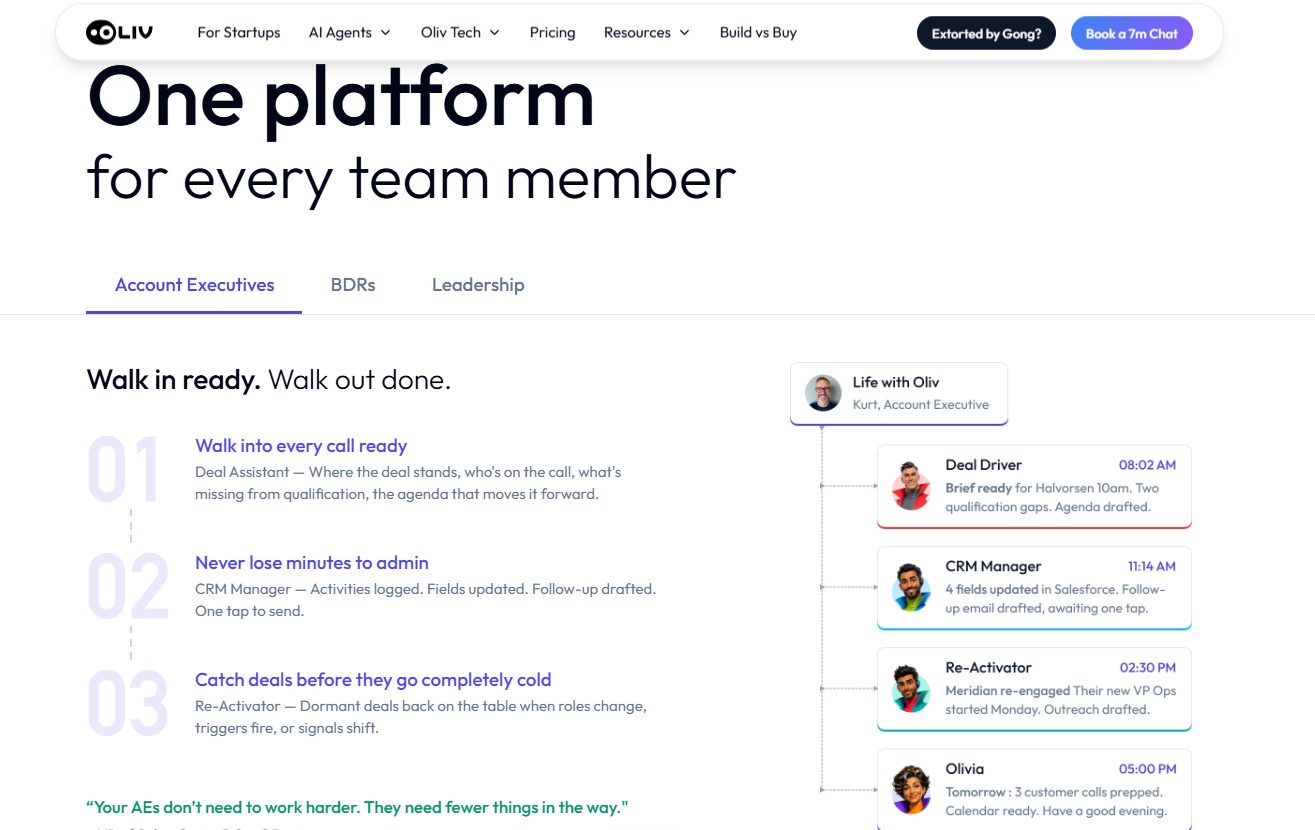
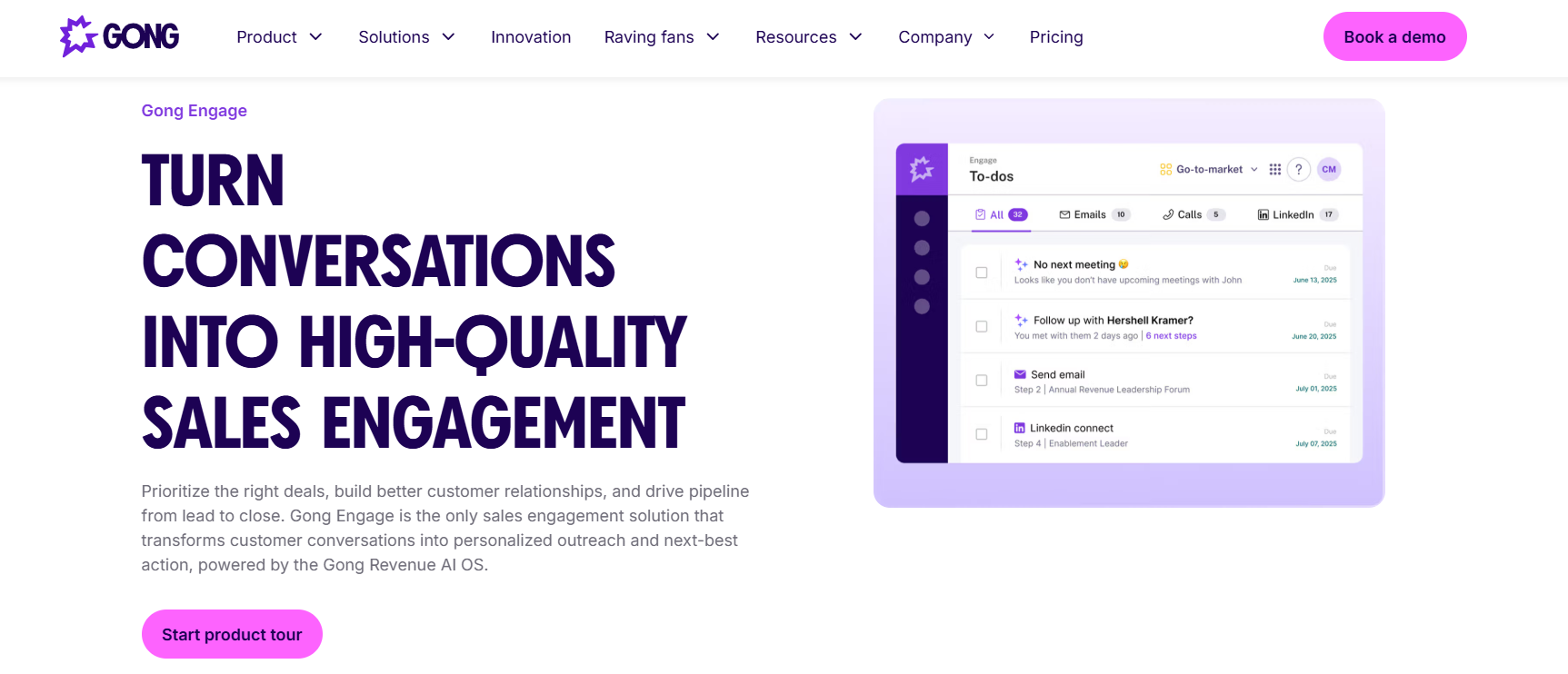
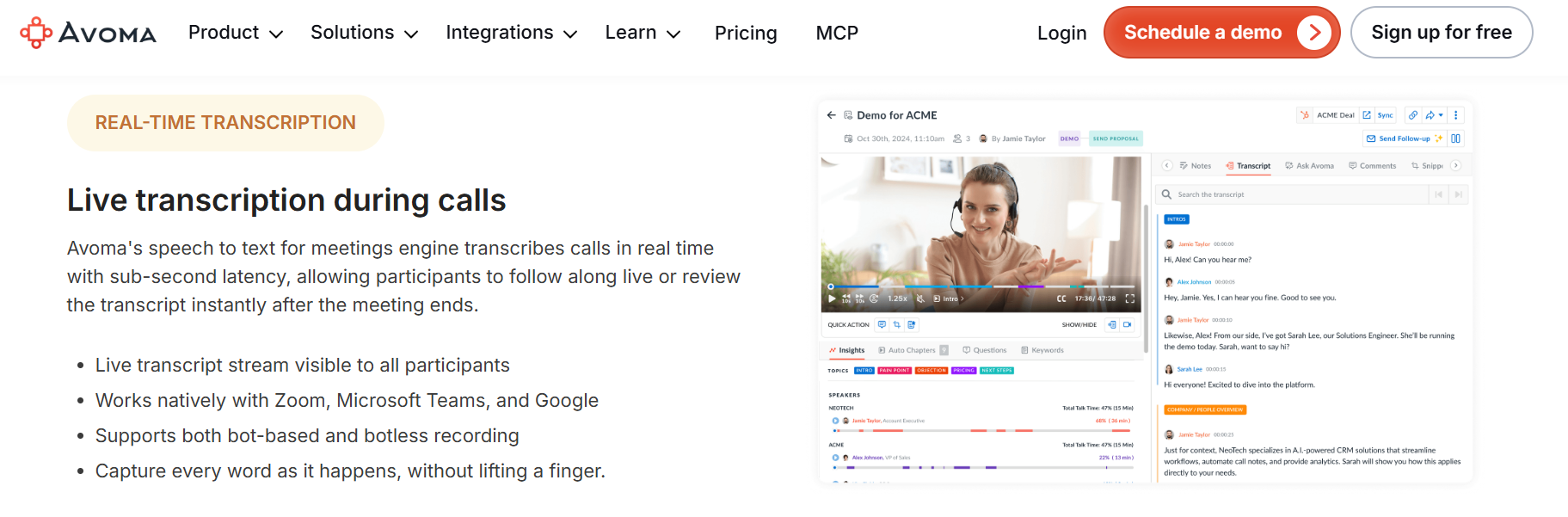
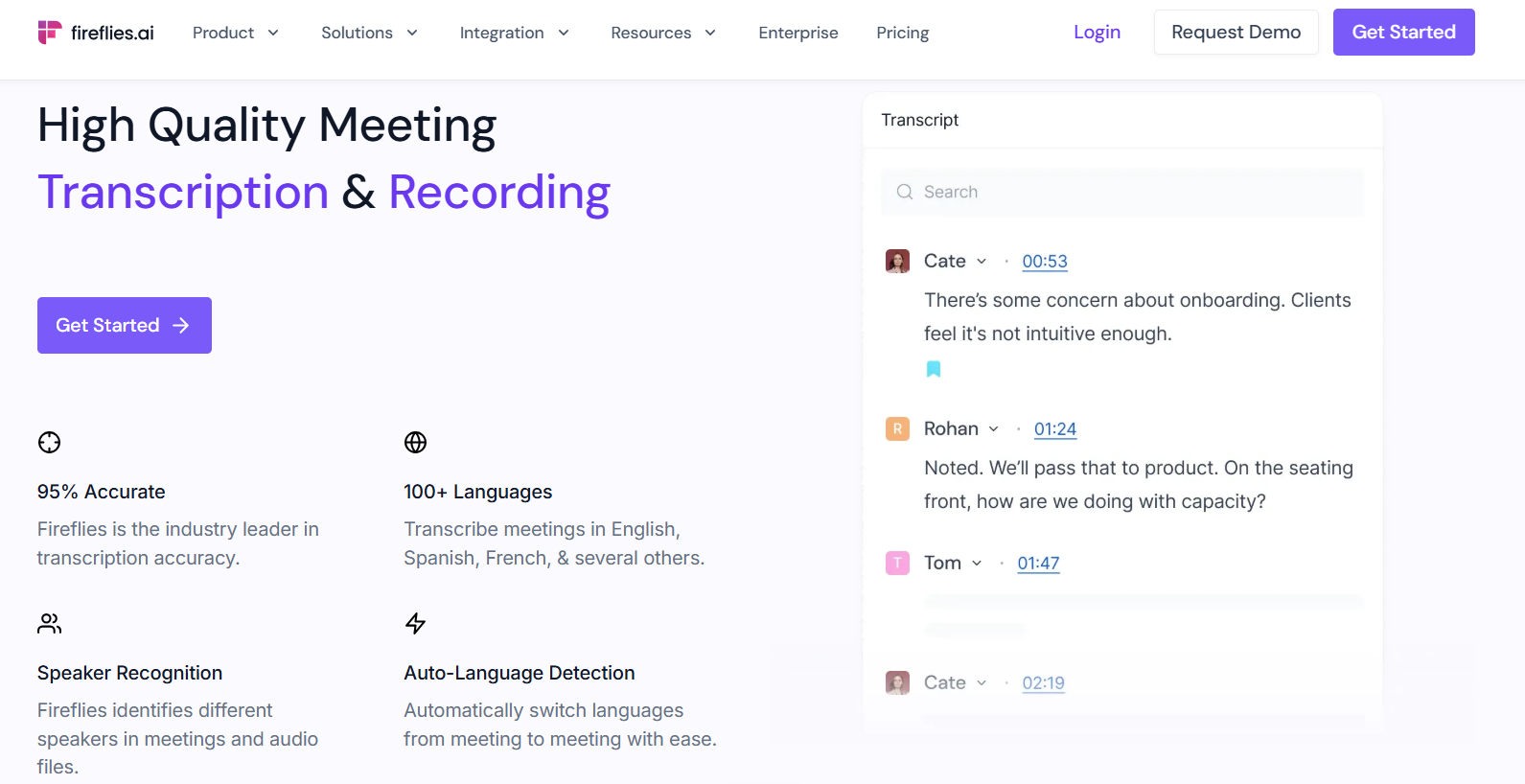

.png)
.png)
.png)

