# Revenue operations software: how Oliv AI's Oliver keeps every agent on one sales process
How revenue operations software keeps one sales process across your tools: what Oliv AI's Oliver agent holds in the process handbook, how a change gets approved and how every agent then follows it.
- Applies to: Revenue operations managers and revenue leaders
- Status: Live
- Verified: 2026-11-03
- Canonical page: https://www.oliv.ai/product-docs/agents/oliver/
Revenue operations software earns its place when your sales process, qualification rules and handoffs stay consistent without being rebuilt in every tool. Oliv AI's Oliver agent holds all of that in one process handbook, from your ICP and personas to your methodology and approval rules. Every other Oliv AI agent works inside those rules. When the process changes, you tell Oliver in plain language. It proposes the update, waits for your sign-off, then passes it to every agent that depends on it.
## At a glance {#at-a-glance}
| | |
|---|---|
| **What it does** | Keeps the process handbook every Oliv AI agent follows, and updates it when your process changes |
| **Who it's for** | RevOps managers, VPs of Sales, CROs and CEOs |
| **Who can open it** | Anyone, from the agent picker on **Home**; RevOps owns the handbook |
| **How you work with it** | A chat on **Home**, or a panel beside **Agents** and **Playbook** |
| **Where the handbook lives** | **Playbook** in the sidebar, with **Edit** and **History** tabs |
| **How changes apply** | **Pending Review**, then **Approve & merge** in **Review changes**, then **Merged** |
| **Methodology** | MEDDPICC, BANT, SPICED or your own framework |
| **Set-up paths** | **You Run It** (2 to 4 sessions) or **We Run It** (live in 2 weeks) |
## What the Oliver agent is {#what-it-is}
Oliv AI's Oliver agent is one of two super agents in Oliv AI. The other is [Oliv AI's Olivia agent](https://www.oliv.ai/product-docs/agents/olivia/), who works with reps on deals. Oliver works on the business rather than within it. Every other agent works on deals, contacts and activities, and Oliver owns the rules they all run by.
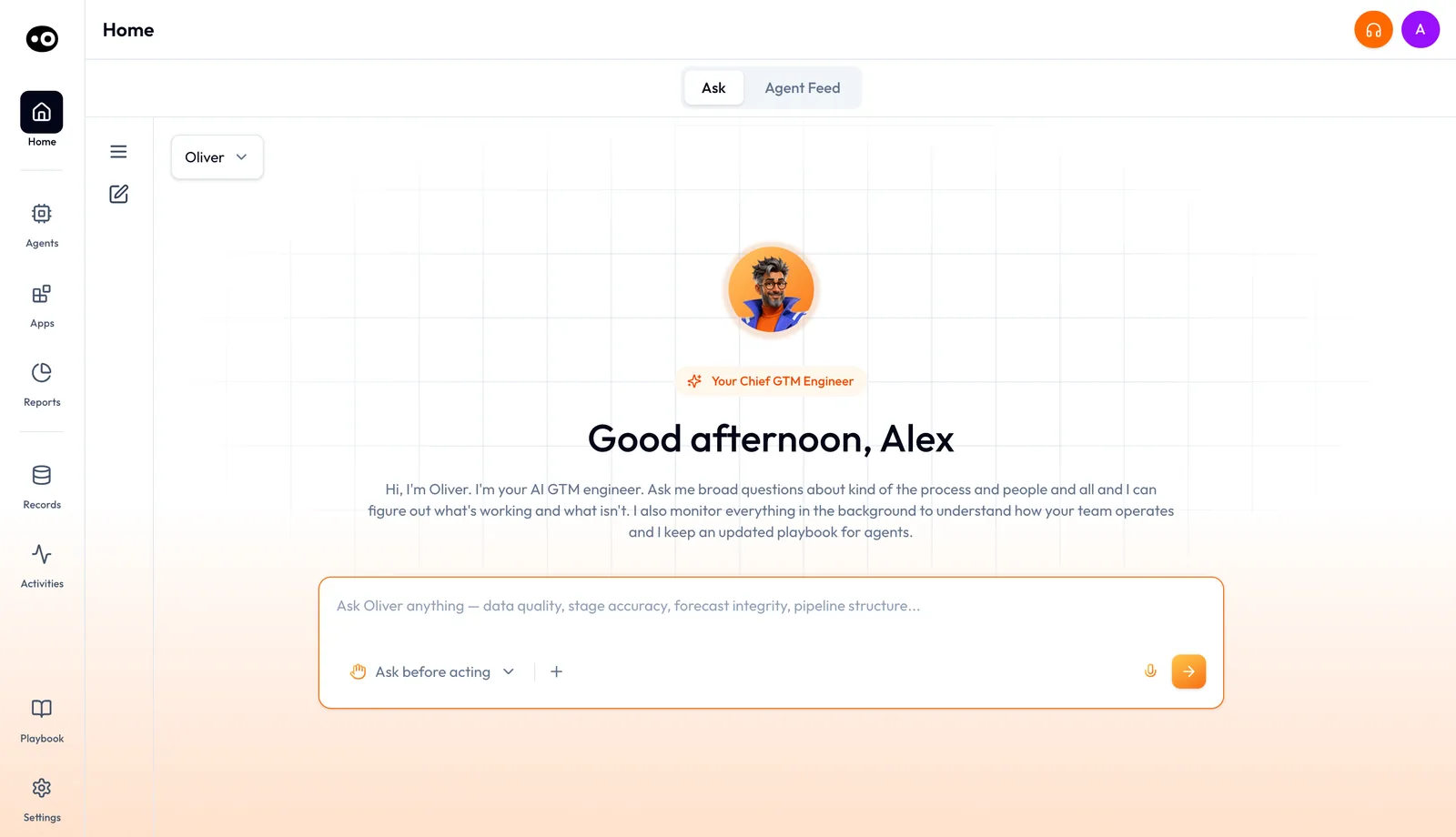
Oliv AI's Oliver agent on Home, in its amber theme. Its prompts point at process questions, such as stage accuracy and forecast integrity, rather than single deals.
On **Home**, Oliver's pill reads **Your Chief GTM Engineer**. In the agent picker it describes itself in one line: "I learn how your team operates and turn it into the rules every other agent follows."
### What the handbook holds {#handbook}
The handbook is a set of structured, interlinked documents. Update the ICP, and the qualifying criteria across agents update with it.
- **ICP definition.** Who you sell to, and the qualifying signals.
- **Persona library.** The roles you target and what they care about.
- **Sales methodology.** MEDDPICC, BANT, SPICED or a custom framework, and the fields each stage requires.
- **Approval workflows.** When the pricing desk gets involved, and the deal size where manager sign-off starts.
- **POC process.** What makes a POC eligible, what success looks like and how long it should run.
- **Proposal standards.** What goes into a proposal, who reviews it and the approval steps.
- **Territory and segmentation rules.** How pipeline is divided, and who owns what.
The handbook lives in **Playbook**, pinned at the bottom of the sidebar. A file tree groups markdown files into folders such as **Market**, **Prospecting** and **Sales**, with **Search playbook** above them. Each file opens on the **Edit** tab with a rich-text toolbar. A status row shows **Synced**, the last editor and a word count, and Oliver sits in a panel on the right.
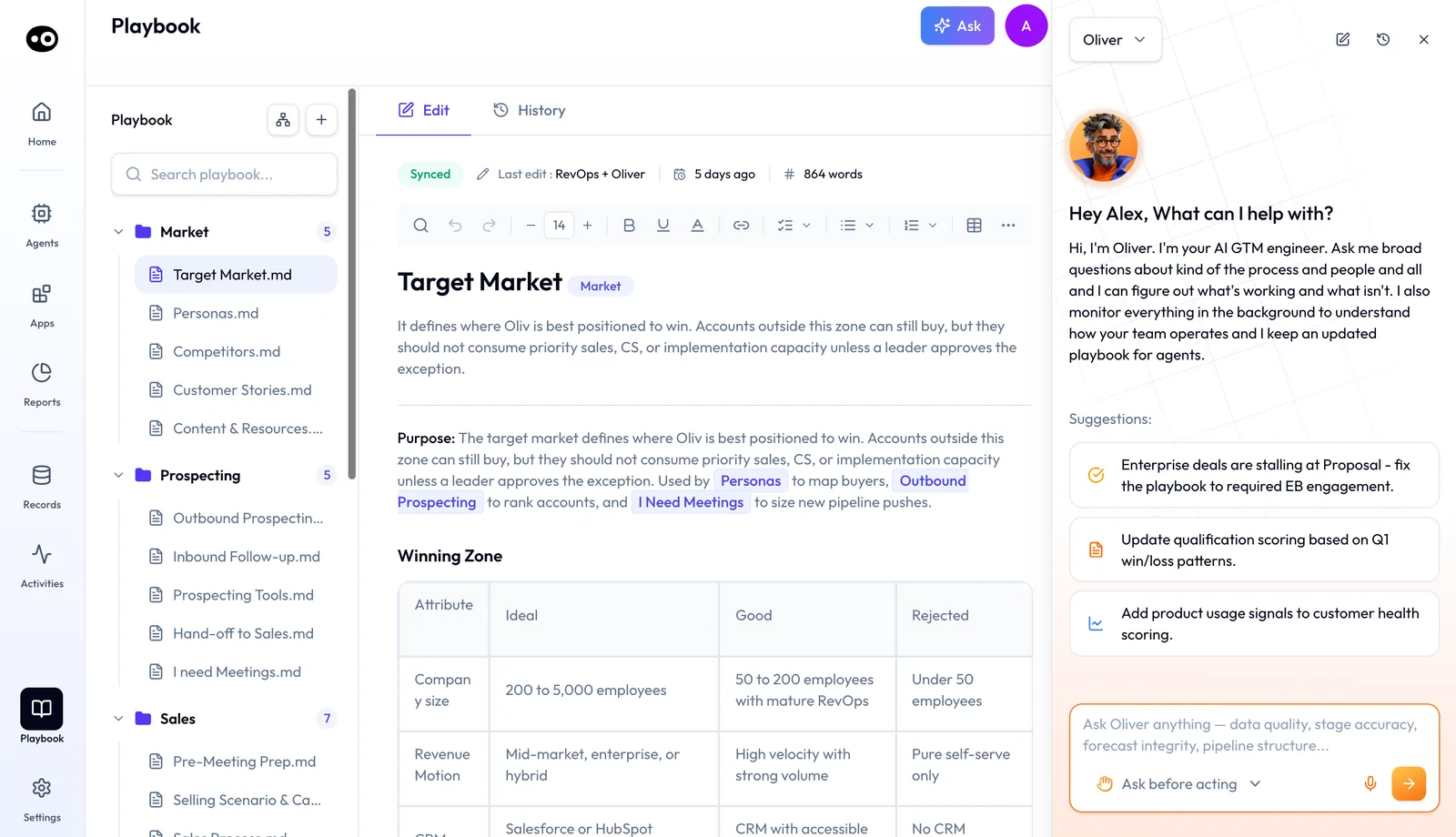
The handbook Oliv AI's Oliver agent keeps is a set of files you can open and edit. Oliver works beside them, so you can ask for a change while reading the rule.
A sample handbook page such as `Target Market.md` opens with a **Winning Zone** table, then runs through Priority Segments, Disqualification Signals, Owner Notes, Trigger Events, Agent Behavior, How This Page Gets Used In Practice and Change Log Guidance. `Sales Process.md` holds a **Sales Stages** table with win percentages, activities and exit criteria. Sections such as **Stage Rules**, **Deal Risk Flags**, **Forecast Category Guidance** and **Deal Driver Alerts** follow. The [Process Graph](https://www.oliv.ai/process-graph) shows this playbook as agents read it.
### What Oliver writes to {#writes-to}
- The company process handbook.
- Platform configuration: agent settings, schema definitions and field mappings.
- Every Olivia conversation, which inherits the handbook context.
- The CRM schema, through the [CRM Manager agent](https://www.oliv.ai/product-docs/agents/crm-manager/), when a process change needs new fields or new mappings.
## Why the Oliver agent matters {#why-it-matters}
### What it's for {#what-its-for}
Oliv AI's Oliver agent is for the people who decide how the company sells. It makes your process something every agent reads and follows, instead of a document people forget.
### How it helps {#how-it-helps}
- **One change, everywhere.** A new rule reaches scorecards, tracking fields and agent context together.
- **Same rules for every rep.** Two reps can't track different data points on the same type of opportunity.
- **Drift gets flagged.** Deals or activity outside your norms go to a person for review.
- **The playbook learns.** Oliver spots patterns across deals and drafts the next update for you.
- **You stay in charge.** Oliver's proposals wait as **Pending Review** until a person approves them.
### What happens without it {#without-it}
The real process lives in training decks and in managers' memories. A new rep needs three to six months to learn it. A new methodology or ICP has to be pushed into six tools by hand, and until that happens every rep runs a different version.
### Why buyers care {#why-buyers-care}
RevOps leads, VPs of Sales and CROs buy Oliver. RevOps configures and owns the handbook. Sales leaders care most when they change methodology, shift the ICP or reset approval thresholds, because that is when consistency breaks first.
## The Oliv AI approach to the Oliver agent {#approach}
{/* 5P */}
Picture a head of revenue operations leaving a meeting with a new rule. From Monday, an SDR passes a meeting to an AE only when the account fits the target segment and discovery notes are complete. Twelve SDRs and twenty AEs need to follow it.
Teams often handle this with a slide, a Slack post and a few CRM field changes, then a short training session. That work tends to stretch over weeks. Until every tool and scorecard catches up, SDRs and AEs may each be running a slightly different version of the rule.
A handoff rule looks like one decision, but it touches qualification fields, coaching standards, routing and the context a rep reads before a call. Once agents do much of that work, the rule only has to be changed in the place every agent reads from.
Oliv AI puts that place in its Oliver agent. The RevOps head describes the new rule in plain language. Oliver proposes the handbook update and the related field changes, and the proposal waits for a person to approve it. Once approved, the change reaches every agent that depends on it, from the next day forward.
Each proposal opens in **Review changes** as a line-by-line diff of every file it touches, with its knock-on effects listed under the diff. It waits as **Pending Review** until someone presses **Approve & merge**.
## Set up the Oliver agent {#set-up}
1. **Connect your CRM.** [Salesforce](https://www.oliv.ai/product-docs/integrations/salesforce/), [HubSpot](https://www.oliv.ai/product-docs/integrations/hubspot/) or Zoho, so Oliver can align with your schema.
2. **Gather your process documents.** Playbooks, methodology decks and any handbook you already have, even if they are messy or incomplete.
3. **Name a RevOps or leadership owner.** That person checks the handbook is accurate during onboarding.
4. **Populate the first handbook.** Oliv AI's onboarding team works with your RevOps lead to translate your playbooks, CRM configuration and methodology into Oliver's structured format. This takes 1 to 2 weeks.
5. **Keep it current in one conversation.** From then on, tell Oliver what changed and it passes the update to every connected agent.
### Choose who runs it {#run-paths}
- **You Run It.** Your RevOps team works with Oliver directly, with full control over every update. Onboarding takes 2 to 4 sessions, with no engineering and no long prompts.
- **We Run It.** Oliv AI's operators keep your playbooks, scorecards and agent context current for you. You're live in 2 weeks, with no prompts to write.
The [RevOps implementation guide](https://www.oliv.ai/blog/oliv-ai-revops-implementation-admin-guide) walks through the first weeks in more detail.
## How a sales process change reaches every tool {#methods}
Say you tighten the exit rule on one stage. There are three usual ways to get that rule into the tools your team works in, and many rollouts mix them. Each one leaves a different gap.
### Announce it: a slide, a Slack post, a training session {#announce-it}
You explain the new rule and why it changed, and reps hear it from a person. This builds understanding, which no field setting can do. Its effect ends with the meeting: nothing stops a deal moving on the old rule, and nothing shows you who is still using it.
### Enforce it in the CRM: required fields at the stage {#enforce-in-crm}
You make the rule hard to skip at the moment a deal moves. In HubSpot, for example, [a required stage property stops users creating or updating the record](https://knowledge.hubspot.com/object-settings/set-up-and-customize-pipelines) until it has a value. This catches a blank field. It misses a field filled in carelessly, and it doesn't reach your scorecards, checklists or decks.
Watch for copies here. HubSpot sets this logic stage by stage inside each pipeline, and [cloning a pipeline copies its conditional stage properties](https://knowledge.hubspot.com/object-settings/set-up-and-customize-pipelines). One rule can end up in several pipelines, and each of them needs changing later.
### Keep one source every tool reads from {#one-source}
You write the rule once, and whatever enforces it reads that copy. Stale copies stop being a problem, because there is only one to change. A deck or a recorded training doesn't read from the source, so those can still go out of date. This method also spreads a bad change as fast as a good one, so the approval step carries real weight.
### Which of these Oliver uses {#what-oliver-uses}
Oliv AI's Oliver agent works the third way. The handbook is the source, the specialist agents read from it, and a process proposal waits for a person in **Review changes**. Where a change needs new fields or mappings, the agent writes to the CRM schema through CRM Manager, which covers part of the second way.
The first way stays with you, because telling the team remains a RevOps job. If you're still weighing the wider category, the [guide to revenue operations software](https://www.oliv.ai/blog/revops-software) covers it.
## Change your process with Oliver {#change-process}
1. **Open Oliver.** Choose **Oliver** in the agent picker on **Home**, or use its panel beside the **Agents** marketplace or **Playbook**. Its saved chats sit in the history panel.
2. **Check the autonomy setting.** The dropdown under the message box opens on **Ask before acting**, where Oliver aligns on its approach before taking actions. **Act without asking** lets it act without asking for permission, and shows a **High Risk** banner: "Oliver can take action on your settings right now."
3. **Ask or tell.** The box reads "Ask Oliver anything", followed by data quality, stage accuracy, forecast integrity and pipeline structure. In **Playbook**, suggestions offer changes such as updating qualification scoring from win/loss patterns.
4. **Read the answer.** A why question returns a **Pipeline Snapshot**, then ranked causes. Each cause carries **Deals impacted** and **Value impacted** badges and chips for the accounts affected.
5. **Find the proposal.** A change Oliver proposes appears on the Playbook **History** tab as **Pending Review**.
6. **Review it.** **Review changes** shows each file as a diff, with removed lines in red and added lines in green. Cards below list the knock-on effects, such as a new CRM field, an agent retrained or deals re-scored.
7. **Decide.** Press **Approve & merge**, **Request edit** or **Cancel**. Approved changes show as **Merged** in **History**.
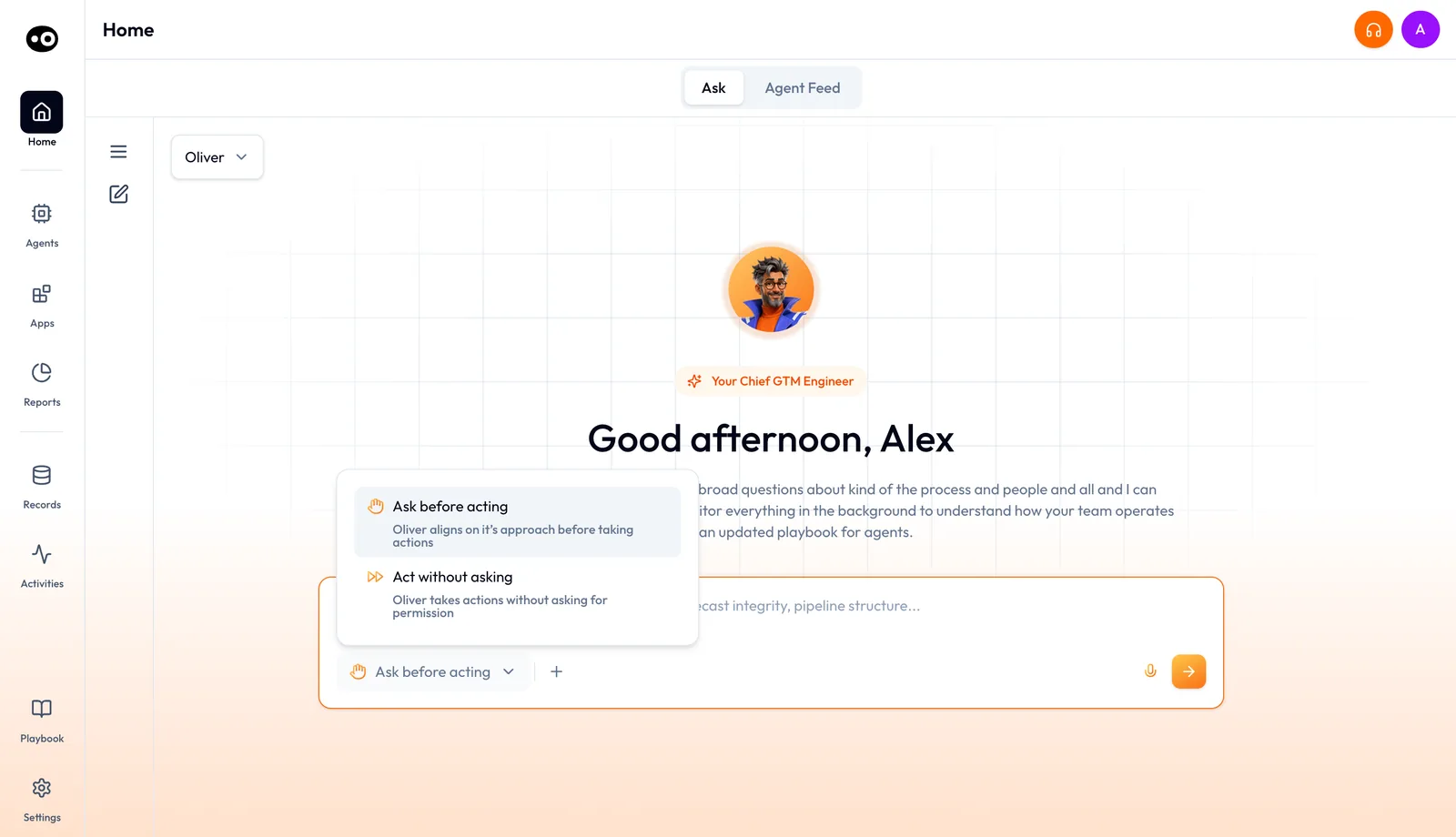
Step 2: set how freely Oliv AI's Oliver agent may act in this conversation before you ask for a process change.
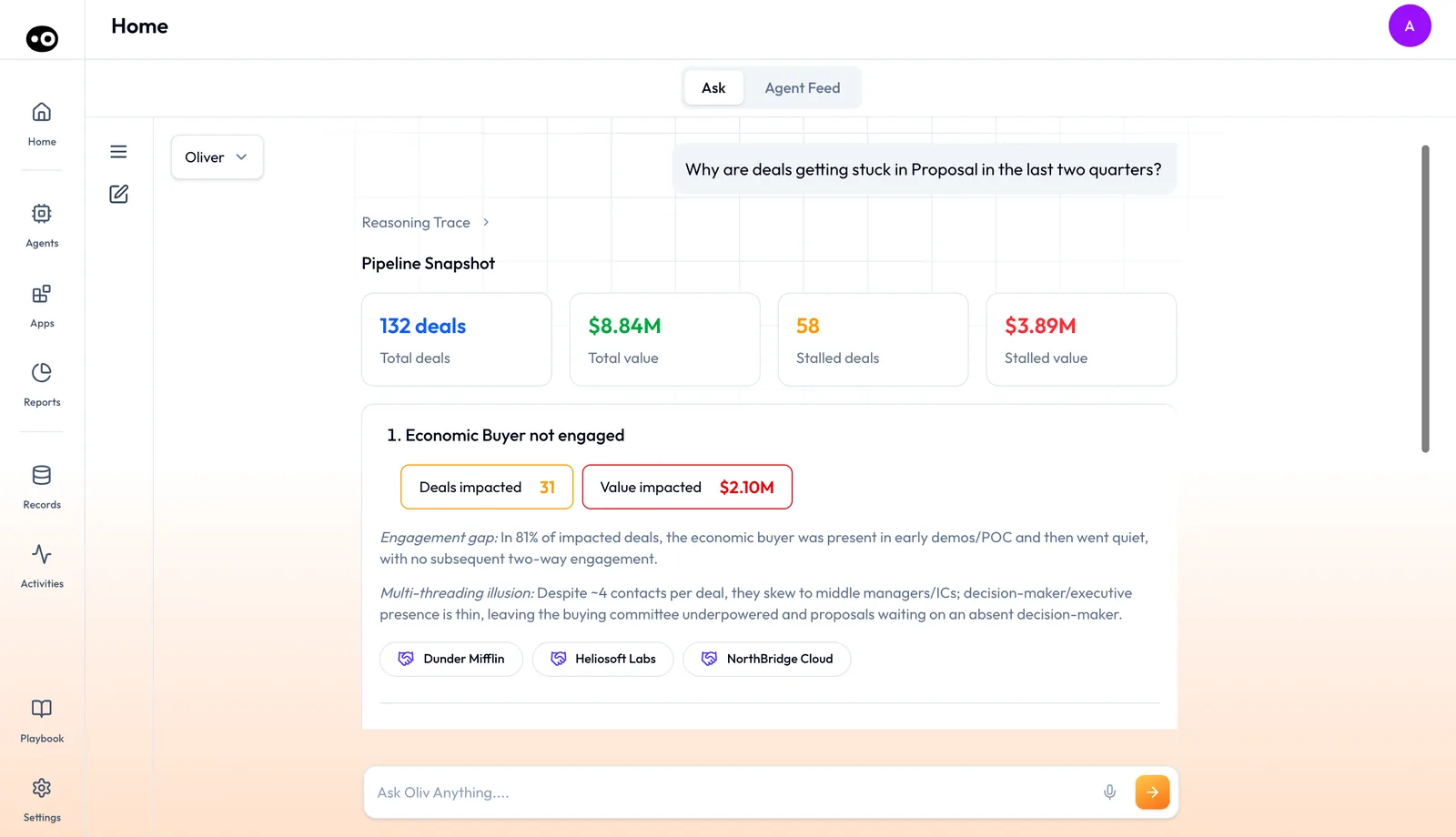
Step 4: Oliv AI's Oliver agent answers a why question with a snapshot, then each cause and its impact. The figures are sample values.
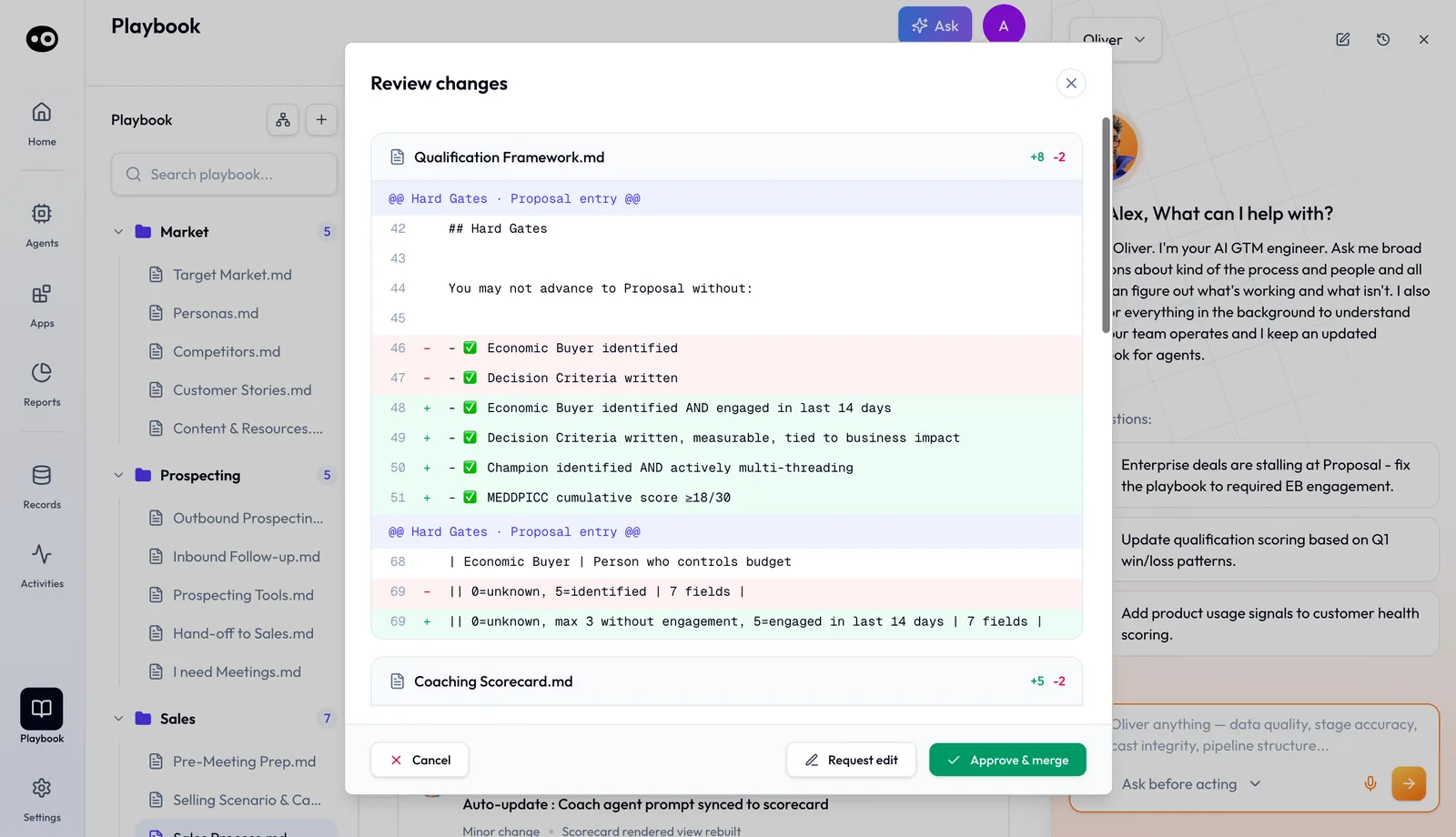
Steps 6 and 7: read exactly what Oliv AI's Oliver agent would change in each file, then approve and merge, ask for an edit or cancel.
Specialist agents carry a separate control on each of their tools, covered in [agent tools and run modes](https://www.oliv.ai/product-docs/agents/builder/tools-and-run-modes/).
### Track every change {#history}
The **History** tab lists every change to the playbook, by your company, by Oliver and by Oliv GTM Engineers. Filters narrow it to **All**, **By Oliver**, **By Your Company** or **By Oliv GTM Engineer**. Each card shows the date, the author, a status, a summary and the number of files changed.
A status reads **Pending Review**, **Merged** or **Autonomous**. Autonomous marks a minor update Oliver applied on its own, such as syncing an agent prompt to a scorecard, noted as "No human review needed".
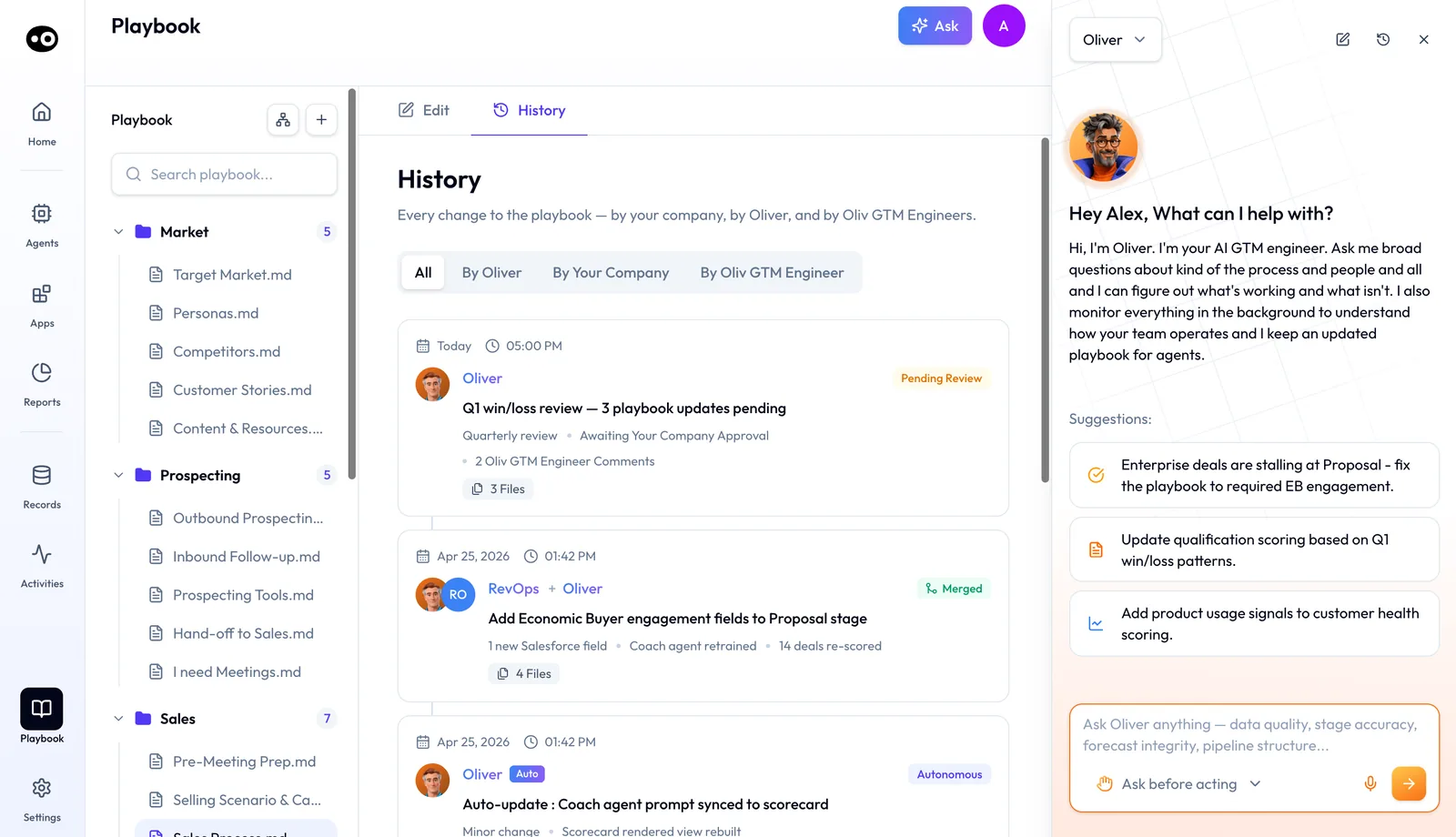
History shows who changed the playbook and whether each change is pending, merged or applied on its own by Oliv AI's Oliver agent.
### Changes Oliver drafts for you {#drafted-changes}
Oliver watches what's winning in the field and drafts the next process update for your review. Its own example: "We've seen 14 POCs extend beyond 30 days without a clear qualification gate. Should we add one?" In the **Agent Feed**, Oliver posts reviews such as a quarterly revenue review, with playbook and agent changes ready for you to review. It also reports when it has updated process files.
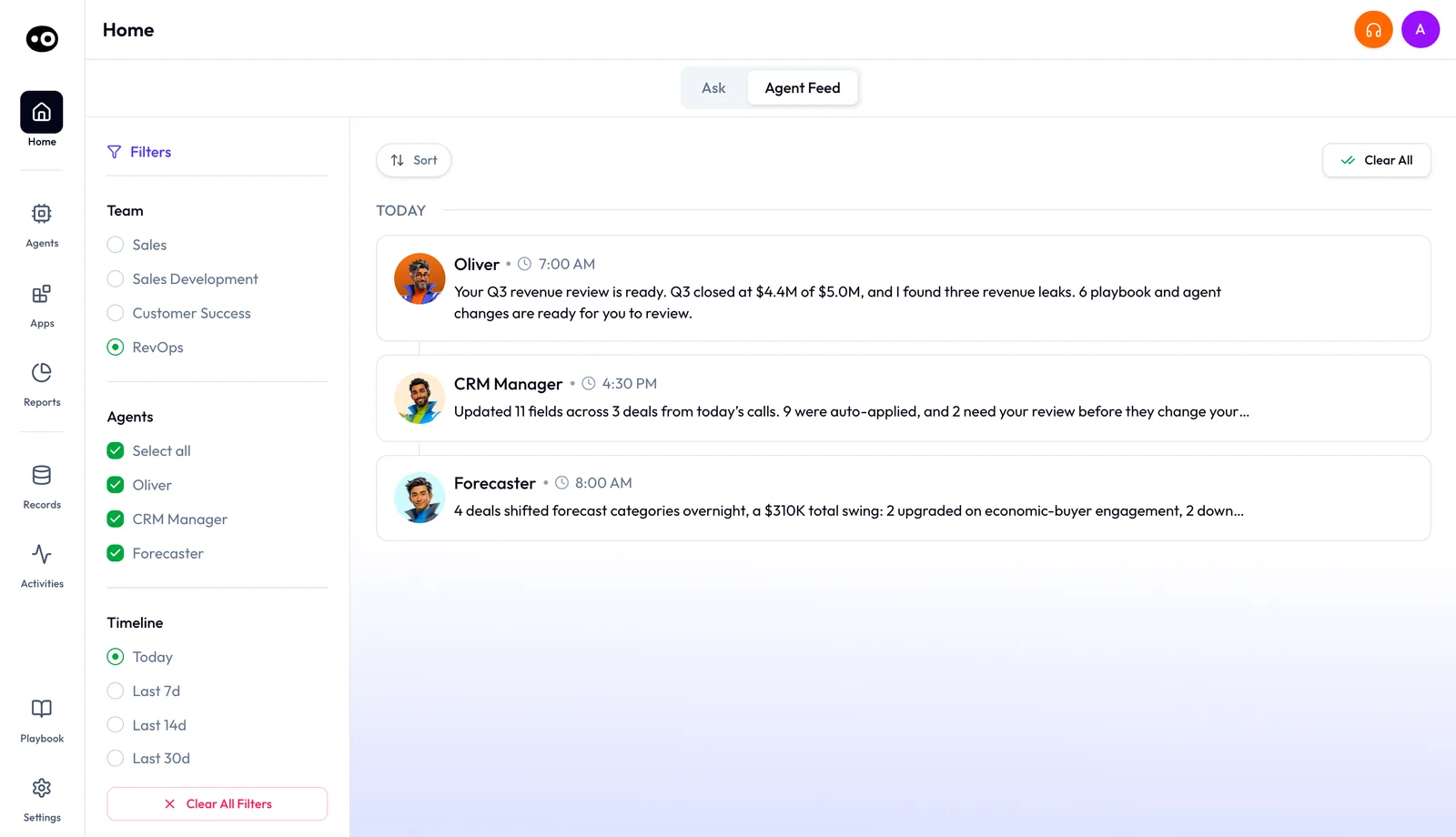
In the RevOps view of the feed, Oliv AI's Oliver agent flags proposed playbook and agent changes waiting for you. The revenue amounts in this view are demo data.
## How to measure rollout lag after a process change {#measure-lag}
A process change isn't finished when it's approved. It's finished when the old rule has gone from the last place it lived. Two measures tell you how close you are, and both count days from the approval date.
- **Average lag.** Add the days each place took to catch up, then divide by the number of places.
- **Longest lag.** Count the days until the last place catches up. Until then, two versions of your rule are live.
Both have weak spots. A place you forgot to list never appears, so the numbers look better than they are. Both also count when a copy changed, not whether reps follow it, so spot-check recent deals as well. Read longest lag first, because an average can hide one straggler.
### Reading lag against the History tab {#lag-in-history}
Oliv AI's Oliver agent gives you the start of the clock. Use the date on a **Merged** card in **History** as day 0. Before you approve, **Review changes** lists the files a change touches and its knock-on effects, which gives you the Oliv AI side of your list. Keep the count for tools outside Oliv AI in your own sheet, with one row per place.
## How to roll out a sales process change by hand {#roll-out-by-hand}
This is the manual method, in the order that causes the least rework. It works with any CRM, and you can run it from a shared sheet.
1. **Write the rule as one sentence.** Say what must be true before a deal leaves the stage. Gartner's 2019 advice was to [measure deal progress by customer verifiers](https://www.gartner.com/en/newsroom/press-releases/2019-11-13-gartner-says-the-traditional-linear-sales-process-no-), so prefer something the buyer did over something the rep ticked.
2. **List every place the old rule lives.** Check CRM stage settings, required fields, the rep playbook, coaching scorecards, deal review checklists, forecast guidance and onboarding decks.
3. **Name one owner and a date for each place.** A place with no owner is the one that stays out of date.
4. **Get sign-off and record day 0.** Approve first, because a rule changed before sign-off may have to be changed back everywhere.
5. **Change the CRM first.** That's where a rep meets the rule, so set the required field in every pipeline that has the stage.
6. **Update everything that depends on the stage.** Work through scorecards, checklists and guidance. If the stage's meaning changed, recheck its win probability, because [HubSpot updates deal probability from that setting](https://knowledge.hubspot.com/properties/hubspots-default-deal-properties) when a deal moves stage.
7. **Tell the team what changes for them.** Say which deals the rule applies to, including deals already in the stage.
8. **Spot-check deals that crossed the stage since day 0.** Any deal that misses the new rule points you to a place still on the old version.
9. **Log the change.** Record the date, the approver and the reason, so the next person knows which version is current.
Step 2 is where this usually goes wrong. A deck nobody listed keeps teaching the old rule to every new hire, and nobody notices because nothing fails. The other trap sits between steps 5 and 6, when the CRM enforces the new rule while a manager still coaches against the old one. Reps then get two answers.
### The same job with Oliver {#same-job-oliver}
Oliv AI's Oliver agent changes the middle of that list, not the start or the end. You still decide the rule and say it in plain language. The agent proposes the update, and **Review changes** shows each file as a diff, with knock-on effects such as a new CRM field or deals re-scored.
Once you press **Approve & merge**, Oliver passes the change to every agent that depends on it, from the next day forward. That covers scorecards, tracking fields and agent context, without you touching individual agent settings. **History** takes the place of the log in step 9.
Step 7 stays yours, and so does anything outside Oliv AI, such as a deck or a recorded training. Keep those places on your list. Oliver also surfaces deals outside your norms for human review, which gives step 8 a starting point.
### Worked example: one stage rule in seven places {#worked-example}
This is an illustrative calculation with sample figures, not an Oliv AI output. A RevOps lead changes the exit rule for one stage, lists the seven places that rule lives and records the day each one catches up.
| Place the rule lives | Days to catch up |
|---|---|
| CRM stage settings | 1 |
| Required field on the stage | 1 |
| Rep playbook | 2 |
| Coaching scorecard | 4 |
| Deal review checklist | 6 |
| Forecast guidance | 9 |
| Onboarding deck | 14 |
| **Total across seven places** | 1 + 1 + 2 + 4 + 6 + 9 + 14 = 37 |
| **Average lag** | 37 / 7 = 5.3 days |
| **Longest lag** | 14 days |
An average of 5.3 days looks fine, but the old rule survives for 14 days somewhere. Five places have caught up by day 6, and the last two keep the old rule alive for another 8 days. Chase those two first, because a new hire reading the onboarding deck learns the old rule for two weeks after approval.
## How Oliver works with other agents {#works-with}
Oliver doesn't work deals itself. It is the layer every execution agent reads from.
### Olivia {#with-olivia}
Oliv AI's Olivia agent runs the front line inside Oliver's boundaries. Oliver sets the stages, ownership and handoffs, and Olivia operates inside them from day one. The [Olivia agent page](https://www.oliv.ai/agents/olivia) describes her side of the pair.
### Coach {#with-coach}
[Oliv AI's Coach agent](https://www.oliv.ai/product-docs/agents/coach/) takes its methodology and process standards from Oliver. Every rep is coached against the same current rules.
### Deal Driver {#with-deal-driver}
[Oliv AI's Deal Driver agent](https://www.oliv.ai/product-docs/agents/deal-driver/) grounds its deal alerts in the qualification framework Oliver defines.
### CRM Manager and Forecaster {#with-crm-forecaster}
The field definitions Oliver keeps decide what [Oliv AI's CRM Manager agent](https://www.oliv.ai/product-docs/agents/crm-manager/) tracks and updates. The methodology Oliver defines feeds [Oliv AI's Forecaster agent](https://www.oliv.ai/product-docs/agents/forecaster/), so the forecast rests on one qualification standard.
### Portfolio Manager and Prospector {#with-cs-outbound}
Health signals and escalation thresholds for [Oliv AI's Portfolio Manager agent](https://www.oliv.ai/agents/portfolio-manager) come from the same handbook. Territory and segmentation rules keep [Oliv AI's Prospector agent](https://www.oliv.ai/agents/prospector) on strategy when the ICP shifts.
## Who uses Oliver, and how {#who-uses-it}
### Revenue operations {#revops}
RevOps managers own Oliver. They define the handbook and approve the changes Oliver proposes, and one conversation replaces edits across many tools. More on Oliv AI for [revenue operations teams](https://www.oliv.ai/revops).
### VPs of Sales and CROs {#sales-leadership}
When the market focus shifts, Oliver realigns every agent to the updated ICP. It runs your methodology across every rep interaction without a training cycle, and flags drift before it shows in pipeline quality. See how [sales teams work with Oliv AI](https://www.oliv.ai/sales).
### Heads of customer success {#customer-success}
Oliver enforces your health standards across every account and carries each renewal criteria change to your CS agents. It also surfaces retention patterns across your book and drafts policy updates for review. Read more on Oliv AI for [customer success](https://www.oliv.ai/customer-success).
### Enablement leads {#enablement}
Enablement sees the effect through coaching. The Coach agent works from the methodology Oliver keeps current, so the standard reps are trained on matches the one agents enforce. The guide to [sales methodology automation](https://www.oliv.ai/blog/sales-methodology-automation-auto-score-meddic-bant-spiced-from-calls) covers scoring calls against a framework.
## How Oliv AI compares for revenue operations software {#compare}
Many platforms let an admin set up a sales methodology in settings. Oliver takes a process change in a chat, applies one change to every agent that depends on it, and drafts the next update from patterns across your deals. Oliv AI is the only platform in this table that does all three.
Revenue operations software features, from each platform's public documentation:
| Platform | Methodology rules applied by AI | Process changed through a chat | Process updates drafted from deal patterns |
|---|---|---|---|
| **Oliv AI** | Yes | Yes | Yes |
| **Gong** | Yes ([AI Deal Reviewer playbooks](https://help.gong.io/docs/how-to-create-and-manage-playbooks)) | Admin settings | Not in docs |
| **Avoma** | Yes ([Deal Methodology from Smart Topics](https://help.avoma.com/configure-deal-methodology)) | Admin settings | Not in docs |
| **Outreach** | Yes ([Sales Methodology for Deal Agent](https://support.outreach.io/support/solutions/articles/159000425245-customize-sales-methodology-in-outreach)) | Admin settings | Not in docs |
| **Fireflies** | Partly ([BANT and MEDDIC reports](https://guide.fireflies.ai/articles/6161594443-learn-about-ai-skills-create-automated-workflows-from-your-meetings)) | Not in docs | Not in docs |
| **Fathom** | Partly ([scorecards against a defined process](https://help.fathom.video/en/articles/7906049)) | Not in docs | Not in docs |
*Yes: documented and built in. Partly: documented with a limit, shown in brackets. Not in docs: not found in the vendor's public documentation.*
### Why Oliv AI is the stronger choice for revenue operations software {#compare-stronger}
- **Tell it, don't configure it.** RevOps describes a process change to Oliver in plain language. Gong's playbooks are [built in AI Deal Reviewer settings, with up to 20 elements per playbook](https://help.gong.io/docs/how-to-create-and-manage-playbooks). Compare [Oliv AI vs Gong](https://www.oliv.ai/blog/gong-vs-oliv).
- **Your methodology, not a preset.** Oliver captures MEDDPICC, BANT, SPICED or a proprietary framework. Avoma provides [three default, non-editable methodologies](https://help.avoma.com/configure-deal-methodology) to start from. Compare [Oliv AI vs Avoma](https://www.oliv.ai/blog/avoma-vs-oliv-ai).
- **One change reaches every agent.** Oliver carries an update to scorecards, tracking fields and agent context together. Outreach's methodology page [supports the MEDDPICC framework by default](https://support.outreach.io/support/solutions/articles/159000425245-customize-sales-methodology-in-outreach) for its Deal Agent. Read [how Gong and Outreach compare](https://www.oliv.ai/blog/gong-vs-outreach).
*Competitor details checked against each vendor's public documentation on 21 October 2026. Features and plans change, so confirm with the vendor before you decide.*
## Limits and things to know {#limits}
- **It doesn't work deals.** Oliver doesn't act on individual opportunities. That is Olivia and the specialist agents.
- **It doesn't track the CRM itself.** Oliver defines what should be tracked, and CRM Manager does the tracking.
- **It isn't a reporting tool.** Oliver can answer a why question about your pipeline, and Olivia, Forecaster and Coach bring you cross-deal insight by reading Oliver's structured layer.
- **Change management is still yours.** Oliver handles the configuration, but telling the team about a change remains a RevOps job.
- **Act without asking carries a warning.** Only Oliver shows the **High Risk** banner, because it can change your settings.
- **Minor updates can apply on their own.** **History** marks them **Autonomous**, so read it to see what changed without a review.
- **It isn't a one-time setup.** The handbook stays accurate only if you keep telling Oliver what changed.
## Common questions {#common-questions}
#### How do you keep a sales process consistent across tools? {#faq-consistent}
Keep one written source of the rules, list every place that copies them and check those places after each change. Oliv AI's Oliver agent keeps that source as the process handbook, and the other agents read from it.
#### How do you roll out a sales process change? {#faq-roll-out}
Write the rule in one sentence, list every place it lives, get sign-off, then update each place with a named owner. With Oliver, you describe the change and approve the proposal, and it reaches every dependent agent from the next day. You still tell the team.
#### Does Oliver replace our CRM? {#faq-crm-layer}
No. Oliv AI is a layer on top of your CRM, and Oliver connects to Salesforce, HubSpot or Zoho to align with your schema. The page on [Oliv AI and your CRM](https://www.oliv.ai/product-docs/platform/oliv-and-your-crm/) explains how the two fit together.
#### Who talks to Oliver? {#faq-who-talks}
Anyone can choose Oliver in the agent picker on **Home**. RevOps managers and senior revenue leaders own the handbook and approve its changes, while reps mostly work with Olivia.
#### How do we get Oliver up and running? {#faq-get-started}
During onboarding, Oliv AI's team works with your RevOps lead to populate the first handbook. It typically takes 1 to 2 weeks.
#### What happens when we change our sales process? {#faq-process-change}
You tell Oliver and approve what it proposes. The change then reaches every connected agent from the next day, including scorecards, tracking fields and agent context.
#### Does Oliver change things on its own? {#faq-on-its-own}
Process proposals wait as **Pending Review** until a person approves them. Minor updates, such as syncing an agent prompt to a scorecard, can apply as **Autonomous** and appear in **History**.
#### Can I see who changed the playbook? {#faq-history}
Yes. The **History** tab lists every change with its author, status and files. Filter it by Oliver, by your company or by Oliv GTM Engineer.
#### Can Oliver handle a custom methodology? {#faq-custom-methodology}
Yes. Whether you run MEDDPICC, BANT, SPICED or something proprietary, Oliver captures it and enforces it.
#### What if our process documents are messy? {#faq-messy-docs}
That's expected. Oliver starts from your existing handbook, playbooks and methodology decks, even when they are messy or incomplete.
#### How is Oliver different from Olivia? {#faq-vs-olivia}
Oliver keeps the GTM playbook current. Olivia runs the front line and routes work to the right agents, inside the rules Oliver sets.
#### What does Oliver do when a deal breaks the rules? {#faq-exceptions}
When a deal or activity falls outside your established norms, Oliver surfaces it for human review rather than letting it drift silently.
#### Do we have to run Oliver ourselves? {#faq-who-runs-it}
No. With **We Run It**, Oliv AI's operators maintain your playbooks on your behalf. With **You Run It**, your RevOps team works with Oliver directly.
#### Why does Oliver show a High Risk warning? {#faq-high-risk}
Setting Oliver to **Act without asking** lets it change your settings without confirming first. The banner sits above the message box while that setting is on.
## Further reading {#further-reading}
- [Set up and manage object pipelines](https://knowledge.hubspot.com/object-settings/set-up-and-customize-pipelines): how HubSpot sets conditional stage properties and required fields, and what cloning a pipeline copies.
- [HubSpot's default deal properties](https://knowledge.hubspot.com/properties/hubspots-default-deal-properties): which deal properties HubSpot updates by itself when a deal changes stage.
- [Gartner on the linear sales process](https://www.gartner.com/en/newsroom/press-releases/2019-11-13-gartner-says-the-traditional-linear-sales-process-no-): a 2019 press release on measuring deal progress by customer verifiers.
## Related {#related}
- [Oliver on oliv.ai](https://www.oliv.ai/agents/oliver): the agent's own page, with the two set-up paths.
- [The Olivia agent docs](https://www.oliv.ai/product-docs/agents/olivia/): the front-line super agent that works inside Oliver's rules.
- [Deal Driver agent docs](https://www.oliv.ai/product-docs/agents/deal-driver/): deal alerts built on Oliver's qualification framework.
- [Agent tools and run modes](https://www.oliv.ai/product-docs/agents/builder/tools-and-run-modes/): how approval works for each agent action.
- [Prepare for a meeting](https://www.oliv.ai/product-docs/workflows/prepare-for-a-meeting/): the brief that carries your methodology into each call.
- [Run deals as an account executive](https://www.oliv.ai/product-docs/use-cases/ae-run-deals/): the rep's day inside the rules Oliver keeps.
- [Sales process automation guide](https://www.oliv.ai/blog/sales-process-automation): automating each stage of the sales process.
- [Scaling revenue operations](https://www.oliv.ai/blog/scaling-revenue-operations-growth-stage-sales-team): keeping process consistent from 25 to 200 reps.
- [Oliv AI product documentation](https://www.oliv.ai/product-docs/): every documented agent and feature.
*Updated 3 November 2026: added how a process change reaches every tool, how to measure rollout lag, the manual method and a worked example.*